
Close Menu
geekfence.comgeekfence.com
    What's Hot

    Live Nation monopoly verdict: Here’s what it means for concerts

    April 17, 2026

    The Download: bad news for inner Neanderthals, and AI warfare’s human illusion

    April 17, 2026

    8 Legit Ways to Get a Free Business Email in 2026

    April 17, 2026
    Facebook X (Twitter) Instagram
    • About Us
    • Contact Us
    Facebook Instagram
    geekfence.comgeekfence.com
    • Home
    • UK Tech News
    • AI
    • Big Data
    • Cyber Security
      • Cloud Computing
      • iOS Development
    • IoT
    • Mobile
    • Software
      • Software Development
      • Software Engineering
    • Technology
      • Green Technology
      • Nanotechnology
    • Telecom
    geekfence.comgeekfence.com
    Home»Cyber Security»Fake ‘Trusted Sender’ Labels Misused in New Apple Mail Phishing Scheme
    Cyber Security

    Fake ‘Trusted Sender’ Labels Misused in New Apple Mail Phishing Scheme

    AdminBy AdminMarch 22, 2026No Comments3 Mins Read6 Views
    Facebook Twitter Pinterest LinkedIn Telegram Tumblr Email
    Fake ‘Trusted Sender’ Labels Misused in New Apple Mail Phishing Scheme
    Share
    Facebook Twitter LinkedIn Pinterest Email


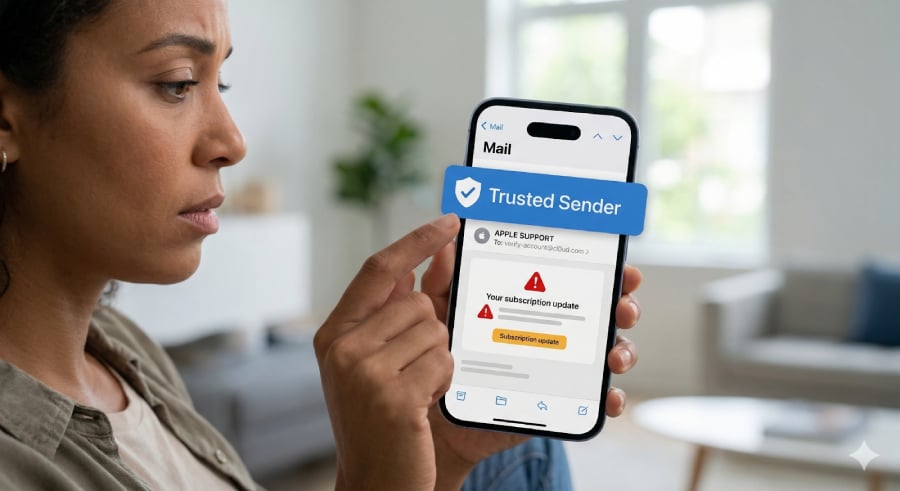
    A woman holding her phone with a "Trusted Sender" verification on a software update.
    Image: Generated via Google’s Nano Banana

    A recently reported phishing scam is raising fresh concerns, though the tactic has actually been around for years. Reports showed that scammers are embedding fake “trusted sender” banners into suspicious emails, potentially misleading users into letting their guard down.

    According to Fox News, the issue came to light when a reader shared a screenshot of a questionable email that carried the reassuring message: “This message was sent from a trusted sender.” At first glance, the label makes the email appear safe, even though the content itself shows clear signs of fraud and the banner itself is completely fabricated.

    The catch is that Apple Mail does not actually generate these labels. Unlike standard spam warnings or BIMI-verified indicators, Apple Mail and iCloud Mail do not feature a native “trusted sender” banner for familiar contacts.

    Instead, scammers are baking these fake banners directly into the HTML or images of the email body to bypass a user’s skepticism. Because the banner is simply part of the email’s content, it can appear on any email client — whether you are using Apple Mail, Gmail, or another provider.

    While Fox News initially attributed the banner to an Apple Mail feature, this tactic relies entirely on social engineering. The fake label is designed to look like a system alert, but it does not verify whether the sender is genuine or whether the message has been tampered with.

    That gap in user awareness is what scammers are now exploiting.

    A familiar trick with a new twist

    Phishing emails have long relied on impersonating trusted brands, but this tactic adds another layer of deception by attempting to mimic the interface of the email app itself.

    By inserting a graphic or text block at the very top of the message that reads “This message was sent from a trusted sender” (sometimes even adding ridiculous text like “(Not scam)”), cybercriminals create what Fox News describes as “a false sense of safety,” in which users trust the fake visual cues rather than carefully reviewing the message.

    Despite the convincing fake label, the phishing email highlighted in the report contained several classic red flags.

    It used a generic greeting, such as “Dear user,” instead of addressing the recipient personally. It also referenced a service called “Cloud+ subscription,” which is slightly off from Apple’s real “iCloud+” branding. The message sought to create panic by warning that personal data could be deleted due to a payment issue, a common tactic used to rush victims into clicking links.

    As Fox News notes, scammers often rely on urgency so “the victim clicks before thinking.”

    The incident highlights a growing challenge in cybersecurity: attackers are no longer just mimicking companies; they are learning how to mimic the systems people rely on to judge trust. When a fake banner disguised as a built-in feature appears to validate an email, it can override a user’s instinct to question suspicious content.

    Must-read security coverage

    Staying safe

    Security experts stress that users should not rely solely on visual cues within the body of email messages. Instead, they should verify account-related messages independently, such as by visiting official websites directly rather than clicking embedded links.

    Other protective steps include enabling two-factor authentication, manually reviewing account settings, and monitoring for subtle branding errors or unusual wording.

    Related reading: For more on emerging mobile threats, check out how the DarkSword exploit is exposing a dangerous iPhone vulnerability.


    Source link

    Share. Facebook Twitter Pinterest LinkedIn Tumblr Email

    Related Posts

    Patch Tuesday, April 2026 Edition – Krebs on Security

    April 17, 2026

    Here’s how to avoid a ‘second strike’

    April 16, 2026

    Adobe Issues Emergency Patch for Critical PDF Flaw Exploited For Months

    April 15, 2026

    Sustainability 101: Let’s talk about energy efficiency

    April 14, 2026

    LinkedIn is spying on you, and you agreed to nothing • Graham Cluley

    April 13, 2026

    Bringing Rust to the Pixel Baseband

    April 12, 2026
    Top Posts

    Understanding U-Net Architecture in Deep Learning

    November 25, 202529 Views

    Hard-braking events as indicators of road segment crash risk

    January 14, 202624 Views

    Redefining AI efficiency with extreme compression

    March 25, 202623 Views
    Don't Miss

    Live Nation monopoly verdict: Here’s what it means for concerts

    April 17, 2026

    This story appeared in Today, Explained, a daily newsletter that helps you understand the most…

    The Download: bad news for inner Neanderthals, and AI warfare’s human illusion

    April 17, 2026

    8 Legit Ways to Get a Free Business Email in 2026

    April 17, 2026

    Patch Tuesday, April 2026 Edition – Krebs on Security

    April 17, 2026
    Stay In Touch
    • Facebook
    • Instagram
    About Us

    At GeekFence, we are a team of tech-enthusiasts, industry watchers and content creators who believe that technology isn’t just about gadgets—it’s about how innovation transforms our lives, work and society. We’ve come together to build a place where readers, thinkers and industry insiders can converge to explore what’s next in tech.

    Our Picks

    Live Nation monopoly verdict: Here’s what it means for concerts

    April 17, 2026

    The Download: bad news for inner Neanderthals, and AI warfare’s human illusion

    April 17, 2026

    Subscribe to Updates

    Please enable JavaScript in your browser to complete this form.
    Loading
    • About Us
    • Contact Us
    • Disclaimer
    • Privacy Policy
    • Terms and Conditions
    © 2026 Geekfence.All Rigt Reserved.

    Type above and press Enter to search. Press Esc to cancel.