

· 1 min read
ClockKit families and templates, there are so many of them. It’s a little bit time consuming if you are looking for the right one.
The official ClockKit documentation on Apple’s site is well written, but it lacks a generic overview of all the existing complications. I’ve created a little cheatsheet for you to simplify the searching process for the right complication style.
This cheatsheet supports watchOS 5. In order to get the template name you just have to add up the names in the proper order. Usually left to right, top to bottom. Don’t worry you’ll get it. 😅
Swift sample code is below the cheatsheet, please scroll! 👇
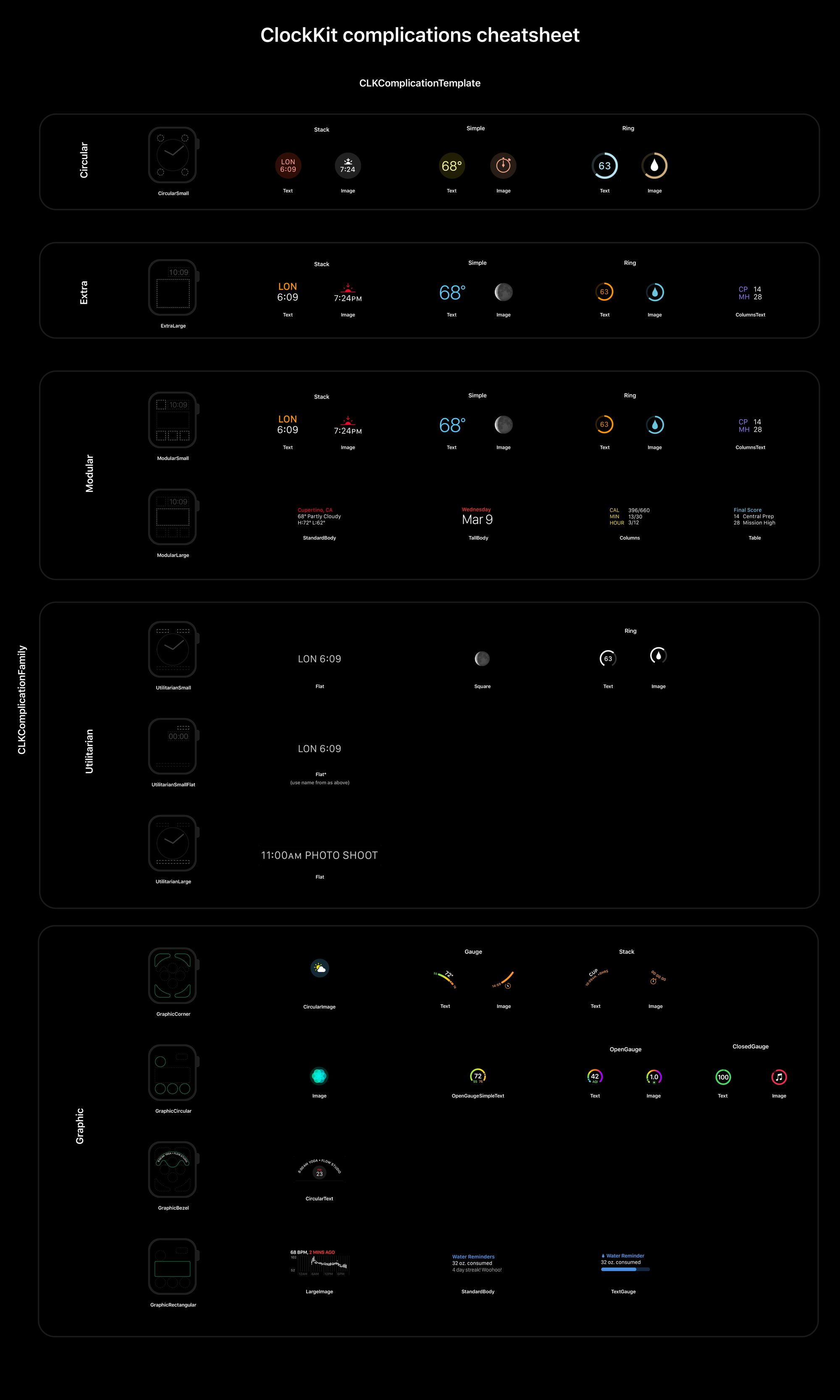
Feel free to right click and download the cheatsheet image.
ClockKit code sample in Swift
This little snippet contains all the ClockKit complication families and templates. 😎
import ClockKit

class ComplicationDataSource: NSObject, CLKComplicationDataSource {

    func getSupportedTimeTravelDirections(
        for complication: CLKComplication,
        withHandler handler: @escaping (CLKComplicationTimeTravelDirections
    ) -> Void) {
        handler([.forward, .backward])
    }

    func getCurrentTimelineEntry(
        for complication: CLKComplication,
        withHandler handler: @escaping (CLKComplicationTimelineEntry?) -> Void
    ) {
        let date = Date()
        var template: CLKComplicationTemplate!

        switch complication.family {
        case .circularSmall:
            template = CLKComplicationTemplateCircularSmallStackText()
            template = CLKComplicationTemplateCircularSmallStackImage()

            template = CLKComplicationTemplateCircularSmallSimpleText()
            template = CLKComplicationTemplateCircularSmallSimpleImage()

            template = CLKComplicationTemplateCircularSmallRingText()
            template = CLKComplicationTemplateCircularSmallRingImage()

            break;
        case .extraLarge:
            template = CLKComplicationTemplateExtraLargeStackText()
            template = CLKComplicationTemplateExtraLargeStackImage()

            template = CLKComplicationTemplateExtraLargeSimpleText()
            template = CLKComplicationTemplateExtraLargeSimpleImage()

            template = CLKComplicationTemplateExtraLargeRingText()
            template = CLKComplicationTemplateExtraLargeRingImage()

            template = CLKComplicationTemplateExtraLargeColumnsText()
            break;
        case .modularSmall:
            template = CLKComplicationTemplateModularSmallStackText()
            template = CLKComplicationTemplateModularSmallStackImage()

            template = CLKComplicationTemplateModularSmallSimpleText()
            template = CLKComplicationTemplateModularSmallSimpleImage()

            template = CLKComplicationTemplateModularSmallRingText()
            template = CLKComplicationTemplateModularSmallRingImage()

            template = CLKComplicationTemplateModularSmallColumnsText()
            break;
        case .modularLarge:
            template = CLKComplicationTemplateModularLargeTable()
            template = CLKComplicationTemplateModularLargeColumns()
            template = CLKComplicationTemplateModularLargeTallBody()
            template = CLKComplicationTemplateModularLargeStandardBody()
            break;
        case .utilitarianSmall:
            template = CLKComplicationTemplateUtilitarianSmallFlat()
            template = CLKComplicationTemplateUtilitarianSmallSquare()
            template = CLKComplicationTemplateUtilitarianSmallRingText()
            template = CLKComplicationTemplateUtilitarianSmallRingImage()
            break;
        case .utilitarianSmallFlat:
            template = CLKComplicationTemplateUtilitarianSmallFlat()
        case .utilitarianLarge:
            template = CLKComplicationTemplateUtilitarianLargeFlat()
            break;
        case .graphicCorner:
            template = CLKComplicationTemplateGraphicCornerCircularImage()
            template = CLKComplicationTemplateGraphicCornerGaugeText()
            template = CLKComplicationTemplateGraphicCornerGaugeImage()
            template = CLKComplicationTemplateGraphicCornerStackText()
            template = CLKComplicationTemplateGraphicCornerTextImage()
            break;
        case .graphicCircular:
            template = CLKComplicationTemplateGraphicCircularImage()
            template = CLKComplicationTemplateGraphicCircularOpenGaugeImage()
            template = CLKComplicationTemplateGraphicCircularOpenGaugeRangeText()
            template = CLKComplicationTemplateGraphicCircularOpenGaugeSimpleText()
            template = CLKComplicationTemplateGraphicCircularClosedGaugeText()
            template = CLKComplicationTemplateGraphicCircularClosedGaugeImage()
            break;
        case .graphicBezel:
            template = CLKComplicationTemplateGraphicBezelCircularText()
            break;
        case .graphicRectangular:
            template = CLKComplicationTemplateGraphicRectangularLargeImage()
            template = CLKComplicationTemplateGraphicRectangularStandardBody()
            template = CLKComplicationTemplateGraphicRectangularTextGauge()
            break;
        }
        let entry = CLKComplicationTimelineEntry(
            date: date,
            complicationTemplate: template
        )
        handler(entry)
    }
}
That’s it for now. Time is over. ⏰
Related posts

· 1 min read
ClockKit families and templates, there are so many of them. It’s a little bit time consuming if you are looking for the right one.
· 3 min read
Learn how to use Bonjour, with UDP/TCP sockets, streams and how to communicate through CoreBluetooth or the watch APIs.