

Close Menu
geekfence.comgeekfence.com
    What's Hot

    Live Nation monopoly verdict: Here’s what it means for concerts

    April 17, 2026

    The Download: bad news for inner Neanderthals, and AI warfare’s human illusion

    April 17, 2026

    8 Legit Ways to Get a Free Business Email in 2026

    April 17, 2026
    Facebook X (Twitter) Instagram
    • About Us
    • Contact Us
    Facebook Instagram
    geekfence.comgeekfence.com
    • Home
    • UK Tech News
    • AI
    • Big Data
    • Cyber Security
      • Cloud Computing
      • iOS Development
    • IoT
    • Mobile
    • Software
      • Software Development
      • Software Engineering
    • Technology
      • Green Technology
      • Nanotechnology
    • Telecom
    geekfence.comgeekfence.com
    Home»Cyber Security»Apple pushes first Background Security Improvements update to fix WebKit flaw
    Cyber Security

    Apple pushes first Background Security Improvements update to fix WebKit flaw

    AdminBy AdminMarch 18, 2026No Comments3 Mins Read3 Views
    Facebook Twitter Pinterest LinkedIn Telegram Tumblr Email
    Apple pushes first Background Security Improvements update to fix WebKit flaw
    Share
    Facebook Twitter LinkedIn Pinterest Email


    Apple pushes first Background Security Improvements update to fix WebKit flaw

    Apple has released its first Background Security Improvements update to fix a WebKit flaw tracked as CVE-2026-20643 on iPhones, iPads, and Macs without requiring a full operating system upgrade.

    The CVE-2026-20643 flaw allows malicious web content to bypass the browser’s Same Origin Policy.

    Apple says the flaw is a cross-origin issue in the Navigation API that was addressed with improved input validation.

    The vulnerability was discovered by security researcher Thomas Espach, with the new update available on iOS 26.3.1, iPadOS 26.3.1, macOS 26.3.1, and macOS 26.3.2.

    This release is the first time Apple has pushed a security fix through its new Background Security Improvements feature, which is used to deliver small out-of-band patches outside the normal security update cycle.

    “Background Security Improvements deliver lightweight security releases for components such as the Safari browser, WebKit framework stack, and other system libraries that benefit from smaller, ongoing security patches between software updates,” explains Apple.

    “In rare instances of compatibility issues, Background Security Improvements may be temporarily removed and then enhanced in a subsequent software update.”

    In the past, Apple security updates required users to install a new OS version and restart their device. However, with Background Security Improvements, Apple can now deliver small updates that are applied to specific components in the background.
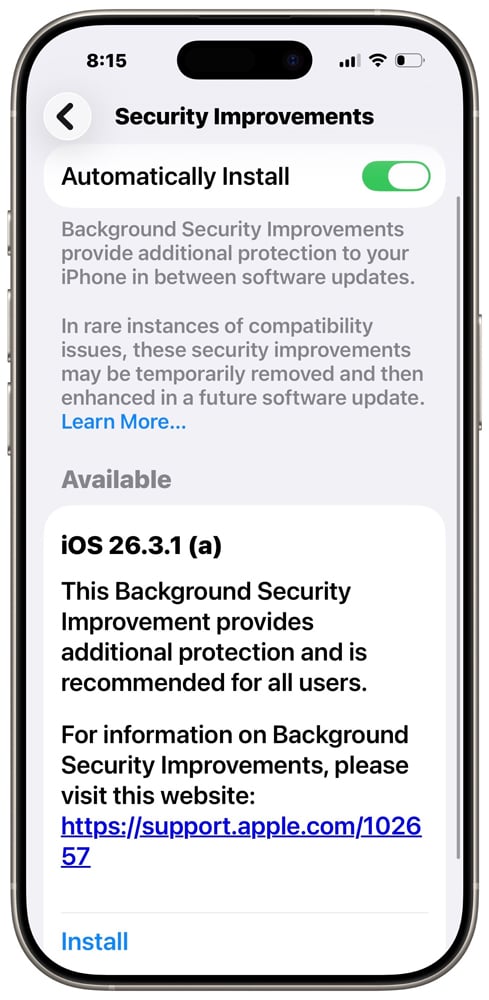
    Background Security Improvements feature
    Background Security Improvements feature

    Apple added the feature in iOS 26.1, iPadOS 26.1, and macOS 26.1, stating it was to be used to quickly patch security flaws between releases.

    Users can access the feature through their device settings under the Privacy & Security menu.

    • On iPhone and iPad: Go to Settings, then tap Privacy & Security.
    • On Mac: From the Apple menu, choose System Settings. Then click Privacy & Security.

    Apple warns that uninstalling a Background Security Improvements update removes all previously applied background patches, reverting the device to the baseline OS version (such as iOS 26.3.1) without any of the incremental security fixes.

    This effectively removes the rapid-response security protections delivered through this feature, leaving devices at the baseline security level until the updates are reapplied or included in a future full update.

    Therefore, unless a baseline security improvement causes an issue on your device, it is strongly recommended that they not be uninstalled.


    tines

    Malware is getting smarter. The Red Report 2026 reveals how new threats use math to detect sandboxes and hide in plain sight.

    Download our analysis of 1.1 million malicious samples to uncover the top 10 techniques and see if your security stack is blinded.


    Source link

    Share. Facebook Twitter Pinterest LinkedIn Tumblr Email

    Related Posts

    Patch Tuesday, April 2026 Edition – Krebs on Security

    April 17, 2026

    Here’s how to avoid a ‘second strike’

    April 16, 2026

    Adobe Issues Emergency Patch for Critical PDF Flaw Exploited For Months

    April 15, 2026

    Sustainability 101: Let’s talk about energy efficiency

    April 14, 2026

    LinkedIn is spying on you, and you agreed to nothing • Graham Cluley

    April 13, 2026

    Bringing Rust to the Pixel Baseband

    April 12, 2026
    Top Posts

    Understanding U-Net Architecture in Deep Learning

    November 25, 202529 Views

    Hard-braking events as indicators of road segment crash risk

    January 14, 202624 Views

    Redefining AI efficiency with extreme compression

    March 25, 202623 Views
    Don't Miss

    Live Nation monopoly verdict: Here’s what it means for concerts

    April 17, 2026

    This story appeared in Today, Explained, a daily newsletter that helps you understand the most…

    The Download: bad news for inner Neanderthals, and AI warfare’s human illusion

    April 17, 2026

    8 Legit Ways to Get a Free Business Email in 2026

    April 17, 2026

    Patch Tuesday, April 2026 Edition – Krebs on Security

    April 17, 2026
    Stay In Touch
    • Facebook
    • Instagram
    About Us

    At GeekFence, we are a team of tech-enthusiasts, industry watchers and content creators who believe that technology isn’t just about gadgets—it’s about how innovation transforms our lives, work and society. We’ve come together to build a place where readers, thinkers and industry insiders can converge to explore what’s next in tech.

    Our Picks

    Live Nation monopoly verdict: Here’s what it means for concerts

    April 17, 2026

    The Download: bad news for inner Neanderthals, and AI warfare’s human illusion

    April 17, 2026

    Subscribe to Updates

    Please enable JavaScript in your browser to complete this form.
    Loading
    • About Us
    • Contact Us
    • Disclaimer
    • Privacy Policy
    • Terms and Conditions
    © 2026 Geekfence.All Rigt Reserved.

    Type above and press Enter to search. Press Esc to cancel.