
Close Menu
geekfence.comgeekfence.com
    What's Hot

    HCLTech acquires HPE telco unit

    December 29, 2025

    This tiny chip could change the future of quantum computing

    December 29, 2025

    What’s In a Name? Mainframe GDGs Get the Job Done

    December 29, 2025
    Facebook X (Twitter) Instagram
    • About Us
    • Contact Us
    Facebook Instagram
    geekfence.comgeekfence.com
    • Home
    • UK Tech News
    • AI
    • Big Data
    • Cyber Security
      • Cloud Computing
      • iOS Development
    • IoT
    • Mobile
    • Software
      • Software Development
      • Software Engineering
    • Technology
      • Green Technology
      • Nanotechnology
    • Telecom
    geekfence.comgeekfence.com
    Home»Cyber Security»Windows 11 tests shared Bluetooth audio support, but only for AI PCs
    Cyber Security

    Windows 11 tests shared Bluetooth audio support, but only for AI PCs

    AdminBy AdminNovember 1, 2025No Comments2 Mins Read2 Views
    Facebook Twitter Pinterest LinkedIn Telegram Tumblr Email
    Windows 11 tests shared Bluetooth audio support, but only for AI PCs
    Share
    Facebook Twitter LinkedIn Pinterest Email


    Windows 11 tests shared Bluetooth audio support, but only for AI PCs

    If you have two headphones, speakers, or any other Bluetooth hardware, you can now share audio between the two devices simultaneously on a Copilot+ PC.

    Microsoft is testing a new feature called “shared audio,” which is built on top of Bluetooth LE Audio broadcast technology.

    With Bluetooth LE Audio broadcast technology, Windows can now transmit an audio stream to two Bluetooth devices.

    Wiz

    Right now, if you have a Bluetooth speaker and an earbud, you can connect only one of them. Even if you manage to connect the two devices, you cannot play audio through both at the same time.

    This is a limitation of Bluetooth, but newer modems include support for Bluetooth LE Audio broadcast technology.

    Modern PCs, particularly Copilot+ PCs, have this technology, and Microsoft is finally adding support for shared audio to Windows 11.

    “Shared audio lets students share music with a friend while studying or brings family members closer by watching a movie together on an airplane,” Microsoft noted.

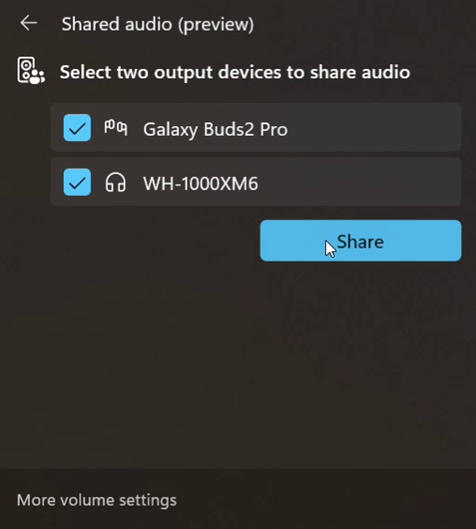
    In Windows 11 Build 26220.7051 (KB5067115), you can turn on the new “Shared audio (preview)” shortcut in quick settings to start sharing audio.
    Windows 11
    Shared audio feature in Windows 11

    Once you’re sharing the audio, you need to use “Stop sharing” to end the sharing session.

    Microsoft says support for more devices will be added later, but for now, only these PCs support the shared audio feature:

    • Surface Laptop, 13.8-inch and 15-inch* | Qualcomm Snapdragon X
    • Surface Laptop for Business, 13.8 and 15-inch* | Qualcomm Snapdragon X
    • Surface Pro, 13-inch** | Qualcomm Snapdragon X
    • Surface Pro for Business, 13-inch** | Qualcomm Snapdragon X

    Coming soon:

    • Samsung Galaxy Book5 360 | Intel Core Ultra Series 200
    • Samsung Galaxy Book5 Pro | Intel Core Ultra Series 200
    • Samsung Galaxy Book5 Pro 360 | Intel Core Ultra Series 200
    • Samsung Galaxy Book4 Edge | Qualcomm Snapdragon X
    • Surface Laptop, 13-inch | Qualcomm Snapdragon X
    • Surface Laptop for Business, 13-inch | Qualcomm Snapdragon X
    • Surface Pro, 12-inch | Qualcomm Snapdragon X
    • Surface Pro for Business, 12-inch | Qualcomm Snapdragon X

    Remember that you’ll also need a supported audio accessory.

    Most Bluetooth devices support Shared audio, such as Galaxy Buds2 Pro, Buds3, and Buds3 Pro.

    This feature is rolling out to everyone in the Windows Insider Program’s Dev and Beta channel with Windows 11 Build 26220.7051 (KB5067115).


    Source link

    Share. Facebook Twitter Pinterest LinkedIn Tumblr Email

    Related Posts

    MongoDB Vulnerability CVE-2025-14847 Under Active Exploitation Worldwide

    December 29, 2025

    How Russia’s Largest Private University is Linked to a $25M Essay Mill – Krebs on Security

    December 28, 2025

    What are brushing scams and how do I stay safe?

    December 27, 2025

    Black or Scrambled Phone Screen? Here’s How to Spot a Hacked vs Broken Phone

    December 26, 2025

    Closing the gap: bitsIO wins Splunkie Award for data and AI-powered nonprofit solutions

    December 25, 2025

    Google Online Security Blog: Further Hardening Android GPUs

    December 23, 2025
    Top Posts

    Understanding U-Net Architecture in Deep Learning

    November 25, 20258 Views

    Microsoft 365 Copilot now enables you to build apps and workflows

    October 29, 20258 Views

    Here’s the latest company planning for gene-edited babies

    November 2, 20257 Views
    Don't Miss

    HCLTech acquires HPE telco unit

    December 29, 2025

    HCLTech moves toward a future of AI-driven growth In sum – what we know: The…

    This tiny chip could change the future of quantum computing

    December 29, 2025

    What’s In a Name? Mainframe GDGs Get the Job Done

    December 29, 2025

    Microsoft named a Leader in Gartner® Magic Quadrant™ for AI Application Development Platforms

    December 29, 2025
    Stay In Touch
    • Facebook
    • Instagram
    About Us

    At GeekFence, we are a team of tech-enthusiasts, industry watchers and content creators who believe that technology isn’t just about gadgets—it’s about how innovation transforms our lives, work and society. We’ve come together to build a place where readers, thinkers and industry insiders can converge to explore what’s next in tech.

    Our Picks

    HCLTech acquires HPE telco unit

    December 29, 2025

    This tiny chip could change the future of quantum computing

    December 29, 2025

    Subscribe to Updates

    Please enable JavaScript in your browser to complete this form.
    Loading
    • About Us
    • Contact Us
    • Disclaimer
    • Privacy Policy
    • Terms and Conditions
    © 2025 Geekfence.All Rigt Reserved.

    Type above and press Enter to search. Press Esc to cancel.