

Close Menu
geekfence.comgeekfence.com
    What's Hot

    Health and wellness influencers dominate social media. A new report shines a light on who they actually are.

    May 7, 2026

    The Best Risk Mitigation Strategy in Data? A Single Source of Truth – O’Reilly

    May 7, 2026

    Build streaming applications on Amazon Managed Service for Apache Flink with AI-assisted guidance

    May 7, 2026
    Facebook X (Twitter) Instagram
    • About Us
    • Contact Us
    Facebook Instagram
    geekfence.comgeekfence.com
    • Home
    • UK Tech News
    • AI
    • Big Data
    • Cyber Security
      • Cloud Computing
      • iOS Development
    • IoT
    • Mobile
    • Software
      • Software Development
      • Software Engineering
    • Technology
      • Green Technology
      • Nanotechnology
    • Telecom
    geekfence.comgeekfence.com
    Home»Cyber Security»Windows 11 tests shared Bluetooth audio support, but only for AI PCs
    Cyber Security

    Windows 11 tests shared Bluetooth audio support, but only for AI PCs

    AdminBy AdminNovember 1, 2025No Comments2 Mins Read3 Views
    Facebook Twitter Pinterest LinkedIn Telegram Tumblr Email
    Windows 11 tests shared Bluetooth audio support, but only for AI PCs
    Share
    Facebook Twitter LinkedIn Pinterest Email


    Windows 11 tests shared Bluetooth audio support, but only for AI PCs

    If you have two headphones, speakers, or any other Bluetooth hardware, you can now share audio between the two devices simultaneously on a Copilot+ PC.

    Microsoft is testing a new feature called “shared audio,” which is built on top of Bluetooth LE Audio broadcast technology.

    With Bluetooth LE Audio broadcast technology, Windows can now transmit an audio stream to two Bluetooth devices.

    Wiz

    Right now, if you have a Bluetooth speaker and an earbud, you can connect only one of them. Even if you manage to connect the two devices, you cannot play audio through both at the same time.

    This is a limitation of Bluetooth, but newer modems include support for Bluetooth LE Audio broadcast technology.

    Modern PCs, particularly Copilot+ PCs, have this technology, and Microsoft is finally adding support for shared audio to Windows 11.

    “Shared audio lets students share music with a friend while studying or brings family members closer by watching a movie together on an airplane,” Microsoft noted.

    In Windows 11 Build 26220.7051 (KB5067115), you can turn on the new “Shared audio (preview)” shortcut in quick settings to start sharing audio.
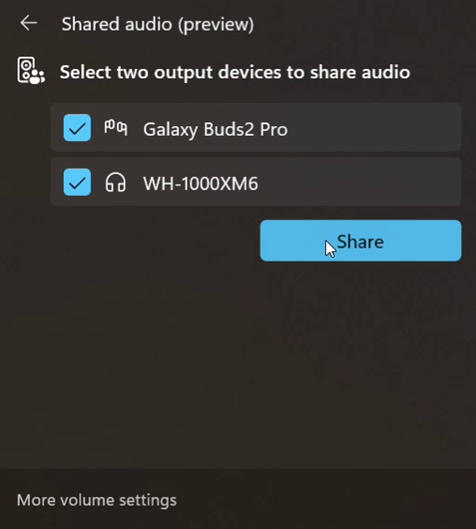
    Windows 11
    Shared audio feature in Windows 11

    Once you’re sharing the audio, you need to use “Stop sharing” to end the sharing session.

    Microsoft says support for more devices will be added later, but for now, only these PCs support the shared audio feature:

    • Surface Laptop, 13.8-inch and 15-inch* | Qualcomm Snapdragon X
    • Surface Laptop for Business, 13.8 and 15-inch* | Qualcomm Snapdragon X
    • Surface Pro, 13-inch** | Qualcomm Snapdragon X
    • Surface Pro for Business, 13-inch** | Qualcomm Snapdragon X

    Coming soon:

    • Samsung Galaxy Book5 360 | Intel Core Ultra Series 200
    • Samsung Galaxy Book5 Pro | Intel Core Ultra Series 200
    • Samsung Galaxy Book5 Pro 360 | Intel Core Ultra Series 200
    • Samsung Galaxy Book4 Edge | Qualcomm Snapdragon X
    • Surface Laptop, 13-inch | Qualcomm Snapdragon X
    • Surface Laptop for Business, 13-inch | Qualcomm Snapdragon X
    • Surface Pro, 12-inch | Qualcomm Snapdragon X
    • Surface Pro for Business, 12-inch | Qualcomm Snapdragon X

    Remember that you’ll also need a supported audio accessory.

    Most Bluetooth devices support Shared audio, such as Galaxy Buds2 Pro, Buds3, and Buds3 Pro.

    This feature is rolling out to everyone in the Windows Insider Program’s Dev and Beta channel with Windows 11 Build 26220.7051 (KB5067115).


    Source link

    Share. Facebook Twitter Pinterest LinkedIn Tumblr Email

    Related Posts

    The Race to Autonomous Transport Networks: A New Study

    May 7, 2026

    Teenager alleged to be Scattered Spider hacker arrested in Finland, faces US extradition

    May 6, 2026

    FTC to ban data broker Kochava from selling Americans’ location data

    May 5, 2026

    The Year of AI-Assisted Attacks

    May 4, 2026

    Anti-DDoS Firm Heaped Attacks on Brazilian ISPs – Krebs on Security

    May 3, 2026

    This month in security with Tony Anscombe – April 2026 edition

    May 2, 2026
    Top Posts

    Understanding U-Net Architecture in Deep Learning

    November 25, 202536 Views

    Hard-braking events as indicators of road segment crash risk

    January 14, 202626 Views

    Redefining AI efficiency with extreme compression

    March 25, 202625 Views
    Don't Miss

    Health and wellness influencers dominate social media. A new report shines a light on who they actually are.

    May 7, 2026

    A generation or two ago, when you had a medical question, the solution was obvious:…

    The Best Risk Mitigation Strategy in Data? A Single Source of Truth – O’Reilly

    May 7, 2026

    Build streaming applications on Amazon Managed Service for Apache Flink with AI-assisted guidance

    May 7, 2026

    Microsoft’s clean energy target under pressure from AI data centres

    May 7, 2026
    Stay In Touch
    • Facebook
    • Instagram
    About Us

    At GeekFence, we are a team of tech-enthusiasts, industry watchers and content creators who believe that technology isn’t just about gadgets—it’s about how innovation transforms our lives, work and society. We’ve come together to build a place where readers, thinkers and industry insiders can converge to explore what’s next in tech.

    Our Picks

    Health and wellness influencers dominate social media. A new report shines a light on who they actually are.

    May 7, 2026

    The Best Risk Mitigation Strategy in Data? A Single Source of Truth – O’Reilly

    May 7, 2026

    Subscribe to Updates

    Please enable JavaScript in your browser to complete this form.
    Loading
    • About Us
    • Contact Us
    • Disclaimer
    • Privacy Policy
    • Terms and Conditions
    © 2026 Geekfence.All Rigt Reserved.

    Type above and press Enter to search. Press Esc to cancel.