

Organizations are naturally drawn to Salesforce, consistently ranked the world’s leading CRM by the International Data Corporation, because of its ability to centralize customer data and streamline operations. Yet delivering on that potential starts with a complex, often underestimated task of migrating historic data into the platform. A clean migration sets up the organization for success, while a hastily planned one can lead to frustration long after the migration is complete.
After nearly a decade designing Salesforce transformations, including working directly inside Salesforce supporting enterprise implementations, I’ve learned that migrating data is never as simple as lifting and shifting records. Whether the source is a legacy CRM, a homegrown system, or a set of disconnected Excel spreadsheets, the migration requires disciplined planning and rigorous data hygiene, along with careful alignment between systems and business workflows. When done well, the process provides the foundation for stronger analytics and growth.
In this article, I’ll share a proven, three-step Salesforce data migration framework I with with clients across industries. We’ll also explore essential tools, cost and timeline expectations, and best practices drawn from real-world projects in sectors where security and data trust are mission-critical.
Salesforce Data Migration Plan: 3 Key Steps
Every Salesforce migration is unique, given the data involved, yet the path to success remains remarkably consistent. The most reliable migrations begin with strategic planning and data preparation, which requires coordination between Salesforce developers and business stakeholders from the outset. It then advances through disciplined execution and concludes with validation and long-term governance. Ultimately, this intentional, three-step approach provides teams with confidence that Salesforce will operate smoothly from the start.
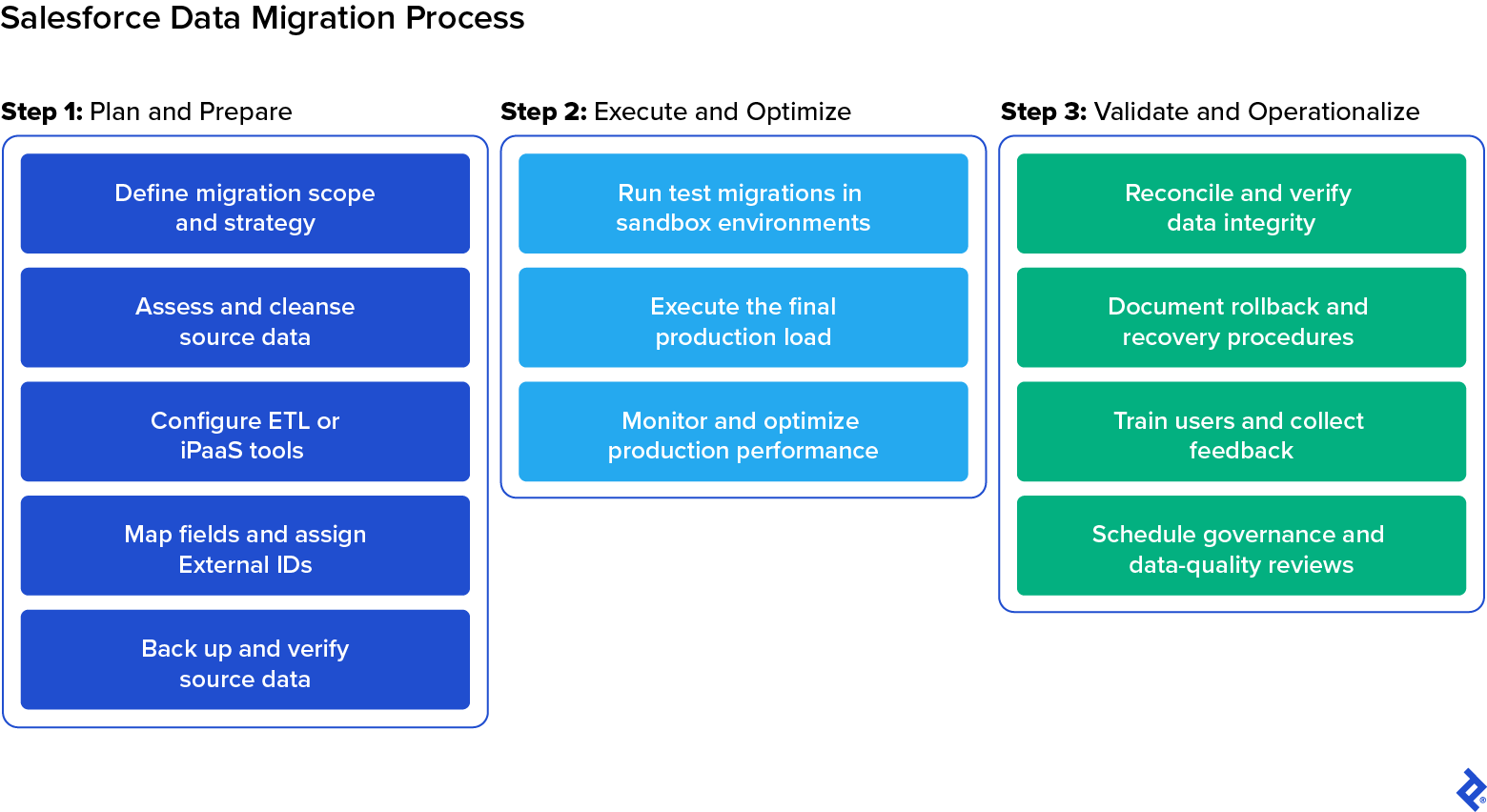
Step 1: Plan and Prepare for Your Salesforce Data Migration
In my experience, careful migration planning and thorough data preparation make the difference between a smooth deployment and a chaotic one. The earlier your team invests in understanding its data and validating its quality, the fewer problems you’ll encounter later, whether you’re importing a few thousand records or millions across multiple systems.
For both business leaders and technical practitioners, it’s worth remembering that it’s always faster and more cost-effective to design a clean migration from the start than to fix a broken or incomplete one after the fact.
Define Migration Scope and Strategy
Before beginning any migration, start by clarifying exactly what you’re moving from the source system and why. This involves defining which datasets the migration will include, such as customer records, opportunities, and support cases, and aligning them with the corresponding Salesforce objects and the processes they’ll support.
This is also where you should choose the right migration approach. Business leaders may assume their teams can migrate data to Salesforce all at once, during a single cutover window. In reality, however, a phased or hybrid strategy is almost always safer. Migrating by department, geography, or data type reduces risk and makes it easier to verify data integrity at each milestone.
One of the most important early decisions is whether Salesforce will become the primary system of record immediately or whether a period of coexistence is required, either as a transitional phase or as part of ongoing synchronization between business systems.
|
Scenario |
How It Works |
Typical Use Cases |
|
One-time historical migration |
Legacy data is moved into Salesforce once, with no new data entering the old system during rollout. |
This approach is commonly used when retiring a legacy CRM or homegrown system and there is little need for operational overlap during the transition. |
|
Transitional coexistence sync |
Salesforce and the legacy system run in parallel temporarily, with key records kept aligned. |
This model is well-suited for phased rollouts across teams, business units, or regions where minimizing disruption and maintaining continuity is critical. |
|
Ongoing operational synchronization |
Salesforce becomes one of several long-term systems of record, requiring recurring sync. |
This scenario is typical for organizations that continue to rely on ERPs, billing platforms, or service systems as primary sources of truth while using Salesforce for downstream workflows. |
From there, work with stakeholders to define success metrics and expected outcomes. What does “successful migration” mean for your team? For some, it’s accurate dashboards on day one; for others, it’s uninterrupted workflows or strict compliance assurance. These goals will drive every technical decision that follows.
Before moving on, be sure to review existing automations and integrations (e.g., flows, triggers, and API connections) that could fire during migration. Document which processes will be paused and who will approve reactivation later. This step prevents unintended customer notifications or workflow loops once real data begins flowing into production.
Assess and Cleanse Source Data
Data cleansing is one of the most critical tasks in any Salesforce migration. Discrepancies are nearly always present, having accumulated quietly over years of system use, and messy data doesn’t become better in a new system. The issues simply become more tangled and expensive to fix. The goal of migration isn’t just to move data from one system to another. It’s a valuable opportunity to refine and improve that data so it’s accurate and business-ready when it reaches Salesforce.
You’ll want to begin with data profiling to uncover quality issues. In addition to flat-file cleanup, many teams use dedicated profiling and matching tools (such as Informatica Cloud Data Quality) to compare external source data against the Salesforce model before import, identifying duplicates, mismatched formats, and relationship-link issues ahead of time. From there, you should standardize key elements, such as naming conventions and region codes, to prevent downstream validation errors.
It’s also smart to run a small preview load in a sandbox using a representative sample of records. Even a handful of test imports can reveal formatting issues or relationship gaps well before full-scale migration begins.
Data governance also requires deciding what not to migrate. For most organizations, only the most recent years of transactional or customer data offer meaningful operational value, though the ideal data retention period varies by industry and use case. Older history is often better archived for compliance, reducing clutter and improving usability in Salesforce.
Select and Configure ETL or Integration Tools
Choosing the right ETL (extract, transform, load) or integration tool depends on the scale and structure of your migration, including whether it’s a one-time cutover or a phased coexistence.
For small, one-time loads, I often rely on Salesforce’s built-in Data Loader or Data Import Wizard. Tools like Dataloader.io or Astera Data Pipeline can handle additional complexity, while larger or recurring migrations typically benefit from full integration platform-as-a-service (iPaaS) solutions like Jitterbit, Informatica IDMC, or MuleSoft, as these offer better control, automation, and auditability. We’ll compare these platforms in more detail later in this guide.
At this stage, the priority is to ensure that your chosen ETL environment connects securely and runs efficiently. Configure authentication, establish API connections, and confirm that throughput and batch limits align with project scope. You should also set up a logging framework that defines where success, error, and partial-load reports will be stored, and assign clear ownership for reviewing them. Documenting these standards early makes reconciliation and troubleshooting far faster down the road.
Map Fields and Assign External IDs
Once your ETL environment is connected, the next step is to align your data structure with Salesforce’s. In my experience, the most successful migrations start with a clear data-mapping document that defines how each source field, whether from a legacy CRM or flat file, corresponds to its Salesforce equivalent while preserving its business meaning.
It’s also important to check for data type mismatches, such as text stored where a numeric or date field is expected. These issues can cause validation failures that cascade through thousands of records. Catching and resolving mismatches early is one of the most effective ways to keep the import process predictable and error-free.
You’ll also need to configure External IDs to maintain parent-child relationships between related records (such as linking accounts with their associated contacts and opportunities). This preserves referential integrity and allows incremental updates in the future without overwriting existing data.
Be sure to review your mappings with business stakeholders, such as sales or marketing leaders, to ensure terminology and object relationships reflect real-world workflows before any data moves into Salesforce.
Back Up and Verify Source Data
Finally, before any data transformation or import, create a full backup of the source data, including attachments, metadata, and configuration details. A reliable backup protects you against failed loads or unexpected data corruption, and it’s often required under regulatory frameworks such as GDPR’s right to be forgotten, HIPAA’s patient privacy rules, and SOX’s data-retention requirements.
Never proceed on the assumption that a backup works; always verify it before the migration. Store backups in a secure, access-restricted, version-controlled repository, and restore a small sample dataset to confirm integrity and readability before moving forward.
It’s also important to establish how logs will be captured and reviewed during the migration. Define where success, error, and partial-load reports will live, who will be responsible for reviewing them, and how issues will be escalated. This ensures you have a complete, auditable record of every load step, which is an especially critical safeguard in regulated environments.
Step 2: Execute and Optimize the Salesforce Data Migration
No matter how well you plan, the real test begins when data starts flowing into Salesforce. In my experience, the most reliable approach is iterative: start small, validate results, adjust, and expand. Migrating in controlled waves reduces the risk of cascading errors and gives teams full visibility into how Salesforce behaves as real data flows in.
Run Test Migrations in Sandbox Environments
Before loading any data into production, begin with structured test migrations in a sandbox or partial-copy environment. These dry runs use a small but representative slice of data to validate formatting, field relationships, and user visibility before scaling up. Even a handful of preview records can reveal issues, such as unexpected deduplication, validation failures, or missing access permissions, which become harder to resolve once they appear in production.
Each iteration should function as a feedback loop: Review success and error logs, refine mapping logic and data hygiene, and rerun the load until the results are predictable and repeatable. These rehearsals should also confirm precisely which rules must be disabled or bypassed ahead of go-live. Iteration cycles also help estimate cutover timing and set realistic expectations for business stakeholders.
Execute the Final Production Load
Once data mappings are locked and sandbox cycles show repeatable success, it’s time to migrate data to Salesforce in production. Always schedule the cutover during a low-activity window and break the load into clearly defined waves based on object hierarchy (for example, starting with accounts, followed by contacts, and then opportunities). This protects referential integrity and makes any issues easier to isolate and correct.
Salesforce’s Bulk API is built for large-scale operations, but real performance is determined by your production environment, not the sandbox where earlier tests were run. That’s why the choice of bulk loading method matters. Salesforce offers two bulk options:
- Bulk API: This legacy option offers fine-grained control over batch sizes, job concurrency, and error handling.
- Bulk API 2.0: This modernized API simplifies configuration and is designed for fast, high-volume data loads with streamlined job management.
The right choice depends on whether precision and control (Bulk API) or maximum throughput with minimal setup (Bulk API 2.0) is more important for your use case.
After each wave completes, run a rapid validation pass to check key dashboards, relationships, and ownership rules. This confirms that business-critical records behave as expected before moving on to the next batch.
Monitor and Optimize Production Performance
Even well-designed migrations can behave differently once real volume and production metadata are introduced. Validation rules and integrations that weren’t evident in the sandbox may activate unexpectedly when thousands of records are deployed to production. This monitoring becomes especially important when migrations occur in waves or when live synchronization is running alongside historical backfill.
Throughout the waves of the migration, focus your monitoring on four key areas:
- API usage and bulk-processing limits: Salesforce enforces strict request caps. Staying ahead of consumption prevents throttling and stalled jobs.
- Automation activity: Flows, triggers, and downstream integrations may activate unexpectedly. Temporarily pausing these prevents surprise emails, billing actions, or external writes.
- Access and visibility controls: Field-level security and record-type assignments can silently block record creation or hide newly migrated data from users who need it.
- Error and retry patterns: Clusters of failures often indicate mapping gaps or validation rule conflicts, so catching them early prevents cascading rejections later.
By actively tracking and adjusting performance during the migration, you avoid slowdowns for users and ensure records enter Salesforce cleanly, without triggering unintended workflows or compliance risks.
Step 3: Validate and Operationalize Your Salesforce Data
A Salesforce migration doesn’t end when the final batch finishes loading. At that stage, the focus shifts from moving records to proving that they support real business operations. This means confirming the integrity of every record and relationship, ensuring users can rely on dashboards and workflows, and implementing governance to prevent data quality from eroding over time.
Reconcile and Verify Data Integrity
The first post-migration priority is to confirm that Salesforce now accurately reflects every record and relationship the business depends on. Begin by comparing source and destination record counts, then cross-checking complex relationships: For example, ensure that all contacts remain correctly associated with their accounts and opportunities and that ownership and visibility rules were preserved during the load.
Reports are one of the most powerful validation tools at this stage. Running business-critical dashboards helps confirm whether sales teams can still see the right pipeline figures and whether service cases remain linked to the correct histories. Any inconsistencies uncovered here are far easier to correct immediately than weeks later, after users have already begun using and updating the data.
A complete data validation cycle also includes reviewing success and failure logs, investigating any records that were skipped or rejected, and confirming that no unintended automations fired during the cutover. This step closes the feedback loop from execution and establishes a clean, trustworthy baseline for everything that comes next.
Document Rollback and Recovery Procedure
Even well-tested migrations can surface surprises at go-live, which is why a clear rollback plan must be defined before the first production record is loaded. Maintain a secure, version-controlled backup of the source data (including attachments and metadata) and keep it for at least one full release cycle after the migration. Rollbacks are rarely needed when planning is strong, but the team must be able to restore the previous state quickly and safely if something goes off script.
It’s also important to document any errors encountered during the import, the resolutions applied, and the rationale behind final decisions. This audit trail not only satisfies compliance requirements but also empowers internal teams to maintain data trust long after the migration team has stepped away.
Train Users and Collect Feedback
The ultimate success of your Salesforce migration hinges on whether your teams feel confident using the data. That’s why I work with business stakeholders early to document how key data points will appear and behave inside Salesforce. Providing a clear “before and after” view helps users understand what has changed and why those decisions were made.
After go-live, structured training becomes essential. It can be helpful to identify champion users within each department who function as advocates to reinforce new processes on the ground and help surface usability issues quickly. Gathering early feedback from frontline users is often the fastest way to uncover gaps in visibility, field configuration, and workflow behavior that didn’t surface in testing and to address them before they undermine adoption.
Schedule Governance and Data-quality Reviews
As your business evolves and teams adapt Salesforce to new processes, the introduction of additional fields, integrations, and automations inevitably causes at least some data drift. Without ongoing governance, even a perfect go-live can gradually erode into unreliable reporting. To preserve the integrity of your Salesforce investment, establish a governance rhythm from the start. I recommend:
- Quarterly data-quality audits to assess record completeness, duplication, ownership, and metadata changes.
- Automated monitoring, including AI-enabled platforms such as Informatica Intelligent Data Management Cloud (IDMC) and Astera Data Pipeline Builder, to help ensure ongoing data governance by flagging inconsistencies and detecting compliance-sensitive updates.
- A structured review calendar for validating access controls, sharing rules, retention policies, and compliance alignment.
- Post-release debriefs to ensure enhancements don’t break transformations or introduce new validation conflicts.
It isn’t necessary to make governance overly complicated. The process simply needs to be intentional and recurring. With recurring checks in place, your Salesforce operation will remain a system users trust and depend on for decision-making.
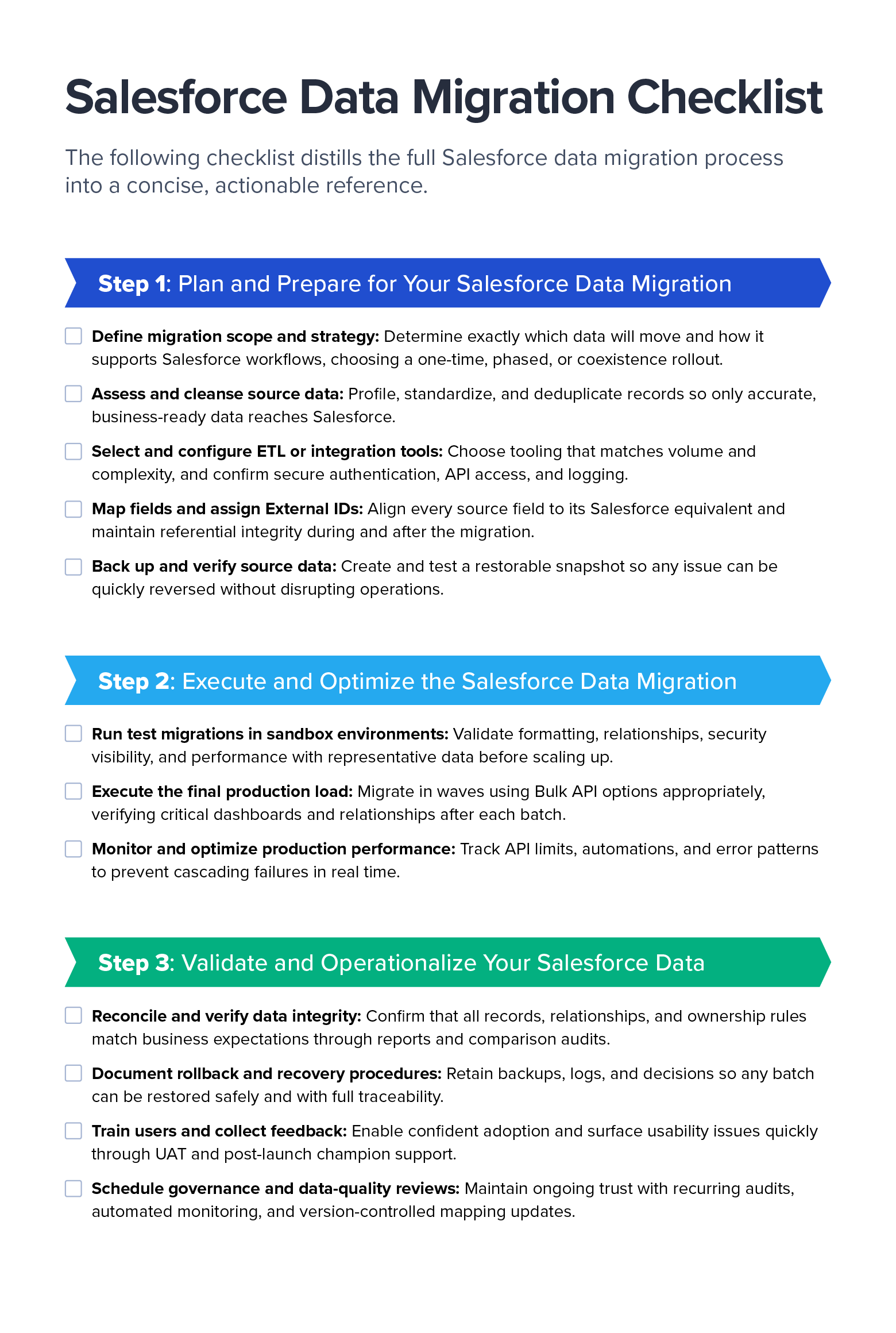
Salesforce Data Migration Checklist (Downloadable)
To make planning easier, I’ve distilled the full Salesforce data migration process into a concise, actionable reference. Download the checklist as a PDF to guide your team through each phase, from preparation to post-migration validation.
Selecting the right tool for a Salesforce migration depends on three practical realities:
- How much data you’re moving
- How clean or standardized it is
- Whether multiple systems must remain aligned during or after migration.
For small, structured imports, especially the first time around, Salesforce’s built-in Data Import Wizard is often the fastest and safest place to start. Once data volume grows or External IDs are required to preserve parent-child relationships, tools such as Salesforce Data Loader, dataloader.io, and Skyvia offer better control, scheduling, and error reporting.
|
Tool |
Approximate Volume Limits |
Best Suited For |
Pros |
Cons |
|
Salesforce Data Import Wizard |
Quick, one-time imports into standard objects with simple relationships |
Built directly into Salesforce; offers guided UI and safe defaults for first-time admins |
Limited object coverage; no scheduling; and weaker handling of parent-child relationships |
|
|
Salesforce Data Loader |
Bulk data loading where teams manage object order and clean CSV files |
Fast; supports scripting for automation; clear error logs |
Requires installation; no advanced transformation features |
|
|
Dataloader.io |
Varies by plan: approximately 10,000 records per month on the free tier to unlimited on the highest paid tier
|
Cloud-based alternative to Data Loader with scheduling and cloud storage connections |
No installation required; offers automation capabilities and integrates with Google Drive, Dropbox, and Box |
Larger volumes and advanced features require a paid subscription; limited transformation features |
|
Skyvia |
Varies by plan: approximately 10,000 records per month for the free plan and custom enterprise options exceeding 100 million
|
Quick migrations or ongoing synchronization between cloud SaaS systems |
Fast to deploy with SaaS templates, built-in scheduling, and read/write sync support |
Not as deep on complex transformations or enterprise governance |
When migrations involve multiple CRMs, regulatory oversight, or major transformation logic, enterprise ETL and iPaaS tools become essential. Solutions like Jitterbit iPaaS, Astera Data Pipeline, Qlik Talend, or Informatica IDMC handle enterprise-scale volumes while providing automation, monitoring, lineage tracking, and the ability to standardize data while it moves.
|
Tool |
Best Suited For |
Pros |
Cons |
|
Jitterbit iPaaS |
Complex multisystem migrations with transformation, deduplication, and staged deployment |
Strong visual mapping, reusable workflows, and job automation and logging |
Licensing cost, notable learning curve, and disciplined design requirements |
|
Astera Data Pipeline |
Significant data cleanup; profiling; hierarchical loads prior to Salesforce import |
Enables robust transformation and provides data quality tools and strong audit and validation features |
Licensing and setup effort; typically requires skilled operators |
|
Informatica IDMC |
Enterprise programs with compliance, governance, and multiple coordinated environments |
Offers mature governance, monitoring, lineage features, and an extensive connector ecosystem |
Higher cost and longer time to initial value; best for enterprise-scale teams |
|
Qlik Talend |
Developer-led pipelines with complex transformations and version-controlled releases |
Flexible and customizable; strong component ecosystem; CI/CD support |
Requires engineering effort, hosting, and operational overhead |
Meanwhile, MuleSoft Composer and Unito are purpose-built for coexistence scenarios, in which Salesforce must operate alongside another system for weeks or months during rollout or continue exchanging data as part of long-term operations.
|
Tool |
Approximate Volume Limits |
Best Suited For |
Pros |
Cons |
|
MuleSoft Composer |
Low-code data sync and lightweight migrations using straightforward mappings |
Fast setup and offers a Salesforce-native experience that’s accessible to administrators |
Limited capability for complex transformations or large one-time loads |
|
|
Unito |
Phased migrations, multi-CRM coexistence, and near-real-time alignment |
Two-way sync; good for gradual rollout; minimal disruption |
Not optimized for high-volume backfill; subscription required |
In every case, I recommend validating the migration with production-scale test runs in a sandbox, confirming success with business-critical reports, and ensuring that error logs and lineage data are captured for auditing. The right tool makes the migration predictable and repeatable so cutover can happen with confidence, even as business systems evolve and data volumes grow.
Salesforce Data Migration Project Costs, Timelines, and ROI
In my experience, the cost and duration of a Salesforce migration depend less on the number of records than on how complex those records are and how reliably they map to Salesforce’s data model. A clean dataset of one million rows with 20 well-structured fields can be migrated much faster than 50,000 records riddled with duplicates, missing IDs, and automation triggers firing behind the scenes.
Because of these variables, I typically shift the conversation away from fixed estimates and toward the drivers that meaningfully influence total effort and value returned.
What Drives Salesforce Migration Costs?
The five biggest levers that determine cost in a Salesforce migration are:
- Data volume and structure: The addition of fields, deeper hierarchies, and complex relationships increases the time required for transformation and testing.
- Data hygiene and remediation: Cleaning duplicates, validating formats, and creating missing values often takes longer than the load itself, but this prevents more expensive problems later.
- Tooling and automation requirements: Native loaders are low-cost for straightforward jobs; governed ETL or iPaaS platforms add license cost but significantly reduce risk in complex programs.
- Integration scope and compliance: End-to-end migrations involving other CRMs, ERPs, or HIPAA or SOX-regulated data must factor in secure transfer, monitoring, and documented lineage.
- Partner support: Bringing in an experienced team to lead the migration increases upfront investment but reduces rework and accelerates timelines, especially for multisystem migrations.
How Long Do Salesforce Migrations Typically Take?
Timelines for Salesforce migrations are driven by data complexity rather than by record count alone. Most projects include two to three cycles of test migrations in sandbox environments, followed by a controlled production cutover. Here are several examples:
- One-time CSV migrations (up to one million records and with few automations) may take around one week from cleaning to production validation.
- Complex historical migrations (with multimillion records and deep relationships) may take two to three weeks, and sometimes longer, depending on data hygiene and metadata behavior in production.
- Cloud-to-cloud coexistence with ongoing synchronization usually requires one to two months to design, test, and operationalize a recurring pipeline.
These ranges reflect the reality that production environments often behave differently from sandboxes, particularly when triggers, record-type restrictions, and asynchronous automations activate at scale. Scheduling also plays a major role. I recommend planning major waves during low-activity windows (such as weekends) so user teams can continue operating without noise or interruption, even if it extends the total delivery timeline.
How Do You Measure ROI for a Salesforce Migration?
Of course, there’s no point in moving data into Salesforce if it doesn’t deliver a measurable return. In my experience, the biggest ROI doesn’t come from the migration activity itself; rather, it comes from what the business can do with clean, trusted data afterward. Salesforce data unlocks improvements across four areas:
- User productivity: Teams spend less time fixing records and more time creating value. For example, sales representatives can focus on conversations instead of cleansing lists in spreadsheets.
- Reporting and forecasting accuracy: Leadership teams can trust dashboards from day one.
- Compliance posture: Clear lineage and auditability reduce regulatory risk, particularly in finance and healthcare.
- Automation and AI readiness: Intelligent workflows and future AI systems perform better when grounded in reliable data.
To ensure those outcomes are visible, I encourage organizations to track post-migration indicators such as record counts, error rates, field completeness, and duplicate reduction. As those signals trend in the right direction, the benefits compound, supporting better decision-making and revenue outcomes moving forward.
Best Practices for Cross-platform CRM Migration
Migrating data into Salesforce from another CRM, like HubSpot or Zoho, introduces challenges you won’t encounter when importing a flat file. With CSV or Excel exports (or data pulled directly from a database), you can preview every row and fix issues up front. Cross-platform migrations, however, rely on another system’s APIs, data model, and automation rules. That means greater interdependencies and more opportunities for hidden mismatches, especially at the larger volumes CRMs typically store.
To maintain control and data quality throughout the migration, I recommend focusing on five Salesforce data migration best practices:
- Align schemas and terminology: Seemingly equivalent objects don’t always represent the same business meaning across platforms. For instance, a “deal” in HubSpot may correspond to a different stage in the Salesforce life cycle. Creating a detailed mapping matrix, reviewed by business stakeholders, helps preserve both meaning and structure.
- Plan for API and volume constraints: High-volume CRM migrations rarely succeed in a single push. Breaking data into controlled batches (often around 10,000 records at a time) allows you to validate success incrementally and diagnose issues before they cascade. This becomes mission-critical when migrating more than a million records.
- Operationalize logging and visibility: With cross-CRM migrations, every batch should produce complete logs showing what was loaded, what failed, and why. These logs become your real-time command center for troubleshooting and a required audit trail if the migration recurs daily or weekly rather than only once.
- Evaluate and reconfigure automations: Legacy triggers and workflows may fire unexpectedly during the migration process. Identify and pause automations that could cause duplicate outreach, billing errors, or downstream data writes.
- Use scalable integration tools: Cross-platform migrations may include a period of coexistence where the legacy CRM and Salesforce remain active at the same time. In these cases, teams typically take a hybrid approach: An ETL tool handles the one-time historical backfill, while a synchronization tool (such as Unito or MuleSoft Composer) keeps active records aligned during rollout. This prevents data drift and ensures that users can transition to Salesforce gradually, without disrupting ongoing operations.
Ultimately, cross-platform migrations should never feel like a black box. Ensuring observability and semantic accuracy throughout the process allows your migration pipeline to scale gracefully without introducing surprises. When done well, each incremental batch becomes evidence that the integration is working exactly as intended, supporting data trust and operational stability from the outset.
Common Salesforce Data Migration Pitfalls (and How to Avoid Them)
Once real production data begins flowing, even well-planned Salesforce migrations can hit unexpected obstacles and flounder. In my experience, most issues fall into a few familiar categories, and each one has proactive steps to prevent it.
- Poor data quality: Most migrations struggle not because of the loading process, but because the data entering Salesforce is incomplete or inconsistent. I always recommend profiling early, checking for missing values, invalid formats, and mismatched field types. Standardizing and deduplicating data upfront avoids cascading failures later. When issues are severe, tools like Astera or Informatica can help automate cleanup before the first record moves.
- Ignoring performance limits: High-volume jobs can fail when Bulk API limits are exceeded or batch sizes are too large. Therefore, break your migration into waves and monitor API usage throughout. Even if a job works in the sandbox, production often has extra metadata and automations that change performance significantly.
- Overlooking existing automations: One of the quickest ways to create chaos is by allowing triggers, flows, or notifications to fire for historical records. I document every automation that might activate during loading, and I work with stakeholders across marketing, sales, and other key functions to decide whether to pause or bypass it. This avoids issues such as customers receiving unexpected emails or triggering erroneous billing actions.
- No rollback or recovery plan: A smooth migration requires knowing exactly how to undo a step if something goes wrong. Teams should always maintain secure, full backups, but more importantly, they should load data in clearly defined chunks so that any errors can be isolated and reversed without affecting the entire dataset. Every batch includes success and failure logs for rapid recovery and audit.
- Treating migration as a one-time event: Salesforce will evolve with your business, so design your migrations to ensure that pipelines are reusable, mappings remain version-controlled, and governance reviews continue to improve quality long after go-live.
- Ignoring metadata dependencies: Even clean data can fail if field permissions or validation rules don’t align across environments. I always compare sandbox and production metadata with real sample volumes, because production nearly always contains more automation than testing environments.
- Skipping user validation: A migration is only successful if the people who rely on the data, from sales and marketing teams to operations and leadership, can use the information with confidence. Therefore, it’s essential to include business users early in user acceptance testing to validate dashboards, reports, and ownership rules. Their feedback surfaces issues that technical mappings alone can’t detect.
Salesforce Data Migration by Industry: Key Challenges and Solutions
Throughout my Salesforce career, I’ve led organizations through end-to-end migrations where data integrity has a direct impact on business performance. While the core migration framework remains consistent across industries, each introduces its own operational constraints, security expectations, and regulatory obligations.
The following sections highlight how migration strategies adapt in healthcare, financial services, and higher education and the lessons that consistently lead to success in each.
Financial Services: Secure Migration for a Regional Investment Firm
In financial services, auditability and data lineage are nonnegotiable. I recently worked with a regional investment firm that needed to migrate twelve years of investor and portfolio history from multiple Microsoft Access databases and spreadsheets into Salesforce Financial Services Cloud. Duplicate investor profiles and mismatched fund identifiers had made it difficult for anyone to verify which numbers were accurate.
We managed the project in phases using Informatica Cloud to provide field-level lineage, checksum verification for each load, and end-to-end encryption for sensitive fields. Compliance teams reviewed log files after every batch to ensure complete traceability back to the source.
By completion, the firm achieved 100% reconciliation of financial history and transitioned to dashboard-driven, audit-ready reporting, eliminating hours of monthly manual data validation.
Healthcare: HIPAA-compliant Patient Data Migration
Healthcare migrations demand strict protection of protected health information (PHI). Every data handling step must meet HIPAA security requirements, including encryption of payloads, role-based access controls, and locking down nonproduction environments.
In one Salesforce Health Cloud migration I led, a large regional health network needed to move referral and case-management data from an on-premises SQL system into Salesforce with uninterrupted care operations. We used MuleSoft Anypoint for secure, encrypted API-based transfers, enforced short-lived authentication tokens (expiring every 24 hours), and applied masking rules so PHI never touched sandbox environments. Access to payloads and logs was limited to HIPAA-cleared personnel, and compliance teams reviewed each batch before production cutover.
The migration was completed with zero security incidents, and the organization went on to pass an independent HIPAA audit with zero findings. Today, case managers work faster in Salesforce with field-level security aligned to clinical roles, demonstrating that security was engineered in from the beginning.
Higher Education: Alumni and Donor Migrations
Universities typically maintain separate systems for applicants, students, alumni, and donors, each with its own ID structures and governance norms. That creates challenges when teams need to unify the full student life cycle inside Salesforce Education Cloud without disrupting academic operations.
At a private university, we used Jitterbit to preserve parent-child relationships between students, alumni, and donation records. Multiple preview imports were reviewed by the advancement and IT teams in a sandbox before the final cutover. When the migration launched, more than 180,000 records were unified with accurate linkages, immediately improving donor segmentation and reducing duplicate outreach.
Achieving Ongoing Salesforce Data Migration Success
While your Salesforce migration may finish, the work of maintaining trustworthy data never stops. In my experience, the highest-performing Salesforce teams treat migration as a continuous discipline, not a one-time project. As new systems come online and automations evolve, even clean data can drift if no one is watching. The goal is to protect the accuracy and compliance of Salesforce data long after go-live.
To make that possible, I encourage teams to iterate regularly, running periodic test loads whenever new objects, integrations, or automations are introduced. AI and automation can accelerate cleanup by standardizing formats and flagging anomalies before they disrupt users, but sensitive fields still require human oversight. By designing for scale from the start (using External IDs, reusable ETL pipelines, and queuing strategies), your organization can ensure that data growth doesn’t necessitate a new architecture later.
As your organization expands into new markets, adopts new tools, or faces evolving regulatory requirements, reinforcing these foundations becomes even more important. Ultimately, successful migrations aren’t judged by the moment the data lands in Salesforce; they’re judged by how confidently the business can rely on the data from that day forward.