



OpenAI recently added a new feature to the ChatGPT app: a hidden gesture that lets you instantly set the effort level of a prompt. ChatGPT also introduced a new way to easily navigate longer conversations. Meanwhile, the default model used by ChatGPT has changed since arriving last month.
Long-press gesture to set intelligence level
First up is a new gesture for assigning the intelligence level of a prompt before pressing send.
Long-pressing the send arrow icon on a message in the ChatGPT app on mobile will invoke the intelligence level picker.
This is basically a way to set how much effort ChatGPT should spend on a prompt before serving up the response.
For example, you can choose between Instant, Thinking, and Extended before sending a message to ChatGPT.
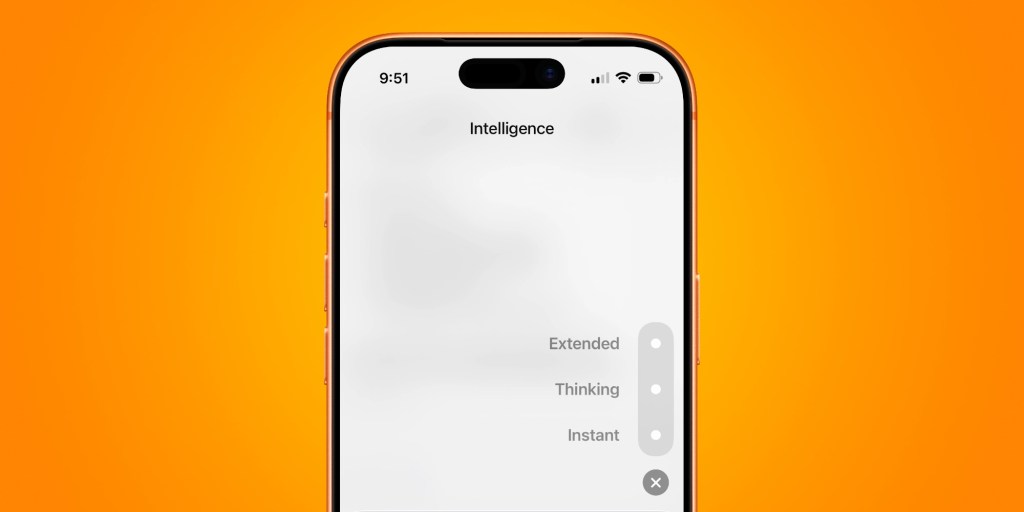
Thinking and Extended can be useful when the Instant response doesn’t give you the results you expected. Intelligence level options will depend on OpenAI subscription level.
This new gesture is a natural and fluid alternative to tapping through menus to switch Intelligence levels, especially as OpenAI pushes the automatic model picker.
Turn your chat into a table of contents
Next up, OpenAI recently added the ability to browse your conversation with ChatGPT using a table of contents.
This makes it easy to switch between different subjects that span a single chat.
The new table of contents feature works automatically for conversations with five or more responses.
It puts a set of lines on the middle right section of the conversation. Mousing over these lines reveals the expanded table of contents. From there, you can click to jump to a specific part of the chat.
The new table of contents feature only appears on ChatGPT’s web app for now, though it would be a handy addition to the mobile and desktop versions in the future.
GPT-5.5 Instant model change
OpenAI also recently updated how the GPT-5.5 Instant model works. This is the default model used for most prompts.
GPT-5.5 Instant arrived on May 5, offering smarter responses with fewer emoji characters.
On Friday, OpenAI tweaked GPT-5.5 Instant to further improve how it responds to users.
“We’re updating GPT-5.5 Instant in ChatGPT and the API to improve response style and quality,” OpenAI shared.
“It’s now easier to read, more natural in everyday conversations, and better paced in practical help tasks, with fewer overly long or bullet-heavy responses.”
Have you noticed the new model response change?


FTC: We use income earning auto affiliate links. More.