
Close Menu
geekfence.comgeekfence.com
    What's Hot

    Foldable iPhone Ultra Release Date, Design, Price Rumours

    May 8, 2026

    The Best Mobile Gaming Controllers for iPhone and Android (2026)

    May 8, 2026

    The Key Trends Shaping Long-Haul Capacity Demand

    May 8, 2026
    Facebook X (Twitter) Instagram
    • About Us
    • Contact Us
    Facebook Instagram
    geekfence.comgeekfence.com
    • Home
    • UK Tech News
    • AI
    • Big Data
    • Cyber Security
      • Cloud Computing
      • iOS Development
    • IoT
    • Mobile
    • Software
      • Software Development
      • Software Engineering
    • Technology
      • Green Technology
      • Nanotechnology
    • Telecom
    geekfence.comgeekfence.com
    Home»Mobile»Google Maps could soon get a long-overdue upgrade that replaces WhatsApp and Google Messages for location sharing – here’s how it’ll work
    Mobile

    Google Maps could soon get a long-overdue upgrade that replaces WhatsApp and Google Messages for location sharing – here’s how it’ll work

    AdminBy AdminMarch 19, 2026No Comments3 Mins Read3 Views
    Facebook Twitter Pinterest LinkedIn Telegram Tumblr Email
    Google Maps could soon get a long-overdue upgrade that replaces WhatsApp and Google Messages for location sharing – here’s how it’ll work
    Share
    Facebook Twitter LinkedIn Pinterest Email


    Whenever anyone asks me to share my current location, I open WhatsApp or Google Messages and go through the respective processes to send it to them. Although the process in both apps is quite straightforward, it involves plenty of steps. Fortunately, an upcoming Google Maps upgrade is going to make sharing locations a lot easier than before.

    Share locations directly from Google Maps

    Not sure about you guys, but I recently found out that I can share locations directly through Google Maps. For those unaware, you need to open the app, tap the blue icon on the map that indicates your location, and an overlay window will appear with a dedicated “Share this location” button. Tap it to generate a URL of your current location, which you can then share via different platforms that show up in the share list.

    However, in the app’s version 26.12.03.884026066, Google is reportedly testing a new floating action button that eliminates the need to tap the blue icon to access the overlay window. You can simply tap the floating action button, which appears on the main map screen, to select the app through which you want to share your current location. The button automatically disappears when you explore other locations in the map.
    In addition to this, the tech giant is reportedly introducing changes to the menu that pops up when you tap the pill-shaped icon at the bottom of the app screen while navigating. Currently, all available options appear in list format. But in the upcoming update, Google has removed a few options it thinks were unnecessary and reformatted the rest as a grid with bigger icons.

    The “Share trip progress” option is reportedly missing from the new UI. The “Show satellite map” and “Show traffic on map” options have also been removed from the list, but they are now available in the Google Maps settings menu.

    An important visual change
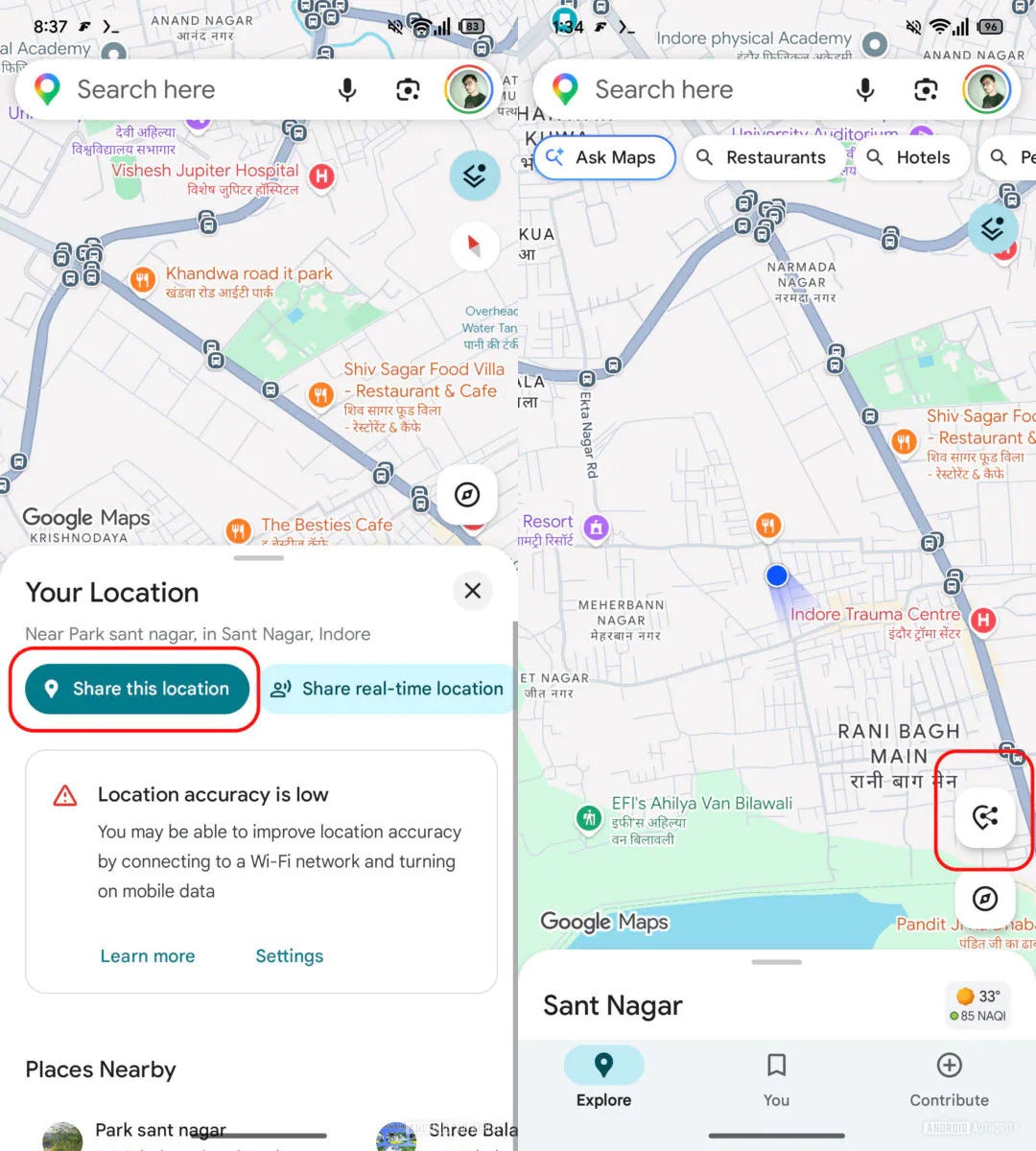
    New floating action button in Google Maps.

    New floating action button in Google Maps. | Image by Android Authority

    By making these changes, Google is clearly hoping that users will start using the Maps app directly to share their location instead of taking the long route of opening WhatsApp or Google Messages. Honestly, I have found sharing locations on Apple Maps to be much smoother.

    On it, you simply need to open the app, swipe up from the bottom, and select the “Share My Location” option. But with the upcoming update in Google Maps, I feel confident that I will start liking its location-sharing experience as well. That said, all the above-mentioned changes are currently available only to limited users. Hopefully, it will see a broader rollout soon.

    Read the latest from Aman Kumar


    Source link

    Share. Facebook Twitter Pinterest LinkedIn Tumblr Email

    Related Posts

    iOS 27 has new features coming for two of iPhone’s most popular apps

    May 8, 2026

    The old Fitbit app is becoming Google Health in under two weeks — here’s what to know

    May 7, 2026

    Here’s when the Samsung Galaxy Ring 2 is coming

    May 6, 2026

    Hackers steal students’ data during breach at education tech giant Instructure

    May 5, 2026

    Galaxy Book6 Enterprise Edition Extends Connected Galaxy Experience to Enterprise IT Environments, Powered by Intel® Core™ Ultra Processors With Intel vPro®

    May 4, 2026

    This $25,000 Robot Looks Right Out of Star Wars

    May 3, 2026
    Top Posts

    Understanding U-Net Architecture in Deep Learning

    November 25, 202539 Views

    Hard-braking events as indicators of road segment crash risk

    January 14, 202627 Views

    Redefining AI efficiency with extreme compression

    March 25, 202626 Views
    Don't Miss

    Foldable iPhone Ultra Release Date, Design, Price Rumours

    May 8, 2026

    iPhone Ultra Fold: In summary Suggested autumn 2026 release date A book-style foldable is expected…

    The Best Mobile Gaming Controllers for iPhone and Android (2026)

    May 8, 2026

    The Key Trends Shaping Long-Haul Capacity Demand

    May 8, 2026

    The Download: AI malaise and babymaking tech

    May 8, 2026
    Stay In Touch
    • Facebook
    • Instagram
    About Us

    At GeekFence, we are a team of tech-enthusiasts, industry watchers and content creators who believe that technology isn’t just about gadgets—it’s about how innovation transforms our lives, work and society. We’ve come together to build a place where readers, thinkers and industry insiders can converge to explore what’s next in tech.

    Our Picks

    Foldable iPhone Ultra Release Date, Design, Price Rumours

    May 8, 2026

    The Best Mobile Gaming Controllers for iPhone and Android (2026)

    May 8, 2026

    Subscribe to Updates

    Please enable JavaScript in your browser to complete this form.
    Loading
    • About Us
    • Contact Us
    • Disclaimer
    • Privacy Policy
    • Terms and Conditions
    © 2026 Geekfence.All Rigt Reserved.

    Type above and press Enter to search. Press Esc to cancel.