

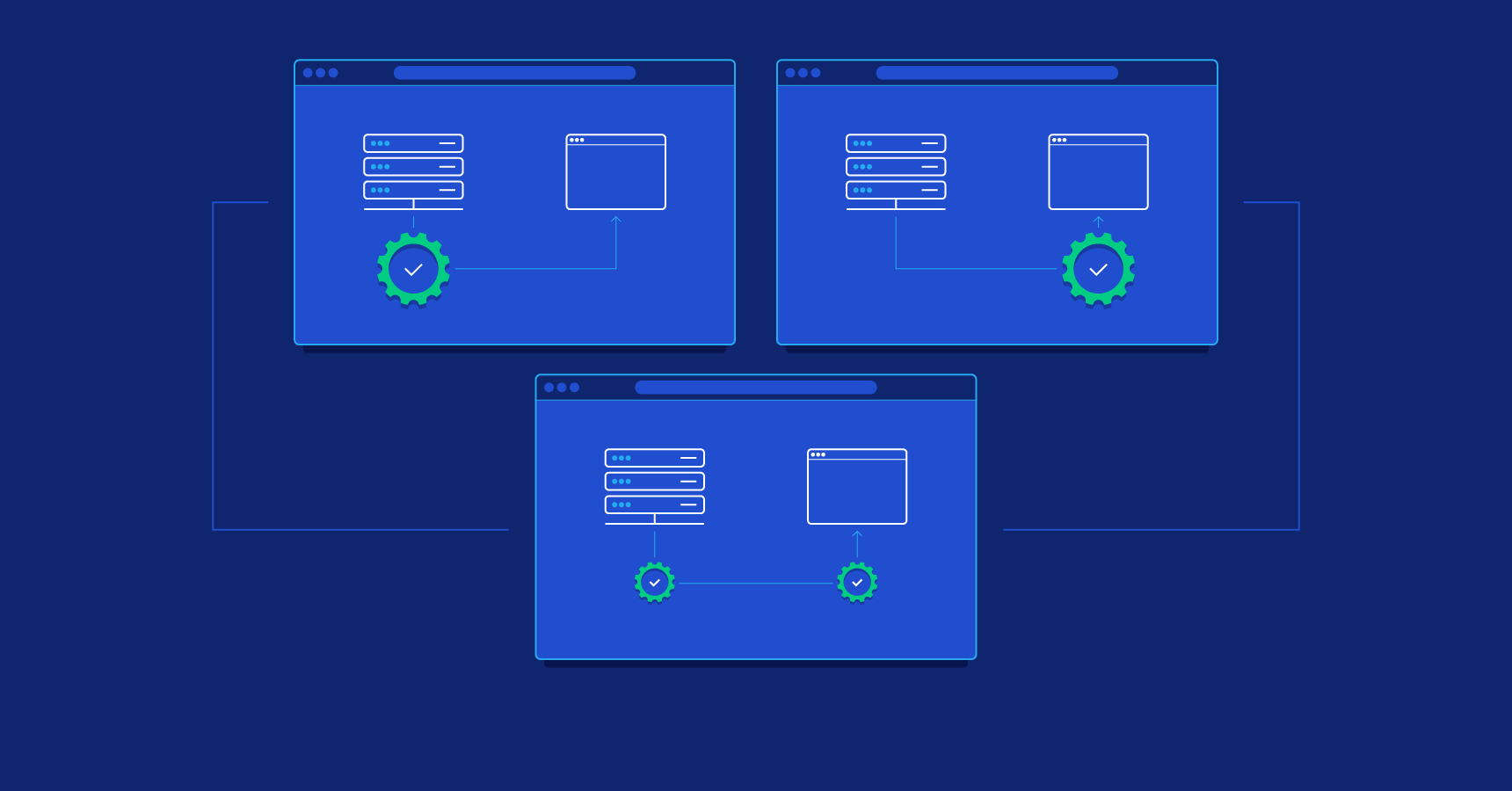
Applications built on a client-server model run across two distinct environments:
- The client is the user’s browser or app. It requests data or content from the server, receives a response, displays it to the user, and enables interaction with the application.
- The server is a remote computer that stores data and runs the core logic of an application.
Although the client-server model is conceptually simple, understanding these environments, and, specifically, how they divide responsibility for logic, performance, and data, is central to modern web development. Knowing the difference between client-side and server-side development, and how they work together, can help you improve performance, security, user experience, and scalability. This topic is especially important today, as most applications use a mix of both approaches.
Understanding Client-side and Server-side Development
In my 15 years as a developer, I’ve learned that if you don’t clearly understand where code runs, who owns which responsibilities, and how client and server interact, architectural decisions quickly unravel. Performance suffers, security gaps emerge, and scaling becomes more difficult than it needs to be. Before diving into advanced techniques, it’s critical to ground yourself in how these environments work and how they divide logic, data, and control.
Defining Client Side
The client side refers to everything executed in the user’s browser. It controls what users see and interact with after loading a page. In other words, if you are an end user, it is the only part of the application that you will effectively deal with.
The client side is responsible for rendering the UI, handling user interactions, and managing local logic. It usually fetches data from server APIs.
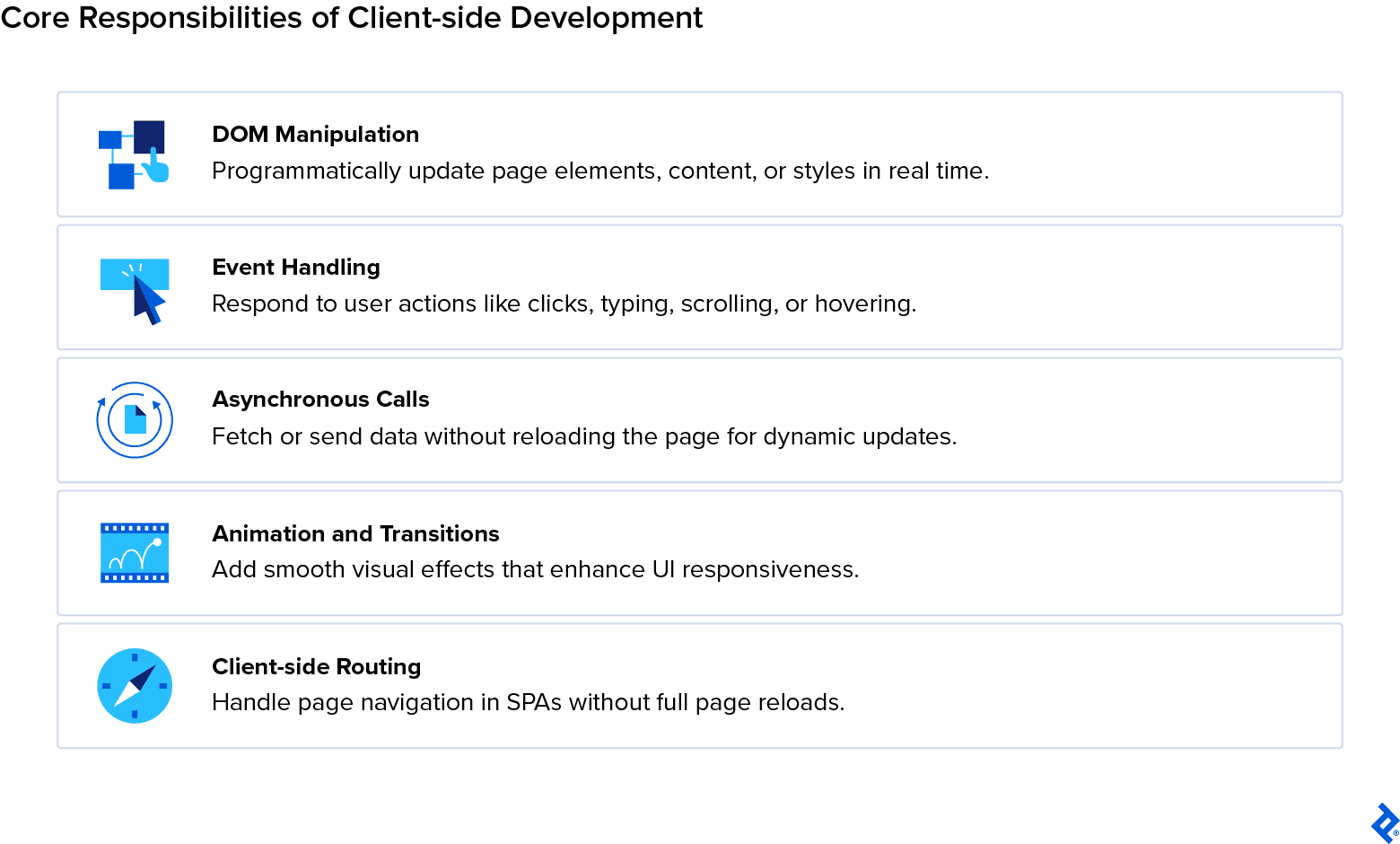
The main responsibilities of client-side development include:
- DOM manipulation: Modifying the Document Object Model (DOM), the structured representation of a web page, by programmatically changing HTML elements, attributes, or content, such as adding or removing elements and updating text or styles.
- Event handling: Listening for and responding to user actions such as clicks, typing, scrolling, hovering, live-search filtering, or highlighting interface elements on scroll.
- Asynchronous calls: Fetching data from servers without reloading the page to improve performance and enable dynamic, real-time content updates using technologies such as AJAX, the Fetch API, and GraphQL.
-
State management: Managing application data on the client, including:
- Server state: Caching, revalidating, and deduplicating REST or GraphQL requests using tools such as React Query, SWR, or Apollo.
- Local/UI state: Maintaining client-only state such as themes, form drafts, and UI state, sometimes persisted using localStorage or IndexedDB.
- Offline/local-first (when applicable): Persisting data locally (for example, in IndexedDB) and synchronizing or merging changes in the background.
- Animation and transitions: Creating visual effects such as smooth menu dropdowns, hover effects, and animated carousel sliders to enhance responsiveness and overall user experience.
- Client-side routing: Managing navigation within a single page application (SPA) by updating the URL and browser history without triggering a full page reload.
The core client-side development languages are HTML, CSS, and JavaScript, and the most popular frameworks include React, Vue.js, Angular, and Svelte. But developers also use several other tools: Redux or MobX for state management, webpack and Parcel for compilation, and various UI libraries.
Defining Server Side
The server side (or back end) encompasses operations handled on a machine before a response is sent to the client. It runs in the server environment and handles data-intensive operations: core or business logic, information processing, authentication, database access, etc.
When a user or application interacts with the client, it sends a request to the server, which then responds with data or prerendered HTML.
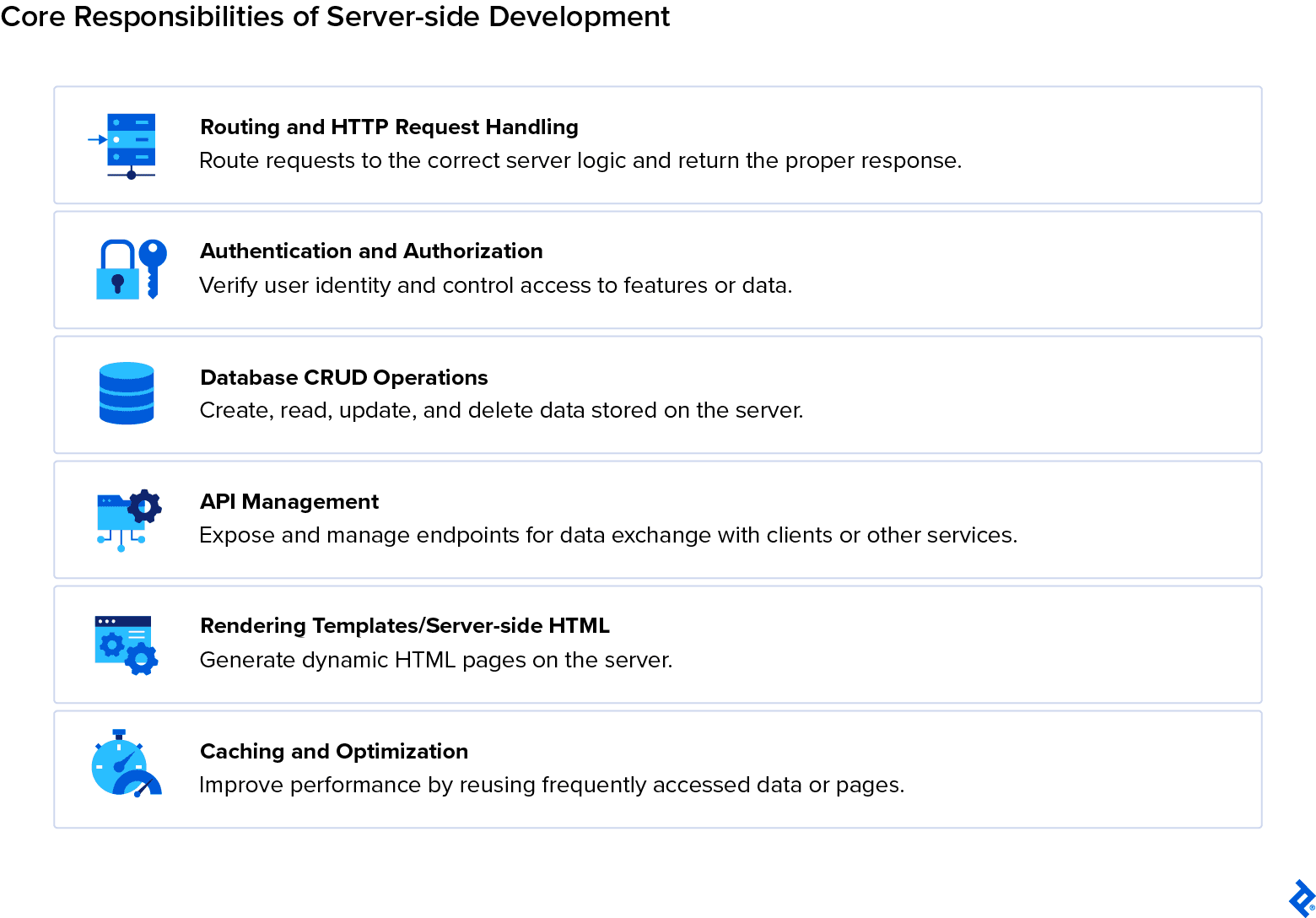
The key responsibilities of server-side development are:
- Routing and HTTP request handling: Directs incoming web requests to the correct server functions or pages and manages responses. This includes handling URLs, query parameters, and form submissions to ensure users get the right content or data.
- Authentication and authorization: Ensures users are who they say they are (authentication) and controls what they can access (authorization), such as login systems, role-based permissions, and resource access.
- Input validation and secure request handling: Validates incoming data and encodes outgoing output to prevent vulnerabilities (such as injection or cross-site scripting). This also includes rate limiting, abuse protection, and web application firewall (WAF) protections for secure-by-default request handling.
- Session and secrets management: Manages user sessions and server-side state, including cookie-based authentication, cross-site request forgery (CSRF) protection, and secure handling of secrets (e.g., API keys and database credentials).
- Database CRUD operations: Handles creating, reading, updating, and deleting data in a database, so that the server can store and manage information like user profiles, posts, or product details.
- API management: Designs and maintains application programming interfaces (APIs) so other apps or client-side code can request or send data.
- Rendering templates/server-side HTML (when using server-side rendering): Generates HTML on the server before sending it to the client, often using template engines so that pages can display dynamic content like user-specific dashboards or product listings.
- Caching and optimization: Enhances performance by temporarily storing frequently used data or pages to optimize server responses. This spans several layers, including application-level caching, reverse proxies, and content delivery network (CDN) or edge caching.
- Background processing and scheduled tasks: Handles job queues and workers, scheduled tasks (cron jobs), email processing, webhooks, and other nonrequest/response work.
Server-side code is typically written in languages such as JavaScript, Python, Ruby, PHP, or Java and executed on infrastructure optimized for stability, such as web servers (Apache, NGINX), application servers (Tomcat, Gunicorn), or cloud platforms (AWS, Azure, Google Cloud).
Databases (think PostgreSQL, MySQL, and MongoDB) are typically central to back-end development, as they serve as data storage and management. Other programs that are important to server-side development include API testing tools like Postman, deployment aids like Docker and Heroku, and CI/CD pipeline handlers like CircleCI.
Execution Environments
When we talk about an execution environment in the context of server side versus client side, we mean the environment where scripts run.
Client-side scripts run within each user’s browser, using local CPU and memory resources. This decentralization reduces the load on the server; however, performance depends on the device’s capabilities and network conditions. A sophisticated JavaScript operation or intricate animation, for instance, might work flawlessly on a high-end desktop but become noticeably sluggish or unresponsive on a lower-end smartphone.
However, the client is primarily dependent on the server to function correctly. Server-side scripts execute centrally in the remote server where they reside. There, resources can be cached, provisioned, and secured. When a web application grows, the burden of scaling infrastructure falls on the server. At the same time, when something breaks, for example, in the database, the client will see consequences such as broken pages and unavailable data.
This is why a good application needs both sides in continuous balance and communication.
Architectural Trade-offs: Performance, Security, and UX
Knowing where code runs directly influences architectural decisions and user outcomes. Understanding how client-side and server-side development address performance, security, and user experience differently is essential to making sound architectural decisions.
Here are some main concerns of application and/or site development, and how each side tackles them:
- Performance: Client-side rendering provides rich interactivity once loaded, but an existing downside is that it can delay initial render, the moment when the browser first renders any visible content on the screen. Server-side rendering delivers content to the browser faster, thereby improving time to first paint and, consequently, indexing if SEO is on your mind.
- Security: Client-side code that is visible to the user is also vulnerable to tampering, and inputs from the client cannot be fully trusted. Keeping code on the server side is safe and protects sensitive operations such as payments, authentication, and API keys.
- User experience (UX): Both the client side and the server side are central to good UX. Good responsiveness, looks, and usability are essential for a positive experience on the platform. While most data traditionally comes from the server, modern local-first architectures (using CRDTs, PWA, IndexedDB) allow it to originate and persist on the client before syncing.
Modern frameworks like Next.js and Remix exist precisely to unify these environments: executing code where it’s most efficient, then handing control back to the browser.
How Client-side Rendering and Interaction Work
Once the browser receives a page from the server, the client-side environment takes over. Here, the browser interprets code, builds the interface, and manages everything the user can see, click, or type.
Client-side Processes
Once the client receives its page, it performs several steps.
The browser parses HTML to build the DOM, applies CSS for visual styling of the application, and executes JavaScript for behavior (such as responsive windows or actions happening on scroll).
Layout adjustments, animations, and form validation are handled by specific scripts where necessary. When dynamic updates are needed, these are also handled here.
Any data is fetched asynchronously, which means that information from the server is pulled without having to halt the rest of the application. The data loads in the background while the UI remains interactive.
Client Side: Execution Environment
As briefly illustrated earlier, all this work occurs locally in the browser’s sandboxed runtime, isolated from the user’s file system and operating system.
Performance is chiefly determined by the user’s device specifications and network: Strong machines will render the application faster, while weaker ones will be slower on the uptake.
However, developers working on the client side can optimize application speed in a number of ways, such as:
- Minimizing JavaScript bundles by combining and compressing files.
- Caching static assets by storing images, CSS, and JS in the browser so repeat visitors don’t redownload them.
- Deferring less crucial scripts, such as analytics or chat widgets, so they don’t block the page from rendering.
Beyond these basics, there are several modern techniques to further improve performance. For instance, virtualization ensures long lists don’t weigh down the DOM by rendering only what’s visible. At the same time, Intersection Observer supports lazy loading (components and images loading just as they enter the viewport). Interfaces can be made to feel instantaneous through optimistic UI updates, where the interface responds immediately before the server confirms a change, or through skeleton screens that hint at content while it loads. Scrolling and interaction can be kept fluid by offloading heavy computations to Web Workers.
Additionally, high-frequency events, such as input or scrolls, can be throttled or debounced to avoid unnecessary recalculations.
Rendering and Interactivity
The primary function of the client is to allow the user to interact with your application. Therefore, rendering and interactivity are the main concerns of client-side developers.
Rendering depends on how your application is structured: In server-side rendered (SSR) or hybrid apps, the browser starts with static HTML sent by the server. JavaScript then attaches event listeners and transitions to dynamic updates, such as those that update content dynamically, respond to clicks, or show live data. This process is known as hydration. In a typical client-side rendering (CSR) setup, the initial markup is minimal, and the browser builds the DOM from scratch before interactivity is added.
The browser continually repaints (or loads) portions of the screen a user sees as JavaScript modifies the DOM in response to user actions. For example, if a user is loading an application and clicks a button to show a hidden menu, the page updates without a full reload.
Event listeners connect user inputs or actions to logic: Clicks and scrolls are turned into state changes that immediately alter what the user sees. For instance, if a user clicks on a form, they might be redirected to a form page, or the form might appear as a drop-down right there on the page without redirection.
Frameworks and Tools
Client-side developers have a rich array of tools to choose from, but the most popular frameworks are React, Vue, and Svelte. These automate DOM updates (like rerendering a component when its data changes) and manage components such as buttons, modals, and forms.
Developers also make use of meta-frameworks, which are frameworks built on top of standard ones to provide extra capabilities. These extend regular framework capabilities with hybrid rendering, which means they prerender parts of the page on the server side, then hydrate the rest on the client side for speed. This practice also supports SEO, as faster pages are more quickly indexed. Examples of meta-frameworks are Next.js and Remix.
Toolchains such as Vite, webpack, and Babel handle bundling, code splitting, and transpilation: In practice, they take your source code, optimize it, and produce files that are browser-ready and therefore load faster. They also support modern JavaScript features even on older browsers.
Client-side Advantages and Limitations
Relying on the client side can be very advantageous thanks to:
- High interactivity: Client-side work is UX-first. Interactivity and rendering are the main concerns, and they are the first and most evident connection with the user.
- Fast updates post-load: Changes to the page happen instantly in the browser without waiting for the server.
- Less server reliance: No matter where your server is, the client is able to handle a lot of work by itself and be independent.
However, relying too much on the client also presents limitations:
- Large initial load times: Rendering heavily relies on JavaScript, which can delay the page from becoming interactive.
- Device-dependent performance: Pages may run slower on older or lower-powered devices because the browser is doing most of the work.
- Weaker SEO: Content rendered only on the client may not be fully visible to search engine crawlers.
In my experience, a common performance issue arises when too much data transformation is done on the client side. Often, the server should prepare the data in the correct format before sending it to the browser, reducing client-side computation and improving the application’s overall responsiveness.
Inside the Server: How Back-end Logic Powers the Web
Server-side development runs the logic that supports every modern web experience. Also known as the back end, it works as the backbone of any application. It processes requests, authenticates users, connects to databases, and assembles the data that browsers ultimately display.
Server-side Processes
The server’s main task is to process client requests via a back-end endpoint. Routing logic determines where the requests go. For example, if the request comes to a ‘/form’ endpoint, the back end will be working on anything on that endpoint, namely, the contents of a form.
The server executes application code and queries the database as needed, based on both routing and application logic. Taking the form as an example once more, imagine a scenario where a user is clicking “save” on a form they have just filled out. The client sends this information to the back end via the ‘/form’ endpoint. Before the server executes the main application logic, the request typically passes through one or more middleware layers. Middleware can perform tasks such as authentication (verifying the user’s identity), input validation (ensuring data is correct and safe), rate limiting (preventing abuse), and other security or preprocessing steps. The server then takes the data from the user’s input, in this case, information within a form, and executes the code triggered by the process of saving. It saves the information in the database and assigns it to the user who triggered the request. Database interactions are called CRUD operations (Create, Read, Update, Delete).
It also constructs a response, typically a 200 OK status code or a JSON payload containing the updated resource, to confirm that the data has been saved successfully.
While these are the bare bones of the operations on the server side, there are several nuances in these processes. For instance, techniques like server-side rendering (SSR) generate fully-formed pages before they reach the browser, reducing initial render time and improving SEO in the process.
Server Side: Execution Environment
Back-end code runs on remote servers or cloud infrastructure (such as AWS, GCP, or Azure). This environment manages concurrency (handling multiple tasks or requests at the same time), memory allocation (how much RAM each process or operation uses), scaling, and uptime (the amount of time the server stays operational without interruption).
Running all these operations centrally helps the server manage resources and keep performance relatively consistent, but it’s not a guarantee. If the system hits high load or a bottleneck (like a database lock or a blocked Node.js event loop), it can affect all users simultaneously. Centralized server-side management creates more consistent performance across users, but it introduces shared failure points. Ultimately, it’s a trade-off between centralized control and the shared risk of failure.
Database Connectivity
Central to server-side development is the connection to data storage, specifically databases such as PostgreSQL, MySQL, or MongoDB. The back end communicates with data stores via queries or direct interactions to retrieve, insert, or modify data.
Interactions with the database are determined by direct or indirect user-triggered events. For example, it might retrieve data to display a user profile and insert or update data when the user posts a comment in the application. The way the back end communicates with the database is determined chiefly by the app’s logic.
To simplify back-end operations, several server-side frameworks offer object relational mappers (ORMs) as an extra layer between the back end and the database (standalone ORMs like Prisma or TypeORM) and framework-integrated solutions (Django ORM, for example). Additional caching layers provided by tools like Redis and memcached help minimize redundant calls, which makes responses faster and consequently improves application performance.
File Access and Authentication
Server code can handle operations such as file uploads, report generation, and serving media assets to clients. Rather than writing directly to a local disk, modern applications typically store files in object storage services such as AWS S3 or Google Cloud Storage, which are durable and scalable. The server ensures all file operations are done securely for each user via authentication and authorization.
While similar, authentication and authorization are two distinct processes. Authentication verifies user identity via session management (handling several requests and responses from a user) or dedicated tools and standards (OAuth, JWT tokens). On the other hand, authorization controls access based on user roles or permissions, effectively determining what a specific user can and cannot access.
These operations are hidden from the client, but they remain intuitive. When logging in, for instance, a user expects access only to their own profile and data.
Languages and Frameworks
JavaScript, Python, PHP, Ruby, and Java are classic server-side languages. But programming languages alone are not enough to sustain the back end of an application. Frameworks are commonly used to organize code and provide structure. Among the most popular are:
- Express.js for JavaScript
- Django and Flask for Python
- Laravel for PHP
- Rails for Ruby
- Spring for Java
Frameworks organize pure languages so that they can handle all main operations, such as routing requests (directing incoming requests to the correct functions), templating (generating dynamic content to send to the client), and middleware orchestration (additional functions between receiving a request and sending a response).
Many modern frameworks integrate APIs and SSR pipelines for hybrid client-server rendering.
Server-side Advantages and Limitations
There are several benefits to relying on the back end, including:
- Centralized data control: All data is managed and stored on the server, so that users and sessions remain consistent.
- Strong security: Sensitive operations like payments, authentication, and API keys are handled on the server and away from the client.
- Consistent SEO: Server-side rendering quickly delivers fully rendered pages to search engines, making indexing more reliable.
- Easier scaling: Servers can be scaled via cloud infrastructure or orchestration tools to handle growing traffic.
However, relying mainly on the server also presents challenges:
- Network latency: Each request must travel to the server, which may delay response times.
- Dependency on server availability: If the server goes down, users cannot access the application.
- Potential blockers under high traffic: A single server may struggle to handle many requests simultaneously. These issues are typically addressed through vertical scaling (adding CPU, RAM, or other resources to existing servers) or horizontal scaling (adding more servers to distribute the load).
The most efficient architectures distribute this load through the use of content delivery networks (CDNs), which deliver copies of static files like images, scripts, and stylesheets from servers closer to the user, lightening the main server’s load. They may also use microservices, breaking up a monolith back-end application into smaller services, and serverless execution, which runs specific tasks on demand in the cloud without requiring a dedicated server to always be running.
In practice, there’s a trade-off between client- and server-side computation. Moving more processing to the server reduces the size of client-side bundles, making pages load faster and exert less demand on the user’s device. However, it can also limit interactivity on the client. Modern hybrid approaches aim to incorporate the best of both worlds..
For example, server-side streaming with isomorphic rendering, or server components with streaming, lets the server process content and send it in chunks to the client. Some parts of the page can be mostly static, while others remain dynamic. This preserves client-side interactivity where it matters most.
Technical Differences Between Client-side and Server-side Development
Client-side and server-side code perform complementary but fundamentally different roles. Understanding their technical boundaries, such as where code runs, who controls resources, and how data moves, is essential for designing successful applications that are as performant as they are secure.
Execution Location and Responsibilities
The first point where client- and server-side operations differ is where they occur.
The client side executes directly in the user’s browser, using the device’s hardware to render and update the interface. The server side runs on a remote infrastructure (a machine or cloud) that handles architecture, prepares content, and handles data and logic before sending it to the browser.
In these two environments, responsibilities are clearly divided. While client-side processes handle presentation, interactivity, and user events, server-side logic manages data processing, business logic, and security actions such as authentication and authorization.
This clear-cut separation defines the ownership of computation for each side: The client is where responsiveness and interactivity are central, while the server mainly handles authority and data integrity.
Performance and Scalability
Rendering can happen both on the client and server sides.
- Client-side rendering offloads computation from the server to the user’s device, reducing back-end strain but making performance more dependent on the user’s hardware and network conditions.
- Server-side rendering offers more consistent performance across users because it occurs on a remote server; however, it may introduce latency with each round trip between the client and the server. This is called centralized processing.
At the end of the day, however, effective scaling depends on the balance between distributed rendering (client) and centralized processing (server). Hybrid or universal frameworks (such as Next.js, Nuxt, and Remix) are good choices for mitigating these trade-offs. They combine prerendered HTML with dynamic client updates, striking a balance to provide both speed and interactivity.
Frameworks like Next.js have blurred the line by improving developer experience (DX), allowing developers to write both client and server logic in a single project, even though the runtimes for client and server remain strictly separated by the network.
You can have server-side logic living right alongside your client code, which means you don’t always need separate API endpoints or a massive back end just to support a page.
Serverless functions take this even further: Front-end engineers can spin up back-end functionality on demand without managing servers, and in some projects, entire back ends run purely on these on-the-fly functions (though functions can experience cold starts, that is, slight latency when invoked after being idle). The result is a system that generally scales more gracefully and makes it easier to rethink who owns what in a project.
Security
The bulk of security is handled by the application’s back end. Client-side code is exposed and fully visible to the user, which means it is vulnerable to manipulation and tampering. Code injection, for instance, is a type of cyber attack that entails malicious code being inserted into an application by taking advantage of poorly constructed input validation.
Due to these risks, the server is a safer place for the main codebase. Server-side code remains hidden, protecting validation, authentication, authorization, and other sensitive operations.
Validating and sanitizing all data in the back end is therefore essential, even if said data has already passed client-side checks. Client-side validation improves user experience, but it should never be treated as a security measure.
File System and Data Access
A tight security system also protects a user’s file system. The client has only limited access to persistent data within the browser, mainly via localStorage, other browser storage APIs like IndexedDB, or cookies that store session information. Modern browsers (Chrome and Edge) also support the File System Access API, which allows sophisticated apps (like VS Code Web or Figma) to read and write actual files on the user’s device with permission.
On the other hand, server-side code can read, write, and manage files on the host system, handling file uploads, content generation, logging, and other tasks.
Still, with greater access comes higher responsibility: Misconfigured permissions or improper sanitization can lead to data leaks or unauthorized file exposure. This is why running timely audits of an application, especially on the server side, is a crucial practice.
Comparison Table: Client vs. Server
|
Feature or Aspect |
Client-side Development |
Server-side Development |
|
Execution Location |
Runs in the browser on the user’s device |
Runs on remote servers or cloud infrastructure |
|
Primary Responsibility |
Interface rendering, interactivity, local logic |
Business logic, authentication, data storage |
|
Performance Dependency |
Dependent on user device, browser, and network speed |
Dependent on server load, architecture, and scaling |
|
Security Exposure |
Code visible to user; vulnerable to tampering |
Logic hidden; strong access control and validation |
|
File System Access |
Limited (sandboxed browser APIs only) |
Full control over server resources/storage |
|
SEO and Initial Load |
Slower first render, delayed indexing and higher crawl budget cost |
Faster initial render, strong SEO compatibility |
|
Scalability |
Scales naturally with users’ devices |
Requires infrastructure scaling and load balancing |
|
Typical Technologies |
HTML, CSS, JavaScript, React, Vue |
Node.js, Python, PHP, Ruby, Java, SQL/NoSQL databases |
Real-world Implications for Developers
When it comes to deciding between client- and server-side rendering (the process of turning code/data into visible content on the screen), it’s good to consider all trade-offs.
Rendering can happen on the client, the server, or both, depending on the architecture.
In client-side rendering (CSR):
- The browser receives mostly JavaScript and minimal HTML.
- JavaScript runs in the browser and generates the HTML for the page.
Example: A React SPA where the page is blank until JavaScript executes, then the content appears.
In server-side rendering (SSR):
- The server generates fully-formed HTML before sending it to the browser.
- The browser can then immediately display content without waiting for JavaScript to generate it.
Example: A traditional multipage website or Next.js prerendered page.
On the other hand, in hybrid rendering:
- Some parts of the page are rendered on the server first. SSR guarantees fast initial render and SEO friendliness.
- Then the browser takes over to handle dynamic updates. CSR handles interactivity.
The best architectures combine both: offloading presentation to the browser while protecting data and computation within a secure back end.
How the Client-server Model Works
The client-server model is the structural foundation of the modern internet. Every interaction, from loading a webpage to submitting a form, follows this exchange: A client requests information, and a server processes that request before sending back a response. Understanding this flow clarifies how applications communicate and share data across distributed systems.
Client-server Architecture
The client-server model divides responsibility between two entities: the client, in the form of a browser, mobile application, or API consumer, and the server, in the shape of an application host or data provider.
The client initiates the communication by sending a request. These are HTTP or HTTPS requests: standardized messages that request specific resources or actions from the server. The server listens, interprets the request, executes the logic as planned, and returns a structured response (HTML, JSON, XML, or binary data). With modern protocols like HTTP/2 and HTTP/3, multiple requests and responses can share a single connection through multiplexing, reducing the overhead of this cycle.
Such a simple architecture is built to scale naturally due to stateless interactions: When the server does not hold client-specific state in memory (as in REST APIs using JWT), it’s easier to add more servers and handle growing traffic. Depending on the infrastructure, many clients can connect to one single server or to multiple, distributed servers. This specific model underpins nearly every web technology, from RESTful APIs to modern real-time protocols like WebSockets and GraphQL subscriptions.
Data Flow and Interaction
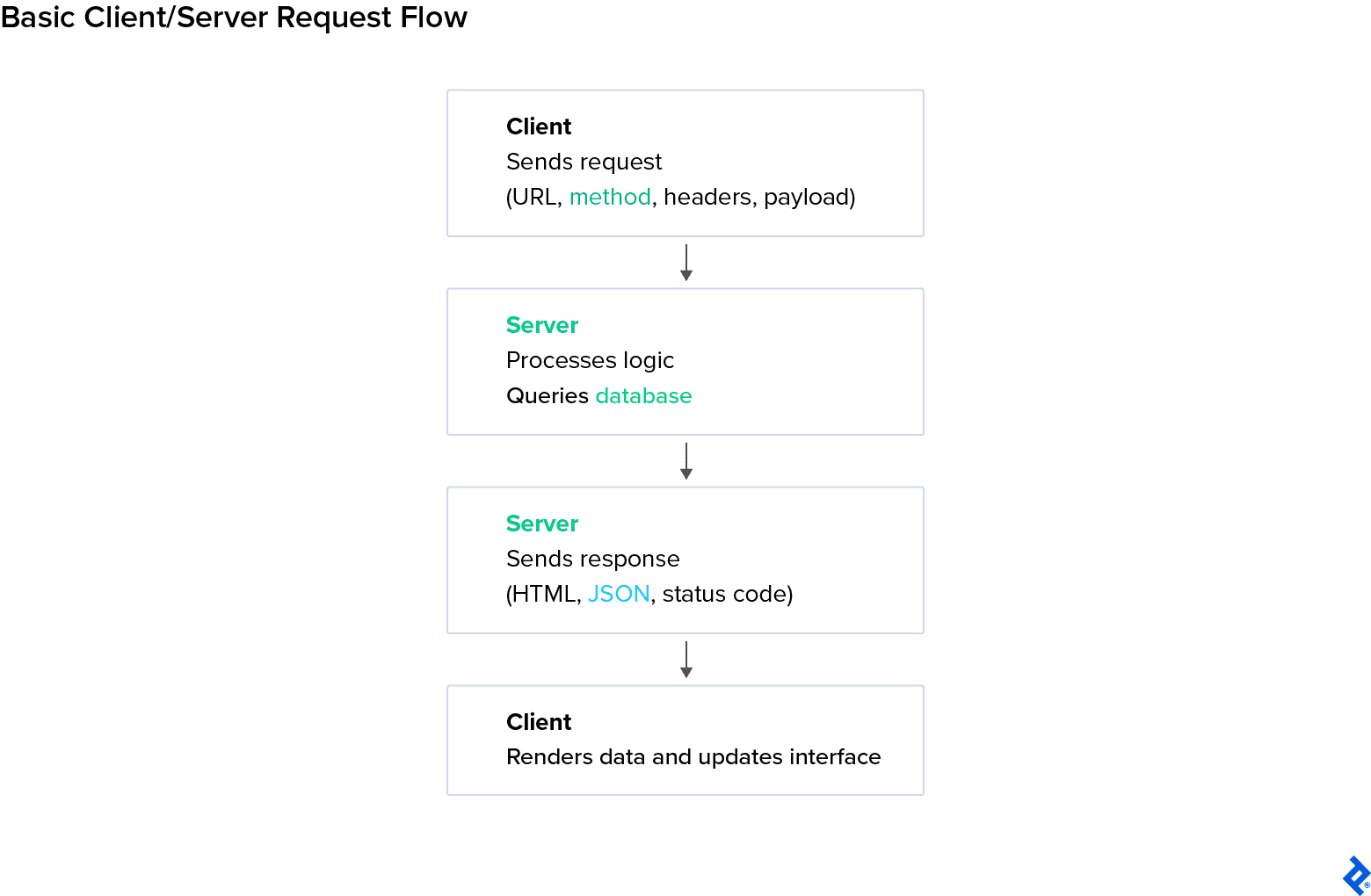
The interaction between the client side and the server side follows a predictable loop:
- The client constructs a request (URL, headers, body) and sends it over the network.
- The server receives the request and runs the necessary code (fetching data, validating input, executing business logic).
- The server returns a response, typically containing either rendered HTML or a JSON payload.
- The client processes the response: displaying a webpage, updating the UI, or triggering another request.
- This request-response cycle repeats continuously.
In advanced cases, servers use asynchronous or streaming techniques to push updates to clients without waiting for new requests (for instance, via server-sent events or WebSockets).
Authentication and Session Management
To maintain continuity across multiple requests, servers use sessions. These are temporary states that link multiple requests to a specific user identity. For example, when a user logs into an application and navigates through the available services and pages, a session keeps the system from “forgetting” the user’s identity every time they access a different part of the app.
Common approaches to session management include:
- Cookies: They store a session identifier, allowing the user to remain authenticated across multiple requests without logging in again.
- JWT tokens: Self-contained signed tokens that store authentication and authorization data and are sent with each request. The server can therefore verify the user without maintaining session state.
- OAuth: A standard that lets users authenticate through a trusted third-party service, granting access without exposing their credentials.
Regardless of the method, each request must carry enough information (be it a session ID, a token, etc.) for the server to verify the permissions before returning the necessary data for the user to proceed. An additional layer of security is added by HTTPS and HSTS encryption, which protect data in transit (during the request exchange).
Proper session handling prevents impersonation and data leakage.
Security in the Client-server Exchange
The rule of thumb is that clients are always considered untrusted sources. The client-server boundary, therefore, defines where trust begins and ends.
This boundary exists at the network interface between the client and the server, where controls like validation are applied. Validating input on the server side is essential to even the most basic application’s security protocol. When they receive data, servers enforce validation, sanitation, and rate limiting (the act of limiting the number of requests coming from the client at once) to prevent attacks like SQL injections (mitigated via parameterized queries) and cross-site scripting (XSS) (mitigated via context-aware output encoding, plus content security policy).
In practice, the server offers advantages for security because sensitive data and secrets are easier to keep hidden. However, developers often assume this automatically makes server code safe, which isn’t true. Both client and server code have their own vulnerabilities: Client-side code is exposed to XSS attacks or token misuse in local storage, while servers can be susceptible to SSRF attacks or DDoS if not properly protected. Hybrid approaches can help: keeping critical logic on the server while letting the client handle safe features.
Firewalls, API gateways (entry points that authenticate requests, enforce rate limits, and route traffic to back-end services), and proxies (intermediaries that forward requests between clients and servers) add another layer of protection.
Modern Approaches and Architectures
While explaining the differences and connection between the client side and the server side is paramount to understanding how this infrastructure works, web development has evolved beyond the strict divide between the two.
Modern architectures blur the boundaries, dynamically distributing logic, rendering, and data processing between both environments. This hybridization gives developers access to the best of both worlds, improving the application’s overall performance while simplifying deployment.
Universal and Hybrid Applications
Two examples of this evolution are universal applications and hybrid applications. While often used interchangeably, these two concepts differ at their core.
A universal (or isomorphic) application runs the same codebase on both the client and the server. The server initially renders the page, delivering fully formed HTML. Then, the same codebase is run (or “rehydrated”) in the browser by the client to handle subsequent interactions. In other words, universal applications run the same application code on both client and server.
A hybrid application combines multiple rendering strategies per route or feature (such as SSR, CSR, and others like API-driven interactions) so that different parts of the app are rendered in different ways, depending on architectural decisions. For example, a hybrid e-commerce application may utilize a client-rendered dashboard and a server-rendered checkout for security reasons. This is the modern standard.
Fundamentally, a universal app focuses on where the same code runs; a hybrid app focuses on how different parts are rendered.
Prerendering and Rehydration
Universal and hybrid applications may utilize prerendering server side. Prerendering generates static HTML during build time or on the first request, which reduces the amount of computation needed on page load.
Once a prerendered page is delivered to the browser, the page is then rehydrated as previously seen.
Tools like Next.js, Gatsby, and Astro smooth this process further by blending static generation with dynamic hydration.
Serverless Architecture and Edge Computing
Efficient architectures often leverage serverless and edge computing.
Serverless architecture entails short-lived functions that run on demand in the back end. While developers don’t manage a persistent server, these functions still execute on servers managed by a cloud provider. This is helpful for apps that need to handle unpredictable traffic or infrequent tasks, like image processing or API endpoints.
The need for a cloud environment is primarily about cost and convenience, since running a machine indefinitely is expensive and inefficient. When going serverless, developers focus on logic while the provider handles scaling, uptime, and capacity management.
Edge computing pushes this execution even closer to the user: The code runs on geographically distributed nodes to reduce latency and serve content faster. While still using the server, their distribution makes for a faster user experience.
Both models support today’s need for global reach and flexibility.
Client-side vs. Server-side SDKs
Software development kits (SDKs) are packages that help developers build full-fledged, multifaceted applications. They offer tools for analytics, monitoring, and data collection, among other functions, making them an excellent option for enterprise apps.
The internet offers a vast array of SDKs, both for client- and server-side implementations. Typically,
- Client-side SDKs track user behavior directly in the browser, making them ideal for insights and UI interaction data. At the same time, they can be affected by ad blockers, network interruptions, or client tampering, so raw data may not always be fully reliable. Modern privacy protections (such as Safari’s ITP and Firefox’s ETP), along with ad blockers, can block a significant share of client-side events (sometimes 30% to 40%), which is a key reason many platforms now support server-side tracking through APIs such as the Conversions API (CAPI). Examples include Amplitude, Google Analytics, and Mixpanel. These tend to be client-side-oriented, though they often also provide server-side endpoints.
- Server-side SDKs capture verified, back-end-originating actions, so they are better suited for system metrics, authenticated actions, and data integrity. These SDKs typically require more setup and sometimes API integration, but the data is more reliable and secure. Examples include Segment, Firebase Admin SDK, and server-side endpoints of Amplitude or Mixpanel.
Many platforms recommend using both client-side and server-side SDKs: While the client captures user engagement, the server confirms event accuracy and links it, and makes user profiles secure.
Choosing Between Client-side and Server-side Rendering
Deciding where rendering and logic should occur (i.e., on the client, the server, or both) is a strategic architectural choice. The decision depends on infrastructure details such as application complexity, user expectations, data sensitivity, and deployment constraints.
Decision-making Criteria
When choosing between client-side and server-side rendering, there are a few things to keep in mind. Make sure to:
- Evaluate performance priorities: Does the app need instant interactivity after load, or a rapid render time for SEO and accessibility? The former is more easily achieved with client-side rendering, while the latter is through server-side rendering.
- Consider user experience goals: Apps requiring frequent updates and smooth transitions favor client-side logic; content-driven sites benefit from prerendered HTML on the server.
- Factor in scalability and infrastructure: Server-side rendering centralizes load, while client-side rendering distributes it across user devices.
- Assess security requirements: Whatever your choice concerning rendering, remember that data and business logic always belong on the server, rather than exposed in the browser.
In general, hybrid and universal frameworks allow mixing CSR and SSR for balancing these priorities. That flexibility, however, comes with added operational complexity: Running a server for SSR or hybrid rendering is typically more expensive and harder to host, scale, and debug than deploying a static SPA to a CDN.
Lastly, when making architectural decisions, it’s important to balance developer workflow and tooling preferences: Framework ecosystems, hosting environments, and team familiarity often guide the final infrastructure decisions.
When to Favor Client-side Rendering (CSR)
Client-side rendering (CSR) has numerous advantages:
- It’s ideal for single-page applications (SPAs), dashboards, editors, and tools that rely on heavy user interaction.
- It supports smooth transitions and dynamic updates without page reloads, improving engagement and perceived speed.
- It reduces the load on the server by shifting rendering tasks to the user’s device.
- It works best when SEO isn’t the top priority, such as in the case of authenticated platforms or internal web tools.
An example of an application that would benefit from client-side rendering would be a productivity dashboard or collaborative document editor built with React or Vue.
When to Favor Server-side Rendering (SSR)
Server-side rendering (SSR) has just as many benefits:
- It’s best suited for content-focused websites, e-commerce, blogs, and landing pages that depend on SEO and fast initial load times.
- It provides crawlable HTML to search engines and guarantees faster first render for users with slow connections or weaker devices.
- It centralizes computation, which enhances control over performance and data validation.
- It supports stronger security by keeping logic, tokens, and sensitive operations off the client.
An example of an application that would benefit from server-side rendering is a marketing website or storefront built with Next.js or Laravel Blade templates.
Hybrid and Universal Approaches
Often, the best choice is a consolidated approach. Many modern frameworks combine CSR and SSR through universal rendering (initializing on the server, then hydrating in the browser) or hybrid rendering, which combines multiple rendering modes.
- Universal systems offer a shared execution environment across server and client, which improves reliability and balances the load between the two.
- Hybrid systems deliver SEO and speed benefits of SSR while maintaining client-side reactivity after the initial load.
SDK integrations typically follow this same mixed model: lightweight event tracking on the client, secure data validation and storage on the server. With this balance, the server delivers ready-to-view pages, and the client takes over once interactivity begins.
Hybrid models are everywhere these days. Take real-time apps like Figma or Google Docs: You need that instant client-side interactivity, but you can also stream certain parts as prerendered bundles so the page loads faster.
E-commerce is similar: Product pages are often server-rendered for SEO, while other sections use incremental static regeneration, static content that updates only when needed. Even mostly static pages, like blogs, can include a few interactive widgets alongside prerendered content.
The hybrid approach basically lets you mix and match: Keep some parts fast and static, while allowing others to stay dynamic and interactive, depending on what each part of your app needs.
Pros and Cons Summary
|
Approach |
Advantages |
Limitations |
Best For |
|
Client-side Rendering |
Rich interactivity, minimal server load, app-like responsiveness |
Slower first render, exposed logic, delayed indexing, and higher crawl cost |
SPAs, dashboards, tools |
|
Server-side Rendering |
Fast initial load, strong SEO, secure data handling |
Higher server costs, limited interactivity or requires full page reloads |
Content-heavy or public websites |
|
Hybrid/Universal |
Combines both advantages; scalable, flexible, SEO-safe |
More complex setup, requires careful state management |
Complex apps needing balance between performance and UX |
Aligning Architecture With Purpose
The distinction between client-side and server-side development extends far beyond where code executes. It defines how an application performs, how it scales as it grows, and how it secures data.
Summary of Key Differences
- Execution: Client-side code runs in the browser, rendering and updating the interface; server-side code runs on remote infrastructure, preparing and delivering data.
- Performance: Client-side rendering supports fluid user experiences postload, while server-side rendering guarantees faster initial loading and better SEO.
- Security: Sensitive logic, credentials, and data operations belong on the server; client code should handle only presentation and input.
- Scalability: Client-side rendering distributes computation across users; server-side rendering centralizes it, offering consistency and control.
- Integration: Modern frameworks increasingly combine both, as hybrid rendering balances responsiveness, discoverability, and maintainability.
The main difference between client-side and server-side rendering is where the work happens: the browser or the server, and consequently, what each environment can safely and efficiently do. Each has pros and cons in speed and control.
The most functional architecture aligns these technical choices with the project’s specific purpose. Developers who know their way around client- and server-side code choose server-side rendering for reliability and SEO, client-side rendering for interactivity and flexibility, and hybrid models when both are beneficial.
In practice, every high-performing web application is a negotiation between these forces. The decision isn’t about ideology as much as it is about intent: how you want users to experience your product and how successfully your system can deliver that experience with the tools at its disposal.