
Close Menu
geekfence.comgeekfence.com
    What's Hot

    HCLTech acquires HPE telco unit

    December 29, 2025

    This tiny chip could change the future of quantum computing

    December 29, 2025

    What’s In a Name? Mainframe GDGs Get the Job Done

    December 29, 2025
    Facebook X (Twitter) Instagram
    • About Us
    • Contact Us
    Facebook Instagram
    geekfence.comgeekfence.com
    • Home
    • UK Tech News
    • AI
    • Big Data
    • Cyber Security
      • Cloud Computing
      • iOS Development
    • IoT
    • Mobile
    • Software
      • Software Development
      • Software Engineering
    • Technology
      • Green Technology
      • Nanotechnology
    • Telecom
    geekfence.comgeekfence.com
    Home»iOS Development»clipped() doesn’t affect hit testing – Ole Begemann
    iOS Development

    clipped() doesn’t affect hit testing – Ole Begemann

    AdminBy AdminDecember 11, 2025No Comments3 Mins Read1 Views
    Facebook Twitter Pinterest LinkedIn Telegram Tumblr Email
    clipped() doesn’t affect hit testing – Ole Begemann
    Share
    Facebook Twitter LinkedIn Pinterest Email


    The clipped() modifier in SwiftUI clips a view to its bounds, hiding any out-of-bounds content. But note that clipping doesn’t affect hit testing; the clipped view can still receive taps/clicks outside the visible area.

    I tested this on iOS 16.1 and macOS 13.0.

    Example

    Here’s a 300×300 square, which we then constrain to a 100×100 frame. I also added a border around the outer frame to visualize the views:

    Rectangle()
      .fill(.orange.gradient)
      .frame(width: 300, height: 300)
      // Set view to 100×100 → renders out of bounds
      .frame(width: 100, height: 100)
      .border(.blue)
    

    SwiftUI views don’t clip their content by default, hence the full 300×300 square remains visible. Notice the blue border that indicates the 100×100 outer frame:
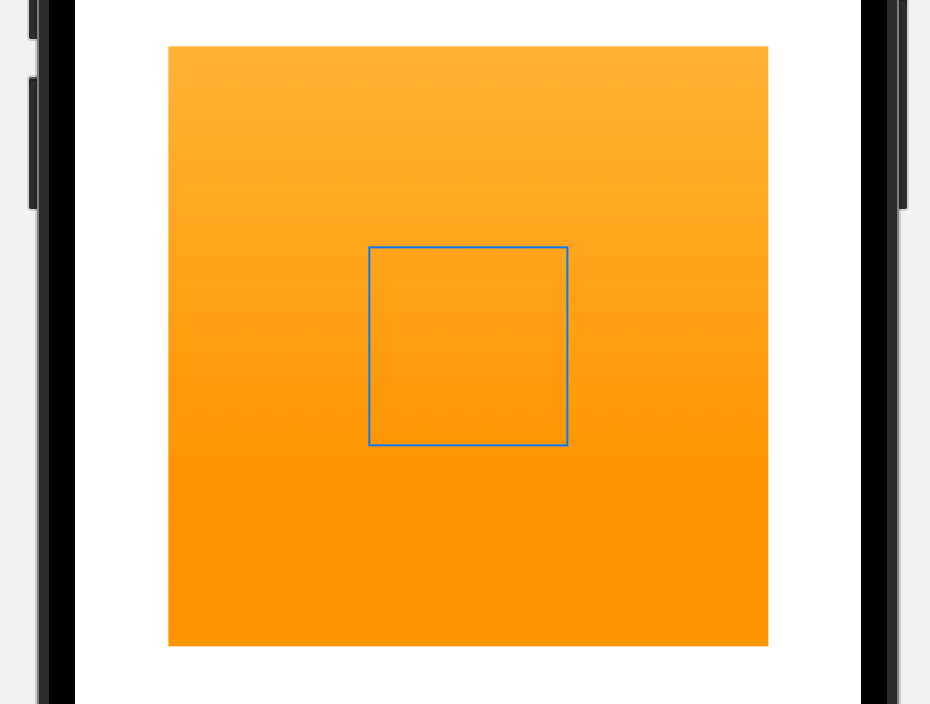
    clipped() doesn’t affect hit testing – Ole Begemann

    Now let’s add .clipped() to clip the large square to the 100×100 frame. I also made the square tappable and added a button:

    VStack {
      Button("You can't tap me!") {
        buttonTapCount += 1
      }
      .buttonStyle(.borderedProminent)
    
      Rectangle()
        .fill(.orange.gradient)
        .frame(width: 300, height: 300)
        .frame(width: 100, height: 100)
        .clipped()
        .onTapGesture {
          rectTapCount += 1
        }
    }
    

    When you run this code, you’ll discover that the button isn’t tappable at all. This is because the (unclipped) square, despite not being fully visible, obscures the button and “steals” all taps.
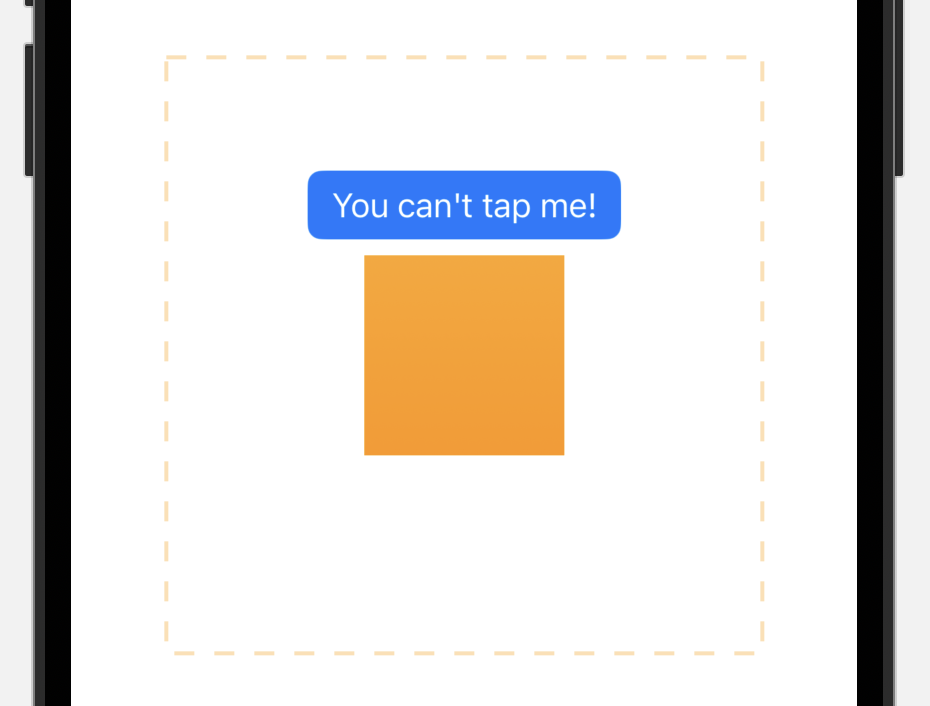
    Xcode preview displaying a blue button and a small orange square. A larger dashed orange outline covers both the smaller square and the button.

    The dashed outline indicates the hit area of the orange square. The button isn’t tappable because it’s covered by the clipped view with respect to hit testing.

    The fix: .contentShape()

    The contentShape(_:) modifier defines the hit testing area for a view. By adding .contentShape(Rectangle()) to the 100×100 frame, we limit hit testing to that area, making the button tappable again:

      Rectangle()
        .fill(.orange.gradient)
        .frame(width: 300, height: 300)
        .frame(width: 100, height: 100)
        .contentShape(Rectangle())
        .clipped()
    

    Note that the order of .contentShape(Rectangle()) and .clipped() could be swapped. The important thing is that contentShape is an (indirect) parent of the 100×100 frame modifier that defines the size of the hit testing area.

    Video demo

    I made a short video that demonstrates the effect:

    • Initially, taps on the button, or even on the surrounding whitespace, register as taps on the square.
    • The top switch toggles display of the square before clipping. This illustrates its hit testing area.
    • The second switch adds .contentShape(Rectangle()) to limit hit testing to the visible area. Now tapping the button increments the button’s tap count.

    The full code for this demo is available on GitHub.

    Summary

    The clipped() modifier doesn’t affect the clipped view’s hit testing region. The same is true for clipShape(_:). It’s often a good idea to combine these modifiers with .contentShape(Rectangle()) to bring the hit testing logic in sync with the UI.


    Source link

    Share. Facebook Twitter Pinterest LinkedIn Tumblr Email

    Related Posts

    Designing custom UI with Liquid Glass on iOS 26 – Donny Wals

    December 29, 2025

    SwiftText | Cocoanetics

    December 28, 2025

    Uniquely identifying views – The.Swift.Dev.

    December 27, 2025

    Unable to upload my app with Transporter. Some kind of version mismatch? [duplicate]

    December 26, 2025

    Experimenting with Live Activities – Ole Begemann

    December 25, 2025

    Announcing Mastering SwiftUI for iOS 18 and Xcode 16

    December 24, 2025
    Top Posts

    Understanding U-Net Architecture in Deep Learning

    November 25, 20258 Views

    Microsoft 365 Copilot now enables you to build apps and workflows

    October 29, 20258 Views

    Here’s the latest company planning for gene-edited babies

    November 2, 20257 Views
    Don't Miss

    HCLTech acquires HPE telco unit

    December 29, 2025

    HCLTech moves toward a future of AI-driven growth In sum – what we know: The…

    This tiny chip could change the future of quantum computing

    December 29, 2025

    What’s In a Name? Mainframe GDGs Get the Job Done

    December 29, 2025

    Microsoft named a Leader in Gartner® Magic Quadrant™ for AI Application Development Platforms

    December 29, 2025
    Stay In Touch
    • Facebook
    • Instagram
    About Us

    At GeekFence, we are a team of tech-enthusiasts, industry watchers and content creators who believe that technology isn’t just about gadgets—it’s about how innovation transforms our lives, work and society. We’ve come together to build a place where readers, thinkers and industry insiders can converge to explore what’s next in tech.

    Our Picks

    HCLTech acquires HPE telco unit

    December 29, 2025

    This tiny chip could change the future of quantum computing

    December 29, 2025

    Subscribe to Updates

    Please enable JavaScript in your browser to complete this form.
    Loading
    • About Us
    • Contact Us
    • Disclaimer
    • Privacy Policy
    • Terms and Conditions
    © 2025 Geekfence.All Rigt Reserved.

    Type above and press Enter to search. Press Esc to cancel.