


Experimentation and validation of LLM performance is critical when building LLM-driven systems that must reliably deliver a service, from customer service chat bots to intelligence analysis tools. To help teams meet the need for rigorous evaluation methods, researchers in SEI’s AI Division developed the Expanding Large Language Model Metrics (ELM) library built on best practices for LLM evaluation and benchmarking.
In this blog post, we provide a tutorial for using the ELM library, a set of extensible, customizable tools designed to make LLM evaluations repeatable, explainable, and consistent. The ELM library enables the following:
- full customization: write your own prompts and assessments and plug in any metrics or models.
- inference-independent evaluation: works on a JSON of inference results so you can generate results in one environment and score them in another.
- auditable and reproducible testing: every run stores the config, seed, model version, and metric code.
- zero-cost, open-source capability: free of hidden fees or vendor lock-in.
Below, we dive into the inference and evaluation engines that power ELM, showing you how to set up a reliable, end‑to‑end evaluation workflow.
Tutorial: Using the ELM Evaluation Engine
The ELM library includes both an inference engine and an evaluation engine. The inference engine enables batch inference using local or API-based models, with built-in logging, hardware monitoring, and validation. The evaluation engine provides a customizable framework for evaluating LLM performance against existing or bespoke benchmarks and metrics. The Python code, available on Github, is designed for lightweight, adaptable experimentation with local or API-based models. The library uses a configuration-driven approach to defining inference and evaluation jobs, ensuring experiments are repeatable.
For local models, users can override hyperparameters to support experimentation and benchmarking. Inference and evaluation results are saved to JSON files alongside input parameters and metadata, providing consistent, queryable experimental outputs.
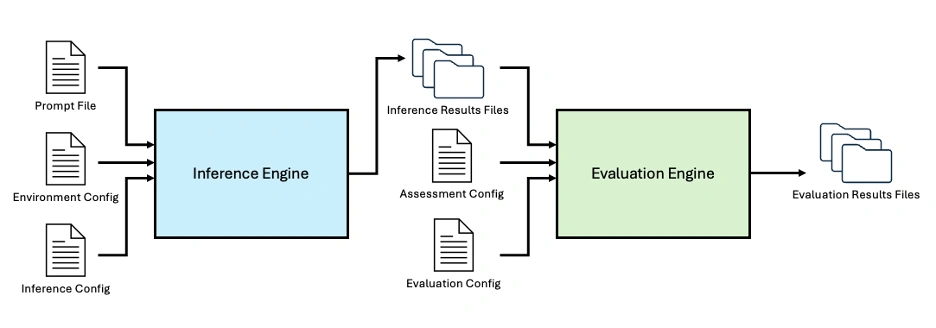
Figure 1: The ELM Library includes an Inference Engine and Evaluation Engine to enable end-to-end LLM evaluation, customizable using a suite of configuration files.
At a high level, users can customize both the model configuration file and the prompt configuration file. These files define a set of reproducible, traceable inferences that are automatically executed by the inference engine. The resulting outputs are then fed into the evaluation engine together with a customizable assessment configuration file and an evaluation configuration file, producing the final evaluation results.
Getting the Engine Ready
To begin, install the ELM library and its dependencies. The requirements.txt file includes common AI/ML packages such as scikit-learn, transformers, torch, and openai. All packages can be obtained via PyPI.
After cloning the repository, navigate to the top level of the repository and install the pipelines and required dependencies with pip:
```bash
pip install -e .
```
For locally hosted models, the pipelines automatically select the best GPU resources (if available) and fall back to the CPU otherwise.
If using an OpenAI model, set the API key in the terminal:
```bash
export OPENAI_API_KEY="{api_key}"
```
Running Batch Inference
The most basic use of the ELM is batch inference over a collection of prompts. Three JSON-style input files are required: a prompt file, an environment config, and an inference config.
Defining a Prompt File
The prompt file contains a formatted list of all the prompts. Each prompt entry must include the name, style, and prompt text. An optional ground-truth text field can be included for evaluation. A list of parameters and definitions are enumerated in PromptConfig.py. Here is an example prompt entry:
```json
[
    {
        "name": "Test Prompt 1",
        "style": "basic",
        "text": "Finish the following sentence:  That's one small step for",
        "gt_text": "man, one giant leap for mankind."
    }
]

```
Setting Up the Environment Configuration
The environment configuration file specifies models and their locations. Every model entry must include the model name and model family. Some families may require additional details. For example, Llama models must specify paths for the weights, tokenizer, and cache. A list of parameters and definitions are enumerated in EnvironmentConfig.py. Here is an example environment configuration file for a run that uses two different versions of Llama 3:
```json
{
    "name": "multi_configs_env",
    "models":
        [
            {
                "model_name": "LLaMa 3.2 1B",
                "model_family": "Llama",
                "weights_dir": "/path/to/Llama3.2-1B-hf",
                "tokenizer_dir": "/path/to/ Llama3.2-1B-hf",
                "cache_dir": "/path/to/ Llama3.2-1B-hf"
            },
            {
                "model_name": "LLaMa 3.2 3B",
                "model_family": "Llama",
                "weights_dir": "/path/to/ Llama3.2-3B-hf",
                "tokenizer_dir": "/path/to/Llama3.2-3B-hf",
                "cache_dir": "/path/to/ Llama3.2-3B-hf"
            },
        ]
}
```
Configuring the Inference Settings
The inference configuration specifies the output directory, the environment config, and one or more inference sets mapping models to prompt files. Inference sets contain lists of prompt file names along with model names that correspond to those defined in the environment configuration file. A list of parameters and definitions are enumerated in InferenceConfig.py. Here is an example inference configuration file:
```json
[
    {
        "output_directory": "test_dir_1",
        "environment_config": "multi_configs_env.json",
        "inference_sets": [
            {
                "models": [
                    "LLaMa 3.2 1B",
                    "LLaMa 3.2 3B"
                ],
                "prompts": [
                    "two_prompts.json",
                    "test_prompt2.json"
                ]
            },
            {
                "models": [
                    "LLaMa 3.1 8B Instruct"
                ],
                "prompts": [
                    "test_prompt2.json"
                ]
            }
        ]
    }
]

```
Running Batch Inference
Once the configuration files have been specified, run the following command from the directory containing Inference_Engine.py to start batch inference:
```bash
python Inference_Engine.py -c /path/to/inference/configs.json
```
The engine writes timestamped results files to the output directory. Each file records
- the original prompt and model name
- RAM & GPU usage (for both model loading and inference)
- the model output
Console logs are written to a separate logs directory.
Running Evaluation Experiments
After batch inference is configured across sets of prompts and models, an assessment step can be incorporated to enable large-scale evaluations. This requires two additional JSON files: an assessment configuration file and an evaluation configuration file. A list of parameters and definitions are enumerated in AssessmentConfig.py and EvaluationConfig.py.
Creating an Assessment Configuration
The assessment configuration file defines the prompts and metrics used during evaluation. The metrics correspond to classes in the metrics folder, and the prompts are specified as paths to the same prompt files used by the inference engine.
The assessment configuration effectively defines a benchmark as a combination of prompts and metrics. For example, a prompt file may contain source texts and corresponding ground-truth summaries, paired with a summarization metric such as ROUGE to evaluate summary performance.
```json
{
    "name": "assess_test_rouge",
    "description": "Test assessment for ROUGE score",
    "version": "1.0",
    "prompts": ["prompt_billsum_demo.json"],
    "metrics": ["ROUGE_Score"]
}

```
Defining an Evaluation Configuration
The evaluation configuration file controls the overall experiment. This file specifies
- the output directory
- a list of models
- a list of the assessment files
- the environment configuration file
- the pipeline type
A full pipeline will run both inference and evaluation, while a metrics_only pipeline relies on previous inference results and will only run the evaluation.
```json
{
    "outdir": "test_rouge_score",
    "pipeline_type": "full",
    "models": ["LLaMa 3.2 1B", "T5 Summarization5"],
    "assessments": ["assess_test_rouge.json"],
    "environment_config": "rouge_eval_env.json",
    "metrics": []
}

```
Executing the Evaluation
From the directory containing Evaluation_Engine.py, run
```bash
python Evaluation_Engine.py -c /path/to/evaluation/configs.json
```
This command runs the evaluation engine, including the inference engine if needed, and produces output files and logs.
If run as a metrics_only pipeline, the primary output file is the evaluation_report.json file that will be saved to the run results directory specified by the outdir field in the evaluation config file. The evaluation report includes
- run metadata (e.g., run_id)
- the originating evaluation configuration file
- the total number of models and assessments
- aggregate results organized by model-assessment pairings, including metric details and references to the corresponding inference result files
Evaluation reports are saved by default to /elm/evaluation_engine/evaluation_results/evaluation_report_timestamp.json file is stored in this outdir. In the case of a full pipeline run, as detailed in the next section, this outdir also contains subdirectories for each model in the run. Each model directory will contain separate directories for each assessment ran against that model, e.g. /gpt-oss-120b/mmlu_assessment. Each assessment directory will contain an inference_result.json file for each prompt within the assessment.
Here is a sample evaluation report from a metrics_only run:
```json
{
    "evaluation_metadata": {
        "run_id": "eval_YYYYMMDD_HHmmss",
        "evaluation_config": "evaluation_configs/source_eval_config.json",
        "timestamp": "YYYY-MM-DDThh:mm:ss.ssssss",
        "pipeline_type": "metrics_only",
        "total_models": 1,
        "total_assessments": 1,
        "total_execution_time": 1.2
    },
    "model_results": [
        {
            "model_name": "LLaMa 3.2 1B",
            "assessments": [
                {
                    "name": "assessment_name",
                    "config": "/path/to/assessment_config.json",
                    "execution_time": 0.8,
                    "total_prompts": 1,
                    "metric_summaries": {
                        "metric_name": {
                            "counts": {
                                "total_items": 1,
                                "scored_items": 1,
                                "skipped_items": 0,
                                "failed_items": 0,
                                "correct_answers": 1,
                                "incorrect_answers": 1
                            },
                            "scores": {
                                "accuracy": 1.0,
                                "accuracy_percentage": 100.0
                            },
                            "issues": []
                        }
                    },
                    "prompt_results": [
                        {
                            "name": "name_of_first_prompt",
                            "model_output": "example model output",
                            "inference_time": 0,
                            "source_file": "/path/to/inference_result_file.json",
                            "gt_text": "C",
                            "metric_details": {
                                "metric_name": {
                                    "status": "ok",
                                    "errors": [],
                                    "correct": true
                                }
                            }
                        }
                    ]
                }
            ]
        }
    ]
}
```
If executed as a full pipeline, the output directory will also include all inference result files generated by the inference engine. Each inference result file records the inputs and outputs for a single inference, along with metadata and hardware utilization (for local models). This includes the model name, prompt configuration, generation configuration, optional quantization configuration, the model’s output, and associated metadata.
Here is a sample evaluation report from a full pipeline run:
```
```json
{
  "evaluation_metadata": {
    "run_id": "eval_20260505_180410",
    "evaluation_config": "evaluation_configs/eval_mmlu_global_facts.json",
    "timestamp": "2026-05-05T18:04:10.513927",
    "pipeline_type": "full",
    "total_models": 1,
    "total_assessments": 1,
    "total_execution_time": 20.6
  },
  "model_results": [
    {
      "model_name": "LLaMa 3.2 1B",
      "assessments": [
        {
          "name": "mmlu_global_facts",
          "config": "/full/path/to/elm/evaluation_engine/assessment_configs/assess_mmlu_global_facts.json",
          "execution_time": 20.6,
          "total_prompts": 1,
          "metric_summaries": {
            "MMLU_Accuracy": {
              "counts": {
                "total_items": 1,
                "scored_items": 1,
                "skipped_items": 0,
                "failed_items": 0,
                "correct_answers": 0,
                "incorrect_answers": 1
              },
              "scores": {
                "accuracy": 0.0,
                "accuracy_percentage": 0.0
              },
              "issues": []
            }
          },
          "prompt_results": [
            {
              "name": "mmlu_global_facts_test_0",
              "model_output": "model response here",
              "inference_time": 12.6,
              "source_file": "/full/path/to/elm/evaluation_engine/evaluation_results/evaluation_name/run_eval_dir/model_name/assessment_name/inference_results/inference_result.json",
              "gt_text": "C",
              "metric_details": {
                "MMLU_Accuracy": {
                  "status": "ok",
                  "errors": [],
                  "correct": false
                }
              }
            }
          ]
        }
      ]
    }
  ]
}
```
Adding Hyperparameter Overrides
Custom hyperparameters can be specified in the inference or evaluation configuration files to override the default settings used by supported HuggingFace Transformers-based local models during generation. The complete generation configuration is recorded in each inference result file to ensure full reproducibility. These overrides enable experimentation with different hyperparameter settings to determine the most suitable configuration for a given model and task, or to observe how model outputs vary as hyperparameters change.
Hyperparameter overrides are applied via the inference configuration file for the inference engine, and via the evaluation configuration file for the evaluation engine. Hyperparameter overrides can be applied at three levels within the configuration files: global, inference set or assessment, and model. Model-level overrides take precedence over inference set or assessment-level overrides, which in turn take precedence over global-level overrides, preserving the most specific settings.
Here is an example of hyperparameter overrides in an inference configuration file:
```json
[
{
  "output_directory": "path/to/store/results",
  "environment_config": "example_env.json",
  "hyperparameters": {			// Global overrides
    "temperature": 0.7,
    "max_new_tokens": 256
  },
  "inference_sets": [
    {
      "prompts": ["example_prompt_file.json"],
      "hyperparameters": {
        "temperature": 0.5		// Set-level overrides
      },
      "models": [
        {"name": "LLaMa 3.2 1B"},
        {
          "name": "LLaMa 3.1 8B Instruct",
          "hyperparameters": {		// Model-level overrides
            "temperature": 0.9,
            "top_k": 100
          }
        }
      ]
    }
  ]
}
]
```
In this example, the Llama 3.1 8B Instruct model will generate responses with a temperature of 0.9, top_k of 100, and max_new_tokens of 256. The Llama 3.2 1B model will generate responses with a temperature of 0.5 and max_new_tokens of 256.
For a full list of configurable options, see HuggingFace GenerationConfig.
Extending the Framework
Custom metrics and new model families can easily be added within the ELM evaluation engine.
Adding a Custom Model Family
The repository includes built-in support for the Llama, OpenAI, and T5 families of models.
To add a new model family, create a Python file in the inference_engine/languagemodels folder. Subclass the provided LanguageModel class and include the following:
- six required methods:
name,load,ask,delete,log, andprompter - any other required attributes defined in the
environment_configfile, such as paths to the model file
Add the model to __all__ in the corresponding __init__ file and update the import statement.
```json
from .LanguageModel import LanguageModel

class Model(LanguageModel):
    def __init__(self, specs):
        self._name = specs["model_name"]
        self.attribute = specs["model_attribute"]
        self.quantization_config_used = None
        # Initialize model-specific parameters

    @property
    def name(self):
        return self._name

    def load(self, quantization_config=None):
        # Load model into memory
        pass

    def ask(self, prompt, history=None, hyperparameters=None):
        # Generate response to prompt
        pass

    def delete(self):
        # Clean up model from memory
        pass

    def log(self):
        # Model-specific logging
        pass

    def prompter(self):
        # Handle prompt formatting
        pass
```
Incorporating a Custom Metric
The framework includes built-in support for the MMLU and ROUGE metrics. ROUGE is an n-gram based similarity score metric used for evaluating translation and summarization. MMLU is a multiple-choice benchmark for measuring knowledge.
To add a custom metric, add a Python file to the evaluation_engine/metrics folder. The metric file should subclass the provided MetricBase class and implement two functions: name() and compute(inference results). The compute function must return a formatted summary of the results including counts, aggregate scores, and individual prompt-level results in the following format:
```json
      "summary": {
                "counts": {
                    "total_items": total_items,
                    "scored_items": scored_items,
                    "skipped_items": skipped_count,
                    "failed_items": failed_count
                },
                "scores": summary_scores,
                "issues": issues
            },
            "individual_results": individual_results
        }
```
Future Work: T&E for Agentic Systems
Agentic systems are rapidly reshaping the landscape of intelligent systems. LLMs serve as the core of autonomous agentic workflows, and evaluating the underlying model is only the first step. Agentic systems bring new challenges: measuring the success of tool usage, analyzing execution traces for efficiency, and gauging performance on end‑to‑end tasks.
The next phase of the ELM project focuses on testing agentic systems and establishing best practices for benchmark creation and application. We plan to expand the ELM Library with the release of a pipeline for designing and running agentic benchmarks set for August 2026.