

pandas remains the default choice for notebooks, exploratory analysis, visualization, and machine learning workflows. Polars focus on fast, memory-efficient DataFrame processing, while DuckDB brings a SQL-first approach for querying local files and embedded analytics.
Each tool fits a different kind of local data workflow. In this article, we compare pandas, Polars, and DuckDB across performance, architecture, interoperability, and real-world use cases.
Differences Between pandas, Polars, and DuckDB
For the ones looking for a high level difference between the three libraries, the following table should work:
| Area | pandas | Polars | DuckDB |
| Main identity | Python DataFrame library | High-performance DataFrame engine | Embedded analytical database |
| Best for | Notebooks, EDA, visualization, ML workflows | Fast ETL, feature engineering, large DataFrame operations | SQL analytics, joins, file queries, local databases |
| Primary interface | DataFrame and Series API | DataFrame, LazyFrame, expressions | SQL and relational queries |
| Execution style | Mostly eager | Eager or lazy | SQL execution on demand |
| Performance | Good for small to medium data | Very fast on single-machine workloads | Very fast for analytical SQL workloads |
| Memory use | Can be high on large data | Usually lower, especially with lazy execution | Often very efficient, with support for larger-than-memory workloads |
| SQL support | Limited, not a core execution model | Available, but secondary | First-class |
| Persistence | Saves to files or external databases | Saves to files or external databases | Can store data in a local .duckdb database file |
| Ecosystem fit | Strongest Python data science compatibility | Growing ecosystem, good Arrow integration | Strong SQL, BI, and file-based analytics support |
| Best default choice when | You need compatibility and ease of use | You need speed in a DataFrame workflow | You prefer SQL or need local analytical storage |
In simple terms, pandas is best when compatibility matters most, Polars is best when DataFrame performance matters most, and DuckDB is best when SQL and local analytics matter most. But there’s more to them then that.
Architecture and Workflow
The biggest difference between pandas, Polars, and DuckDB is how they think about data.
- pandas is built around the DataFrame. It works especially well when you are exploring data step by step in a notebook. You load data, inspect it, filter rows, create columns, group values, and pass the result to plotting or machine learning libraries. This makes pandas very natural for interactive analysis, but it also means many operations run eagerly and may create intermediate objects in memory.
- Polars also uses a DataFrame-style interface, but its design is more performance-oriented. It uses a columnar engine and supports lazy execution, where the full query plan can be optimized before the result is computed. This makes Polars strong for repeatable data pipelines, feature engineering, and transformations where speed and memory efficiency matter.
- DuckDB follows a relational database model. Instead of starting with DataFrame operations, it starts with SQL. This makes it a strong fit for joins, aggregations, window functions, and analysis over files such as CSV and Parquet. It can also store results in a local DuckDB database file, which gives it a persistence advantage over pandas and Polars.
In short, pandas feels like a notebook-first DataFrame tool, Polars feels like a fast analytical engine wrapped in a DataFrame API, and DuckDB feels like a local SQL warehouse that runs inside your Python environment.
Performance and Memory Use
Performance is one of the main reasons people compare pandas, Polars, and DuckDB. On small and medium-sized datasets, pandas often works well enough, especially when the task is simple and the data fits comfortably in memory. It is still a practical choice for many notebook-based workflows.
The difference becomes clearer as the data grows.
- pandas usually needs more memory because many operations are eager and intermediate results may be materialized. This can make large scans, joins, and group-by operations slower and heavier.
- Polars is designed for high-performance DataFrame processing. Its lazy execution engine can optimize the full query before running it. It can push filters and column selections closer to the data source, use multiple CPU cores, and reduce unnecessary memory use.
- DuckDB is also very strong on large local analytical workloads. It is built like a database engine, so it handles SQL queries, joins, aggregations, and file scans efficiently. It can query Parquet and CSV files directly and can also spill to disk when needed.
In general, pandas is good for familiar in-memory work, Polars is better for fast DataFrame pipelines, and DuckDB is better for SQL-heavy analytics over large local files. Benchmarks often place Polars and DuckDB ahead of pandas on large analytical workloads, but the exact result depends on the file format, query shape, data types, and hardware.
Use Cases and Best Fit
The best choice depends on the type of work you do most often.
- Use pandas when your work is centered around notebooks, exploration, visualization, statistics, or machine learning. It is the easiest option when you need strong compatibility with the Python data science ecosystem. Many libraries still expect pandas DataFrames, so pandas remains the lowest-friction choice for classic data science workflows.
- Use Polars when you need faster DataFrame processing on a single machine. It is a good fit for ETL, feature engineering, preprocessing, and repeatable data transformation pipelines. Its lazy execution model makes it especially useful when you want to scan files, filter columns, group data, and delay computation until the final result is needed.
- Use DuckDB when your workflow is naturally SQL-based. It is strong for joins, aggregations, window functions, and ad hoc analytics over CSV or Parquet files. It is also useful when you want to store results in a local database file instead of only writing outputs to separate files.
In practice, these tools do not have to compete. Many modern workflows combine them. DuckDB can handle SQL queries and file scans, Polars can handle fast DataFrame transformations, and pandas can be used at the final stage for visualization, modeling, or library compatibility.
Interoperability and Ecosystem Support
Interoperability is one reason these tools are often used together instead of being treated as direct replacements for one another.
- pandas has the strongest ecosystem support. Many Python libraries for visualization, statistics, machine learning, and reporting are built around pandas DataFrames. This makes pandas especially useful near the end of a workflow, where the data may need to move into tools like scikit-learn, statsmodels, matplotlib, or other familiar Python packages.
- Polars has improved a lot in this area. It can work with Arrow, NumPy, pandas, and several machine learning workflows. This makes it easier to use Polars for fast preprocessing and then convert the result when another library expects a different format. Its Arrow-based design also makes data exchange efficient in many cases.
- DuckDB also connects well with the wider data ecosystem. In Python, it can query pandas DataFrames, Polars DataFrames, Arrow tables, CSV files, and Parquet files directly. This makes it useful as a bridge between SQL workflows and DataFrame workflows.
A practical workflow can therefore use DuckDB for SQL queries and file scans, Polars for fast transformations, and pandas for final analysis, visualization, or machine learning compatibility. This hybrid approach is often more useful than trying to force one tool to do everything.
Hands-on Comparison: pandas vs Polars vs DuckDB
So far, we have compared pandas, Polars, and DuckDB based on architecture, performance, memory use, ecosystem support, and use cases. Now let us compare them practically by solving the same data pipeline in all three tools.
In this hands-on comparison, we will use two sample datasets:
orders.parquet, which contains order detailscustomers.csv, which contains customer segment information
The goal is the same for all three tools:
- Read order and customer data
- Filter only completed orders
- Join orders with customer segments
- Calculate daily revenue by segment
- Save the final result
This example makes the comparison more practical because it shows how each tool approaches the same task. pandas uses a familiar DataFrame style, Polars uses a lazy expression-based workflow, and DuckDB uses SQL directly over files.
Creating the Sample Data
First, we create two small files that will be used by all three tools. This keeps the comparison fair because pandas, Polars, and DuckDB will all work with the same input data.
import pandas as pd
import numpy as np

np.random.seed(42)

customers = pd.DataFrame({
    "customer_id": range(1, 501),
    "segment": np.random.choice(
        ["Consumer", "Corporate", "Small Business"],
        size=500
    )
})

orders = pd.DataFrame({
    "order_id": range(1, 5001),
    "customer_id": np.random.randint(1, 501, size=5000),
    "order_ts": pd.date_range("2025-01-01", periods=5000, freq="h"),
    "status": np.random.choice(
        ["complete", "pending", "cancelled"],
        size=5000,
        p=[0.7, 0.2, 0.1]
    ),
    "amount": np.round(np.random.uniform(100, 5000, size=5000), 2)
})

orders.to_parquet("orders.parquet", index=False)
customers.to_csv("customers.csv", index=False)

print("Sample files created.") 
This creates two files: orders.parquet and customers.csv.
Now let us solve the same task using pandas, Polars, and DuckDB.
pandas Approach
pandas is the most familiar option for many Python users. It is especially useful when you are working in notebooks, doing exploratory analysis, or preparing data for visualization and machine learning.
import pandas as pd

orders = pd.read_parquet("orders.parquet")
customers = pd.read_csv("customers.csv")

pandas_result = (
    orders[orders["status"] == "complete"]
    .merge(
        customers[["customer_id", "segment"]],
        on="customer_id",
        how="left"
    )
    .assign(order_date=lambda df: pd.to_datetime(df["order_ts"]).dt.date)
    .groupby(["segment", "order_date"], as_index=False)["amount"]
    .sum()
    .rename(columns={"amount": "revenue"})
)

pandas_result.to_parquet("daily_revenue_pandas.parquet", index=False)

pandas_result.head()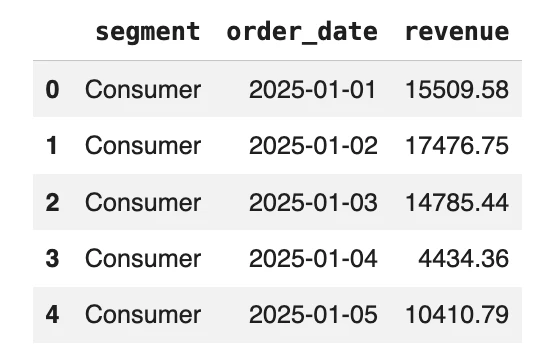
In the pandas version, the data is loaded into memory first. The filtering, joining, date conversion, grouping, and saving steps are written as DataFrame operations.
This approach is easy to read and works well for small to medium-sized datasets. However, for larger datasets, memory usage can become a concern because pandas usually works eagerly and may create intermediate objects.
Polars Approach
Polars is also a DataFrame tool, but it is designed for performance. It supports lazy execution, which means the query can be optimized before it actually runs.
import polars as pl

orders = pl.scan_parquet("orders.parquet")
customers = pl.scan_csv("customers.csv")

polars_query = (
    orders
    .filter(pl.col("status") == "complete")
    .join(
        customers.select(["customer_id", "segment"]),
        on="customer_id",
        how="left"
    )
    .with_columns(
        pl.col("order_ts").dt.date().alias("order_date")
    )
    .group_by(["segment", "order_date"])
    .agg(
        pl.col("amount").sum().alias("revenue")
    )
)

polars_result = polars_query.collect()

polars_result.write_parquet("daily_revenue_polars.parquet")

polars_result.head()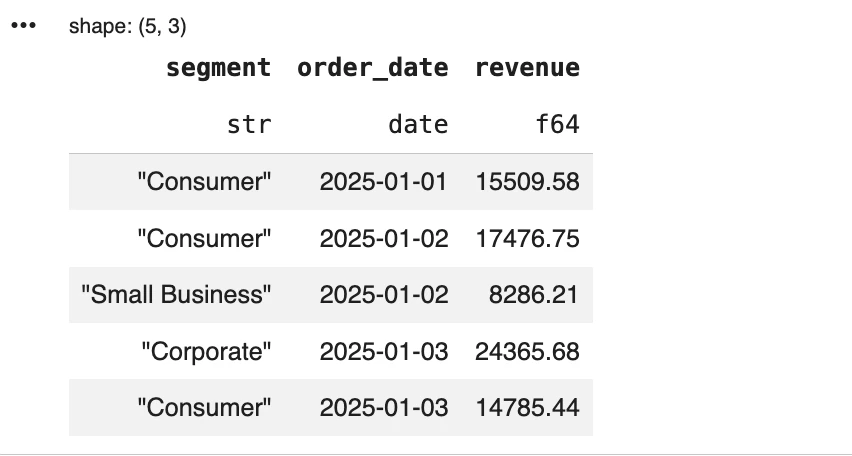
In the Polars version, scan_parquet() and scan_csv() create a lazy query plan instead of loading the data immediately. The actual computation happens only when collect() is called.
Compared with pandas, this approach is more performance-oriented. It is useful when you have larger transformations, repeated ETL steps, or workflows where query optimization can reduce unnecessary work.
DuckDB Approach
DuckDB is different from pandas and Polars because it is SQL-first. Instead of using a DataFrame API, we can write the entire pipeline as a SQL query.
import duckdb

con = duckdb.connect("analytics.duckdb")

con.execute("""
CREATE OR REPLACE TABLE daily_revenue AS
SELECT
    c.segment,
    CAST(o.order_ts AS DATE) AS order_date,
    SUM(o.amount) AS revenue
FROM read_parquet('orders.parquet') AS o
LEFT JOIN read_csv_auto('customers.csv') AS c
USING (customer_id)
WHERE o.status="complete"
GROUP BY 1, 2
ORDER BY 1, 2
""")

duckdb_result = con.execute("""
SELECT *
FROM daily_revenue
LIMIT 5
""").fetchdf()

duckdb_result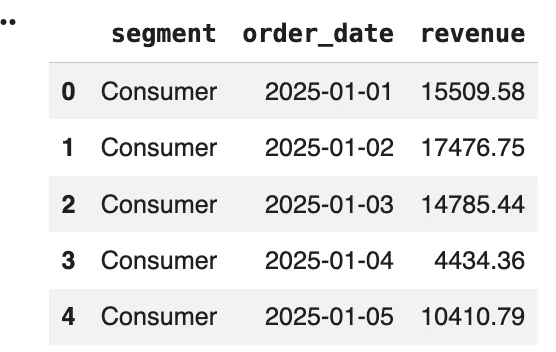
In the DuckDB version, the Parquet and CSV files are queried directly. DuckDB handles the filtering, joining, aggregation, and table creation through SQL.
Compared with pandas and Polars, DuckDB feels more like a local analytics database. It is especially useful when your workflow involves SQL, joins, aggregations, window functions, or direct querying over files.
Comparing the Three Approaches
All three tools solve the same problem, but they do it in different ways.
| Tool | Style | What happens in this example | Best fit |
| pandas | DataFrame-first | Loads files into DataFrames and applies transformations step by step | Notebooks, EDA, visualization, ML workflows |
| Polars | Lazy DataFrame engine | Builds an optimized query plan and runs it when collect() is called | Fast ETL, feature engineering, large transformations |
| DuckDB | SQL-first | Queries CSV and Parquet files directly using SQL | SQL analytics, joins, aggregations, local database workflows |
The final output is the same: daily revenue by customer segment. The main difference is the workflow.
pandas is the easiest to follow if you already know Python DataFrames. Polars is better when you want faster DataFrame processing and lazy execution. DuckDB is better when the task is naturally SQL-based or when you want to query files directly without loading them into a DataFrame first.
Checking the Results
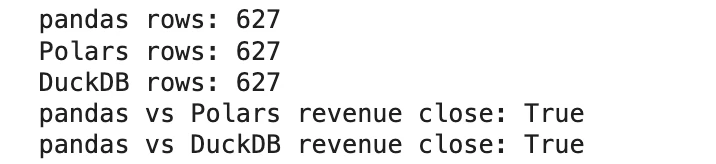
To confirm that all three tools created similar outputs, we can compare the saved results.
import pandas as pd
import polars as pl
import numpy as np

pandas_out = pd.read_parquet("daily_revenue_pandas.parquet")
polars_out = pl.read_parquet("daily_revenue_polars.parquet").to_pandas()
duckdb_out = con.execute("""
SELECT *
FROM daily_revenue
""").fetchdf()

pandas_out["order_date"] = pd.to_datetime(pandas_out["order_date"])
polars_out["order_date"] = pd.to_datetime(polars_out["order_date"])
duckdb_out["order_date"] = pd.to_datetime(duckdb_out["order_date"])

sort_cols = ["segment", "order_date"]

pandas_out = pandas_out.sort_values(sort_cols).reset_index(drop=True)
polars_out = polars_out.sort_values(sort_cols).reset_index(drop=True)
duckdb_out = duckdb_out.sort_values(sort_cols).reset_index(drop=True)

print("pandas rows:", len(pandas_out))
print("Polars rows:", len(polars_out))
print("DuckDB rows:", len(duckdb_out))

print("pandas vs Polars revenue close:", np.allclose(pandas_out["revenue"], polars_out["revenue"]))
print("pandas vs DuckDB revenue close:", np.allclose(pandas_out["revenue"], duckdb_out["revenue"]))
We can see that the revenue values matched across all three tools.
Recommendations and Decision Matrix
The best tool depends on the shape of your work, not on a universal ranking. pandas, Polars, and DuckDB all have strengths, but they are strongest in different situations.
| Requirement | Best choice | Why |
| Interactive notebooks and exploratory analysis | pandas | It is familiar, easy to use, and works well with the Python data science ecosystem. |
| Visualization, statistics, and ML workflows | pandas | Many Python libraries still integrate most smoothly with pandas DataFrames. |
| Fast ETL and feature engineering | Polars | It offers lazy execution, multithreading, and efficient memory usage. |
| Large DataFrame transformations on one machine | Polars | It is designed for high-performance columnar processing. |
| SQL-heavy analysis | DuckDB | It has a first-class SQL engine and handles joins, aggregations, and window functions well. |
| Querying CSV or Parquet files directly | DuckDB | It can run SQL directly on files without loading everything into a DataFrame first. |
| Local analytics storage | DuckDB | It can store data in a local .duckdb database file. |
| Existing pandas codebase that needs speed improvements | DuckDB plus pandas | DuckDB can handle heavier queries while pandas remains the familiar interface. |
| New local analytics workflow | DuckDB plus Polars | DuckDB works well for SQL and persistence, while Polars works well for fast DataFrame transformations. |
A simple rule is useful here. Choose pandas when compatibility matters most. Polars when DataFrame performance matters most. Choose DuckDB when SQL, file-based analytics, or local persistence matters most.
For many real projects, the strongest answer is not one tool. A practical workflow might use DuckDB to query files, Polars to transform data efficiently, and pandas to support visualization or machine learning at the final stage.
Conclusion
pandas, Polars, and DuckDB are all useful, but they are useful in different ways.
- pandas is still the best choice when you need familiarity, notebook-friendly workflows, and strong support from the Python data science ecosystem. It is especially helpful for exploration, visualization, statistics, and machine learning.
- Polars is the better choice when you want fast DataFrame processing on a single machine. It works well for ETL, feature engineering, and large transformations where speed and memory efficiency matter.
- DuckDB is the strongest option when your workflow is SQL-first. It is also the best fit when you want to query files directly or store results in a lightweight local database.
In practice, the best setup often uses more than one tool. DuckDB can handle SQL and file scans, Polars can run fast transformations, and pandas can support final analysis, visualization, and machine learning workflows.

Hi, I am Janvi, a passionate data science enthusiast currently working at Analytics Vidhya. My journey into the world of data began with a deep curiosity about how we can extract meaningful insights from complex datasets.
Login to continue reading and enjoy expert-curated content.