

How a fast-growing scam is tricking WhatsApp users into revealing their most sensitive financial and other data

05 Nov 2025
•
,
4 min. read
Scams and other threats that are doing the rounds on messaging apps like WhatsApp are a stark reminder of how easily even trusted platforms can be weaponized against us.
One deceptive tactic that has gained traction recently involves tricking people into sharing their phone screens during a WhatsApp video call. The screen-sharing feature, available in WhatsApp since 2023, is increasingly being turned against the app’s users to steal their data, identities and money.
Cases of what is essentially a spin on remote access fraud have been reported from various parts of the world, including the United Kingdom, India and Hong Kong, where one victim lost no less than HK$5.5 million (US$700,000) in a carefully orchestrated ploy.
Here’s what you should know about the scam and how you can stay safe from it.
How does the scam unfold?
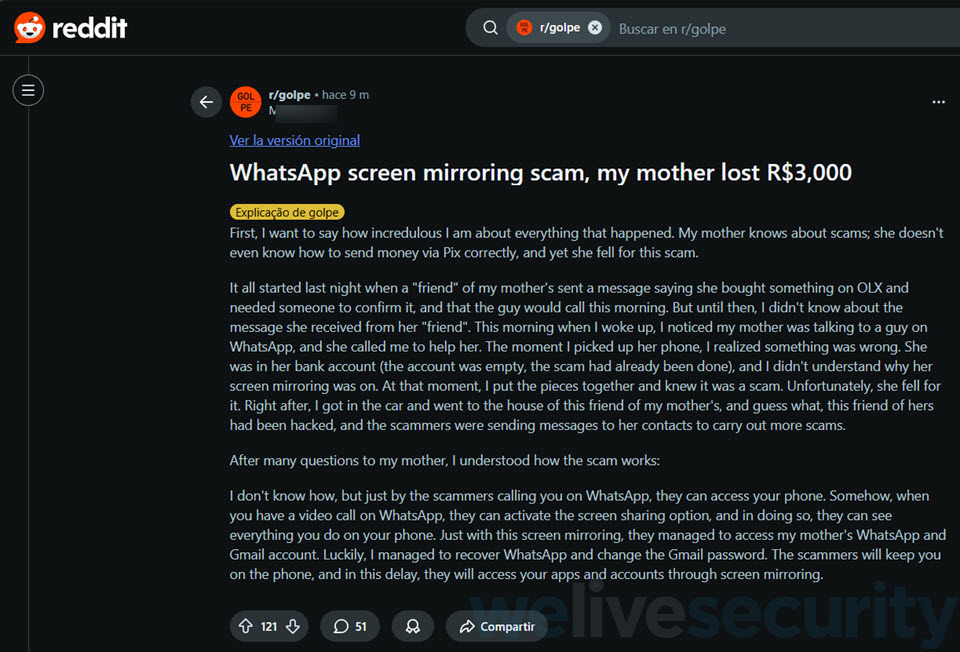
As the goal is to build trust or create panic so that you act impulsively, the scam relies less on technical wizardry and more on psychological manipulation. Here’s how it typically unfolds:
1. The call
Everything starts with a WhatsApp video call from an unfamiliar number. The scammer masquerades as a bank or service representative, a WhatsApp or Meta support agent, or even a friend or relative of yours in distress. To appear legitimate, they spoof a local phone number while their video feed may be disabled, dark or blurry to conceal their true identity.
2. The problem
Next comes a sense of urgency. The caller will claim that there’s an unauthorized charge on your credit card, an open session on another device that needs to be closed, a pending prize that needs your verification, or a risk that your account may be suspended. The goal, of course, is to create a sense of panic and get you to act without thinking twice.
3. Screen sharing
The scammer then asks you to share your phone’s screen, ostensibly to assist you remotely so they can “resolve” the alleged issue. You may be asked to install a legitimate remote access app, such as AnyDesk or TeamViewer. Once you oblige, any incoming text messages and WhatsApp verification codes become visible to them. With those in their hands, the attacker can immediately take over your WhatsApp account. It gets even worse from here, however.
4. Access to personal data
With your screen visible to the bad actor in real time, they can also steal your passwords, 2FA codes, one-time passwords (OTPs), as well as capture screenshots or ask you to open your banking app and trick you into making bank transfers – all under the pretext of resolving the purported problem. They can also dupe their marks into installing malware, such as keyloggers, that silently records sensitive information for later theft.
5. Theft of accounts and money
After obtaining verification codes and banking data, scammers can drain your banking accounts and hijack social media and other online accounts and go on to impersonate you to continue to scam, this time targeting your relatives and friends.
How to protect yourself
The scam is effective because it exploits three potent ingredients: trust (created by a video call from a trusted entity), urgency (created by a fabricated problem), and control (granted through the screen sharing feature or a remote access tool). This combination gives criminals near-total visibility into your phone.
Staying safe from this scam, therefore, depends more on awareness and discipline than on technological safeguards. With that in mind, stick to these essential practices:
- Never share your screen with someone you don’t personally know, doubly so during an unsolicited call. If you receive a call from an unknown number where the caller claims to represent a bank, online service provider or any other trusted entity, hang up and contact the institution directly through a verified channel.
- Never share your passwords, verification codes or any personal or financial data over the phone. Online services, banks or any other legitimate companies will never ask for your passwords, PINs, or card details through unsolicited calls or messages.
- Avoid installing remote-access apps at the behest of strangers as remote access tools like AnyDesk or TeamViewer can grant them full control of your device.
- Verify alarming information independently. Be aware that scammers will try to rush you into action, typically by making you panic. Resist the urge to oblige; instead, take a deep breath and think.
- If someone claims that there’s a problem with your bank account or your friend or relative is in trouble, contact your bank or your relative directly and through another channel before taking any action.
- Enable 2FA in WhatsApp (called two-step verification in the app) by navigating to Settings → Account → Two-step verification → Turn on or Set up PIN. That way, even if cybercriminals get hold of your login credentials, they will need this second factor to access your account.
Staying secure starts with skepticism
The scam described above is another reminder that social engineering remains one of the most powerful weapons in a cybercriminal’s arsenal. It also reveals how a momentary lapse in judgment can wipe out your life savings. In cases like these, therefore, awareness is your first and strongest line of protection.