

retrieves the stats (clapCount, voterCount, responseCount, and readingTime) of Medium posts

In this article, I will explain how to retrieve the stats ( claps count, voter count, response count, and reading time) of Medium feed posts using a REST API, the lack of this feature in the Medium RSS feed is what motivated me to create this advanced Medium API. This is my 41st Medium article.
Initial Intuition
I wanted to obtain the stats ( claps count, voter count, response count, and reading time) of my Medium posts while working on my personal website development. 2 years before when I implement the medium widget to my website I found Pixelpoint.io which generated a widget with clap counts of a medium post. At that moment I wondered how they implemented it? Then I forget to research it but last month I found that pixelpoint.io’s widget is not working. I looked everywhere for a solution to my needs but couldn’t find one, so I had no choice but to code it myself.
My initial intuition was to look at the RSS feed but there were no such details are provided then I looked at the official documentation of the public REST API by Medium, and nothing was there either. The Medium REST API only allows you to create a Medium article by HTTP POST method(cf section 3.3). You can’t retrieve or edit a Medium article by using the Medium API 😔.
In order to get an understanding of how the useful stats are retrieved in the Medium post, I started to inspect the Medium using browser developer tools. Shockingly, there was no request to obtain the stats among all the XHR calls, which push me to look at the HTML response of the Medium post.
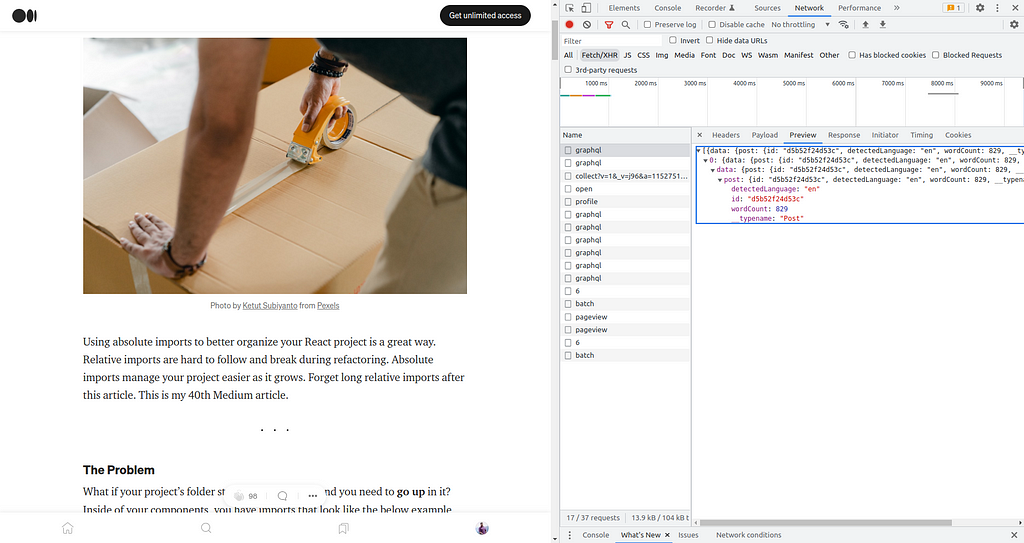
curl >> post.html
As a javascript variable, the claps count, voter count, response count, and reading time are directly injected into the HTML response. You can verify that by typing console.log(window.__APOLLO_STATE__); in the Javascript console of the Post page.
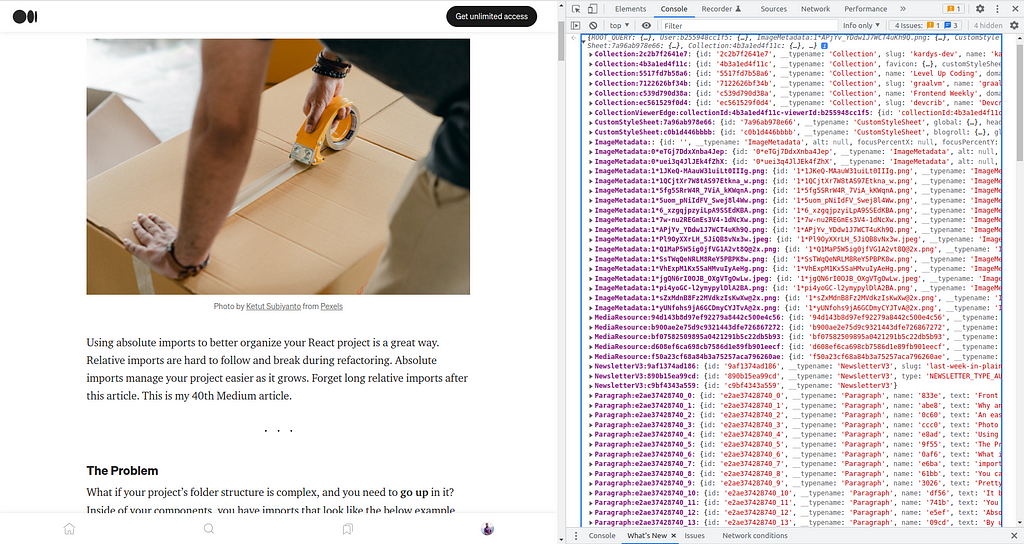
Then I scrape those useful stats using request and cheerio .
How to scrape data in Script Tag

In a medium post, data comes as JSON in a script tag. By using javascript, those data are picked up and rendered in DOM on the browser-side. Usually, data in a script tag takes this form:
https://medium.com/media/ec3ceb318aeebbb8045647b77cec49c1/href
Then I scrape Medium post data without a headless browser.
https://medium.com/media/3dad5342e13f9fae28b34508c8b55b1c/href
First, I get the website and look for errors. Then I confirmed whether the body exists, and load the body using cheerio in $ . In try block, all the tag script contents are mapped in an array. Then find the element which includes window.__APOLLO_STATE__ , replace the assignment window.__APOLLO_STATE__ = with an empty string. I replace the /"/g with ‘"’ and parse with JSON.parse . Finally, get the appropriate values from the JSON.
The advantages of this technique over headless browsers are super fast and takes way less processing and resources.
How to use the Advanced Medium API
You could able to use the Advanced Medium API that I developed as follows:
There are 5 types of requests. you could be able to get all the responses by using HTTP GETmethod.
Medium feed in JSON
You could able to get the RSS feed of the last 10 Medium posts by using the following links (replace your username instead of @username ).
medium.com/feed/@username
or
username.medium.com/feed
The following request of the API gives the direct JSON conversion of that RSS Feed.
curl https://advanced-medium-api.herokuapp.com/medium/user/{userId}
Medium Advanced Data
You could able to get the Medium feed in JSON with the missing part of the Medium feed such as clapCount, voterCount, responseCount, readingTime. each missing data injected in every post(items) object.
The following request of the API gives the JSON conversion of the RSS feed with the injection of missing data.
curl https://advanced-medium-api.herokuapp.com/advanced/user/{userId}
Medium Customized Data
JSON conversion of the Medium RSS feed is customized according to the categories. Order the Medium post’s tags according to their use count among the latest 10 posts and the tagOrder return that tags' order rank. Medium's latest 10 posts were divided by 3 and every 3 posts were pushed in an array and those arrays were pushed in one array. There is an algorithm that returns the most suitable tag for the Medium post among the other tags of that Medium post.
The following request of the API gives the customized version of the Medium feed in JSON
curl https://advanced-medium-api.herokuapp.com/customized/user/{userId}
Medium Customized Advanced Data
This response contains the Medium customized data with the injection of missing stats such as clapCount, voterCount, responseCount, readingTime.
The following request of the API gives the customized version of the Medium feed in JSON with the missing part of the Medium feed.
curl https://advanced-medium-api.herokuapp.com/advanced/customized/user/{userId}
Missing data of a particular post.
This response contains only the missing part (clapCount, voterCount, responseCount, readingTime) of Medium feed for a particular Medium post.
Request 💻 ➡ 🌎 :
curl https://advanced-medium-api.herokuapp.com/medium/post/{postId}
Response 🌎➡💻 :
{
  "clapCount": 98,
  "responseCount": 4,
  "voterCount": 12,
  "readingTime": 4
}
Conclusion
This API is Open Source and I welcome your contributions. last 2 years I used the medium widget from Pixelpoint.io which generated a widget with clap counts of a medium post. I didn’t do research to get the missing part of the Medium feed when I used Pixelpoint.io. but 2 months before Pixelpoint.io is not working and this incident affects my personal website. Therefore I pushed myself and created this API.
The Medium RSS Feed’s Missing Part was originally published in Geek Culture on Medium, where people are continuing the conversation by highlighting and responding to this story.