

· 2 min read
Turn an incompatible object into a target interface or class by using a real world example and the adapter design pattern in Swift.
Fist of all let me emphasize that, this is the real world representation of what we’re going to build in this little Swift adapter pattern tutorial:
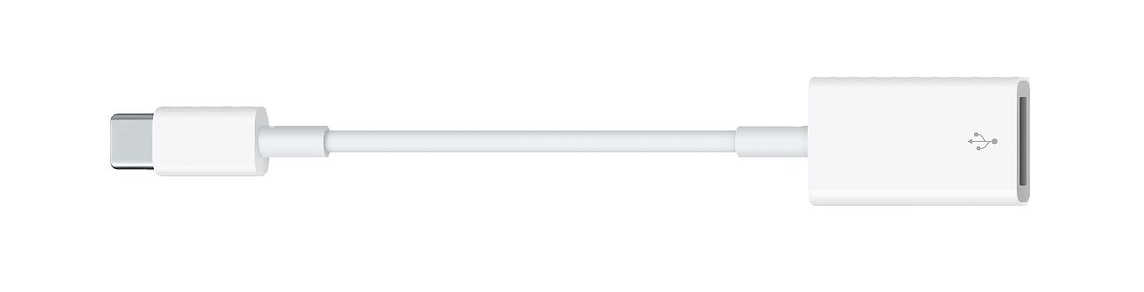
Adapter is a structural design pattern that allows objects with incompatible interfaces to work together. In other words, it transforms the interface of an object to adapt it to a different object.
So adapter can transform one thing into another, sometimes it’s called wrapper, because it wraps the object and provides a new interface around it. It’s like a software dongle for specific interfaces or legacy classes. (Dongle haters: it’s time to leave the past behind!) 😂
Adapter design pattern implementation
Creating an adapter in Swift is actually a super easy task to do. You just need to make a new object, “box” the old one into it and implement the required interface on your new class or struct. In other words, a wrapper object will be our adapter to implement the target interface by wrapping an other adaptee object. So again:
Adaptee
The object we are adapting to a specific target (e.g. old-school USB-A port).
Adapter
An object that wraps the original one and produces the new requirements specified by some target interface (this does the actual work, aka. the little dongle above).
Target
It is the object we want to use adaptee with (our USB-C socket).
How to use the adapter pattern in Swift?
You can use an adapter if you want to integrate a third-party library in your code, but it’s interface doesn’t match with your requirements. For example you can create a wrapper around an entire SDK or backend API endpoints in order to create a common denominator. 👽
In my example, I’m going to wrap an EKEvent object with an adapter class to implement a brand new protocol. 📆
import Foundation
import EventKit

// our target protocol
protocol Event {
    var title: String { get }
    var startDate: String { get }
    var endDate: String { get }
}

// adapter (wrapper class)
class EventAdapter {

    private lazy var dateFormatter: DateFormatter = {
        let dateFormatter = DateFormatter()
        dateFormatter.dateFormat = "yyyy. MM. dd. HH:mm"
        return dateFormatter
    }()

    private var event: EKEvent

    init(event: EKEvent) {
        self.event = event
    }
}

// actual adapter implementation
extension EventAdapter: Event {

    var title: String {
        return self.event.title
    }
    var startDate: String {
        return self.dateFormatter.string(from: event.startDate)
    }
    var endDate: String {
        return self.dateFormatter.string(from: event.endDate)
    }
}

// let's create an EKEvent adaptee instance
let dateFormatter = DateFormatter()
dateFormatter.dateFormat = "MM/dd/yyyy HH:mm"

let calendarEvent = EKEvent(eventStore: EKEventStore())
calendarEvent.title = "Adapter tutorial deadline"
calendarEvent.startDate = dateFormatter.date(from: "07/30/2018 10:00")
calendarEvent.endDate = dateFormatter.date(from: "07/30/2018 11:00")

// now we can use the adapter class as an Event protocol, instead of an EKEvent
let adapter = EventAdapter(event: calendarEvent)
// adapter.title
// adapter.startDate
// adapter.endDate
Another use case is when you have to use several existing final classes or structs but they lack some functionality and you want to build a new target interface on top of them. Sometimes it’s a good choice to implement an wrapper to handle this messy situation. 🤷♂️
That’s all about the adapter design pattern. Usually it’s really easy to implement it in Swift – or in any other programming language – but it’s super useful and sometimes unavoidable.
Kids, remember: don’t go too hard on dongles! 😉 #himym
Related posts

· 6 min read
In this article I am going to show you how to implement a basic event processing system for your modular Swift application.
· 4 min read
Learn the iterator design pattern by using some custom sequences, conforming to the IteratorProtocol from the Swift standard library.
· 4 min read
Learn how to use lazy properties in Swift to improve performance, avoid optionals or just to make the init process more clean.
· 5 min read
Beginner’s guide about optics in Swift. Learn how to use lenses and prisms to manipulate objects using a functional approach.