Close Menu
geekfence.comgeekfence.com
    What's Hot

    Designing trust & safety (T&S) in customer experience management (CXM): why T&S is becoming core to CXM operating model 

    January 24, 2026

    iPhone 18 Series Could Finally Bring Back Touch ID

    January 24, 2026

    The Visual Haystacks Benchmark! – The Berkeley Artificial Intelligence Research Blog

    January 24, 2026
    Facebook X (Twitter) Instagram
    • About Us
    • Contact Us
    Facebook Instagram
    geekfence.comgeekfence.com
    • Home
    • UK Tech News
    • AI
    • Big Data
    • Cyber Security
      • Cloud Computing
      • iOS Development
    • IoT
    • Mobile
    • Software
      • Software Development
      • Software Engineering
    • Technology
      • Green Technology
      • Nanotechnology
    • Telecom
    geekfence.comgeekfence.com
    Home»iOS Development»Swift adapter design pattern – The.Swift.Dev.
    iOS Development

    Swift adapter design pattern – The.Swift.Dev.

    AdminBy AdminJanuary 22, 2026No Comments4 Mins Read1 Views
    Facebook Twitter Pinterest LinkedIn Telegram Tumblr Email
    Swift adapter design pattern – The.Swift.Dev.
    Share
    Facebook Twitter LinkedIn Pinterest Email


    7/29/18 2:20 PM
    · 2 min read


    Turn an incompatible object into a target interface or class by using a real world example and the adapter design pattern in Swift.

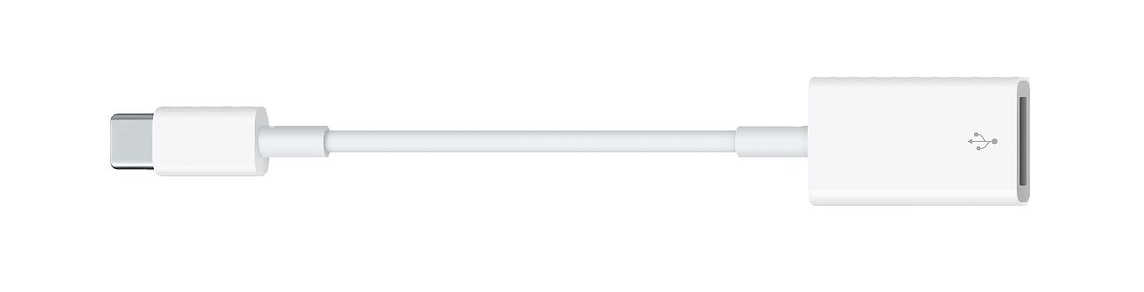
    Fist of all let me emphasize that, this is the real world representation of what we’re going to build in this little Swift adapter pattern tutorial:
    Swift adapter design pattern – The.Swift.Dev.

    Adapter is a structural design pattern that allows objects with incompatible interfaces to work together. In other words, it transforms the interface of an object to adapt it to a different object.

    So adapter can transform one thing into another, sometimes it’s called wrapper, because it wraps the object and provides a new interface around it. It’s like a software dongle for specific interfaces or legacy classes. (Dongle haters: it’s time to leave the past behind!) 😂

    Adapter design pattern implementation

    Creating an adapter in Swift is actually a super easy task to do. You just need to make a new object, “box” the old one into it and implement the required interface on your new class or struct. In other words, a wrapper object will be our adapter to implement the target interface by wrapping an other adaptee object. So again:

    Adaptee

    The object we are adapting to a specific target (e.g. old-school USB-A port).

    Adapter

    An object that wraps the original one and produces the new requirements specified by some target interface (this does the actual work, aka. the little dongle above).

    Target

    It is the object we want to use adaptee with (our USB-C socket).

    How to use the adapter pattern in Swift?

    You can use an adapter if you want to integrate a third-party library in your code, but it’s interface doesn’t match with your requirements. For example you can create a wrapper around an entire SDK or backend API endpoints in order to create a common denominator. 👽

    In my example, I’m going to wrap an EKEvent object with an adapter class to implement a brand new protocol. 📆

    import Foundation
    import EventKit
    
    // our target protocol
    protocol Event {
        var title: String { get }
        var startDate: String { get }
        var endDate: String { get }
    }
    
    // adapter (wrapper class)
    class EventAdapter {
    
        private lazy var dateFormatter: DateFormatter = {
            let dateFormatter = DateFormatter()
            dateFormatter.dateFormat = "yyyy. MM. dd. HH:mm"
            return dateFormatter
        }()
    
        private var event: EKEvent
    
        init(event: EKEvent) {
            self.event = event
        }
    }
    
    // actual adapter implementation
    extension EventAdapter: Event {
    
        var title: String {
            return self.event.title
        }
        var startDate: String {
            return self.dateFormatter.string(from: event.startDate)
        }
        var endDate: String {
            return self.dateFormatter.string(from: event.endDate)
        }
    }
    
    // let's create an EKEvent adaptee instance
    let dateFormatter = DateFormatter()
    dateFormatter.dateFormat = "MM/dd/yyyy HH:mm"
    
    let calendarEvent = EKEvent(eventStore: EKEventStore())
    calendarEvent.title = "Adapter tutorial deadline"
    calendarEvent.startDate = dateFormatter.date(from: "07/30/2018 10:00")
    calendarEvent.endDate = dateFormatter.date(from: "07/30/2018 11:00")
    
    // now we can use the adapter class as an Event protocol, instead of an EKEvent
    let adapter = EventAdapter(event: calendarEvent)
    // adapter.title
    // adapter.startDate
    // adapter.endDate
    

    Another use case is when you have to use several existing final classes or structs but they lack some functionality and you want to build a new target interface on top of them. Sometimes it’s a good choice to implement an wrapper to handle this messy situation. 🤷‍♂️

    That’s all about the adapter design pattern. Usually it’s really easy to implement it in Swift – or in any other programming language – but it’s super useful and sometimes unavoidable.

    Kids, remember: don’t go too hard on dongles! 😉 #himym


    Swift facade design pattern – The.Swift.Dev.

    Share this article

    Thank you. 🙏

    Related posts

    Swift facade design pattern – The.Swift.Dev.

    11/27/20 3:20 PM
    · 6 min read


    In this article I am going to show you how to implement a basic event processing system for your modular Swift application.

    Swift facade design pattern – The.Swift.Dev.

    8/19/18 2:20 PM
    · 4 min read


    Learn the iterator design pattern by using some custom sequences, conforming to the IteratorProtocol from the Swift standard library.

    Swift facade design pattern – The.Swift.Dev.

    12/17/18 3:20 PM
    · 4 min read


    Learn how to use lazy properties in Swift to improve performance, avoid optionals or just to make the init process more clean.

    Swift facade design pattern – The.Swift.Dev.

    8/12/22 2:20 PM
    · 5 min read


    Beginner’s guide about optics in Swift. Learn how to use lenses and prisms to manipulate objects using a functional approach.


    Source link

    Share. Facebook Twitter Pinterest LinkedIn Tumblr Email

    Related Posts

    A Deep Dive into SwiftData migrations – Donny Wals

    January 24, 2026

    AI, find me some work…

    January 23, 2026

    Text is not visible when the button is in disabled state

    January 21, 2026

    What’s New in SwiftUI for iOS 18

    January 19, 2026

    WWDC 2023: A Reflection on Apple’s “Spatial Computing” Journey

    January 17, 2026

    Swift facade design pattern – The.Swift.Dev.

    January 16, 2026
    Top Posts

    Understanding U-Net Architecture in Deep Learning

    November 25, 202511 Views

    Hard-braking events as indicators of road segment crash risk

    January 14, 20269 Views

    Microsoft 365 Copilot now enables you to build apps and workflows

    October 29, 20258 Views
    Don't Miss

    Designing trust & safety (T&S) in customer experience management (CXM): why T&S is becoming core to CXM operating model 

    January 24, 2026

    Customer Experience (CX) now sits at the intersection of Artificial Intelligence (AI)-enabled automation, identity and access journeys, AI-generated content…

    iPhone 18 Series Could Finally Bring Back Touch ID

    January 24, 2026

    The Visual Haystacks Benchmark! – The Berkeley Artificial Intelligence Research Blog

    January 24, 2026

    Data and Analytics Leaders Think They’re AI-Ready. They’re Probably Not. 

    January 24, 2026
    Stay In Touch
    • Facebook
    • Instagram
    About Us

    At GeekFence, we are a team of tech-enthusiasts, industry watchers and content creators who believe that technology isn’t just about gadgets—it’s about how innovation transforms our lives, work and society. We’ve come together to build a place where readers, thinkers and industry insiders can converge to explore what’s next in tech.

    Our Picks

    Designing trust & safety (T&S) in customer experience management (CXM): why T&S is becoming core to CXM operating model 

    January 24, 2026

    iPhone 18 Series Could Finally Bring Back Touch ID

    January 24, 2026

    Subscribe to Updates

    Please enable JavaScript in your browser to complete this form.
    Loading
    • About Us
    • Contact Us
    • Disclaimer
    • Privacy Policy
    • Terms and Conditions
    © 2026 Geekfence.All Rigt Reserved.

    Type above and press Enter to search. Press Esc to cancel.