
Close Menu
geekfence.comgeekfence.com
    What's Hot

    OpenAI launches GPT-5.2 as it battles Google’s Gemini 3 for AI model supremacy – Computerworld

    December 14, 2025

    The Download: Expanded carrier screening, and how Southeast Asia plans to get to space

    December 14, 2025

    How Bayer transforms Pharma R&D with a cloud-based data science ecosystem using Amazon SageMaker

    December 14, 2025
    Facebook X (Twitter) Instagram
    • About Us
    • Contact Us
    Facebook Instagram
    geekfence.comgeekfence.com
    • Home
    • UK Tech News
    • AI
    • Big Data
    • Cyber Security
      • Cloud Computing
      • iOS Development
    • IoT
    • Mobile
    • Software
      • Software Development
      • Software Engineering
    • Technology
      • Green Technology
      • Nanotechnology
    • Telecom
    geekfence.comgeekfence.com
    Home»Software Development»GitHub Copilot for CLI for PowerShell
    Software Development

    GitHub Copilot for CLI for PowerShell

    AdminBy AdminNovember 23, 2025No Comments2 Mins Read0 Views
    Facebook Twitter Pinterest LinkedIn Telegram Tumblr Email
    GitHub Copilot for CLI for PowerShell
    Share
    Facebook Twitter LinkedIn Pinterest Email


    GitHub Next has this cool project that is basically Copilot for the CLI (command line interface). You can sign up for their waitlist at the Copilot for CLI site.

    Copilot for CLI provides three shell commands: ??, git? and gh?

    This is cool and all, but I use PowerShell. Turns out these ?? commands are just router commands to a larger EXE called github-copilot-cli. So if you go “?? something” you’re really going “github-copilot-cli what-the-shell something.”

    So this means I should be able to to do the same/similar aliases for my PowerShell prompt AND change the injected prompt (look at me I’m a prompt engineer) to add ‘use powershell to.’

    Now it’s not perfect, but hopefully it will make the point to the Copilot CLI team that PowerShell needs love also.

    Here are my aliases. Feel free to suggest if these suck. Note the addition of “user powershell to” for the ?? one. I may make a ?? and a p? where one does bash and one does PowerShell. I could also have it use wsl.exe and shell out to bash. Lots of possibilities.

    function ?? { 
    $TmpFile = New-TemporaryFile
    github-copilot-cli what-the-shell ('use powershell to ' + $args) --shellout $TmpFile
    if ([System.IO.File]::Exists($TmpFile)) {
    $TmpFileContents = Get-Content $TmpFile
    if ($TmpFileContents -ne $nill) {
    Invoke-Expression $TmpFileContents
    Remove-Item $TmpFile
    }
    }
    }

    function git? {
    $TmpFile = New-TemporaryFile
    github-copilot-cli git-assist $args --shellout $TmpFile
    if ([System.IO.File]::Exists($TmpFile)) {
    $TmpFileContents = Get-Content $TmpFile
    if ($TmpFileContents -ne $nill) {
    Invoke-Expression $TmpFileContents
    Remove-Item $TmpFile
    }
    }
    }
    function gh? {
    $TmpFile = New-TemporaryFile
    github-copilot-cli gh-assist $args --shellout $TmpFile
    if ([System.IO.File]::Exists($TmpFile)) {
    $TmpFileContents = Get-Content $TmpFile
    if ($TmpFileContents -ne $nill) {
    Invoke-Expression $TmpFileContents
    Remove-Item $TmpFile
    }
    }
    }

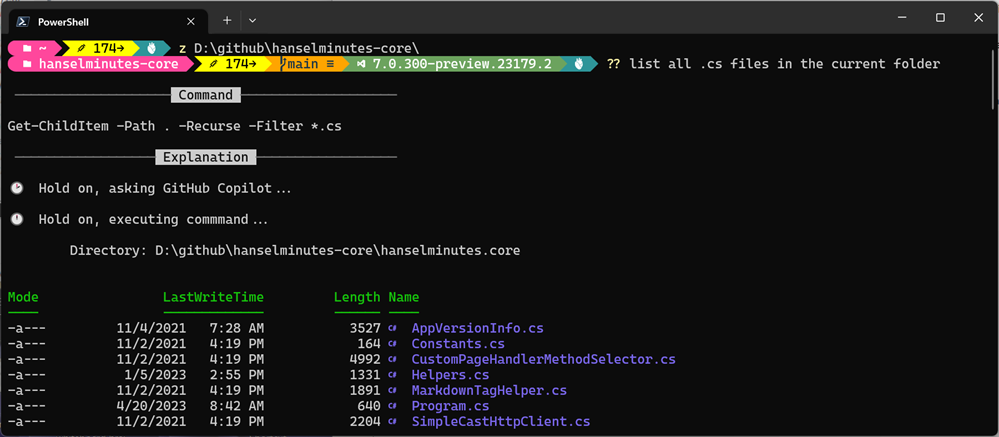
    It also then offers to run the command. Very smooth.
    image

    Hope you like it. Lots of fun stuff happening in this space.


    About Scott

    Scott Hanselman is a former professor, former Chief Architect in finance, now speaker, consultant, father, diabetic, and Microsoft employee. He is a failed stand-up comic, a cornrower, and a book author.

    facebook
    bluesky
    subscribe
    About   Newsletter

    Hosting By
    Hosted on Linux using .NET in an Azure App Service


    Source link

    Share. Facebook Twitter Pinterest LinkedIn Tumblr Email

    Related Posts

    What is Enterprise Commerce? Custom Solution or Ready-Made?

    December 13, 2025

    Infragistics open sources 50+ Ignite UI components

    December 12, 2025

    The Wax and the Wane of the Web – A List Apart

    December 11, 2025

    How to Set Date Time from Mac Command Line

    December 10, 2025

    Use your own user @ domain for Mastodon discoverability with the WebFinger Protocol without hosting a server

    December 9, 2025

    To vibe or not to vibe

    December 8, 2025
    Top Posts

    Understanding U-Net Architecture in Deep Learning

    November 25, 20257 Views

    Microsoft 365 Copilot now enables you to build apps and workflows

    October 29, 20257 Views

    Here’s the latest company planning for gene-edited babies

    November 2, 20256 Views
    Don't Miss

    OpenAI launches GPT-5.2 as it battles Google’s Gemini 3 for AI model supremacy – Computerworld

    December 14, 2025

    Rachid ‘Rush’ Wehbi, CEO of e-commerce platform Sell The Trend, has tested GPT-5.2 under real-world…

    The Download: Expanded carrier screening, and how Southeast Asia plans to get to space

    December 14, 2025

    How Bayer transforms Pharma R&D with a cloud-based data science ecosystem using Amazon SageMaker

    December 14, 2025

    How cloud infrastructure shapes the modern Diablo experience 

    December 14, 2025
    Stay In Touch
    • Facebook
    • Instagram
    About Us

    At GeekFence, we are a team of tech-enthusiasts, industry watchers and content creators who believe that technology isn’t just about gadgets—it’s about how innovation transforms our lives, work and society. We’ve come together to build a place where readers, thinkers and industry insiders can converge to explore what’s next in tech.

    Our Picks

    OpenAI launches GPT-5.2 as it battles Google’s Gemini 3 for AI model supremacy – Computerworld

    December 14, 2025

    The Download: Expanded carrier screening, and how Southeast Asia plans to get to space

    December 14, 2025

    Subscribe to Updates

    Please enable JavaScript in your browser to complete this form.
    Loading
    • About Us
    • Contact Us
    • Disclaimer
    • Privacy Policy
    • Terms and Conditions
    © 2025 Geekfence.All Rigt Reserved.

    Type above and press Enter to search. Press Esc to cancel.
