
Close Menu
geekfence.comgeekfence.com
    What's Hot

    Diarrhea outbreak: What is cyclosporiasis, and why is it suddenly everywhere?

    July 15, 2026

    Intelligence is Free, Now What? Data Systems for, of, and by Agents – The Berkeley Artificial Intelligence Research Blog

    July 15, 2026

    Take insights anywhere with Genie One on mobile

    July 15, 2026
    Facebook X (Twitter) Instagram
    • About Us
    • Contact Us
    Facebook Instagram
    geekfence.comgeekfence.com
    • Home
    • UK Tech News
    • AI
    • Big Data
    • Cyber Security
      • Cloud Computing
      • iOS Development
    • IoT
    • Mobile
    • Software
      • Software Development
      • Software Engineering
    • Technology
      • Green Technology
      • Nanotechnology
    • Telecom
    geekfence.comgeekfence.com
    Home»Software Engineering»Getting a URL Parameter in Javascript
    Software Engineering

    Getting a URL Parameter in Javascript

    AdminBy AdminJuly 13, 2026No Comments3 Mins Read3 Views
    Facebook Twitter Pinterest LinkedIn Telegram Tumblr Email
    Getting a URL Parameter in Javascript
    Share
    Facebook Twitter LinkedIn Pinterest Email


    When programming in Javascript there are times when you might want to know if there were any parameters passed through the URL. In case you aren’t familiar with URL parameters, they are the arguments set after the base URL and the ‘?’. For example let’s look at the below example:

    https://www.josephamaurer.com/Projects/DevAPI/RecentDevPosts.html?PerPage=100

    ?PerPage=100 is the first parameter that is passed with this URL. It’s up to your javascript logic to grab this parameter’s value and use it appropriately. So can there be multiple parameters? You betcha! Additional parameters are added with the following syntax:

    https://www.josephamaurer.com/Projects/DevAPI/RecentDevPosts.html?PerPage=100&Page=2

    ‘&Page=2’ is the second parameter that is with this URL. At this point you might be wondering what are the limitations of passing arguments like this? Well the obvious one is that you can’t have any spaces. Another is that the ‘#’ character is reserved for jumping to a section of a document. Generally, URL Encoding is used to deal with this problem and make any text safe to pass in the URL. Internet Explorer (RIP) had a maximum length of 2,083 characters. Although, the RFC 2616 spec says that servers need to be able to handle any number of characters, you do risk a web server failing to respond if the request is too long. I highly recommend looking at the Google Chrome guidelines if you plan to do this on a production project.

    Web Forms

    The most common use of these query strings within a URL is web forms. When a user hits submit on a form, their responses are posted in the URL for processing by the backend. In this tutorial, we’ll focus on just grabbing values from that URL for processing, but there are plenty of examples of using this on the backend.

    URL Search Params

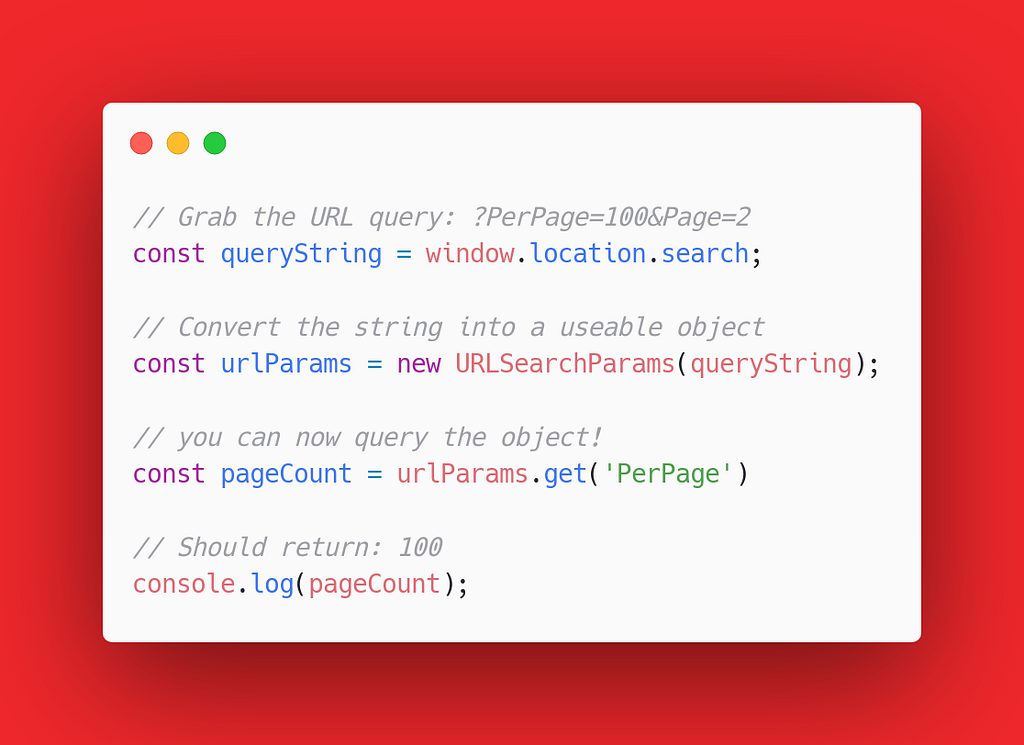
    When using javascript to parse the URL, it is easiest to use URLSearchParams instead of trying to parse the string yourself. You could use regular expressions to try to do this, but as I wrote earlier this is a terrible idea. So let’s look at the example below and see how this works.
    Getting a URL Parameter in Javascript

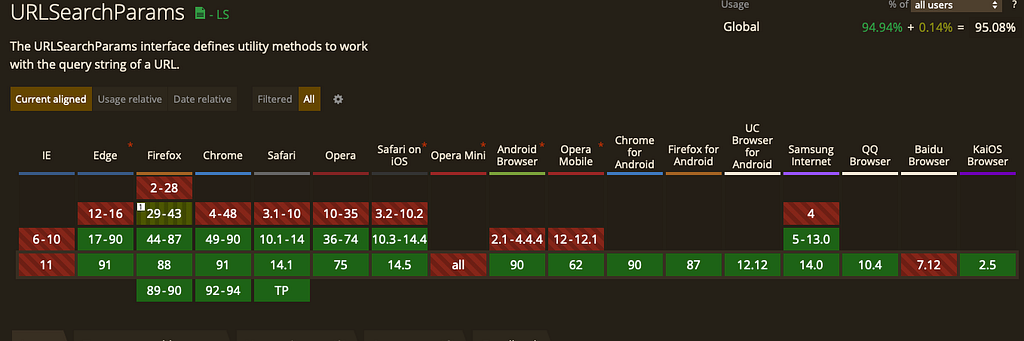
    As you can see, grabbing the params is actually a really straightforward process. You can very easily query to see what objects are present and check if they are null or an actual value first before using them. At the time of writing this, browser support is very good and is available to use almost everywhere.
    Live Example

    Building on my last video post, you can now pass parameters to my example page to play with the number of posts that it returns.

    DEV.to API Tester: Recent Posts

    Let me know if you end up having a use for this method and happy coding 😊


    Getting a URL Parameter in Javascript was originally published in Geek Culture on Medium, where people are continuing the conversation by highlighting and responding to this story.


    Source link

    Share. Facebook Twitter Pinterest LinkedIn Tumblr Email

    Related Posts

    AURA and Open-Source Agents for Production Operations

    July 15, 2026

    Why and How to Use Absolute Imports in React

    July 12, 2026

    Clare Liguori on AWS Strands SDK for AI Agents – Software Engineering Radio

    July 10, 2026

    Eric Ries on Why Good Companies Go Bad

    July 9, 2026

    Exploring Shader Graph in Unity

    July 7, 2026

    The Medium RSS Feed’s Missing Part

    July 6, 2026
    Top Posts

    Understanding U-Net Architecture in Deep Learning

    November 25, 202561 Views

    Hard-braking events as indicators of road segment crash risk

    January 14, 202631 Views

    Redefining AI efficiency with extreme compression

    March 25, 202630 Views
    Don't Miss

    Diarrhea outbreak: What is cyclosporiasis, and why is it suddenly everywhere?

    July 15, 2026

    As if we needed one more thing to worry about so soon after the hantavirus…

    Intelligence is Free, Now What? Data Systems for, of, and by Agents – The Berkeley Artificial Intelligence Research Blog

    July 15, 2026

    Take insights anywhere with Genie One on mobile

    July 15, 2026

    We tested Cisco Secure Firewall 6160 with NetSecOPEN for AI-scale

    July 15, 2026
    Stay In Touch
    • Facebook
    • Instagram
    About Us

    At GeekFence, we are a team of tech-enthusiasts, industry watchers and content creators who believe that technology isn’t just about gadgets—it’s about how innovation transforms our lives, work and society. We’ve come together to build a place where readers, thinkers and industry insiders can converge to explore what’s next in tech.

    Our Picks

    Diarrhea outbreak: What is cyclosporiasis, and why is it suddenly everywhere?

    July 15, 2026

    Intelligence is Free, Now What? Data Systems for, of, and by Agents – The Berkeley Artificial Intelligence Research Blog

    July 15, 2026

    Subscribe to Updates

    Please enable JavaScript in your browser to complete this form.
    Loading
    • About Us
    • Contact Us
    • Disclaimer
    • Privacy Policy
    • Terms and Conditions
    © 2026 Geekfence.All Rigt Reserved.

    Type above and press Enter to search. Press Esc to cancel.