
Close Menu
geekfence.comgeekfence.com
    What's Hot

    Understanding VHF (Very High Frequency) Propagation

    July 7, 2026

    M&A Monthly: June/July 2026

    July 7, 2026

    Guidelines for Respectful Use of AI – O’Reilly

    July 7, 2026
    Facebook X (Twitter) Instagram
    • About Us
    • Contact Us
    Facebook Instagram
    geekfence.comgeekfence.com
    • Home
    • UK Tech News
    • AI
    • Big Data
    • Cyber Security
      • Cloud Computing
      • iOS Development
    • IoT
    • Mobile
    • Software
      • Software Development
      • Software Engineering
    • Technology
      • Green Technology
      • Nanotechnology
    • Telecom
    geekfence.comgeekfence.com
    Home»Software Engineering»Exploring Shader Graph in Unity
    Software Engineering

    Exploring Shader Graph in Unity

    AdminBy AdminJuly 7, 2026No Comments3 Mins Read2 Views
    Facebook Twitter Pinterest LinkedIn Telegram Tumblr Email
    Exploring Shader Graph in Unity
    Share
    Facebook Twitter LinkedIn Pinterest Email


    Exploring Shader Graph in Unity

    There is something that you realize really quickly when you start programming games, and it’s that materials are coded differently than anything else. They work almost in mysterious ways that can often be hard to describe and the code is often very dense c style code that doesn’t shed any light on how or why something works the way it does.

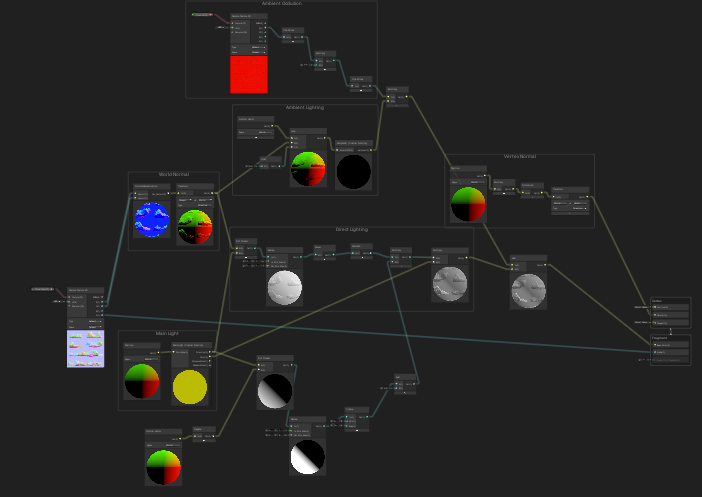
    Enter Shader Graphs, Unity’s latest attempt to help alleviate some of the mystery and confusion around how shaders work. This feature is recently out of preview and has a wide array of features that aim to shift how shaders are made. Before, you made shaders with code, now the hope is that you make shaders with graphs like the one below:
    Want to follow along? Here is a link to the sample project!

    So if shaders are for programming materials, why is it so hard? Because you are writing low level code that the GPU needs to take and determine how in the world this object is going to look. It’s a complicated process but the benefit is that you are not taking up valuable CPU time with compute heavy tasks that are often needed to determine how something is going to look (i.e. shiny, dull, transparent, etc).

    Shader Graphs allow the coder to visually assemble the “graphical elements” that manipulate the end properties of how something is going to look. In the video, we look at the basics of what a node is, how to connect them, and how to find the documentation around each possible node. We also go over some of the new features in Shader Graphs since there have been some changes since the project is now officially supported.

    https://medium.com/media/774b25fc5a4afc62ac04f4b657196f84/href

    Pro Tips

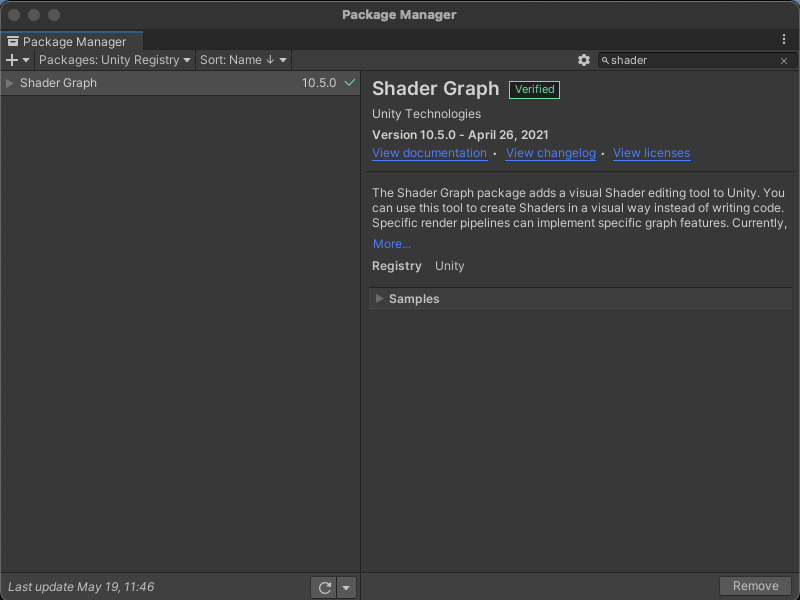
    1. Make sure you have Shader Graph included in the project

    To make sure that you can use Shader Graph, go to Window -> Package Manager and make sure that Shader Graph is included in the project Resources.
    2. Quickly get to the documentation for what a node does.

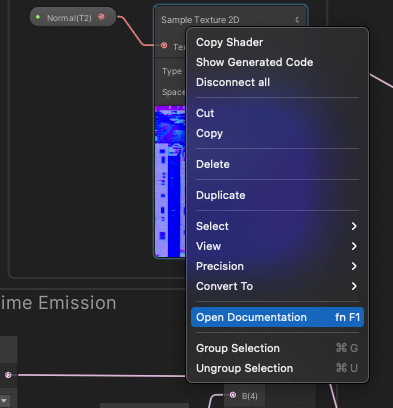
    When looking at a node it might be hard to exactly tell what this black box does when computing. To quickly go to the documentation, Right click on the node and hit ‘View Documentation’. It will bring up a Unity page with relevant information.
    3. Use Sticky Notes and Groups!!

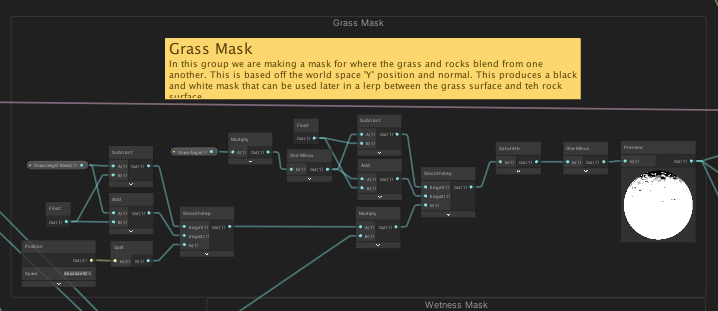
    One of the newer features is that you can add sticky notes and groups of nodes to help organize your graph. It massively helps anyone looking at your graph later to understand how something is working. In the example below, you can see a ‘Grass Mask’ group that has a sticky note attached to it.
    Follow me on Twitter for more tech articles!


    Exploring Shader Graph in Unity was originally published in Geek Culture on Medium, where people are continuing the conversation by highlighting and responding to this story.


    Source link

    Share. Facebook Twitter Pinterest LinkedIn Tumblr Email

    Related Posts

    The Medium RSS Feed’s Missing Part

    July 6, 2026

    Grafana’s Approach to AI-Native Observability

    July 4, 2026

    Spring Boot OAuth2: Secure Authentication and Authorization

    July 3, 2026

    OOP: Object Oriented Programming

    July 2, 2026

    We Tried Agile and It Didn’t Work

    June 30, 2026

    Software-Defined Warfare: Crossing the Chasm in Two Software Areas

    June 29, 2026
    Top Posts

    Understanding U-Net Architecture in Deep Learning

    November 25, 202559 Views

    Hard-braking events as indicators of road segment crash risk

    January 14, 202631 Views

    Redefining AI efficiency with extreme compression

    March 25, 202628 Views
    Don't Miss

    Understanding VHF (Very High Frequency) Propagation

    July 7, 2026

    More Information VHF frequencies (30–300 MHz) support broadcasting, voice communications, aviation navigation, and defense radar.…

    M&A Monthly: June/July 2026

    July 7, 2026

    Guidelines for Respectful Use of AI – O’Reilly

    July 7, 2026

    How Real Estate Investors Can Use Big Data for Non-QM Lending

    July 7, 2026
    Stay In Touch
    • Facebook
    • Instagram
    About Us

    At GeekFence, we are a team of tech-enthusiasts, industry watchers and content creators who believe that technology isn’t just about gadgets—it’s about how innovation transforms our lives, work and society. We’ve come together to build a place where readers, thinkers and industry insiders can converge to explore what’s next in tech.

    Our Picks

    Understanding VHF (Very High Frequency) Propagation

    July 7, 2026

    M&A Monthly: June/July 2026

    July 7, 2026

    Subscribe to Updates

    Please enable JavaScript in your browser to complete this form.
    Loading
    • About Us
    • Contact Us
    • Disclaimer
    • Privacy Policy
    • Terms and Conditions
    © 2026 Geekfence.All Rigt Reserved.

    Type above and press Enter to search. Press Esc to cancel.