

Cut, Copy and Paste in JavaScript

The browser allows JavaScript scripts to read and write to the clipboard, and automatically copy or paste content. In general, scripts should not modify the user’s clipboard, so as not to meet the user’s expectations. However, sometimes it can be convenient to do this, such as the “one-click copy” function, the user clicks a button, and the specified content is automatically entered into the clipboard. Currently, there are three ways to implement clipboard operations.
- Document.execCommand()method
- Asynchronous Clipboard API
- copy,cut and paste Events
This article introduces these three methods one by one. This is my 37th Medium article.
Document.execCommand() method
Document.execCommand() is the traditional method of manipulating the clipboard, which is supported by various browsers. It supports the three operations of copy, cut, and paste.
- Document.execCommand('copy') — copy
- Document.execCommand('cut') — cut
- Document.execCommand('paste') — paste
Copy or Cut operation
When copying, first select the text and then call the Document.execCommand('copy'), the selected text will enter the clipboard.
https://medium.com/media/9d3d2c9d872794a6960dac276cdafef3/href
In the above example, the script first selects the text in the inputElement of the input box ( inputElement.select() ), and then Document.execCommand('copy') copies it to the clipboard. Note that the copy operation is best placed in the event listener function, triggered by the user (for example, the user clicks a button). If the script is executed autonomously, some browsers may report an error. Cut operation is also similar to the copy operation.
https://medium.com/media/2c370cdc565840fc90b9b2d114951405/href
Paste operation
When pasting, calling Document.execCommand('paste') will output the contents of the clipboard to the current focus element.
https://medium.com/media/87c5e442a7018036dfc607514de7c9af/href
Disadvantage
Although the Document.execCommand() method is convenient, it has some disadvantages. First, it can only copy the selected content to the clipboard, and cannot write content to the clipboard arbitrarily. Secondly, it is an asynchronous operation. If you copy/paste a large amount of data, the page will freeze. Some browsers will also pop up a prompt box and ask the user for permission. At this time, the page will become unresponsive before the user makes a choice. In order to solve these problems, browser vendors have proposed an asynchronous Clipboard API.
Asynchronous Clipboard API
Clipboard API is the next-generation clipboard operation method, which is more powerful and reasonable than the traditional Document.execCommand() method. All its operations are asynchronous and return Promise objects without causing page jams. Moreover, it can put arbitrary content (such as pictures) into the clipboard. The navigator.clipboard property returns the Clipboard object, and all operations are performed through this object.
const clipboardObj = navigator.clipboard;
If the navigator.clipboard property returns undefined, it means that the current browser does not support this API (you can see the full compatibly table on Can I use…). Since users may put sensitive data (such as passwords) on the clipboard, allowing scripts to read them arbitrarily will cause security risks, so this API has more security restrictions. First of all, the Chrome browser stipulates that only HTTPS protocol pages can use this API. However, the development environment (localhost) allows the use of non-encrypted protocols. Secondly, the user’s permission needs to be clearly obtained when calling. The specific implementation of permissions uses the Permissions API. There are two permissions related to the clipboard: clipboard-write (write permission) and clipboard-read (read permission). The “write permission” is automatically granted to the script, and the “read permission” must be explicitly granted by the user. In other words, the script can be automatically completed when writing to the clipboard, but when reading the clipboard, the browser will pop up a dialog box asking whether the user agrees to read.
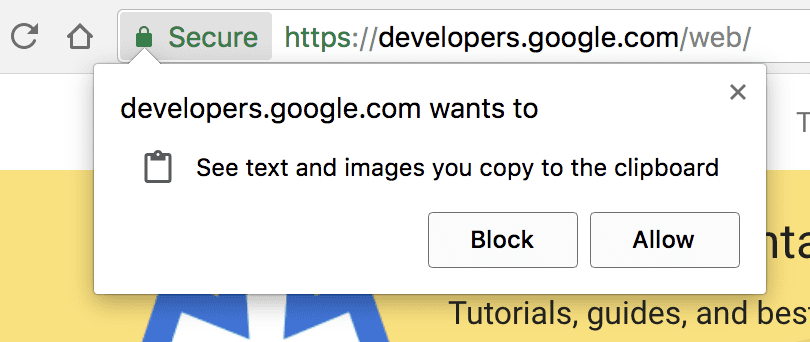
In addition, it should be noted that what the script reads is always the clipboard of the current page. One problem that this brings is that if you paste the relevant code into the developer tool and run it directly, an error may be reported because the current page at this time is the window of the developer tool, not a web page.
https://medium.com/media/c917e180df44ce0caf0e422b013fb7c6/href
If you paste the above code into the developer tool and run it, an error will be reported. Because when the code is running, the developer tool window is the current page, and there is no DOM interface that the Clipboard API depends on this page. One solution is to put the relevant code in setTimeout() to delay running, and quickly click on the page window of the browser before calling the function to turn it into the current page.
https://medium.com/media/d4a86d5bd7042b55a12b262e7de204b8/href
After the above code is pasted into the developer tool to run, quickly click on the page window of the webpage to make it the current page, so that no error will be reported.
Clipboard object
clipboard.readText()
The clipboard.readText() method is used to copy the text data in the clipboard.
https://medium.com/media/edbdd6afe11db16aef6fd8cf2a5de380/href
In the above example, after the user clicks on the page, the text in the clipboard will be output. Note that the browser will pop up a dialog box at this time, asking the user whether to agree with the script to read the clipboard.
If the user disagrees, the script will report an error. At this time, you can use the try…catch structure to handle errors.
https://medium.com/media/7c30cda146134fe78fac02686240a822/href
clipboard.read()
The clipboard.read() method is used to copy the data in the clipboard, which can be text data or binary data (such as pictures). This method requires explicit permission from the user. This method returns a Promise object. Once the state of the object becomes resolved, an array can be obtained, and each array member is an instance of a ClipboardItem object.
https://medium.com/media/5cfc2aab31a340fb24537d54448883e5/href
The ClipboardItem object represents a single clip item and each clip item has a clipboardItem.types property and a clipboardItem.getType() method. The clipboardItem.types property returns an array whose members are the MIME types available for the clip item. For example, a clip item can be pasted in HTML format or in plain text format. Then it has two MIME types (text/html and text/plain). The clipboardItem.getType(type) method is used to read the data of the clip item and returns a Promise object. This method accepts the MIME type of the clip item as a parameter and returns the data of that type. This parameter is required, otherwise, an error will be reported.
clipboard.writeText()
The clipboard.writeText() method is used to write text content to the clipboard.
https://medium.com/media/b2786f780145c34da1d8d8b5f9970b7a/href
The above example is that after the user clicks on the web page, the script writes text data to the clipboard. This method does not require user permission, but it is best to put it in try…catch to prevent errors.
https://medium.com/media/5b8e90947eaf99a062e9f43615c2fb1d/href
clipboard.write()
The clipboard.write() method is used to write arbitrary data to the clipboard, which can be text data or binary data. This method accepts a ClipboardItem instance as a parameter, which represents the data written to the clipboard.
https://medium.com/media/1e4d8b9a0faa7aa9e8a6e4b84bd23a91/href
In the above example, the script writes a picture to the clipboard. Note that the Chrome browser currently (until this writer writes this article) only supports writing images in PNG format. clipboardItem() is a constructor natively provided by the browser to generate an instance of clipboardItem. It accepts an object as a parameter. The key name of the object is the MIME type of the data, and the key value is the data itself. The following example is to write the value of the same clip item in multiple formats to the clipboard, one is text data, and the other is binary data for pasting on different occasions.
https://medium.com/media/4f89456ef61ba1676c74565508e34724/href
Copy, Cut, and Paste Events
When the user puts data into the clipboard, the copy event will be triggered. The following example is to convert the text that the user puts on the clipboard to uppercase.
https://medium.com/media/56349f2db4f9a0c68d50bfbd1e7b8e7d/href
In the above example, the clipboardData property of the event object contains the clipboard data. It is an object with the following properties and methods.
- Event.clipboardData.setData(type, data) : To modify the clipboard data, you need to specify the data type.
- Event.clipboardData.getData(type) : To obtain clipboard data, you need to specify the data type.
- Event.clipboardData.clearData([type]) : Clear clipboard data, you can specify the data type. If you do not specify the type, all types of data will be cleared.
- Event.clipboardData.items : An array-like object contains all clip items, but usually there is only one clip item
The following example is to intercept the user’s copy operation and put the specified content into the clipboard.
https://medium.com/media/4c39a1a4f6b3efcf4b47960f1f287627/href
In the above example, first, use e.preventDefault() to cancel the default operation of the clipboard, and then the script takes over the copy operation. The cut event is triggered when the user performs a cutting operation. Its processing is exactly the same as the copy event, and the cut data is also obtained from the Event.clipboardData property.
When the user uses the clipboard data to paste, the paste event will be triggered. The following example is to intercept the paste operation, the data in the clipboard is taken out by the script.
https://medium.com/media/6aab8e207fccce5d7e966d382c2050b0/href
Conclusion
For user experience, Clipboard access is a great tool. But Clipboard access has its thorns. Some users bring malicious data and some users carry sensitive data. Make sure you handle other user’s data responsibly. You need to prepare yourself for those nasty paste events.
Asynchronous Clipboard API is new, and no browser supports all features, but it’s easier to use and more robust than the old Document.execCommand() method.
Explore Clipboard Operation in JavaScript was originally published in Geek Culture on Medium, where people are continuing the conversation by highlighting and responding to this story.