


Summary created by Smart Answers AI
In summary:
- Tech Advisor reports that Apple’s iOS 27 update will allow users to adjust or disable the controversial ‘Liquid Glass’ interface effects following mixed user reactions.
- The semi-transparent design feature, while visually appealing to some, has caused readability issues with notifications and interface elements for many iPhone users.
- iOS 27 arrives in September for iPhone 11 and newer models, offering customization options through Display & Brightness settings and accessibility features.
Apple’s 2026 WWDC kicked off last night with its keynote. Among the biggish pieces of news were fresh protections for kids online, promises that Siri AI will soon be able to do much of what Gemini can do now (although only on a handful of models, and not in the EU), and the unexpected decision to wipe several Apple Watch models from the WatchOS update list. Surprise!
But it’s telling that Apple pretty much led the event with design news – although there’s really nothing new about it.
Instead, the keynote segment amounted to an acknowledgement from Apple that Liquid Glass, the brand’s biggest software interface redesign since 2013’s iOS 7, is less than universally loved. Functionality is being added in iOS 27 to allow users to dial back the design to their own comfort level.
Apple Director of Human Interface Shubham Kedia said: “Like with all major design updates, there’s a natural process where we take a bold leap forward and then we continue to iterate.”
Okay, I can sort of buy that. However, he continued, somewhat less convincingly: “Now we’re making some additional refinements, starting with updating the foundations of how Liquid Glass is built.”
Now, I have to take issue with this. I don’t think that “additional refinements” and “updating the foundations” of how something is built are exactly the same thing. Or even very close. One means tweaking it, the other means wondering if there’s a way you can tear it all down. And that’s fairly close to what Apple is doing.
As the name suggests, Liquid Glass adds a glassy look to screen design and icons, and a semi-transparent, floating effect to interactive elements. But some users find it blurry, or complain that notifications are hard to read.
That’s why Apple is adding in a slider and other settings in iOS 27 that’ll allow you to turn up Liquid Glass effects – or, more likely, turn them right down, or off altogether.
That is much less of a design refinement and much more of a way that users can pretend the whole Liquid Glass thing never happened at all.
iO2 27 is coming to supported iPhones (the iPhone 11 and up, the iPhone SE second and third generations) this September, with the launch of the iPhone 18 series. iOS 27 is currently in its developer beta phase.
How to turn off Liquid Glass in the meantime
While you can’t turn the Liquid Glass effects off completely at this stage, there are a couple of steps you can take to minimise the glassy look.
Here’s what to do.
Change your accessibility settings
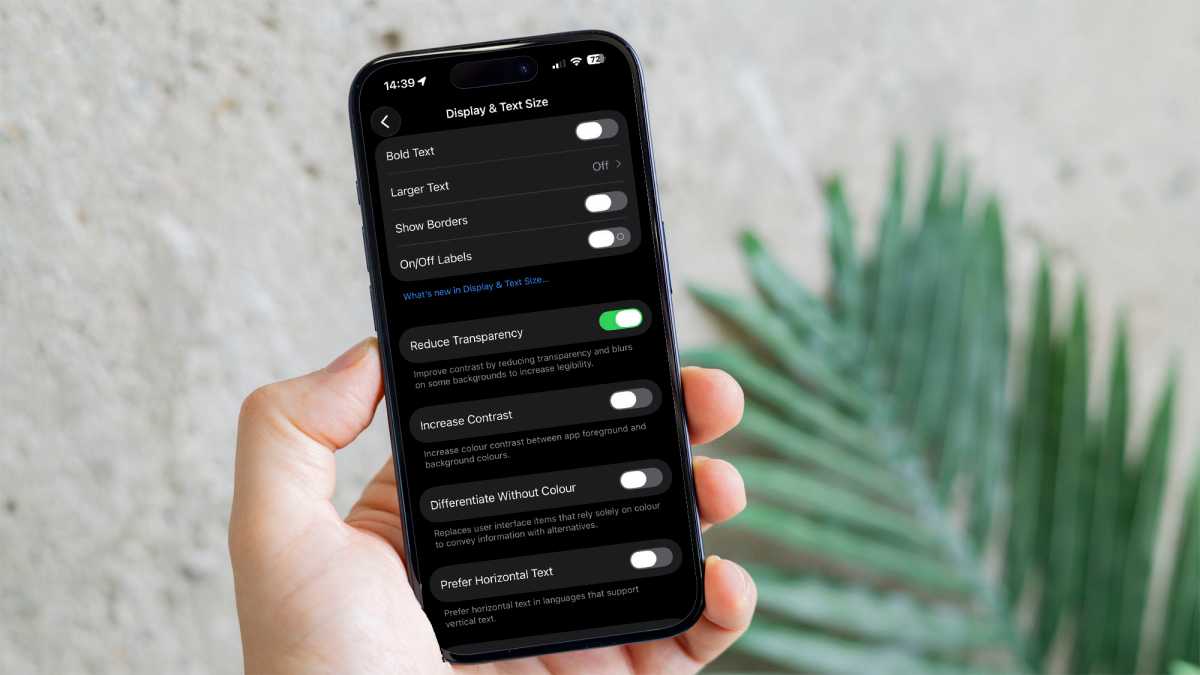
Go to Settings > Accessibility > Display & Text Size, then toggle on Reduce Transparency.
Dominik Tomaszewski / Foundry
This will also have an effect on other aspects of your display, so this may not be the perfect option for you.
Change your display settings
But there is another way.
Go to Settings > Display & Brightness > Liquid Glass. Change it from Clear to Tinted.
This setting should, at the very least, make it easier to read notifications.

Dominik Tomaszewski / Foundry
iO2 27 will be arriving with the new iPhone 18 lineup this September. Find out everything we know about the upcoming iPhone 18 models.