


Apple has released its first Background Security Improvements update to fix a WebKit flaw tracked as CVE-2026-20643 on iPhones, iPads, and Macs without requiring a full operating system upgrade.
The CVE-2026-20643 flaw allows malicious web content to bypass the browser’s Same Origin Policy.
Apple says the flaw is a cross-origin issue in the Navigation API that was addressed with improved input validation.
The vulnerability was discovered by security researcher Thomas Espach, with the new update available on iOS 26.3.1, iPadOS 26.3.1, macOS 26.3.1, and macOS 26.3.2.
This release is the first time Apple has pushed a security fix through its new Background Security Improvements feature, which is used to deliver small out-of-band patches outside the normal security update cycle.
“Background Security Improvements deliver lightweight security releases for components such as the Safari browser, WebKit framework stack, and other system libraries that benefit from smaller, ongoing security patches between software updates,” explains Apple.
“In rare instances of compatibility issues, Background Security Improvements may be temporarily removed and then enhanced in a subsequent software update.”
In the past, Apple security updates required users to install a new OS version and restart their device. However, with Background Security Improvements, Apple can now deliver small updates that are applied to specific components in the background.
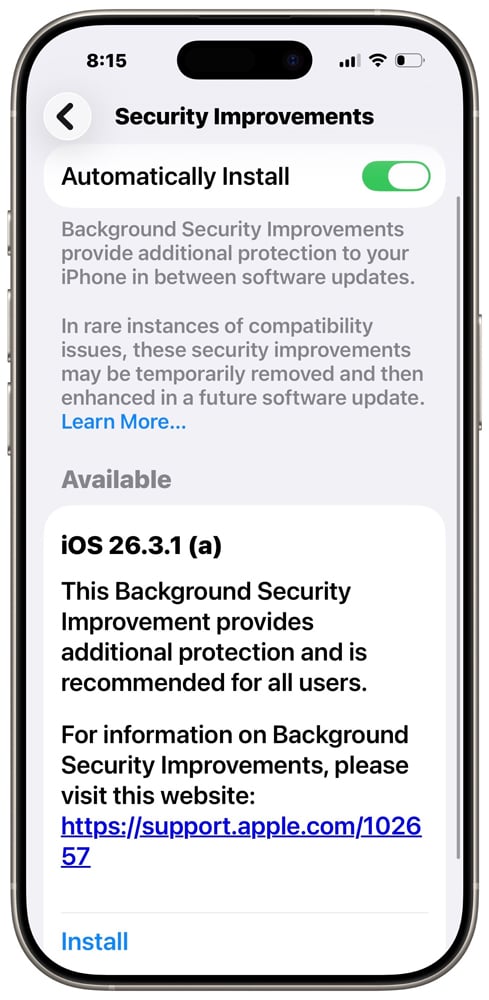
Apple added the feature in iOS 26.1, iPadOS 26.1, and macOS 26.1, stating it was to be used to quickly patch security flaws between releases.
Users can access the feature through their device settings under the Privacy & Security menu.
- On iPhone and iPad: Go to Settings, then tap Privacy & Security.
- On Mac: From the Apple menu, choose System Settings. Then click Privacy & Security.
Apple warns that uninstalling a Background Security Improvements update removes all previously applied background patches, reverting the device to the baseline OS version (such as iOS 26.3.1) without any of the incremental security fixes.
This effectively removes the rapid-response security protections delivered through this feature, leaving devices at the baseline security level until the updates are reapplied or included in a future full update.
Therefore, unless a baseline security improvement causes an issue on your device, it is strongly recommended that they not be uninstalled.

Malware is getting smarter. The Red Report 2026 reveals how new threats use math to detect sandboxes and hide in plain sight.
Download our analysis of 1.1 million malicious samples to uncover the top 10 techniques and see if your security stack is blinded.