
Close Menu
geekfence.comgeekfence.com
    What's Hot

    Open Cosmos launches first satellites for new LEO constellation

    January 25, 2026

    Achieving superior intent extraction through decomposition

    January 25, 2026

    How UX Research Reveals Hidden AI Orchestration Failures

    January 25, 2026
    Facebook X (Twitter) Instagram
    • About Us
    • Contact Us
    Facebook Instagram
    geekfence.comgeekfence.com
    • Home
    • UK Tech News
    • AI
    • Big Data
    • Cyber Security
      • Cloud Computing
      • iOS Development
    • IoT
    • Mobile
    • Software
      • Software Development
      • Software Engineering
    • Technology
      • Green Technology
      • Nanotechnology
    • Telecom
    geekfence.comgeekfence.com
    Home»Cyber Security»Windows 11 tests shared Bluetooth audio support, but only for AI PCs
    Cyber Security

    Windows 11 tests shared Bluetooth audio support, but only for AI PCs

    AdminBy AdminNovember 1, 2025No Comments2 Mins Read2 Views
    Facebook Twitter Pinterest LinkedIn Telegram Tumblr Email
    Windows 11 tests shared Bluetooth audio support, but only for AI PCs
    Share
    Facebook Twitter LinkedIn Pinterest Email


    Windows 11 tests shared Bluetooth audio support, but only for AI PCs

    If you have two headphones, speakers, or any other Bluetooth hardware, you can now share audio between the two devices simultaneously on a Copilot+ PC.

    Microsoft is testing a new feature called “shared audio,” which is built on top of Bluetooth LE Audio broadcast technology.

    With Bluetooth LE Audio broadcast technology, Windows can now transmit an audio stream to two Bluetooth devices.

    Wiz

    Right now, if you have a Bluetooth speaker and an earbud, you can connect only one of them. Even if you manage to connect the two devices, you cannot play audio through both at the same time.

    This is a limitation of Bluetooth, but newer modems include support for Bluetooth LE Audio broadcast technology.

    Modern PCs, particularly Copilot+ PCs, have this technology, and Microsoft is finally adding support for shared audio to Windows 11.

    “Shared audio lets students share music with a friend while studying or brings family members closer by watching a movie together on an airplane,” Microsoft noted.

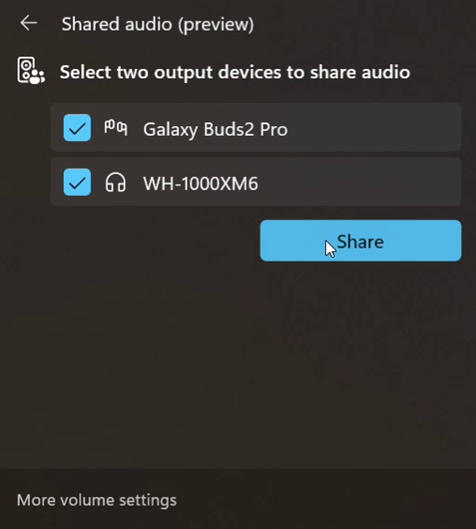
    In Windows 11 Build 26220.7051 (KB5067115), you can turn on the new “Shared audio (preview)” shortcut in quick settings to start sharing audio.
    Windows 11
    Shared audio feature in Windows 11

    Once you’re sharing the audio, you need to use “Stop sharing” to end the sharing session.

    Microsoft says support for more devices will be added later, but for now, only these PCs support the shared audio feature:

    • Surface Laptop, 13.8-inch and 15-inch* | Qualcomm Snapdragon X
    • Surface Laptop for Business, 13.8 and 15-inch* | Qualcomm Snapdragon X
    • Surface Pro, 13-inch** | Qualcomm Snapdragon X
    • Surface Pro for Business, 13-inch** | Qualcomm Snapdragon X

    Coming soon:

    • Samsung Galaxy Book5 360 | Intel Core Ultra Series 200
    • Samsung Galaxy Book5 Pro | Intel Core Ultra Series 200
    • Samsung Galaxy Book5 Pro 360 | Intel Core Ultra Series 200
    • Samsung Galaxy Book4 Edge | Qualcomm Snapdragon X
    • Surface Laptop, 13-inch | Qualcomm Snapdragon X
    • Surface Laptop for Business, 13-inch | Qualcomm Snapdragon X
    • Surface Pro, 12-inch | Qualcomm Snapdragon X
    • Surface Pro for Business, 12-inch | Qualcomm Snapdragon X

    Remember that you’ll also need a supported audio accessory.

    Most Bluetooth devices support Shared audio, such as Galaxy Buds2 Pro, Buds3, and Buds3 Pro.

    This feature is rolling out to everyone in the Windows Insider Program’s Dev and Beta channel with Windows 11 Build 26220.7051 (KB5067115).


    Source link

    Share. Facebook Twitter Pinterest LinkedIn Tumblr Email

    Related Posts

    Android’s pKVM Becomes First Globally Certified Software to Achieve Prestigious SESIP Level 5 Security Certification

    January 24, 2026

    Fortinet confirms critical FortiCloud auth bypass not fully patched

    January 23, 2026

    Filling the Most Common Gaps in Google Workspace Security

    January 22, 2026

    Patch Tuesday, January 2026 Edition – Krebs on Security

    January 21, 2026

    Why LinkedIn is a hunting ground for threat actors – and how to protect yourself

    January 20, 2026

    This Week in Scams: Fake Brand Messages and Account Takeovers

    January 19, 2026
    Top Posts

    Understanding U-Net Architecture in Deep Learning

    November 25, 202511 Views

    Hard-braking events as indicators of road segment crash risk

    January 14, 20269 Views

    Microsoft 365 Copilot now enables you to build apps and workflows

    October 29, 20258 Views
    Don't Miss

    Open Cosmos launches first satellites for new LEO constellation

    January 25, 2026

    Press Release Open Cosmos, the company building satellites to understand and connect the world, has…

    Achieving superior intent extraction through decomposition

    January 25, 2026

    How UX Research Reveals Hidden AI Orchestration Failures

    January 25, 2026

    ByteDance steps up its push into enterprise cloud services

    January 25, 2026
    Stay In Touch
    • Facebook
    • Instagram
    About Us

    At GeekFence, we are a team of tech-enthusiasts, industry watchers and content creators who believe that technology isn’t just about gadgets—it’s about how innovation transforms our lives, work and society. We’ve come together to build a place where readers, thinkers and industry insiders can converge to explore what’s next in tech.

    Our Picks

    Open Cosmos launches first satellites for new LEO constellation

    January 25, 2026

    Achieving superior intent extraction through decomposition

    January 25, 2026

    Subscribe to Updates

    Please enable JavaScript in your browser to complete this form.
    Loading
    • About Us
    • Contact Us
    • Disclaimer
    • Privacy Policy
    • Terms and Conditions
    © 2026 Geekfence.All Rigt Reserved.

    Type above and press Enter to search. Press Esc to cancel.