

A user signs in. Their identity is then used to pull data from another service, call an external API, and return a response, all without any of those systems ever seeing the user’s password. What makes that possible is a token: a short-lived credential that says this request is allowed. The handoff of that token is where things get complicated. Too little access and the request fails, too much and you risk exposing data that was never meant to be part of the transaction. This is an example of a typical security flow, and it’s where most issues appear.
OAuth2 was designed to handle these issues, allowing third-party applications to use another system’s data without handling user credentials. Rather than sharing sensitive login information like passwords, applications use tokens that define what is allowed and expire after a set amount of time. It’s a widely used approach because it’s both secure and scalable.
In the Spring framework, support for OAuth2 has been updated to match how modern applications authenticate requests across services. Earlier versions made it easy to get started, but they often hid how requests were handled once they moved through the system. That became difficult to work with as applications grew more complex. With Spring Boot 3.x and Spring Security 6, those abstractions have been reduced: Developers now define security through dedicated configuration and security components, which makes it easier to see how requests are processed and access is checked. In other words, the flow is visible in the code.
While the newer model gives Spring developers more control over how security is applied throughout the application, it also places more responsibility on configuration. Decisions around authentication, token validation, and access rules are now defined more directly in code, which makes security behavior easier to trace but also easier to misconfigure. Each case needs to be set up with care to prevent issues surfacing later.
This article explores how OAuth2 is implemented in modern Spring Boot applications, with a focus on how the core roles are structured within the current Spring Security model. We examine the configuration patterns and security decisions behind authentication and authorization across distributed systems, so developers can trace and troubleshoot security flows in complex application environments.
Understanding OAuth2 in Spring Boot
Sometimes, OAuth2 breaks in ways that are difficult to explain at first glance. A user might sign in successfully, for example, but a request to another service is rejected. A token is present, but access is denied. The system can appear inconsistent because different parts of the flow are doing different things. Working with OAuth2 in Spring Boot means thinking in terms of how rules are enforced and where access decisions are made.
What Is OAuth2 and How Does It Work?
OAuth2 is an authorization framework that allows an application to access external resources on behalf of a user without handling their credentials. First, the user is redirected to an authorization server to sign in and verify their identity. The application then receives an access token from the authorization server that specifies what it can do and for how long. That token is included in requests to a resource server, which decides whether to allow them. When access needs to continue, a refresh token can be used to obtain a new one without asking the user to sign in again.
OAuth2 Roles in a Spring Boot Architecture
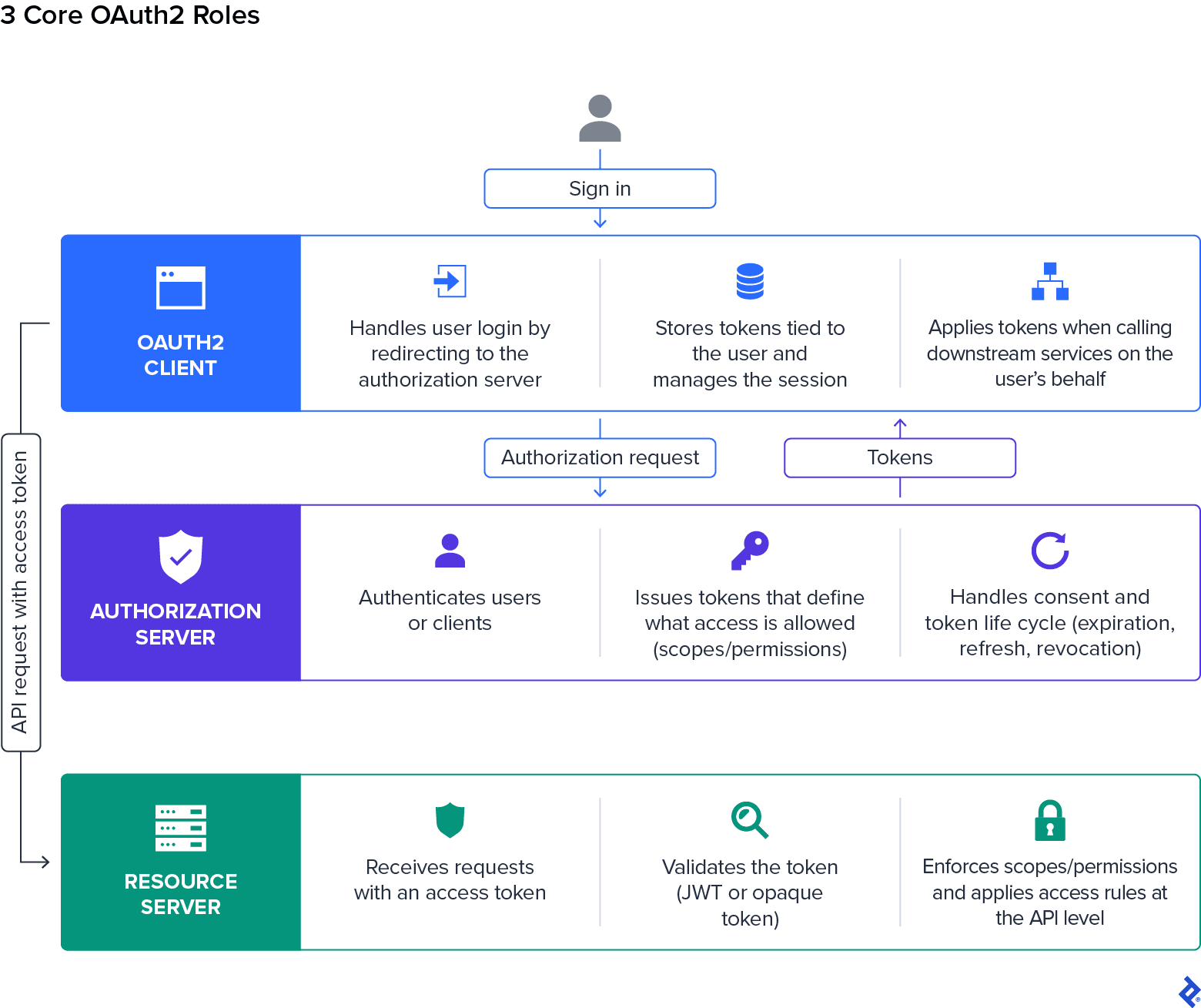
In Spring Boot, OAuth2 is structured around a small set of roles that divide how user authentication and access are handled. Each role is responsible for a different part of the request life cycle. A single application can take on more than one of these roles, depending on how it interacts with other systems.
This is how the core roles are typically defined:
- The OAuth2 client handles user login by redirecting to an external provider for authentication, then manages the resulting session within the application. It stores the tokens issued by the authorization server during authentication and applies them when calling downstream services on the user’s behalf.
- The authorization server authenticates users or clients and issues tokens that define what access is allowed. It also handles consent and token life-cycle concerns such as expiration and refresh. When applications need to issue and manage their own tokens, modern Spring setups use Spring Authorization Server, which replaces older, deprecated modules. In many cases, this role is handled by external providers such as Google, Okta, or Auth0.
- The resource server receives incoming requests containing those tokens and checks whether the attached token is valid before allowing access to protected endpoints. It enforces scopes or permissions defined in the token and applies access rules at the API level.
A Modern Approach to Spring Security 6 OAuth2 Architecture
Spring Security 6 removes the old adapter-based configuration model, so security is now defined directly through beans and filter chains instead of an inherited setup.
A minimal OAuth2 login configuration might look like this:
@Bean
SecurityFilterChain securityFilterChain(HttpSecurity http) throws Exception {
    http
        .authorizeHttpRequests(auth -> auth.anyRequest().authenticated())
        .oauth2Login(Customizer.withDefaults());

    return http.build();
}
The configuration above reflects several broader changes in how OAuth2 security is structured in Spring Security 6:
-
SecurityFilterChaindetermines how requests are processed, including when authentication occurs and how access is enforced. -
Lambda-based DSL keeps configuration in one place and defines OAuth2 features such as
oauth2Login,oauth2Client, andoauth2ResourceServerinline. - Role-based feature selection enables only the capabilities needed for the application’s role.
- Targeted dependencies align starters with that role, so the classpath matches how OAuth2 is used.
-
Legacy pattern removal excludes classes such as
WebSecurityConfigurerAdapterand older autoconfiguration modules from the default setup.
Spring Boot as an OAuth2 Client
As an OAuth2 client, an application uses delegated authentication by relying on an external provider to handle user sign-in. After the user authenticates, the provider returns tokens that the application can use in later requests. This is one of the most common ways to structure an OAuth app, as it supports both single sign-on and API access within a single flow.
In Spring Boot, you implement the OAuth client role using Spring Security, which provides built-in support for OAuth2 login and external identity providers. Developers configure how the application connects to those providers, what permissions are requested, and how tokens are used after login.
Implementing OAuth2 Login in Spring Boot
In Spring Boot, developers enable OAuth2 login through Spring Security with a small amount of configuration. Once it’s in place, Spring Security manages the flow between the application and the external provider.
The login process is typically initiated through an endpoint such as /oauth2/authorization/{registrationId}, where registrationId refers to a configured provider such as Google or GitHub. When accessed, the endpoint redirects the user to the selected identity provider.
Login is configured by enabling oauth2Login() within the SecurityFilterChain. When a user signs in, the application redirects them to the identity provider’s authorization endpoint. After authentication and consent, the identity provider returns an authorization code, which Spring Security exchanges for access and ID tokens. The ID token, defined by OpenID Connect, contains the user’s identity information and can be used to establish the session and access profile details.
Customizing the OAuth2 Login Page
By default, Spring Security generates a standard login page for OAuth2 authentication flows. In many production applications, teams replace this with a custom interface so authentication matches the application’s branding and user experience requirements.
A custom login page can be configured directly within the SecurityFilterChain:
@Bean
SecurityFilterChain securityFilterChain(HttpSecurity http) throws Exception {
    http
        .authorizeHttpRequests(auth -> auth.anyRequest().authenticated())
        .oauth2Login(oauth2 -> oauth2
            .loginPage("/custom-login")
        );

    return http.build();
}
The application must then provide a controller and front-end page for the configured /custom-login endpoint. From there, users can initiate authentication through links such as /oauth2/authorization/google or other configured providers. This approach enables teams to customize the authentication experience while still relying on Spring Security to handle the underlying OAuth2 authorization flow and token exchange process.
Configuring OAuth2 Providers in application.yml
OAuth2 providers are configured through properties in application.yml, which define how the application connects to external identity services. Spring Boot includes defaults for common providers, so most setups require only a small amount of configuration.
A typical configuration looks like this:
spring:
  security:
    oauth2:
      client:
        registration:
          google:
            client-id: your-client-id
            client-secret: your-client-secret
            scope:
              - openid
              - profile
              - email
Key configuration points include:
-
Provider registration: You must register the application with the provider, often through tools such as the Google Cloud Console, to obtain a
client-idandclient-secret. -
Client configuration: Settings are defined under
spring.security.oauth2.client.registration, including the provider, scopes, and redirect URI. - Provider endpoints: Spring Boot provides built-in defaults for common providers, such as Google or GitHub, while custom authorization and token endpoints can be specified when needed.
- Multiple provider support: Separate client registrations can be defined within the same application to support more than one provider.
Accessing User Information and Calling APIs
After authentication, the application has access to some user information and the tokens issued during login. These are used in subsequent requests and when calling external services.
The typical flow looks like this:
-
Access user details: Identity information is available through
OAuth2UserorOidcUser, depending on the provider. - Retrieve the access token: Retrieval is handled through the authorized client associated with the current session.
-
Call external APIs: The token is included in requests made with
RestClientorWebClientwhen accessing protected services. -
Manage the authorized client: The application stores and manages the authorized client through components such as
OAuth2AuthorizedClientService.
Key Architectural Considerations
When implementing an OAuth2 client in Spring Boot, teams need to make several foundational design decisions early in development:
- Whether authentication is handled entirely through an external identity provider or combined with internal session management
- How tokens are stored, refreshed, and attached to outbound requests across different application layers and services
- Which OAuth2 grant types are required for user-based flows versus application-level service communication
- How much OAuth2 behavior should remain framework-managed versus customized through explicit security configuration
Spring Boot as an OAuth2 Resource Server
By the time a request reaches the application, authentication has already taken place. The task at this stage is to evaluate those tokens and decide whether access should be granted. This is where most access issues surface. A request can carry a valid token and still be rejected, depending on how it’s interpreted and what rules are applied. Understanding how this layer works makes those outcomes easier to trace and control.
Configuring OAuth2 Resource Server in Spring Boot
Developers configure Spring Security to validate tokens and apply access rules on each request. Resource server support is enabled within the SecurityFilterChain, where the application is set up to treat incoming requests as protected by default. This is typically done by configuring oauth2ResourceServer().jwt() or .opaqueToken(). Token validation depends on how the token is represented.
Two common approaches are:
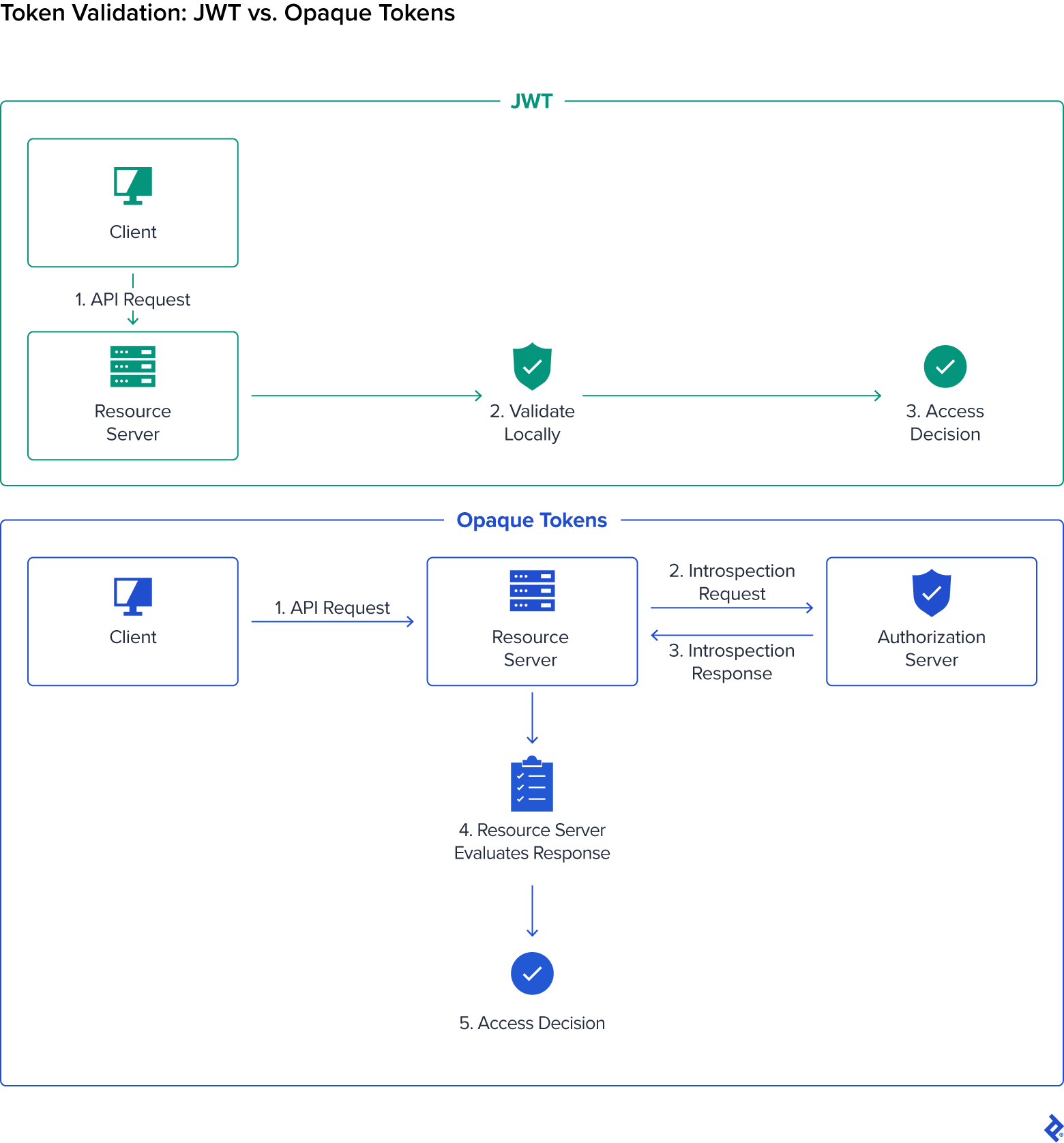
JSON Web Tokens (JWTs), which are self-contained tokens that can be verified locally using public keys exposed through a jwk-set-uri. In Spring Boot, JWT validation is commonly configured through an issuer URI:
spring:
  security:
    oauth2:
      resourceserver:
        jwt:
          issuer-uri:
Opaque tokens, which are tokens that contain no readable identity data and must be validated through an introspection endpoint. This requires the resource server to call the authorization server during token validation:
spring:
  security:
    oauth2:
      resourceserver:
        opaque-token:
          introspection-uri: /introspect
          client-id: client-id
          client-secret: client-secret
Access control is defined using authorizeHttpRequests, which determines the routes that require authentication and what kind of access is allowed. Protection can be applied to specific endpoints or across the entire application.
JWT vs. Opaque Tokens in Spring Security
JWT and opaque tokens handle access checks differently on each request. In many setups, the authorization server determines the token format and the application is configured to accept it. When teams control token issuance themselves, the choice between JWT and opaque tokens comes down to how requests are evaluated and how quickly changes need to take effect.
Here’s an overview of the key differences.
|
Aspect |
JWT |
Opaque Tokens |
|---|---|---|
|
Runtime behavior |
Access decisions rely on data already present in the token. |
Access decisions depend on a lookup to the authorization server. |
|
Performance |
Network calls are not required for each request. |
A network request is required for each validation. |
|
Revocation |
Access changes take effect only when tokens expire or are rotated. |
Access changes take effect immediately. |
|
Token contents |
Identity and authorization data are carried within the token. |
The token acts as a reference to data stored by the authorization server. |
|
Operational impact |
Careful design and key management are required. |
Availability and latency of the introspection service affect request handling. |
JWTs are self-contained, with a structured format that encodes identity and access data directly in the token. This allows them to be validated locally and keeps request handling fast, but because the application continues to use that data until the token is replaced, access updates don’t take effect until then. Opaque tokens, on the other hand, carry no usable data on their own, so each request is checked against the authorization server. This adds a network call, but means access updates take effect immediately. For developers, it means that JWTs require careful decisions around token lifetime and scope, while opaque tokens add overhead but offer tighter control.
Securing APIs With Bearer Tokens
Regardless of which validation strategy is used, the request flow inside the resource server follows the same general pattern. Requests to protected APIs and HTTP services rely on bearer tokens carried with each call. The client includes the token in the Authorization header and the application evaluates it before any business logic runs.
In Spring Security, this happens automatically once resource server support is enabled. The framework extracts the token from the header, validates it based on the configured strategy, and either allows the request to proceed or rejects it. A typical request looks like:
Authorization: Bearer
If the token is missing, invalid, or expired, the request is rejected with a 401 Unauthorized response. When the token is valid, access control rules determine what the request is allowed to do, often based on scopes or roles attached to the token. This model keeps authentication separate from request handling while still enforcing access control consistently across the application.
Resource Server Design Considerations
Resource server configuration informs how access decisions are enforced throughout the application life cycle, particularly in distributed environments where multiple services evaluate tokens independently. Key architectural decisions typically include:
- Whether JWT or opaque token validation better matches the system’s performance, revocation, and operational requirements
- How authorization rules are enforced across APIs and downstream services
- Where token validation and authorization checks occur within the request life cycle
- How signing keys, token lifetime, and introspection behavior are managed as infrastructure and traffic patterns evolve
Calling External APIs with OAuth2
After handling login, applications often need to call other services as part of the same request. In these cases, Spring Security can manage tokens automatically when making outbound API calls, which allows applications to communicate with external services without handling those steps directly.
Calling Protected APIs with OAuth2
Calling a protected API involves making outbound requests to another service. In Spring Boot, these requests are typically made using RestClient or WebClient, with tokens attached as part of the request. Rather than adding tokens manually, Spring Security integrates with these clients so that tokens are resolved and applied automatically. The application makes the request, and the token is included based on the current context, either the user’s session or a registered client.
A request made through WebClient might look like this:
webClient.get()
    .uri("
    .retrieve()
    .bodyToMono(String.class);
Token handling is managed by OAuth2AuthorizedClientManager, which obtains tokens when needed and refreshes them as they expire. This supports both user-based flows, where requests act on behalf of an authenticated user, and client-based flows, where the application authenticates using its own credentials.
Client Credentials Grant Type and Application-level Access
The client credentials grant is used when an application calls another service without a user involved. Instead of acting on behalf of a person, the application authenticates with its own credentials and receives a token that represents the service itself. The resulting token is scoped to application-level permissions and is commonly used in back-end services, scheduled jobs, and internal APIs where requests run independently of a user session. You need to scope permissions carefully, usually limiting them to the minimum required.
When client credentials are used with RestClient, Spring Security can resolve the authorized client from request attributes and attach the appropriate access token to outbound requests. RequestAttributePrincipalResolver allows the application to associate the request with an application-level principal, rather than a logged-in user, which is useful for service-to-service calls. A typical configuration looks like this:
@Bean
RestClient restClient(OAuth2AuthorizedClientManager authorizedClientManager) {
    OAuth2ClientHttpRequestInterceptor requestInterceptor =
        new OAuth2ClientHttpRequestInterceptor(authorizedClientManager);

    requestInterceptor.setPrincipalResolver(
        new RequestAttributePrincipalResolver()
    );

    return RestClient.builder()
        .requestInterceptor(requestInterceptor)
        .build();
}
The outbound request can then specify the client registration and principal through request attributes:
String response = restClient.get()
    .uri("
    .attributes(clientRegistrationId("internal-api"))
    .attributes(principal("service-client"))
    .retrieve()
    .body(String.class);
This keeps token acquisition tied to the configured client registration and its approved scopes, rather than requiring the application to manually construct or attach bearer tokens.
Configuring and Customizing OAuth2 Client Behavior
Developers can control how tokens are acquired, refreshed, and applied during outbound requests through a combination of client registrations and authorized client components. Spring Security also allows applications to support multiple OAuth2 grant types within the same runtime configuration.
For example, multiple OAuth2 flows can be enabled through a shared OAuth2AuthorizedClientProvider configuration:
OAuth2AuthorizedClientProvider provider =
    OAuth2AuthorizedClientProviderBuilder.builder()
        .authorizationCode()
        .clientCredentials()
        .refreshToken()
        .build();
In production systems, small timing differences between the client, authorization server, and downstream services can cause an access token to expire while a request is already in progress. Spring Security allows developers to account for this by configuring clock skew on the authorized client provider, so tokens are refreshed slightly before their exact expiry time. For example:
OAuth2AuthorizedClientProvider provider =
    OAuth2AuthorizedClientProviderBuilder.builder()
        .authorizationCode()
        .refreshToken(refreshToken ->
            refreshToken.clockSkew(Duration.ofSeconds(60))
        )
        .clientCredentials(clientCredentials ->
            clientCredentials.clockSkew(Duration.ofSeconds(60))
        )
        .build();
This configuration treats tokens as expired before their actual expiration time, reducing the chance that an outbound request begins with a token that becomes invalid midflight. Teams can adjust the skew based on infrastructure latency, authorization server behavior, and how long downstream requests typically take.
In application.yml, each client registration defines how the application connects to an external provider, including credentials, scopes, and endpoints. During execution, OAuth2AuthorizedClientManager handles token acquisition and refresh. To support different grant types and flows, you can enable or combine OAuth2AuthorizedClientProvider implementations as needed.
Token Life Cycle Management in Spring Boot OAuth2
After a user signs in, the token issued during that flow is reused across multiple requests and services. This introduces more points of failure, because each service may validate or interpret the token independently. A request can fail if the token has expired and hasn’t been refreshed in time, or if another service evaluates it differently. To keep those flows reliable, teams have to make deliberate choices about how tokens are renewed and validated, and where they’re stored.
Token Expiration and Refresh Strategies
Access tokens are intentionally short-lived. When a token expires midflow, any downstream call that depends on it will fail unless a new token is issued in time. Refresh tokens are used to obtain new access tokens without requiring the user to sign in again. This keeps requests moving without interrupting the flow, but only if the token is refreshed before the next call that depends on it.
In Spring Security, token refresh is typically handled through the authorized client infrastructure, so outbound requests can obtain a fresh access token before calling a protected service.
The key decision is how long tokens remain valid and when they’re renewed. Short lifetimes reduce exposure but increase the chance of refresh during active requests. In practice, this decision comes down to how predictable your request flows are and how much risk the system can tolerate.
Token Storage and Security Considerations
Once a token has been issued, the focus is on containment. A leaked token can often be used immediately, particularly in distributed systems where the same credentials may be accepted across multiple services. How tokens are stored and transmitted affects how much damage a compromised token can cause. Storage strategies also vary depending on whether tokens are handled in a browser, mobile client, or back-end service.
Common practices in OAuth2 include:
- Avoiding insecure browser storage: Access tokens are generally kept out of browser local storage because malicious scripts running in the browser can potentially read and steal that data if the application is compromised.
- Using secure storage mechanisms: Applications often rely on secure, HTTP-only cookies or back-end session storage so tokens are less exposed to client-side scripts.
- Protecting tokens during transmission: HTTPS is used for all token exchange and API communication to prevent interception in transit.
- Limiting token scope and lifetime: Tokens are typically restricted to the minimum required permissions and shorter expiration windows to reduce the impact of exposure.
- Encrypting sensitive data: Systems may encrypt token-related data in storage, so exposed databases don’t immediately reveal usable credentials.
Security Best Practices for Spring Boot OAuth2
Implementing OAuth2 is only one part of securing an application. Production systems need additional safeguards around how requests are handled, access is enforced, and security issues are detected and resolved. Spring Security includes many protections by default, but secure behavior still depends on how the application is configured and maintained. The following practices focus on strengthening OAuth2 implementation in real-world Spring Boot environments.
Using PKCE for Secure Authorization Code Flow
The OAuth2 login flow was originally designed for applications that could safely store client credentials on a back-end server. Public clients, such as single-page applications (SPAs) and mobile apps, don’t have that protection, because parts of the flow run in environments the user controls.
After a user signs in, the authorization server returns a temporary authorization code to the application. Spring Security then completes the authorization code exchange to obtain access and ID tokens. Proof Key for Code Exchange (PKCE) strengthens this process by preventing intercepted authorization codes from being reused by another application. PKCE works by adding two extra values to the authorization process:
- A code challenge, which is sent with the initial authorization request
- A code verifier, which is sent later when the application exchanges the authorization code for tokens
The authorization server checks that those values match before issuing tokens. This means that even if an attacker intercepts the authorization code during the redirect flow, they still can’t exchange it for a usable token without the original verifier.
In browser-based applications, the front end often continues making authenticated requests after the user signs in. Mobile applications usually store tokens using built-in operating system protections that make them harder for other applications to access. Some teams use a Backend-for-Frontend architecture, where the back end handles OAuth2 communication and the front end works through server-managed sessions instead of storing tokens directly. This keeps tokens out of the browser and moves more of the authentication logic to the server.
In modern Spring Security configurations, PKCE is enabled automatically for many OAuth2 client setups and is widely recommended for browser-based and mobile applications. Even when it’s not strictly required, it adds another layer of protection to one of the most exposed parts of the OAuth2 flow.
Protecting Against CSRF and Configuring CORS
OAuth2 flows often involve redirects between browsers, applications, and external identity providers. Because requests may cross domains and carry authenticated sessions or tokens, browser security settings become an important part of the overall security model. Misconfigured browser protections can allow unauthorized requests or expose endpoints more broadly than intended.
Two important concepts in Spring Security are Cross-Site Request Forgery (CSRF) protection and Cross-Origin Resource Sharing (CORS). Stateless APIs secured entirely through bearer tokens often disable CSRF protection, while browser-based applications using sessions or cookies usually keep it enabled.
In practice, teams typically:
- Enable CSRF protection for browser-based applications that rely on sessions or cookies, helping prevent malicious sites from submitting unauthorized requests on behalf of authenticated users.
- Configure CORS to allow requests only from trusted domains and only for the HTTP methods the application actually needs to support.
- Limit cross-domain requests to only the endpoints that require them, instead of allowing external access across the entire application.
- Align front-end and back-end configurations so browser behavior and server-side access rules enforce the same security boundaries.
Managing Secrets and Sensitive Configuration
OAuth2 depends on a small set of credentials and cryptographic keys that applications use to authenticate themselves and validate tokens. If those values are exposed, attackers may be able to impersonate trusted services or gain unauthorized access to protected systems. Because of that, sensitive configuration needs to be handled carefully throughout development and deployment.
In Spring Boot environments, teams typically protect sensitive configuration by:
- Storing sensitive credentials and keys outside the application codebase, often through environment variables or dedicated secret management systems, such as HashiCorp Vault or cloud provider secret stores.
- Avoiding hardcoded credentials in source code or committed configuration files, where they can be exposed through repositories or deployment artifacts.
- Rotating client secrets and signing keys regularly so older credentials can’t be reused indefinitely if they are leaked.
- Restricting access to sensitive configuration across development, testing, and production environments so only authorized systems and team members can retrieve those values.
Common Misconfigurations and Troubleshooting
Many OAuth2 issues stem from configuration errors rather than implementation flaws. A request may fail even when authentication appears to succeed, particularly when multiple services validate tokens differently or rely on inconsistent provider settings. Spring Security’s debug logging and testing support can help trace how requests move through the authentication flow and where validation fails.
logging.level.org.springframework.security=DEBUGThe table below outlines some of the most common OAuth2 issues in Spring Boot applications, along with the typical causes and the steps developers take to resolve them.
|
Issue |
Cause |
Typical Resolution |
|---|---|---|
|
Login fails after authentication. |
The redirect URI in the application doesn’t exactly match the value registered with the identity provider. |
Check that the redirect URL matches across the providers and Spring configuration, including the protocol, port, and path. |
|
Requests are denied even after login. |
The token doesn’t include the permissions required by the API. |
Verify which scopes or permissions are requested during login and required by the protected endpoint. |
|
Tokens are rejected unexpectedly. |
Token validation settings are incomplete or inconsistent. |
Check signing keys, issuer settings, and whether the application is configured for JWT or token introspection. |
|
Authentication works in one environment but fails in another. |
Provider settings or credentials differ between environments. |
Review client credentials, provider URLs, and environment-specific configuration. |
Testing OAuth2 in Spring Boot
Testing OAuth2 behavior is a crucial step in validating Spring Security configuration, particularly when applications apply different access rules across endpoints and services. Spring Security’s testing support allows developers to simulate authenticated users, JWTs, and OAuth2 login flows without depending on a live identity provider during integration tests.
For applications secured as resource servers, tests can attach a mock JWT directly to the request and verify that an authenticated call succeeds:
@SpringBootTest
@AutoConfigureMockMvc
class ApiSecurityTests {

    @Autowired
    MockMvc mockMvc;

    @Test
    void shouldAllowAuthenticatedRequest() throws Exception {
        mockMvc.perform(get("/api/data")
                .with(jwt()))
            .andExpect(status().isOk());
    }
}
It’s equally important to verify that protected endpoints reject requests that don’t include valid authentication:
@Test
void shouldDenyUnauthenticatedRequest() throws Exception {
    mockMvc.perform(get("/api/data"))
        .andExpect(status().isUnauthorized());
}
Applications using OAuth2 login can test the client side of the authentication flow in a similar way by simulating authenticated browser session:
@SpringBootTest
@AutoConfigureMockMvc
class LoginTests {

    @Autowired
    MockMvc mockMvc;

    @Test
    void shouldAuthenticateWithOAuth2Login() throws Exception {
        mockMvc.perform(get("/dashboard")
                .with(oauth2Login()))
            .andExpect(status().isOk());
    }
}
These test utilities are provided through SecurityMockMvcRequestPostProcessors, which lets teams verify authentication behavior, authorization rules, and protected endpoint access without requiring live OAuth2 infrastructure during automated testing.
Core Implementation Considerations
Many OAuth2 security issues arise as a result of operational decisions rather than the authentication flow itself. Important implementation decisions include:
- How tokens are stored and refreshed across browsers, back-end services, and distributed systems
- Where browser-facing authentication flows remain exposed to CSRF risks or cross-origin access issues
- How signing keys and client credentials are isolated between environments
- How testing and observability expose inconsistent authorization behavior before deployment
Securing Access Across Modern Systems
Applications depend on constant communication between systems that were built, deployed, and scaled independently from one another. Security issues aren’t always caused by a dramatic failure or obvious vulnerability. More often, they appear in the gaps between services: a token that expires at the wrong moment, or an API that interprets access differently.
Working effectively with OAuth2 in Spring Boot requires understanding those pressure points before they turn into production issues. The current Spring Security model gives developers far more visibility into how authentication and authorization are actually applied through a request life cycle, which makes it possible to reason about security behavior.
This is an important change because secure application development is increasingly tied to system design itself, and small decisions can carry large operational consequences. An application may appear secure in development, but if all the pieces aren’t aligned carefully, changing infrastructure or traffic patterns may still cause it to fail.
In distributed systems, trust isn’t carried forward automatically. Each service, token exchange, API call, and validation step has to reinforce it again. Developers who understand how OAuth2 functions inside modern Spring applications are better equipped to build resilient systems that maintain consistent access control, even as complexity grows.