

Sales teams spend hours every day on tasks that should never see a human. Research a prospect, score them against their fit, and put it all into a CRM. These are repeatable, rule based processes AI workflows driven by multi-agent systems can do all three, with speed and consistency that no human team can match.
This guide will show you exactly how to build that system. You will use LangGraph to orchestrate several AI agents, powered by OpenAI’s state-of-the-art LLMs, to build a sales pipeline that takes raw prospect data and turns it into a fully updated CRM entry, with zero manual effort. Let’s do it!
What Are AI Workflows for Sales Teams?
An AI workflow is an automated series of AI-enabled steps that performs jobs traditionally done by sales reps or SDRs. A multi-agent system assigns each task to a dedicated agent instead of a single model doing all the work. One agent looks into. One more qualifies. A third records the result. Together, they make for a robust, repeatable pipeline.
Why Sales Teams Need AI Automation Today
Today’s B2B sales cycles are data rich. A rep could be spending 30-40% of their time on non-selling activities such as researching LinkedIn profiles, scoring leads against ICP criteria, or updating Salesforce. That time has a direct cost.
AI automation addresses this in three ways:
- Speed: Prospecting takes seconds, not minutes.
- Consistency: Consistency Each lead is judged by the same standards, eliminating the possibility of human bias.
- Scale: The pipeline that handles 10 prospects handles 10,000 with no additional headcount.
Automating sales workflows does not mean eliminating salespeople. It’s about returning their time to do what only humans can do, build relationships and close deals.
The Multi-Agent Approach to Sales Automation
A single LLM prompt isn’t robust enough to cover the entire sales research to CRM pipeline. Each task such as research, qualification, and data entry has different logic, different failure modes, and different data requirements.
Multi-agent systems solve this by breaking the problem into focused sub-tasks:
- Agent 1: Agent 1 is solely concerned with gathering structured research data on a prospect.
- Agent 2: will care about scoring that data against your Ideal Customer Profile (ICP).
- Agent 3: will do the formatting and writes the result back to your CRM.
LangGraph handles the connections between these agents, how each one runs, and how data flows between them. The architecture is more reliable, easier to debug and much simpler to extend than a single monolithic prompt.
Understanding LangGraph for Sales Automation
LangGraph is a framework for building stateful multi-step AI applications on top of LangChain. It models your workflow as a directed graph, where the nodes are agents or functions, and the edges describe how the state flows between them.
This design makes LangGraph especially powerful for sales workflows where the next step often depends on the result of the previous one, e.g., only running the CRM update if the lead actually qualifies.
Why LangGraph Is Ideal for Sales Workflows
Other orchestration frameworks model pipelines as linear chains. What you get from LangGraph:
- Conditional routing: If the lead is not qualified, skip the CRM update.
- Shared state: Prospect data, scores, messages, full context for each agent.
- Checkpointing: Resume a failed pipeline right where it stopped.
- Parallel execution: Run independent agents in parallel for speed.
That control of the flow of execution is critical in a sales automation system, where decisions like “is this lead worth pursuing?” have a direct effect on downstream steps.
Key LangGraph Concepts You Need to Know
Before writing any code, one should understand the below four core concepts:
- State: A TypedDict describing all the data your pipeline keeps track of. Think of it as a communal scratchpad that all agents can read and write from.
- Nodes: Nodes are basically the python functions that take the current state and return a new state.
- Edges: Edges are the links between the nodes. They can be fixed like always go to Node B after visiting Node A or conditional like go to Node B or Node C depending on a value in the state.
- Graph: Graph will be the final object which will get executed by you. It hooks up all the nodes and edges and exposes a
invoke()function.
Architecting the Multi-Agent Sales System
This system will have 3agents running in order with some conditional branching, kinda like if this then that but not exactly…
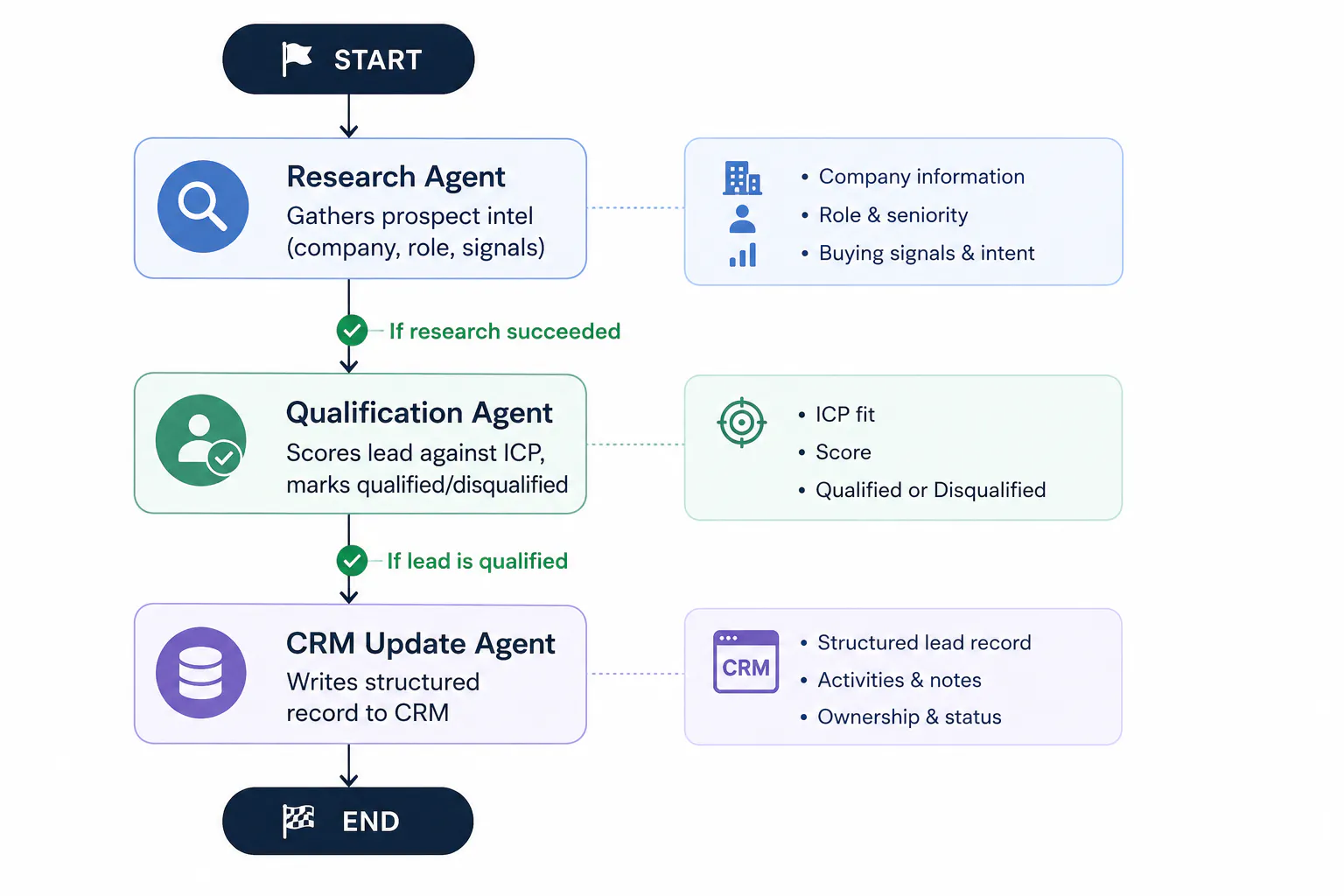
If the research agent ends up failing to gather data, the pipeline just bails out early. If the qualification agent then marks a lead as disqualified, the CRM update doesn’t happen at all, so no notes or fields get written. This conditional logic keeps things from going messy later, so you never end up with bad, or at least irrelevant, data downstream
System Architecture Overview
The shared state object is really the backbone of this whole setup. Each agent reads from that same object, and then writes back to it too. This is what the entire state looks like across the lifecycle of one single prospect:
| Field | Set By | Description |
| prospect_name | Input | Full name of the prospect |
| company | Input | Company the prospect works at |
| role | Input | Job title of the prospect |
| Input | Contact email | |
| linkedin_url | Input | LinkedIn profile URL (optional) |
| research_data | Research Agent | Structured JSON with company details and signals |
| qualification_score | Qualification Agent | Integer score from 0–100 |
| qualification_reason | Qualification Agent | Plain-text explanation of the score |
| is_qualified | Qualification Agent | Boolean qualification flag |
| crm_record | CRM Agent | Final record written to CRM |
| crm_updated | CRM Agent | Boolean confirmation of CRM update |
| pipeline_messages | All agents | Log of each workflow step for observability |
Setting Up Your Environment
Getting the dependencies in place the right way is the very first step. This approach leans on LangGraph, LangChain, and the OpenAI client, which makes sense I guess. Also you’ll bring in python-dotenv, just to help manage your API key safely and without leaking it somewhere.
Installing Dependencies
Before installing the dependencies please make sure that your current python version should be 3.9 or higher. For the proper execution of LangGraph, TypeDict, and Hint support. And then run the following command in your terminal:
pip install langgraph langchain-openai langchain python-dotenv Project Structure
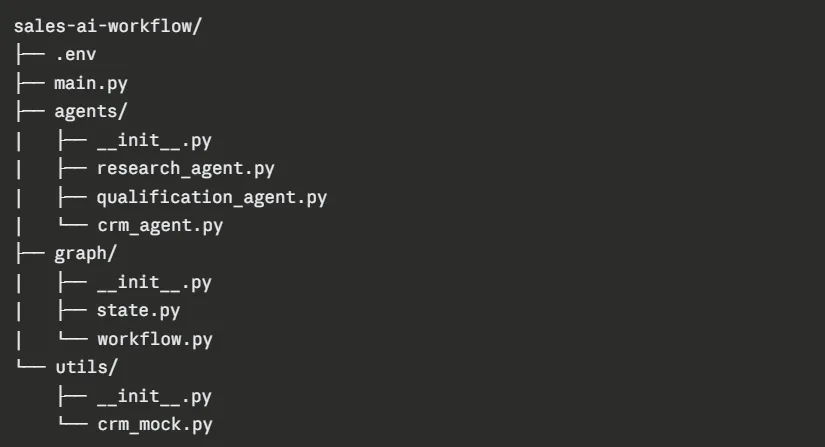
You can organise your working directory like shown below for proper clarity and maintainability.
Environment Configuration
Create a .env file in your project root:
OPENAI_API_KEY=your_openai_api_key_here Note: Please make sure not to hard code the api keys in the source files. Always load them from the environment variables.
Building the Multi-Agent System: Step-by-Step
Now we’ll start to build each component, kind of, and keep it consistent. Start with the state schema, and then build every agent, afterwards you wire them together in a LangGraph workflow.
Step 1: Define the Shared State Schema
The state schema is the contract your whole system is built on. Every agent reads from and writes to this object, no exceptions really.
graph/state.py
from typing import (
    TypedDict,
    Optional,
    List,
    Dict,
    Any
)

class SalesState(TypedDict):
    """
    Shared state across all agents
    in the sales workflow.

    Every agent reads this in full
    and returns an updated version.
    """

    # --- Input fields ---
    # Set at pipeline start
    prospect_name: str
    company: str
    role: str
    email: str
    linkedin_url: Optional[str]

    # --- Research Agent outputs ---
    research_data: Optional[
        Dict[str, Any]
    ]

    # --- Qualification Agent outputs ---
    qualification_score: Optional[int]
    qualification_reason: Optional[str]
    is_qualified: Optional[bool]

    # --- CRM Agent outputs ---
    crm_record: Optional[
        Dict[str, Any]
    ]

    crm_updated: Optional[bool]

    # --- Observability ---
    pipeline_messages: List[str]
Step 2: Build the Prospect Research Agent
The research agent takes raw prospect information and then enriches it. In a production setting, this agent would call external tools like Apollo.io, Clearbit, or a web search API. Here, you will use gpt-4.1-mini to simulate “intelligent research” based on the inputs you provide. The whole architecture is designed so you can drop in real tool calls later with minimal changes, and you don’t have to rework everything.
agents/research_agent.py
import json

from langchain_openai import ChatOpenAI
from langchain_core.messages import (
    SystemMessage,
    HumanMessage
)

from graph.state import SalesState


llm = ChatOpenAI(
    model="gpt-4.1-mini",
    temperature=0
)


def prospect_research_agent(
    state: SalesState
) -> SalesState:
    """
    Agent 1: Prospect Research

    Takes basic prospect information and
    returns structured research data
    including company context,
    role signals,
    and buying intent indicators.
    """

    print(
        f"\n[Research Agent] Starting research on "
        f"{state['prospect_name']} "
        f"at {state['company']}"
    )

    system_prompt = """
    You are an expert B2B sales researcher.

    Given a prospect's name,
    company,
    and role,
    you generate structured research data
    that a sales rep would need
    to qualify and personalize outreach.

    You must return ONLY valid JSON.
    No markdown,
    no explanation,
    just the JSON object.

    Return this exact structure:

    {
        "company_overview":
            "2-3 sentence description",

        "company_size":
            "estimated employee range",

        "industry":
            "primary industry vertical",

        "funding_stage":
            "bootstrapped | seed |
            series_a | series_b |
            series_c | public | unknown",

        "tech_stack_signals":
            ["tool1", "tool2", "tool3"],

        "role_seniority":
            "ic | manager |
            director | vp | c_suite",

        "role_buying_power":
            "low | medium | high",

        "pain_points":
            ["pain1", "pain2", "pain3"],

        "recent_signals":
            ["recent company news"],

        "personalization_hooks":
            ["hook1", "hook2"]
    }
    """

    user_message = f"""
    Research this prospect:

    Name:
    {state['prospect_name']}

    Company:
    {state['company']}

    Role:
    {state['role']}

    Email:
    {state['email']}

    LinkedIn:
    {state.get('linkedin_url', 'Not provided')}

    Return structured JSON research data.
    """

    try:

        response = llm.invoke([
            SystemMessage(content=system_prompt),
            HumanMessage(content=user_message)
        ])

        raw_content = response.content.strip()

        # Strip markdown code fences
        # if the model wraps output

        if raw_content.startswith("```"):

            raw_content = raw_content.split("```")[1]

            if raw_content.startswith("json"):
                raw_content = raw_content[4:]

        research_data = json.loads(raw_content)

        print(
            f"[Research Agent] Research complete. "
            f"Industry: {research_data.get('industry')}, "
            f"Seniority: "
            f"{research_data.get('role_seniority')}"
        )

        return {
            **state,
            "research_data": research_data,
            "pipeline_messages": (
                state["pipeline_messages"] + [
                    f"Research Agent: Successfully researched "
                    f"{state['prospect_name']} "
                    f"at {state['company']}. "
                    f"Industry: "
                    f"{research_data.get('industry')}, "
                    f"Role buying power: "
                    f"{research_data.get('role_buying_power')}"
                ]
            )
        }

    except (json.JSONDecodeError, Exception) as e:

        print(f"[Research Agent] Error: {e}")

        return {
            **state,
            "research_data": None,
            "pipeline_messages": (
                state["pipeline_messages"] + [
                    f"Research Agent: Failed to gather "
                    f"research data. Error: {str(e)}"
                ]
            )
        }
Step 3: Build the Lead Qualification Agent
The qualification agent scores each prospect against your Ideal Customer Profile (ICP). It uses the structured research data from Agent 1, then apply a scoring rubric sort of thing, and sets a boolean is_qualified flag that controls if the pipeline keeps going into the CRM step.
agents/qualification_agent.py
import json

from langchain_openai import ChatOpenAI
from langchain_core.messages import (
    SystemMessage,
    HumanMessage
)

from graph.state import SalesState


llm = ChatOpenAI(
    model="gpt-4.1-mini",
    temperature=0
)


# Define your ICP here
# Adjust this to match your actual target customer profile
ICP_CRITERIA = """

IDEAL CUSTOMER PROFILE (ICP):

- Company size: 20–500 employees
- Funding stage: seed, series_a, series_b, or series_c
- Industries:
  SaaS, B2B Tech, Marketing Agencies,
  Professional Services

- Role buying power: medium or high
- Role seniority:
  manager, director, vp, or c_suite

- Key pain points:
  manual workflows,
  operational inefficiency,
  scaling operations,
  lack of automation,
  high headcount costs

SCORING GUIDE (0–100):

- 80–100:
  Strong ICP fit — prioritize immediately

- 60–79:
  Good fit — worth pursuing
  with personalized outreach

- 40–59:
  Partial fit — add to nurture sequence

- Below 40:
  Poor fit — disqualify

"""


def lead_qualification_agent(
    state: SalesState
) -> SalesState:
    """
    Agent 2: Lead Qualification

    Scores the prospect against ICP criteria
    using structured research data.

    Sets is_qualified flag to control
    downstream CRM update step.
    """

    print(
        f"\n[Qualification Agent] "
        f"Scoring {state['prospect_name']}..."
    )

    research_data = state.get("research_data")

    if not research_data:

        print(
            "[Qualification Agent] "
            "No research data available. "
            "Marking as unqualified."
        )

        return {
            **state,
            "qualification_score": 0,
            "qualification_reason": (
                "Research data was unavailable. "
                "Cannot qualify without data."
            ),
            "is_qualified": False,
            "pipeline_messages": (
                state["pipeline_messages"] + [
                    "Qualification Agent: "
                    "Skipped — no research data available."
                ]
            )
        }

    system_prompt = f"""
    You are a senior sales qualification specialist.

    You evaluate prospects against a strict ICP
    and return a qualification score with reasoning.

    {ICP_CRITERIA}

    You must return ONLY valid JSON
    with this exact structure:

    {{
        "score": ,

        "is_qualified":
            = 60,
            false otherwise>,

        "score_breakdown": {{
            "company_size_fit": <0-20>,
            "industry_fit": <0-20>,
            "role_seniority_fit": <0-20>,
            "buying_power_fit": <0-20>,
            "pain_point_alignment": <0-20>
        }},

        "qualification_reason":
            "<2-3 sentence explanation>",

        "recommended_action":
            ""
    }}
    """

    user_message = f"""
    Qualify this prospect:

    Prospect:
    {state['prospect_name']}

    Company:
    {state['company']}

    Role:
    {state['role']}

    Research Data:

    {json.dumps(research_data, indent=2)}

    Score them against the ICP and
    return the qualification JSON.
    """

    try:

        response = llm.invoke([
            SystemMessage(content=system_prompt),
            HumanMessage(content=user_message)
        ])

        raw_content = response.content.strip()

        if raw_content.startswith("```"):

            raw_content = raw_content.split("```")[1]

            if raw_content.startswith("json"):
                raw_content = raw_content[4:]

        qualification_data = json.loads(raw_content)

        score = qualification_data.get("score", 0)

        is_qualified = qualification_data.get(
            "is_qualified",
            False
        )

        reason = qualification_data.get(
            "qualification_reason",
            "No reason provided."
        )

        print(
            f"[Qualification Agent] "
            f"Score: {score}/100 | "
            f"Qualified: {is_qualified}"
        )

        return {
            **state,
            "qualification_score": score,
            "qualification_reason": reason,
            "is_qualified": is_qualified,
            "pipeline_messages": (
                state["pipeline_messages"] + [
                    f"Qualification Agent: "
                    f"{state['prospect_name']} "
                    f"scored {score}/100. "
                    f"Qualified: {is_qualified}. "
                    f"Action: "
                    f"{qualification_data.get('recommended_action')}. "
                    f"Reason: {reason}"
                ]
            )
        }

    except (json.JSONDecodeError, Exception) as e:

        print(f"[Qualification Agent] Error: {e}")

        return {
            **state,
            "qualification_score": 0,
            "qualification_reason": (
                f"Qualification failed due to error: "
                f"{str(e)}"
            ),
            "is_qualified": False,
            "pipeline_messages": (
                state["pipeline_messages"] + [
                    f"Qualification Agent: "
                    f"Failed with error — {str(e)}"
                ]
            )
        }
Step 4: Build the Mock CRM Utility
In production, this module calls your actual CRM’s API. For this guide, you implement a mock that writes records into a local JSON file i.e; sort of a drop in replacement pattern so it’s easy to swap it with a real API call later, without too much fuss.
utils/crm_mock.py
import json
import os
from datetime import datetime

CRM_FILE = "crm_records.json"

def write_to_crm(record: dict) -> dict:
    """
    Mock CRM write function.

    In production, replace this with your CRM SDK call.

    HubSpot example:
        hubspot_client.crm.contacts.basic_api.create(
            SimplePublicObjectInput(properties=record)
        )

    Salesforce example:
        sf.Contact.create(record)
    """

    # Load existing records
    records = []

    if os.path.exists(CRM_FILE):

        with open(CRM_FILE, "r") as f:

            try:
                records = json.load(f)

            except json.JSONDecodeError:
                records = []

    # Add new record with metadata
    crm_record = {
        "id": f"LEAD-{len(records) + 1:04d}",
        "created_at": datetime.utcnow().isoformat(),
        "status": "qualified",
        **record
    }

    records.append(crm_record)

    # Write back
    with open(CRM_FILE, "w") as f:
        json.dump(records, f, indent=2)

    print(
        f"[CRM] Written record with ID: "
        f"{crm_record['id']}"
    )

    return crm_record
Step 5: Build the CRM Update Agent
The CRM agent only runs when a lead is qualified. It takes the full prospect information and turns it into a tidy CRM entry, then it writes it using the utility above. Also it produces a personalized first touch email draft as part of that same record.
agents/crm_agent.py
import json

from langchain_openai import ChatOpenAI
from langchain_core.messages import (
    SystemMessage,
    HumanMessage
)

from graph.state import SalesState
from utils.crm_mock import write_to_crm


llm = ChatOpenAI(
    model="gpt-4.1-mini",
    temperature=0.3
)


def crm_update_agent(state: SalesState) -> SalesState:
    """
    Agent 3: CRM Update

    Formats qualified prospect data into a structured CRM record.
    Also generates a personalized first-touch email draft.

    Only runs when is_qualified is True.
    """

    print(
        f"\n[CRM Agent] Creating CRM record "
        f"for {state['prospect_name']}..."
    )

    system_prompt = """
    You are a CRM specialist.

    Given prospect research and qualification data,
    you create a clean, structured CRM record and a
    personalized first-touch email.

    Return ONLY valid JSON with this structure:

    {
        "contact": {
            "name": "",
            "email": "",
            "company": "",
            "role": "",
            "linkedin_url": ""
        },
        "lead_details": {
            "industry": "",
            "company_size": "",
            "funding_stage": "",
            "qualification_score": ,
            "qualification_reason": "",
            "pain_points": ["", ""],
            "tech_stack": ["", ""]
        },
        "outreach": {
            "first_touch_email_subject": "",
            "first_touch_email_body":
                "",
            "personalization_notes":
                ""
        },
        "next_steps": ""
    }
    """

    user_message = f"""
    Create a CRM record for this qualified lead:

    Name: {state['prospect_name']}
    Company: {state['company']}
    Role: {state['role']}
    Email: {state['email']}
    LinkedIn: {state.get('linkedin_url', 'N/A')}

    Qualification Score:
    {state['qualification_score']}/100

    Qualification Reason:
    {state['qualification_reason']}

    Research Data:

    {json.dumps(state.get('research_data', {}), indent=2)}

    Generate a structured CRM record with a
    personalized outreach email.
    """

    try:

        response = llm.invoke([
            SystemMessage(content=system_prompt),
            HumanMessage(content=user_message)
        ])

        raw_content = response.content.strip()

        if raw_content.startswith("```"):
            raw_content = raw_content.split("```")[1]

            if raw_content.startswith("json"):
                raw_content = raw_content[4:]

        crm_data = json.loads(raw_content)

        # Write to CRM
        crm_record = write_to_crm(crm_data)

        print(
            f"[CRM Agent] Record created successfully. "
            f"ID: {crm_record.get('id')}"
        )

        return {
            **state,
            "crm_record": crm_record,
            "crm_updated": True,
            "pipeline_messages": (
                state["pipeline_messages"] + [
                    f"CRM Agent: Successfully created "
                    f"CRM record {crm_record.get('id')} "
                    f"for {state['prospect_name']}. "
                    f"First-touch email draft generated."
                ]
            )
        }

    except (json.JSONDecodeError, Exception) as e:

        print(f"[CRM Agent] Error: {e}")

        return {
            **state,
            "crm_record": None,
            "crm_updated": False,
            "pipeline_messages": (
                state["pipeline_messages"] + [
                    f"CRM Agent: Failed to create CRM "
                    f"record. Error: {str(e)}"
                ]
            )
        }
Step 6: Wire the Graph Together
This is kinda where LangGraph comes in. You define the nodes, set the conditional edges, and then you compile the graph. The routing logic reads the state values to figure out which node runs next, and then, it continues.
graph/workflow.py
from langgraph.graph import StateGraph, END
from graph.state import SalesState
from agents.research_agent import prospect_research_agent
from agents.qualification_agent import lead_qualification_agent
from agents.crm_agent import crm_update_agent


def route_after_research(state: SalesState) -> str:
    """
    Route to qualification if research succeeded.
    Exit early if research failed.
    """

    if state.get("research_data"):
        return "qualify"

    print("[Router] Research failed. Exiting pipeline.")
    return END

def route_after_qualification(state: SalesState) -> str:
    """
    Route to CRM update only if lead is qualified.
    Exit if lead is disqualified.
    """

    if state.get("is_qualified"):
        return "update_crm"

    print(
        f"[Router] Lead disqualified "
        f"(score: {state.get('qualification_score')}). "
        f"Skipping CRM update."
    )

    return END

def build_sales_workflow() -> StateGraph:
    """
    Build and compile the multi-agent sales workflow graph.
    """

    workflow = StateGraph(SalesState)

    # Register agent nodes
    workflow.add_node(
        "research",
        prospect_research_agent
    )

    workflow.add_node(
        "qualify",
        lead_qualification_agent
    )

    workflow.add_node(
        "update_crm",
        crm_update_agent
    )

    # Set entry point
    workflow.set_entry_point("research")

    # Add conditional edges
    workflow.add_conditional_edges(
        "research",
        route_after_research,
        {
            "qualify": "qualify",
            END: END
        }
    )

    workflow.add_conditional_edges(
        "qualify",
        route_after_qualification,
        {
            "update_crm": "update_crm",
            END: END
        }
    )

    # Final edge
    workflow.add_edge("update_crm", END)
    return workflow.compile()

# Export compiled graph
sales_pipeline = build_sales_workflow()
Running the Pipeline End-to-End
After all those components are ready, you wire everything up inside main.py. It’s basically the start point where the pipeline kicks in, you take in prospect input and then it runs, like end to end without much delay.
The Main Entry Point
main.py
import os
import json

from dotenv import load_dotenv
from graph.workflow import sales_pipeline

load_dotenv()


def run_sales_pipeline(prospect: dict) -> dict:
    """
    Run the full sales AI workflow for a single prospect.

    Args:
        prospect: Dict with keys:
            prospect_name,
            company,
            role,
            email,
            linkedin_url (optional)

    Returns:
        Final pipeline state with all agent outputs.
    """

    # Initialize state with empty pipeline messages
    initial_state = {
        "prospect_name": prospect["prospect_name"],
        "company": prospect["company"],
        "role": prospect["role"],
        "email": prospect["email"],
        "linkedin_url": prospect.get("linkedin_url"),
        "research_data": None,
        "qualification_score": None,
        "qualification_reason": None,
        "is_qualified": None,
        "crm_record": None,
        "crm_updated": None,
        "pipeline_messages": []
    }

    print(f"\n{'=' * 60}")
    print(
        f"RUNNING SALES PIPELINE: "
        f"{prospect['prospect_name']} @ {prospect['company']}"
    )
    print(f"{'=' * 60}")

    # Run the graph
    final_state = sales_pipeline.invoke(initial_state)

    # Print pipeline summary
    print(f"\n{'=' * 60}")
    print("PIPELINE SUMMARY")
    print(f"{'=' * 60}")

    for msg in final_state["pipeline_messages"]:
        print(f"  • {msg}")

    print(f"\nFinal Result:")
    print(f"  Qualified: {final_state.get('is_qualified')}")
    print(f"  Score: {final_state.get('qualification_score')}/100")
    print(f"  CRM Updated: {final_state.get('crm_updated')}")

    if final_state.get("crm_record"):
        print(
            f"  CRM Record ID: "
            f"{final_state['crm_record'].get('id')}"
        )

    return final_state


def run_batch_pipeline(prospects: list) -> list:
    """
    Run the pipeline for multiple prospects sequentially.

    For parallel execution, use asyncio or a thread pool.
    """

    results = []

    for i, prospect in enumerate(prospects):
        print(
            f"\nProcessing prospect "
            f"{i + 1}/{len(prospects)}..."
        )

        result = run_sales_pipeline(prospect)
        results.append(result)

    return results


if __name__ == "__main__":

    # --- Single prospect example ---
    sample_prospect = {
        "prospect_name": "Sarah Chen",
        "company": "Growthly",
        "role": "VP of Operations",
        "email": "[email protected]",
        "linkedin_url": "
    }

    result = run_sales_pipeline(sample_prospect)

    # --- Batch example ---
    batch_prospects = [
        {
            "prospect_name": "Marcus Rivera",
            "company": "DataLayer",
            "role": "Head of Sales",
            "email": "[email protected]",
            "linkedin_url": None
        },
        {
            "prospect_name": "Priya Nair",
            "company": "Loopform",
            "role": "Founder & CEO",
            "email": "[email protected]",
            "linkedin_url": "
        }
    ]

    batch_results = run_batch_pipeline(batch_prospects)

    print(
        f"\nBatch complete. "
        f"Processed {len(batch_results)} prospects."
    )

    qualified = [
        r for r in batch_results
        if r.get("is_qualified")
    ]

    print(
        f"Qualified: "
        f"{len(qualified)}/{len(batch_results)}"
    )
Complete Pipeline Output
Below is the actual terminal output from running python main.py against three prospects. Two that qualify and one that does not, Pay attention how the conditional router fires for the third prospect, and it exits cleanly before the CRM step, with no errors at all.
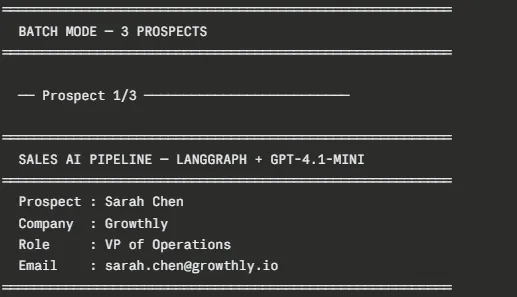
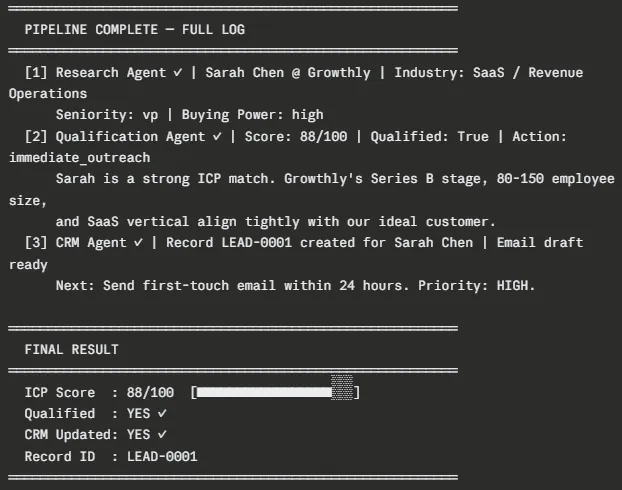
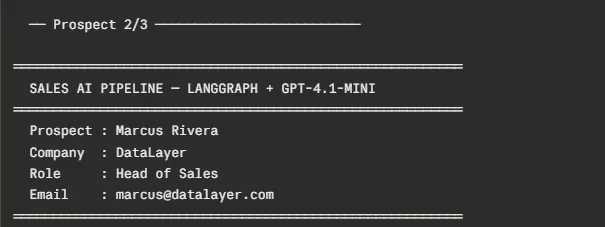
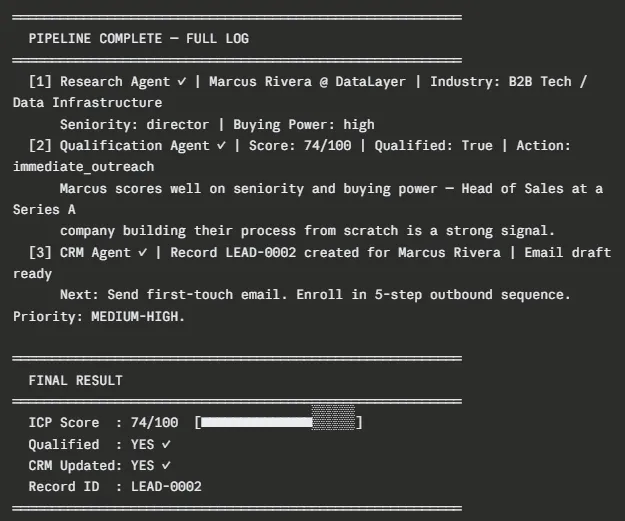
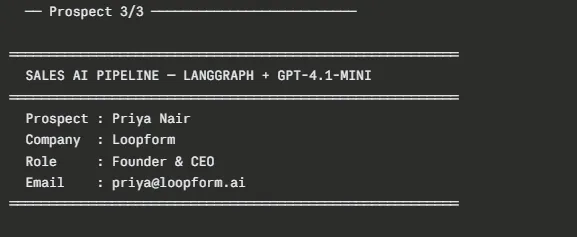
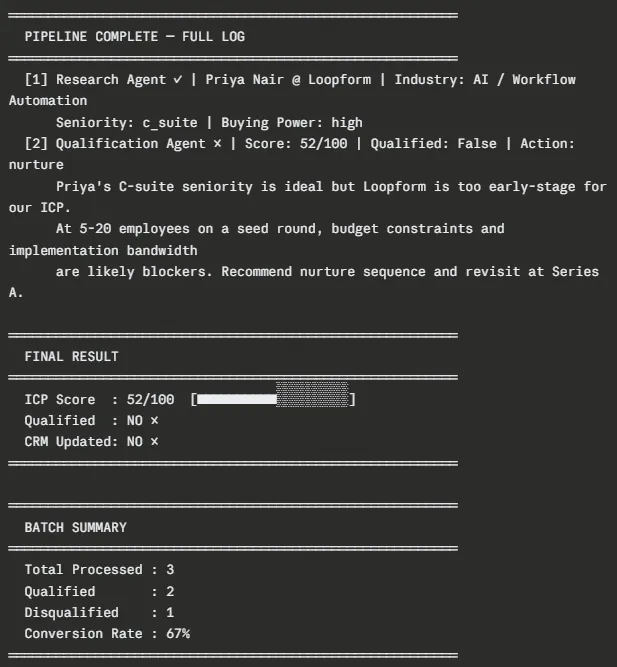
A few things worth noting in this output. Sarah Chen scores 88/100 and gets a fully personalized email draft that references her Series B announcement, and the existing Zapier usage context the research agent surfaced, kinda clean. Marcus Rivera scores 74/100 and qualifies, but the outreach takes a slightly different angle: more about building sales infrastructure from scratch and less about other baggage. Priya Nair scores 52/100 and the LangGraph router just skips Agent 3 entirely, no CRM write at all, no wasted API call, no bad data moving downstream.
The crm_records.json file on disk should end up with two structured records (LEAD-0001 and LEAD-0002), each one containing the complete lead details, the qualification reasoning, and the outreach draft so a rep can take action right away.
Tips For Production Considerations
A working prototype is one thing. A system you can trust with real sales data is another. Before deploying this pipeline in production, address these areas.
Adding Real Tool Calls to the Research Agent
Right now the research agent uses the LLM trained knowledge as a kind of substitute to simulate research. For production, you should give it actual instruments, not just learned heuristics. With LangChain this becomes pretty direct, for example by using the @tool decorator:
from langchain_core.tools import tool
import requests


@tool
def search_company_apollo(company_name: str) -> dict:
    """Search Apollo.io for company data."""

    response = requests.get(
        "
        headers={
            "x-api-key": os.getenv("APOLLO_API_KEY")
        },
        json={
            "q_organization_name": company_name
        }
    )

    return response.json()
Bind this tool to your research agent’s LLM with bind_tools([search_company_apollo]) and adjust the agent so it can handle tool_call responses coming back from the model.
Error Handling and Retry Logic
Then add retry logic for brief API hiccups, using LangGraph’s built in support or a simple wrapper decorator:
import time
from functools import wraps

def retry(max_attempts=3, delay=2):
    def decorator(func):

        @wraps(func)
        def wrapper(*args, **kwargs):
            for attempt in range(max_attempts):
                try:
                    return func(*args, **kwargs)

                except Exception as e:
                    if attempt == max_attempts - 1:
                        raise

                    print(
                        f"Attempt {attempt + 1} failed: {e}. "
                        f"Retrying in {delay}s..."
                    )

                    time.sleep(delay)

        return wrapper

    return decorator


@retry(max_attempts=3, delay=2)
def prospect_research_agent(state: SalesState) -> SalesState:

    # ... agent code
Parallel Batch Processing
For high-volume pipelines where you’re moving through hundreds of prospects, run them concurrently, using asyncio, it sort of helps keep things flowing.
import time
from functools import wraps

def retry(max_attempts=3, delay=2):
    def decorator(func):
        @wraps(func)
        def wrapper(*args, **kwargs):
            for attempt in range(max_attempts):
                try:
                    return func(*args, **kwargs)

                except Exception as e:
                    if attempt == max_attempts - 1:
                        raise

                    print(
                        f"Attempt {attempt + 1} failed: {e}. "
                        f"Retrying in {delay}s..."
                    )

                    time.sleep(delay)

        return wrapper

    return decorator


@retry(max_attempts=3, delay=2)
def prospect_research_agent(state: SalesState) -> SalesState:
    # ... agent code
Connecting to a Real CRM
Swap out the mock write_to_crm function with your real CRM client, that’s the part you’d wire to your actual API or service.
# HubSpot
from hubspot import HubSpot
from hubspot.crm.contacts import SimplePublicObjectInput

def write_to_crm_hubspot(record: dict) -> dict:

    client = HubSpot(api_key=os.getenv("HUBSPOT_API_KEY"))

    contact = client.crm.contacts.basic_api.create(
        SimplePublicObjectInput(
            properties={
                "firstname": record["contact"]["name"].split()[0],
                "lastname": record["contact"]["name"].split()[-1],
                "email": record["contact"]["email"],
                "company": record["contact"]["company"],
                "jobtitle": record["contact"]["role"],
            }
        )
    )

    return {
        "id": contact.id,
        **record
    }
Adding LangSmith Observability
Also set these environment variables so every agent run gets traced inside LangSmith:
LANGCHAIN_TRACING_V2=true
LANGCHAIN_API_KEY=your_langsmith_api_key
LANGCHAIN_PROJECT=sales-ai-workflow
Each time anything fires, you’ll see it in your LangSmith dashboard, with full input/output traces for every node, which ends up being, genuinely invaluable for debugging and tuning prompts.
Conclusion
Sales teams still doing manual research and lead scoring are wasting valuable time. The multi-agent system in this guide automates the workflow from raw prospect data to enriched CRM records and personalized outreach drafts. The architecture is intentionally modular, with each agent handling a single responsibility, while conditional routing prevents bad or incomplete data from moving further down the pipeline.
Start with the mock setup, refine your ICP scoring using real pipeline data, and then connect live integrations for production use. With minimal changes, this workflow can scale to hundreds of prospects, allowing sales teams to spend more time on conversations instead of prospect research and admin work.

Hello! I’m Vipin, a passionate data science and machine learning enthusiast with a strong foundation in data analysis, machine learning algorithms, and programming. I have hands-on experience in building models, managing messy data, and solving real-world problems. My goal is to apply data-driven insights to create practical solutions that drive results. I’m eager to contribute my skills in a collaborative environment while continuing to learn and grow in the fields of Data Science, Machine Learning, and NLP.
Login to continue reading and enjoy expert-curated content.