
Close Menu
geekfence.comgeekfence.com
    What's Hot

    Customer experience management (CXM) predictions for 2026: How customers, enterprises, technology, and the provider landscape will evolve 

    December 28, 2025

    What to Know About the Cloud and Data Centers in 2026

    December 28, 2025

    Why Enterprise AI Scale Stalls

    December 28, 2025
    Facebook X (Twitter) Instagram
    • About Us
    • Contact Us
    Facebook Instagram
    geekfence.comgeekfence.com
    • Home
    • UK Tech News
    • AI
    • Big Data
    • Cyber Security
      • Cloud Computing
      • iOS Development
    • IoT
    • Mobile
    • Software
      • Software Development
      • Software Engineering
    • Technology
      • Green Technology
      • Nanotechnology
    • Telecom
    geekfence.comgeekfence.com
    Home»Mobile»Your Pixel can now get rid of HDR pictures and videos, here’s how
    Mobile

    Your Pixel can now get rid of HDR pictures and videos, here’s how

    AdminBy AdminDecember 7, 2025No Comments3 Mins Read0 Views
    Facebook Twitter Pinterest LinkedIn Telegram Tumblr Email
    Your Pixel can now get rid of HDR pictures and videos, here’s how
    Share
    Facebook Twitter LinkedIn Pinterest Email


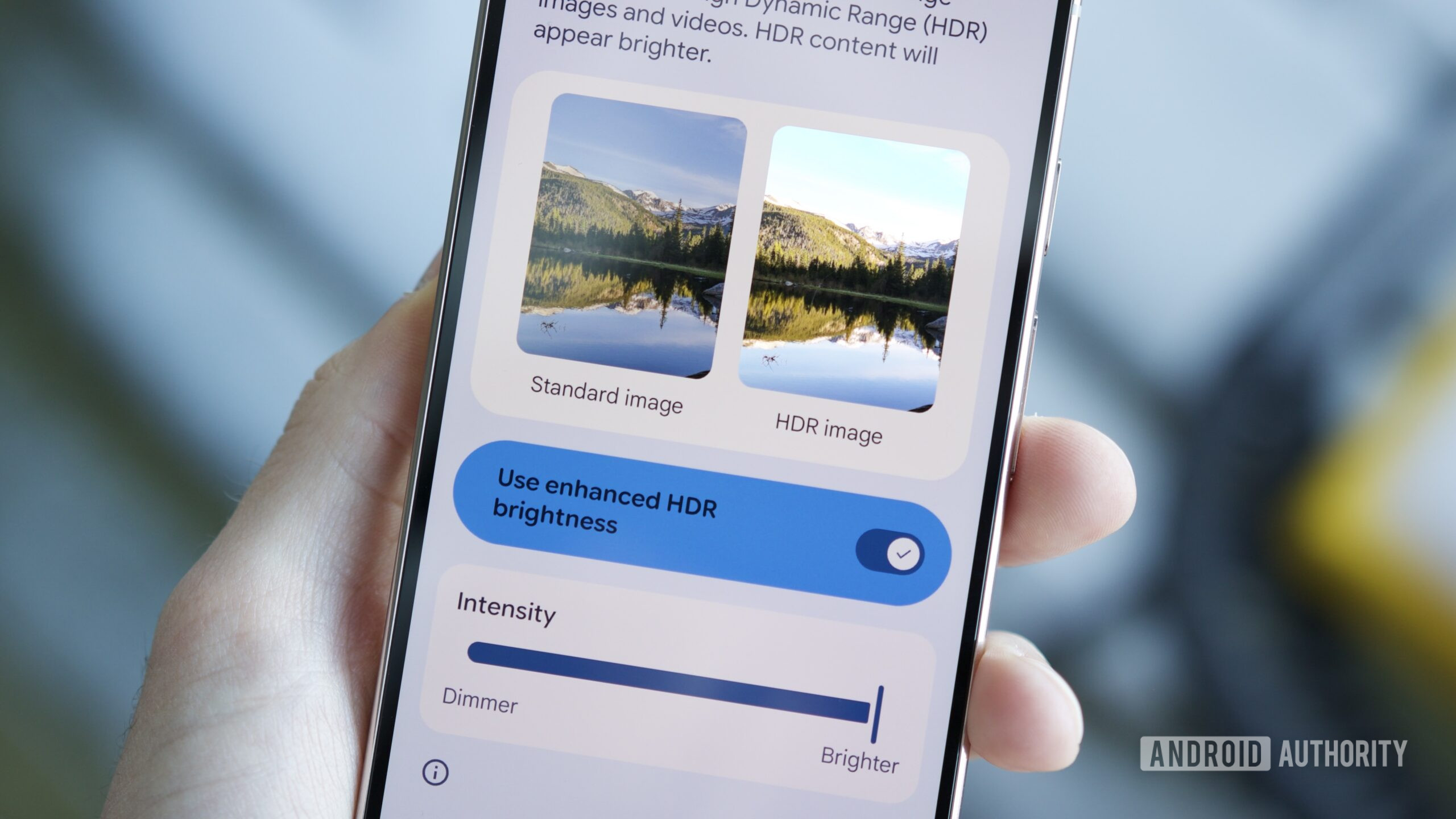
    A Pixel phone, showing the new Enhanced HDR brightness settings in Android 16 QPR2.

    Joe Maring / Android Authority

    We’ve all been there before. You’re scrolling through Instagram or Threads, an HDR picture/video pops up on your feed, and you’re instantly blinded by how bright it is. HDR content certainly has its place, but on our phones, it can sometimes be more of a nuisance than a benefit.

    As part of its One UI 7 update earlier this year, Samsung added a “Super HDR” toggle to its Galaxy phones, allowing you to disable overly bright HDR content. Now, Google Pixel phones have a similar feature called “Enhanced HDR brightness.”

    Enhanced HDR brightness was added to Google’s Pixel lineup as part of the Android 16 QPR2 update that began rolling out last week. Here’s how to find and use the feature to save your eyeballs from further HDR blindness.

    How are you going to use Enhanced HDR brightness on your Pixel?

    2 votes

    How to use Enhanced HDR brightness in Android 16 QPR2

    With that out of the way, finding and using Enhanced HDR brightness is pretty simple, so long as you know where to look. Here’s what you’ll need to do.

    1. Open the Settings app on your Pixel.
    2. Tap Display & touch.
    3. Tap Enhanced HDR brightness.

    By default, the toggle next to Use enhanced HDR brightness is enabled, meaning you’ll see HDR pictures and videos in their full, HDR-ified form. However, if you tap the toggle to disable the feature, HDR brightness is completely turned off.

    Google shows you two sample pictures on this page, and you’ll see the difference in real time between HDR brightness on and off. It’s visible in the screenshots below, but the effect is much more prominent in person.

    Alternatively, if you don’t want to completely turn off HDR brightness but still want to control it a bit, you can use the Intensity slider to make it dimmer or brighter. I’ve found that around 50-60% brightness is a great middle ground for my eyes, but definitely play around with it to see what feels best for you.

    Even if you’re 100% pro-HDR, I think we can all agree that having the option to turn HDR brightness off or lower it is a big win. Your phone screen should never be uncomfortable to look at, and this is a very handy tool to keep your eyes happy.

    Are you keeping HDR brightness fully enabled, cranking it down, or turning it off? Let us know in the comments.

    Don’t want to miss the best from Android Authority?

    google preferred source badge light@2xgoogle preferred source badge dark@2x

    Thank you for being part of our community. Read our Comment Policy before posting.


    Source link

    Share. Facebook Twitter Pinterest LinkedIn Tumblr Email

    Related Posts

    ReMarkable has slipped into Reddit to learn what users want

    December 28, 2025

    HomeKit, Thread, Matter, and more

    December 27, 2025

    Gmail might finally let you switch to a new address without starting over

    December 26, 2025

    2025 Winners and losers: Apple

    December 25, 2025

    Trump administration’s ban on foreign-made drones starts this week — you can say goodbye to new DJI models

    December 24, 2025

    An Expert Explains 6 Common Laundry Mistakes That Are Killing Your Favorite Garments

    December 23, 2025
    Top Posts

    Understanding U-Net Architecture in Deep Learning

    November 25, 20258 Views

    Microsoft 365 Copilot now enables you to build apps and workflows

    October 29, 20258 Views

    Here’s the latest company planning for gene-edited babies

    November 2, 20257 Views
    Don't Miss

    Customer experience management (CXM) predictions for 2026: How customers, enterprises, technology, and the provider landscape will evolve 

    December 28, 2025

    After laying out our bold CXM predictions for 2025 and then assessing how those bets played out…

    What to Know About the Cloud and Data Centers in 2026

    December 28, 2025

    Why Enterprise AI Scale Stalls

    December 28, 2025

    New serverless customization in Amazon SageMaker AI accelerates model fine-tuning

    December 28, 2025
    Stay In Touch
    • Facebook
    • Instagram
    About Us

    At GeekFence, we are a team of tech-enthusiasts, industry watchers and content creators who believe that technology isn’t just about gadgets—it’s about how innovation transforms our lives, work and society. We’ve come together to build a place where readers, thinkers and industry insiders can converge to explore what’s next in tech.

    Our Picks

    Customer experience management (CXM) predictions for 2026: How customers, enterprises, technology, and the provider landscape will evolve 

    December 28, 2025

    What to Know About the Cloud and Data Centers in 2026

    December 28, 2025

    Subscribe to Updates

    Please enable JavaScript in your browser to complete this form.
    Loading
    • About Us
    • Contact Us
    • Disclaimer
    • Privacy Policy
    • Terms and Conditions
    © 2025 Geekfence.All Rigt Reserved.

    Type above and press Enter to search. Press Esc to cancel.