
Close Menu
geekfence.comgeekfence.com
    What's Hot

    Emerald Fennell’s Wuthering Heights Review

    February 14, 2026

    Infrastructure, Not Compute, is the Real AI Bottleneck

    February 14, 2026

    ALS stole this musician’s voice. AI let him sing again.

    February 14, 2026
    Facebook X (Twitter) Instagram
    • About Us
    • Contact Us
    Facebook Instagram
    geekfence.comgeekfence.com
    • Home
    • UK Tech News
    • AI
    • Big Data
    • Cyber Security
      • Cloud Computing
      • iOS Development
    • IoT
    • Mobile
    • Software
      • Software Development
      • Software Engineering
    • Technology
      • Green Technology
      • Nanotechnology
    • Telecom
    geekfence.comgeekfence.com
    Home»UK Tech News»What Does a Yellow Light on My Oral-B iO Mean and How Can I Fix It?
    UK Tech News

    What Does a Yellow Light on My Oral-B iO Mean and How Can I Fix It?

    AdminBy AdminJanuary 2, 2026No Comments3 Mins Read21 Views
    Facebook Twitter Pinterest LinkedIn Telegram Tumblr Email
    What Does a Yellow Light on My Oral-B iO Mean and How Can I Fix It?
    Share
    Facebook Twitter LinkedIn Pinterest Email


    You bought your Oral-B iO a few months ago and now, although it seems to be working normally, the centre of the Mode button has started to glow yellow after you’ve used it. (According to Oral-B, it’s a yellow light, but it may look orange or amber to you.)

    Here’s what it means and how to sort it out.

    If you’re looking for Oral-B buying advice, you can see our top recommendations in our best Oral-B electric toothbrush round-up. And if you want to know the differences between all the iO models – what each brush does and why there’s such a big variation in prices between them – see our complete Oral-B iO guide.

    One of the advantages of buying an iO is the amount of feedback the brush will provide. They all feature quadrant alerts, to let you know when to move on to the next section of your mouth when brushing, an overall two-minute brushing timer, and a pressure sensor that glows red when you press too hard and green when you get it just right. (Some of the high-end models will even give you detailed brushing guidance and feedback.)

    Each brush will also let you know when the battery is running low. That’s what it means when the power button glows red.

    But what does it mean when the mode button – the one below the power button – lights up in yellow? Here’s how it looks on the Oral-B iO Series 4 I use daily.
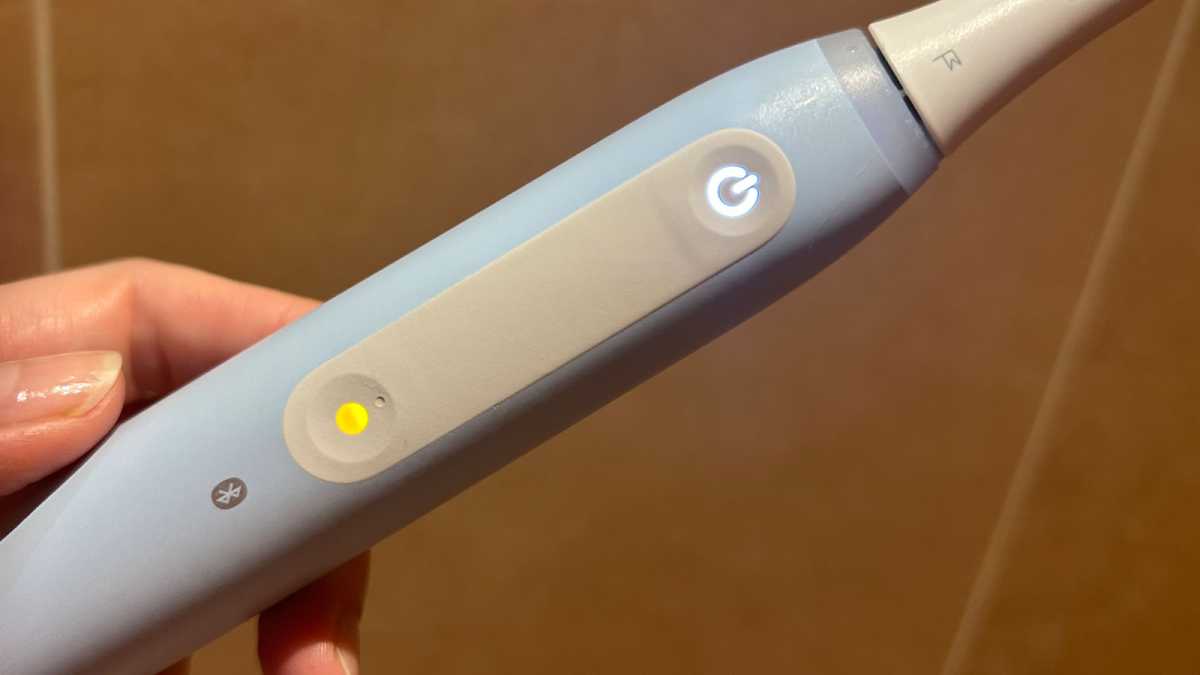
    A close-up of the yellow mode button

    Emma Rowley / Foundry

    What does a yellow light on my Oral-B IiO brush mean?

    The yellow light is just another type of feedback your iO provides for you. It’s letting you know that it’s time to replace your toothbrush head, as you’ve been using it for around three months.

    Older brush heads start to lose their efficacy. They simply won’t clean your teeth as well as a fresh brush head. You can also tell when it’s time to replace the brush head if the bristles have started to splay or, depending on the type of brush head you use, when the colour of the bristles has started to fade.

    How can I turn off the yellow light on my Oral-B iO?

    Once you’ve replaced your brush head, you’ll need to reset the brush reminder. To do this on the handle, press and hold the mode button for two seconds. The brush will vibrate in response.

    If you have an app-connected iO, you can also set up a reminder in app. To do this, go into the Oral-B app and choose “Devices” from the bottom menu. This will take you to the app page that displays brush head information. You’ll need to have your iO to hand and to switch it on so you can sync it with the app.
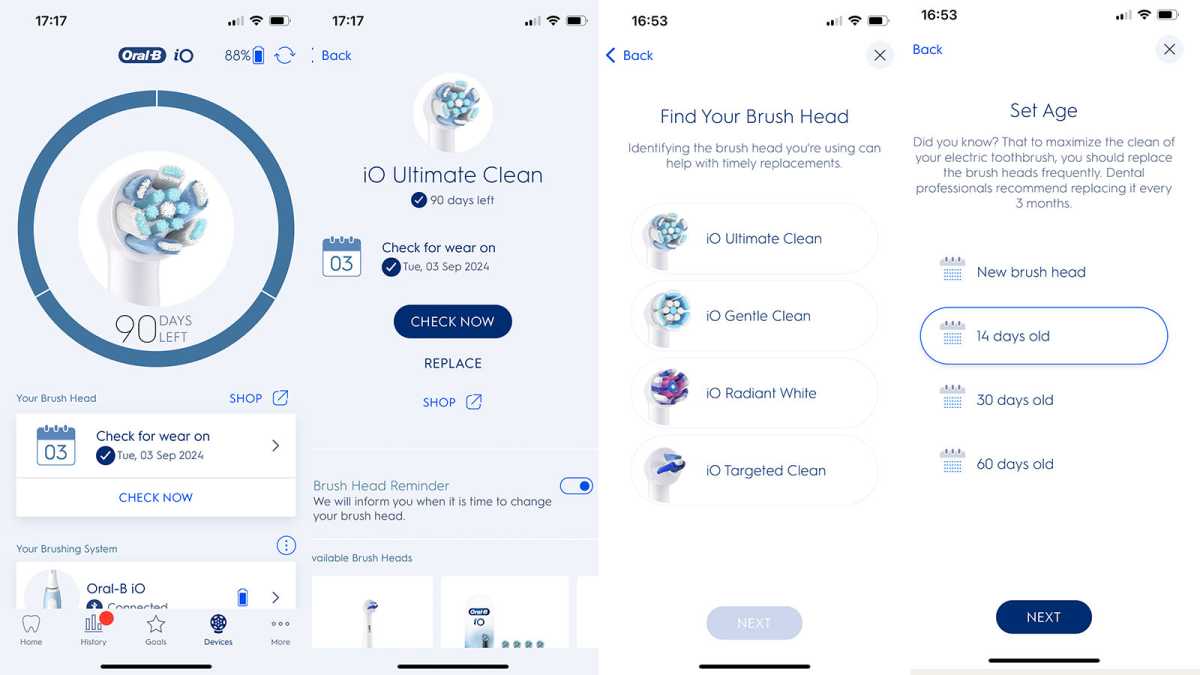
    Screenshots from the Oral-B app, showing the process for setting up a new brush head

    Foundry

    The app will ask you when you began using the new brush head and which type it is. Once you go through this process, you’re all set up. You’ll get another reminder in three months’ time.

    For our top Oral-B recommendations, have a look at our round-up of the best Oral-B brushes, which are all fully reviewed and tested.


    Source link

    Share. Facebook Twitter Pinterest LinkedIn Tumblr Email

    Related Posts

    Emerald Fennell’s Wuthering Heights Review

    February 14, 2026

    The SaaSocalypse after Anthropic: why the panic says more about markets than software 

    February 13, 2026

    Geotab Helps Reduce Fleet Risk with New AI-Powered GO Focus Pro Dash Cam

    February 12, 2026

    A trio of tasty new Android notification enhancements – Computerworld

    February 11, 2026

    Buying a phone in 2026? Follow this one rule

    February 10, 2026

    Wealth management outlook for 2026: trends and sourcing implications 

    February 9, 2026
    Top Posts

    Hard-braking events as indicators of road segment crash risk

    January 14, 202617 Views

    Understanding U-Net Architecture in Deep Learning

    November 25, 202512 Views

    How to integrate a graph database into your RAG pipeline

    February 8, 20268 Views
    Don't Miss

    Emerald Fennell’s Wuthering Heights Review

    February 14, 2026

    Summary created by Smart Answers AIIn summary:Tech Advisor highlights six critical errors in Emerald Fennell’s…

    Infrastructure, Not Compute, is the Real AI Bottleneck

    February 14, 2026

    ALS stole this musician’s voice. AI let him sing again.

    February 14, 2026

    What is Prompt Chaining?

    February 14, 2026
    Stay In Touch
    • Facebook
    • Instagram
    About Us

    At GeekFence, we are a team of tech-enthusiasts, industry watchers and content creators who believe that technology isn’t just about gadgets—it’s about how innovation transforms our lives, work and society. We’ve come together to build a place where readers, thinkers and industry insiders can converge to explore what’s next in tech.

    Our Picks

    Emerald Fennell’s Wuthering Heights Review

    February 14, 2026

    Infrastructure, Not Compute, is the Real AI Bottleneck

    February 14, 2026

    Subscribe to Updates

    Please enable JavaScript in your browser to complete this form.
    Loading
    • About Us
    • Contact Us
    • Disclaimer
    • Privacy Policy
    • Terms and Conditions
    © 2026 Geekfence.All Rigt Reserved.

    Type above and press Enter to search. Press Esc to cancel.