


Allowing other apps and webpages to link into your app with deeplinks is a really good way for you to make your app more flexible, and to ensure that users of your app can more easily share content with others by sharing direct links to your contents.
To support deeplinking on iOS, you have two options available:
- Support deeplinking through custom URL schemes like
maxine://workout/dw-1238-321-jdjd - Support deeplinking through Universal Links which would look like this
/maxine-app/workout/dw-1238-321-jdjd
To add support for option one, all you need to do is register your custom URL scheme and implement onOpenURL to handle the incoming links. This approach is outlined in my post on handling deeplinks in a SwiftUI app, so I won’t be including detailed steps for that in this post.
This post will instead focus on showing you how you can set your app up for option 2; Universal Links.
We’ll look at the requirements for Universal Links, how you can enable this on the server, and lastly we’ll see how you can support Universal Links in your app.
The major benefit of Universal Links is that only the owner of a domain can establish a link between an app and a domain. In contrast, when you pick a custom URL scheme, other apps can try to claim the same scheme. The first app that claimed the scheme on a given user’s device will be used to handle URLs with that specific scheme.
With Universal Links, you have full control over which apps are allowed to claim a given domain or path. So in my case, I can make sure that only Maxine will be used to handle URLs that start with /maxine-app/.
Setting up your server for Universal Links
Every app that wants to support Universal Links must have a server counterpart. This means that you can only support Universal Links for domains you own.
When a user installs your app, iOS will check for any claims that the app makes about Universal Links. For example, if my app claims to support then iOS will perform a check to make sure this claim is correct.
To do that, iOS will make a request to https://www.donnywals.com/apple-app-site-association. Every app that supports Universal Link must return a valid JSON response from /apple-app-site-association.
In the JSON that’s returned by this endpoint, the server will specify which apps are allowed to handle Universal Links for this domain. It can also specify which paths or components should or should not be treated as Universal Links.
We’ll look at a couple of examples in this post but for a full overview of what you can and can’t do in your app site association file you can take a look at the applinks documentation on apple.com.
If I were to add support for Universal Links to my own domain, A simple app site association I could upload would look as follows:
{
  "applinks": {
    "details": [
      {
        "appIDs": ["4JMM8JMG3H.com.donnywals.ExerciseTracker"],
        "components": [
          "/": "/maxine/*"
        ]
      }
    ]
  }
}
This JSON specifies the appID that’s allowed to be used on this domain. I also specify a components array that will specify patterns for which URLs should be redirected to my app. You can specify lots of different rules here as you can see on the page for components.
In this case, I specified that my app will handle any URL that starts with /maxine/. The * at the end means that we allow any sequence of characters to come after /maxine/.
Once you’ve made your /apple-app-site-association available on your site, you can go ahead and configure your app for Universal Links.
Setting up your app for Universal Links
In order to inform iOS about your intent to handle Universal Links, you need to add the Associated Domains capability to your project. Do this by selecting your app Target, navigate to Signing and Capabilities and add Associated Domains.
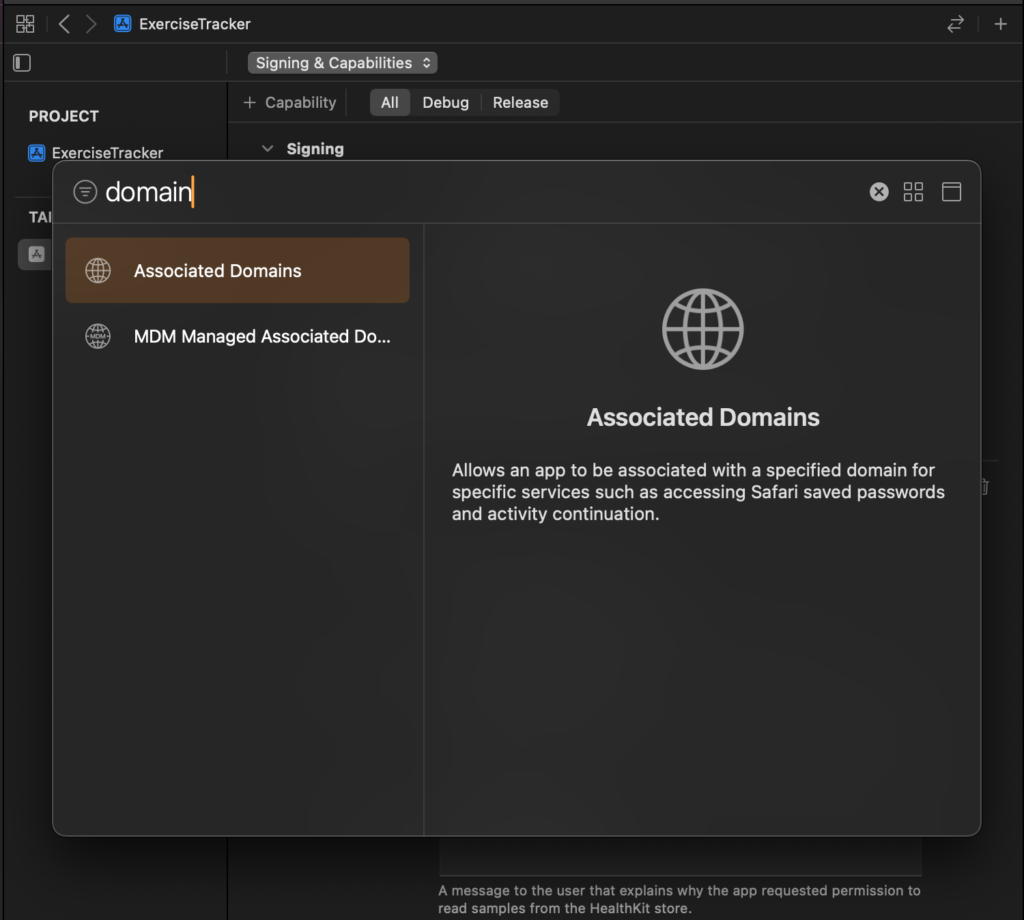
After doing this, you need to register your domain using the applinks: prefix. For example, if I want to open links hosted on donnywals.com I need to write applinks:donnywals.com.
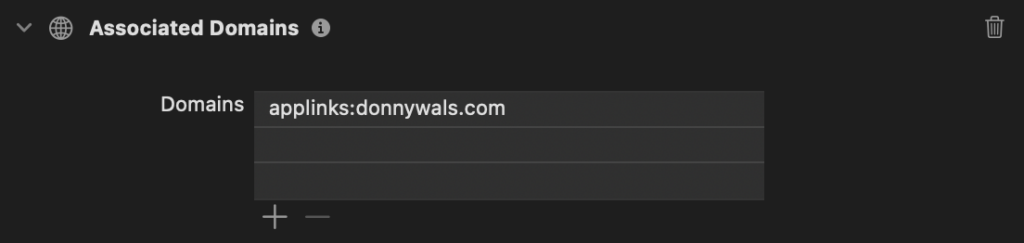
When installing my app, Apple will navigate to my domain’s apple-app-site-association file to verify that my app is allowed to handle links for donnywals.com. If everything checks out, opening links for donnywals.com/maxine/ would open Maxine since that’s the path that I configured in my JSON file.
Testing Universal Links
Universal Links are best tested by tapping on links on your device. I typically have a Notes file with links that I want to test. You can also use a tool like RocketSim if you’re looking for a quick way to test link handling on the simulator.
Note that sometimes Debug builds don’t immediately work with Universal Links. Especially when adding support after having installed the app previously. Reinstalling the app can sometimes solve this. Otherwise a reboot can work wonders too.
When everything works, your app’s onOpenURL view modifiers should be called and you’ll be passed the full URL that your app is asked to handle.
To learn more about onOpenURL, refer to my post on handling deeplinks on iOS.
Universal Link best practices
When you add support for Universal Links you implement a reliable way for users to open certain links in your application. That said, users can choose not to follow the link into your app and stay in their browser instead.
When a user refuses to navigate to your app, you want to make sure that they can (at least) see some of the contents that they were supposed to see. Or, at the very least you want to make sure that a user understands that they opened a link that was supposed to take them to your app.
You can host HTML content on the routes that you’d normally redirect to your app. In some cases that means you can show the exact same content that the user would see in the app. In other cases, you might show a page that tells the user that they should either download your app or enable Universal Links for your app again in settings.