

Amazon Sidewalk is a shared, community-sourced network that leverages existing Amazon Echo and Ring devices as gateways to provide secure, low-power connectivity for IoT devices—enabling applications ranging from asset tracking and smart home security to remote diagnostics for appliances and tools.
AWS IoT Core for Amazon Sidewalk device management is evolving to meet the needs of growing deployments that leverage this community-sourced network. To manage a Sidewalk device fleet, operators need to configure device settings and manage device identities through AWS IoT Core APIs with scale in mind. This has required implementing retry logic, tracking operation outcomes, and understanding API rate limits. As customer deployments scale beyond thousands of devices, there is an opportunity to streamline configuration management across entire fleets and empower teams to manage large-scale deployments with greater ease and confidence.
Today, we’re excited to announce new bulk management capabilities for AWS IoT Core for Amazon Sidewalk that helps transform how you provision, configure, and manage thousands of devices. With the new AWS Cloud Development Kit (CDK) stack from the AWS IoT Core team, you can now onboard entire manufacturing batches through simple JSON files, update device configurations across your fleet in minutes, and receive detailed operational reports—all while respecting API rate limits and maintaining full visibility through Amazon CloudWatch dashboards. Whether you’re provisioning your first batch of Sidewalk devices or managing updates across an existing fleet, these new capabilities reduce operational overhead from hours to minutes while providing enterprise-grade error handling and reporting.
The new ‘bulk management solution for Sidewalk device fleets’ is a CDK app that eliminates the manual overhead of device management operations through AWS IoT Core.
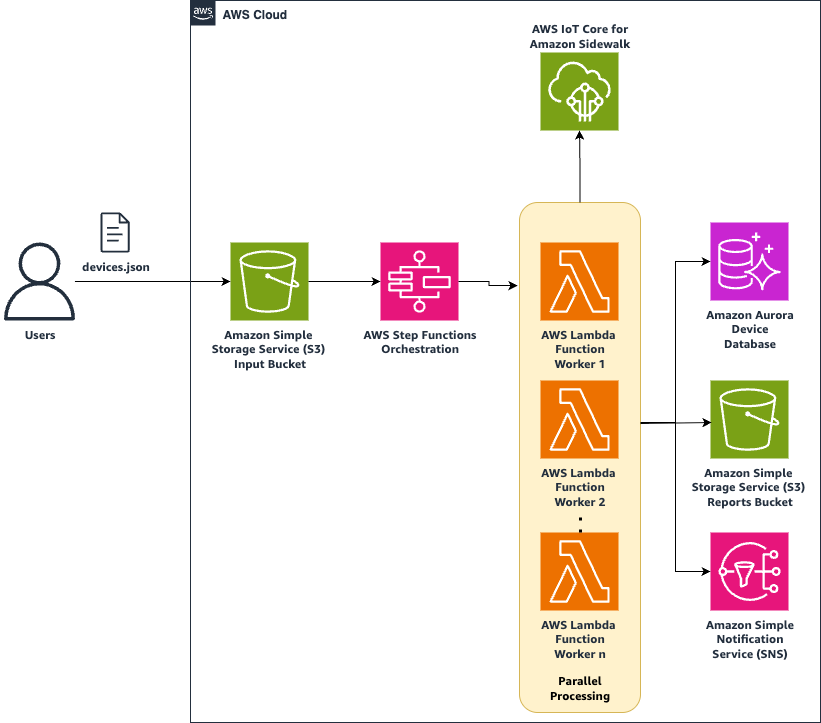
Bulk Provisioning AWS CloudFormation Stack for AWS IoT Core for Amazon Sidewalk
Key capabilities:
The stack delivers five essential capabilities that address the core challenges of fleet management:
CDK-based deployment for easy setup – Deploy the entire solution to your account with a single CDK command, customizing behavior through a simple configuration file. No complex infrastructure setup or manual resource provisioning required.
JSON-based bulk operations – Define device operations using straightforward JSON files that support both create and update operations. Reference devices by Sidewalk Manufacturing Serial Number (SMSN) or AWS IoT Wireless Device ID.
Real-time monitoring through Amazon CloudWatch – Track operation progress through purpose-built CloudWatch dashboards that display processing rates, success metrics, and error counts as they happen.
Automated error handling and reporting – Receive comprehensive reports distinguishing between retriable and permanent failures, with clear error messages for rapid remediation. The stack automatically retries any failures with exponential backoff.
Flexible notification options – Choose your preferred notification channel—Amazon Simple Queue Service (SQS) for queue-based processing, Amazon SNS for event-driven workflows, or Amazon S3-only for simple file-based reporting.
Three core operations:
The stack supports three fundamental operations that cover the entire device lifecycle:
1. Bulk create: Upload a JSON file containing device configurations including SMSN, device profiles, destinations, and positioning settings. The stack validates inputs, processes devices in parallel while respecting API limits, and generates detailed reports of successful and failed provisioning attempts.
2. Bulk update: Update device settings such as positioning status, destination names, or tags across hundreds or thousands of devices simultaneously. The stack automatically looks up devices by SMSN or AWS IoT Wireless Device ID, applies only the specified changes, and maintains a complete audit trail of modifications.
3. Bulk validation: Validate JSON structure and field requirements before making any AWS API calls, catching configuration errors early. This prevents partial batch failures and wastes API calls, providing immediate feedback on issues like missing required fields, invalid field formats, or malformed JSON structure.
Each operation respects your configured API rate limits, provides detailed success/failure reporting, and integrates seamlessly with your existing AWS infrastructure through standard services like Amazon S3, AWS Lambda, and Amazon Aurora.
How it works:
Step 1: Sidewalk bulk management stack deployment
Download the Sidewalk device bulk management package and extract it on a machine that has AWS credentials for your account. You can learn more about configuring security credentials for the AWS CDK CLI here.
Deployment requires just a configuration file and two CDK commands. The CDK app automatically provisions all necessary AWS resources in your account.
First, install and bootstrap the AWS CDK in your account:
# Install CDK globally
npm install -g aws-cdk
# Bootstrap CDK in your AWS account
cdk bootstrap
Create a config.json file in the directory where you extracted the package to customize the stack for your specific requirements:
{
  // Notification channel: "SQS", "SNS", or "NONE" (S3 reports only)
  "notificationType": "SQS", // SQS configuration (if using SQS)
  "sqsProperties": {
    "queueName": "sidewalk-bulk-notifications",
    "visibilityTimeout": 300 },
  // Default API rate limits - adjust based on your AWS IoT Core quotas
  "createWirelessDeviceApiTps": 10,
  "getWirelessDeviceApiTps": 10,
  "updateWirelessDeviceApiTps": 10
}
Deploy the solution with your configuration:
cd aws-iot-wireless-device-bulk-management-cdk-v1.0.0
cdk deploy --parameters-file config.json
This CDK deployment command creates:
- Amazon S3 bucket for uploading device JSON files and storing operation reports
- AWS Lambda functions for processing bulk operations with automatic retry logic
- Amazon Aurora table integrated with your database cluster for device state management
- Amazon CloudWatch dashboards for real-time operation monitoring
- Notification infrastructure (Amazon SQS queue or Amazon SNS topic based on your configuration)
Please note that you will incur AWS charges for using the above-mentioned services. For more information, refer pricing pages of each AWS service listed above. As provided, the stack costs ~$50/mo for quiescent hosting costs primarily driven by the Aurora cluster (0.5 ACU min). The operation of provisioning or updating config on 1M devices would add <$15 in incremental cost.
Step 2: Device provisioning
With the stack deployed, you can immediately begin provisioning devices in bulk.Create a JSON file defining your device batch with all necessary configuration:
{
  "operation": "create",
  "batchName": "manufacturing-batch-20250917",
  "devices": [
    {
      "smsn": "SIDEWALK-DEVICE-001",
      "deviceName": "warehouse-sensor-001",
      "deviceProfileId": "prof-a1b2c3d4e5f6",
      "uplinkDestinationName": "warehouse-data-destination",
      "positioning": {
        "enabled": true,
        "positioningDestinationName": "asset-tracking-destination" },
      //optional tags
      "tags": [
       {"key": "location", "value": "warehouse-1"},
       {"key": "type", "value": "temperature-sensor"} ]
    },
    {
      "smsn": "SIDEWALK-DEVICE-002",
      "deviceName": "warehouse-sensor-002",
      "deviceProfileId": "prof-a1b2c3d4e5f6",
      "uplinkDestinationName": "warehouse-data-destination",
      "positioning": { "enabled": false } }
    // ... additional devices ]
}
Upload the file to the Amazon S3 bucket, triggering automatic processing:
- Immediate validation of JSON structure and required fields.
- Parallel processing of devices while respecting API rate limits.
- Automatic retries for transient failures with exponential backoff. See retry logic below.
- Comprehensive reporting delivered to S3 and your notification channel.
As processing begins, your CloudWatch dashboard displays:
- Devices processed per minute
- Running success/failure counts
- Current retry queue depth
- Estimated time to completion
Step 3: Configuration updates
To modify device configurations across your fleet without re-provisioning, follow the steps below.
Reference devices using either their original SMSN or the AWS-assigned Wireless Device ID:
{
  "operation": "update",
  "batchName": "enable-positioning-batch-20250918",
  "devices": [
    { // Reference by SMSN
      "smsn": "SIDEWALK-DEVICE-001",
      "positioning": { "enabled": false } },
    { // Reference by AWS Wireless Device ID
      "awsWirelessDeviceId": "a1b2c3d4-5678-90ab-cdef-EXAMPLE11111",
      "positioning": { "enabled": true, "positioningDestinationName": "new-tracking-destination" } },
    { // Update multiple properties
      "smsn": "SIDEWALK-DEVICE-003",
      "deviceName": "warehouse-sensor-003-renamed",
      "uplinkDestinationName": "warehouse-data-v2",
      "tags": [
        {"key": "firmware", "value": "v2.1.0"},
        {"key": "lastUpdated", "value": "2025-09-18"} ]
    }
  ]
}
The stack supports updating any modifiable device property:
- Enable/disable positioning capabilities
- Change uplink or positioning destinations
- Update device names and tags
- Modify any other AWS IoT Core supported attributes
The update process follows the same pattern as creation—upload the JSON file to S3, monitor progress via CloudWatch, and receive detailed reports upon completion. The stack automatically handles device lookups, validates that devices exist before attempting updates, and provides clear error messages for any devices that cannot be modified.
Best practices:
Recommended batch sizes based on configuration maturity –
- Small batches (100-500 devices): Ideal for testing and validation
- Medium batches (500-2,000 devices): Optimal balance of processing time and error isolation
- Large batches (2,000-10,000 devices): Production deployments with well-tested configurations
Configure TPS limits based on your AWS IoT Core quotas and operational requirements:
| Operation | Default TPS | Recommended Setting | Processing Rate |
|---|---|---|---|
| Create | 10 | 8 (80% of limit) | ~480 devices/min |
| Update | 10 | 8 (80% of limit) | ~480 devices/min |
| Get | 10 | 10 (100% of limit) | ~600 devices/min |
Calculate expected processing time using this formula:
Time (minutes) = Number of Devices / (TPS * 60) * 1.2
The 1.2 factor accounts for retries and processing overhead. Example estimates:
- 1,000 devices at 8 TPS: ~2.5 minutes
- 5,000 devices at 8 TPS: ~12.5 minutes
- 10,000 devices at 8 TPS: ~25 minutes
Error handling –
Common error codes and their meanings:
| Error code | Meaning | Action required |
|---|---|---|
| ResourceNotFoundException | Device profile or destination not found | Verify resource exists before retry |
| ThrottlingException | API rate limit exceeded | Automatic retry with backoff |
| ValidationException | Invalid parameter value | Fix configuration and retry |
| ConflictException | Device already exists | Skip or use update operation |
| InternalServerException | Temporary AWS service issue | Automatic retry |
The stack implements intelligent retry logic:
- Automatic retries: Transient errors (throttling, internal errors) retry up to 3 times
- Exponential backoff: Wait times of 1s, 2s, 4s between retries
- Dead letter queue: Permanent failures logged for manual review
- Batch isolation: Failed devices don’t block successful ones
Validation best practices
- Test with small batches before processing thousands of devices
- Validate device profiles exist using AWS CLI or Console before bulk operations
- Use consistent naming conventions for easier troubleshooting
- Include meaningful batch names for operation tracking
- Verify JSON syntax using a JSON validator before upload
- Check required fields match your device profile requirements
Conclusion
AWS IoT Core’s new bulk management stack for Amazon Sidewalk fundamentally helps transform how organizations deploy and manage IoT devices at scale. By replacing manual API calls and custom scripts with a robust, CDK-deployable solution, teams can now provision thousands of devices in minutes rather than hours or days. This represents a significant step forward for IoT teams looking to scale their device deployments efficiently. By leveraging AWS IoT Core for Amazon Sidewalk’s bulk provisioning features, you can onboard devices using the AWS IoT console, API operations, or AWS CLI commands—with the flexibility to add devices individually or via CSV files stored in Amazon S3For IoT operations teams, these capabilities translate directly into reduced operational overhead by making it easier to securely onboard, organize, monitor, and remotely manage Sidewalk devices at scale throughout their lifecycle. Combined with built-in monitoring, teams gain the operational visibility needed to maintain reliable Sidewalk device fleets. With these new capabilities now available, your team can shift focus from managing provisioning infrastructure to building the innovative IoT solutions that drive your business forward—letting AWS handle the complexity of scaling your Sidewalk device fleet from hundreds to millions.
Additional Resources
About the authors

Ben Cooke
Ben is a Senior Partner Solutions Architect at Amazon Web Services, helping partners and customers create innovative solutions for the IoT, Games and Media & Entertainment industries. With over 20 years of technology experience spanning embedded systems, cloud architecture, and technical sales roles, Ben brings deep technical expertise to solving complex industry challenges. Outside of work, he enjoys adventures with his family and all things automotive.

Calvin Li (李一晗)
Calvin is a Senior Software Development Engineer in the AWS IoT team based in Seattle, WA, specializing in IoT device connectivity, location services, and scalable architectures that support millions of connected devices. When not working, he enjoys exploring new technology and traveling with his family.

Kexin Zhang (张珂昕)
Kexin is a Software Engineer in AWS IoT team based in Seattle, where she helps build scalable IoT applications from prototype to production. When not connecting devices to the cloud, she disconnects by hiking, swimming, and solving puzzles that don’t require debugging.