

GPT 5.1 is here. OpenAI is calling it the next big step, and honestly, it feels like one. When GPT-5 came out, people were amazed by its power but not everyone was happy. They removed the o-series models that many users loved for complex reasoning tasks.
That move didn’t sit well.
Now with GPT-5.1, OpenAI seems to have listened. The update brings back that same deep-thinking ability, only smarter and faster. It’s quick with simple tasks, thoughtful with complex ones, and a lot more natural in how it responds. GPT-5.1 feels less like a tech upgrade and more like a course correction. It gives users what they missed: control, flexibility, and a model that actually feels intelligent. Let’s try the model out and see how it performs.
What’s New in GPT 5.1?
GPT-5.1 feels like the version GPT-5 should have been. It’s faster, more natural, and a lot better at following instructions. The model now balances speed with depth, giving you sharper answers without losing context.
Here’s what’s new and improved:
- Two model options: You can now pick between Instant (for fast replies) and Thinking (for deeper reasoning). It gives users back control over how they want the model to perform.
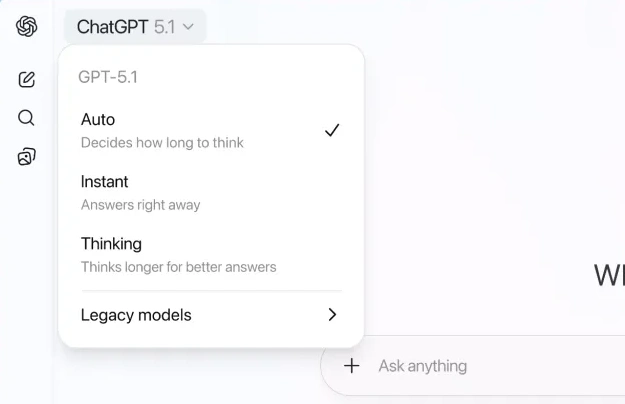
- Smarter reasoning mode: GPT-5.1 reintroduces a dedicated “thinking” model that adjusts its response time based on task complexity. Quick for simple prompts, more thorough for complex ones.
- Better tone and personality: The model sounds more human and conversational. You can choose from tone presets like friendly, professional, or quirky, depending on your goal.
- Improved instruction following: GPT-5.1 listens better. It follows specific prompts more accurately and stays on topic without drifting.
- Warmer, more natural responses: The overall tone feels less robotic and more like you’re chatting with a real person.
- Fewer mistakes: With better context awareness, the model makes fewer logical or factual errors compared to GPT-5.
Let’s Try GPT 5.1
I will be trying out the tasks I previously did with GPT 5, you can find my detailed review in this article: Here’s My Honest Review of GPT-5. These tasks are being done using the ChatGPT interface.
Task 1: Coding
I am using the thinking mode to create this game.
Create a cute and interactive UI for a “Guess the Word” game where the player knows a secret word and provides 3 short clues (max 10 letters each). The AI then has 3 attempts to guess the word. If the AI guesses correctly, it wins; otherwise, the player wins.
Output:
When I created this game last time with GPT 5, it lacked the core feature where the player can input the secret word for the AI to guess. With GPT 5.1, I was able to enter the word in the game, making it a much better and useful application.
Task 2: Instruction Following
Always respond in 6 words.
Output:
GPT-5.1 follows instructions much better than before. When you give it specific directions, it actually listens. If you ask for six words, you get six. It understands tone, structure, and length more precisely. This makes it far more reliable for tasks where accuracy and consistency matter.
Task 3: Empathy
Ugh I spilled coffee all over myself before my meeting do you think everyone thought I was an idiot 🙁
Output:
Source: OpenAI
GPT-5.1 handles empathy much better than GPT-5. While GPT-5 gives polite reassurance and practical advice, GPT-5.1 feels more human. It recognizes how the user feels, calms them, and reframes the moment with warmth and understanding. Instead of just offering fixes, it connects and helps the user feel seen and supported.
Access and Availability
GPT-5.1 takes a clear step forward in both capability and usability. The new Auto mode still routes each query to the model that fits best, so most users will not need to choose one manually. What you will notice is how much smarter and more natural the answers sound.
Both Instant and Thinking models are rolling out first to paid users including Pro, Plus, Go, and Business plans, followed by free and logged-out users. Enterprise and Education accounts get early access for seven days before GPT-5.1 becomes the default for everyone.
The API versions are also on the way, with GPT-5.1 Instant added as gpt-5.1-chat-latest and GPT-5.1 Thinking as gpt-5.1. The older GPT-5 models will stay available under the legacy dropdown for three months, giving users time to compare and adjust. OpenAI says this approach of offering a sunset period for older models will continue, helping people transition smoothly while still sharing feedback.
Making ChatGPT Feel More Like You
GPT-5.1 is not just smarter, it is also more personal. OpenAI has added new ways to customize how ChatGPT sounds and responds, making it easier to match your own communication style. Whether you want it to sound professional, casual, or creative, you can now set that tone directly from the settings.
Here are the new tone options you can choose from:
- Default: A balanced tone that works for most situations.
- Friendly: Warm, approachable, and chatty.
- Professional: Polished, clear, and precise.
- Candid: Direct, honest, and encouraging.
- Quirky: Playful and imaginative.
- Efficient: Simple, concise, and straight to the point.
- Nerdy and Cynical: Still available for those who prefer extra personality.
For users who want even more control, GPT-5.1 now lets you fine-tune the details. You can adjust how concise or warm the responses are, decide how often emojis appear, and even let ChatGPT suggest tone changes automatically when it notices your preferences.
Conclusion
GPT-5.1 builds on what GPT-5 started, refining both performance and user experience. The model feels more capable, more consistent, and more adaptable to different needs. It follows instructions better, understands tone more naturally, and gives users greater control through personalization. The return of the distinct reasoning mode also shows that OpenAI is listening to feedback and adjusting its approach. While it is not a complete overhaul, GPT-5.1 is a thoughtful upgrade that bridges the gap between speed, intelligence, and usability.
How much of an improvement it feels will depend on what you use it for. But overall, it marks steady progress toward a more reliable and human-like AI experience.
Let me know your thoughts in the comment section below!

Hello, I am Nitika, a tech-savvy Content Creator and Marketer. Creativity and learning new things come naturally to me. I have expertise in creating result-driven content strategies. I am well versed in SEO Management, Keyword Operations, Web Content Writing, Communication, Content Strategy, Editing, and Writing.
Login to continue reading and enjoy expert-curated content.