


The solution was to flatten these ridiculous hierarchies iteratively instead of recursively. SwiftText now handles arbitrarily deep nesting without breaking a sweat.
The Word Document Problem
I wanted agents to produce editable documents that non-Apple people could actually use. HTML isn’t really editable, and PDFs are static printouts. But DOCX? That’s the lingua franca of the business world.
Behind the scenes, DOCX is just a strict XML dialect in a ZIP archive — conceptually similar to HTML. So I implemented the conversion (#5):
swifttext render document.md -o document.docxThe output matches the PDF renderer’s styling: Helvetica Neue body text, sized headings with bottom borders, code blocks as single-cell tables with proper padding. Nice to have this option available for the future…
SwiftMail
SwiftMail sparked more community interest than I expected. Contributors found bugs, suggested improvements, and submitted PRs. The library saw heavy use in Post, which meant every edge case in my mail flow became a potential bug report.
The Threading Nightmare
Message-IDs appear everywhere in email: the Message-ID header, In-Reply-To, References. They’re all supposed to be in the format
This caused subtle bugs in Post’s reply drafting — threading headers would sometimes have double angle brackets, sometimes none. The fix was to introduce a proper MessageID value type:
let id = MessageID(localPart: "abc", domain: "example.com")
print(id.description)  // ""
Now angle brackets are handled correctly everywhere, and threading headers just work. And we unified this between SMTP and IMAP, so that the same type can be round tripped. I went through thousands of emails in my archive and couldn’t find a single message ID that didn’t adhere to the standard.
The Buffer Limit Problem
Rather than forcing callers to manage batch sizes manually, I made chunking automatic and transparent. Request 10,000 messages? SwiftMail splits it into manageable chunks internally. The API stays clean.
The Calendar Invite Problem
ICS files were being treated as text bodies instead of attachments. This meant calendar invites from Outlook users weren’t properly extracted by Post’s mail-room. The fix? Correctly classify text/calendar parts as attachments (#126) and give them a default invite.ics filename when none is specified.
The Linux SSE Problem
SwiftMCP’s SSE client didn’t work on Linux. It used URLSession.bytes(for:), which isn’t available in FoundationNetworking. The runtime just threw unsupportedPlatform.
The fix was a URLSessionDataDelegate that streams incoming bytes into an AsyncStream, feeding the same SSE parser used on Apple platforms. Same behavior, different plumbing. Now SwiftMCP clients work identically on macOS and Linux.
Post
Post matured from a working prototype to something I actually rely on daily. The mail-room skill sorts my invoices, archives newsletters, routes GitHub notifications to Discord, and marks spam that my server-side filter missed. Getting here meant fixing a lot of stability issues.
A user – a friend 😇 – tried to fetch their entire mailbox — thousands of messages — and SwiftMail crashed. The FETCH command line was too long, exceeding NIO’s buffer limits (#118). So we added some internal batching to avoid this problem.
The Connection Race
The original architecture used two persistent IMAP connections per server: one for IDLE (watching for new mail) and one for fetching. The fetch connection needed periodic NOOP commands to stay alive — roughly every 17 minutes. But servers timeout connections after about 26-27 minutes.
See the problem? The NOOP interval races with the server timeout. Sometimes the NOOP arrives too late, the connection dies, and recovery takes 60 seconds with a bunch of log noise (#3). I tasked an AI with analyzing mail.app’s connection logs and piece together the IMAP idle strategies for GMAIL as well as Dovecot. This informed the new strategy for SwiftMail.
The solution was simpler than I expected: make fetch connections ephemeral. Create them on-demand when new mail arrives, reuse them if still alive, dispose if dead. No more NOOP heartbeat. No more races. The IDLE connection stays persistent (the IDLE protocol naturally keeps it alive), and fetch connections are short-lived by design.
The SIGPIPE Problem
This one was sneaky. If a hook script crashed while postd was still writing JSON to its stdin, the OS would kill the daemon with SIGPIPE. Not “log an error and continue” — full daemon death.
The fix was one line: explicitly ignore SIGPIPE. Now Post logs “Broken pipe” and keeps running.
The Zero-Config Problem
The original setup required a ~/.post.json config file even if all your credentials were in the keychain. That’s friction I didn’t need.
Now Post auto-discovers servers from the keychain (#1). One command is all you need:
post keychain add personal --host imap.gmail.com --port 993
postd start  # discovers "personal" automatically
SwiftMCP
The MCP framework went from 1.1.0 to 1.4.0 in two weeks. That’s not version inflation — each release addressed real needs from my client project.
Here’s the thing about MCP: it’s a great protocol for APIs in general, not just AI agents. You get formalized infrastructure for bidirectional messaging — the server can push to the client, not just respond to requests. And because SwiftMCP generates Swift code for both sides, you don’t have to think about the wire protocol. Define your @MCPServer, and the client proxy comes for free.
While implementing client and servers for a huge project I am working on these days, I found – and eliminated – many more rough edges and missing features.
From Logs to Structured Notifications
Originally, I was piggy-backing status updates into normal log notifications. The server would emit a log message like “Queue: 3 jobs running, 0 errors” and the client would parse it. That felt stupid.
The MCP spec allows custom notifications with arbitrary structured data. So I made that possible in SwiftMCP. Now my daemon broadcasts health status as a proper typed notification:
TRACE: [SwiftMCP] Received JSON-RPC message: {
  "jsonrpc": "2.0",
  "method": "notifications/healthChanged",
  "params": {
    "concurrencyLimit": 4,
    "errorCount": 0,
    "runningJobs": 0,
    "uptimeSeconds": 210.67,
    "version": "0.1.0"
  }
}
The client defines a Codable struct and gets compile-time type safety:
struct HealthStatus: Codable {
    let concurrencyLimit: Int
    let errorCount: Int
    let runningJobs: Int
    let uptimeSeconds: Double
}

extension MyClient: MCPServerProxyNotificationHandling {
    func handleNotification(_ method: String, params: HealthStatus) async {
        if params.errorCount > 0 {
            logger.warning("Server reporting \(params.errorCount) errors")
        }
    }
}
Resource Subscriptions
MCP has a concept of “resources” identified by URI. I needed clients to watch individual queue items — submit a job, get a URI back, track its progress.
Now there’s full support for resource subscriptions. The client calls subscribeResource(uri:), and when that resource changes, the server broadcasts an update to all subscribers. On the server side, you just call broadcastResourceUpdated(uri:) whenever state changes. SwiftMCP handles the subscription tracking and fan-out.
This turned my queue system from polling-based to push-based. Much cleaner.
The File Size Problem
My client project needed to upload documents to an MCP server. Base64 encoding works for small files, but falls apart quickly for anything substantial — the JSON payload balloons, you hit message size limits, and everything grinds to a halt (#73).
The new architecture uses CID-based uploads: clients send cid: placeholders in tool arguments, upload files to POST /mcp/uploads/{cid} concurrently, and the server delivers the data to your tool function transparently. There’s even progress notifications during upload. Opting in is one protocol conformance:
@MCPServer
struct MyServer: MCPFileUploadHandling { }
The next steps here are being a bit smarter about memory on the server side. Instead of keeping it all in RAM multiple times, I am pondering to stream the binary data straight to files and to use memory-mapped Data instead. Also there should be a binary file download functionality that bypasses the MCP base64 approach. Still thinking how to best do that.
The mDNSResponder Problem
Post’s daemon uses Bonjour for local MCP discovery. One day it just stopped working. The logs showed: “DNS Error: ServiceNotRunning.”
Turns out macOS’s mDNSResponder had restarted (which happens more often than you’d think — network changes, sleep/wake, system updates), and my Bonjour listener died with it (#77).
The fix was a generation-based state machine with exponential backoff. When mDNSResponder dies, SwiftMCP retries: 1s → 2s → 4s → 8s → up to 60s max. When it comes back, the listener recovers automatically. No more 1-second retry spam, no more orphaned tasks.
SwiftMCP Meets Xcode
And now for the surprise: Xcode now exposes an MCP server. You can enable it under Settings → Intelligence → “Allow external agents to use Xcode tools.”
Here’s what you see if you look at it with Claude Code:

Adding it to Claude was quick and painless — but my first instinct was to generate a SwiftMCP client proxy so I could remote-control Xcode from any Swift app:
swift run SwiftMCPUtility generate-proxy \
  --command "/Applications/Xcode-beta.app/Contents/Developer/usr/bin/mcpbridge"
That’s when things got interesting. Xcode never showed the approval dialog. After some debugging, I discovered the proxy generator wasn’t sending the notifications/initialized notification after the initialize handshake. The MCP spec requires this, and Xcode’s server is strict about it (#91).
While fixing that, I also added client identity — Xcode displays the client name and version in its approval dialog:

The proxy generator now automatically derives the client name from the MCP server’s advertised name. For xcode-tools, you get an XcodeTools enum namespace with a Client actor inside — matching the structure you’d get from @MCPServer(generateClient: true).
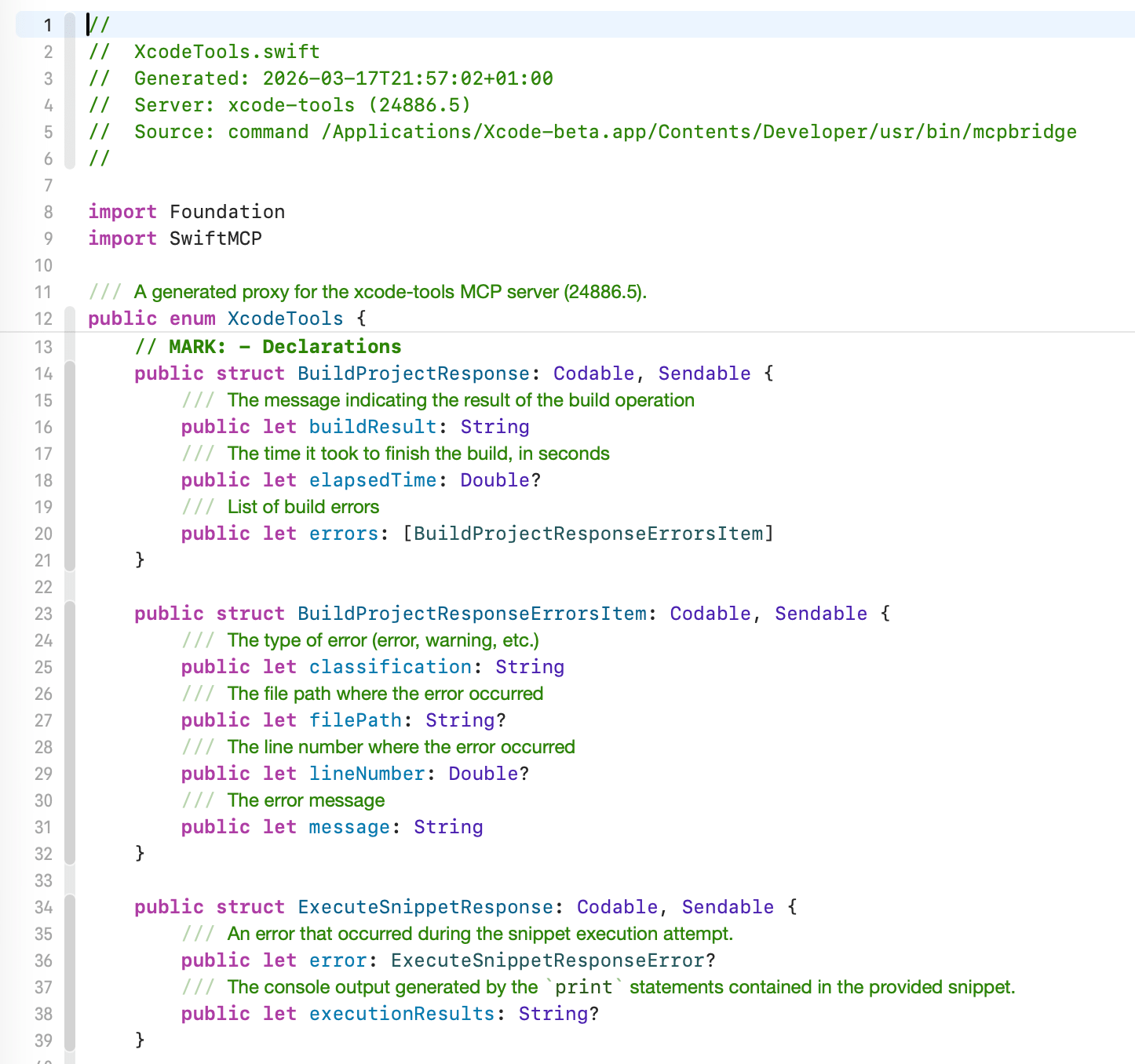
The generator produces typed response structs for all 19 tools, complete with all the documentation that the MCP tool has in the schema.
And the Client actor with auto-derived naming:
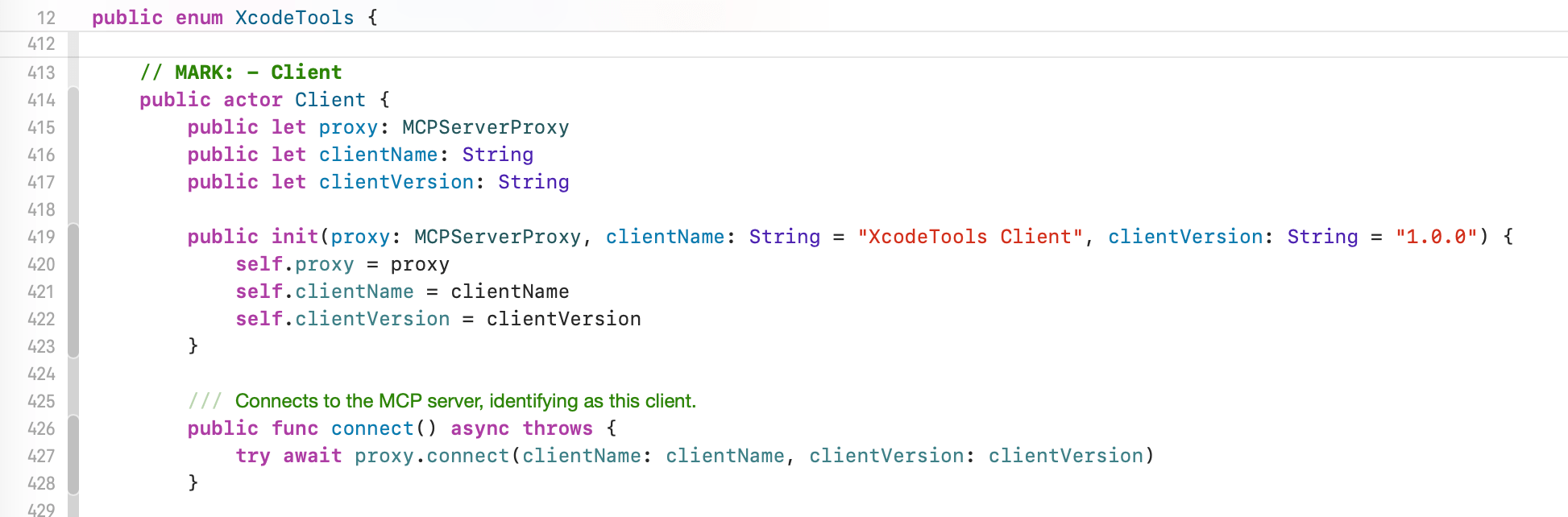
You can see the full generated XcodeTools.swift on GitHub Gist.
I have to say, Apple did a nice job here. The MCP schema is well fleshed out — they have structured response types for everything. BuildProjectResponse tells you exactly what you get back: success status, build log path, errors and warnings as typed arrays. Same for RunTestsResponse, GetBuildLogResponse, and the rest. It’s clear someone thought about the developer experience. My one gripe? Most of the struct types lack documentation comments, even though the MCP spec supports descriptions for every field. A missed opportunity — but the types themselves are self-explanatory enough.
Oh and the other gripe: you need to have open any project you want to interact with. You need tab IDs for almost all operations. But it’s a great and very surprising initiative from Apple!
Before all this works though, you have to also enable the “Allow external agents to use Xcode tools” switch found under Intelligence.

Conclusion
RL (“real life”) work drives the most interesting enhancements to my open source projects. When something feels off then I just want to fix it right away. Or rather, have an agent fix it right away.
A big client project pushed me to polish SwiftMCP for use as API, and my interest in the Xcode MCP tools benefitted the client proxy parts of SwiftMCP. I was pondering if it might be interesting to auto-generate a CLI tool for Xcode Tools. This might be a great example for using the MCP utility….
The other enhancements were driven mostly by me working on my OpenClaw’s ability to read and mange my inboxes. More and more I am using the features to draft me a email responses. For those my agent can get the markdown representation of a HTML email and craft a markdown response interleaving the > quoted questions of the email being replied to. And of course threading headers get preserved to. The next step there is to add the feature of actually also sending such drafts.
Busy times!
Related
Categories: Updates