
Close Menu
geekfence.comgeekfence.com
    What's Hot

    Designing trust & safety (T&S) in customer experience management (CXM): why T&S is becoming core to CXM operating model 

    January 24, 2026

    iPhone 18 Series Could Finally Bring Back Touch ID

    January 24, 2026

    The Visual Haystacks Benchmark! – The Berkeley Artificial Intelligence Research Blog

    January 24, 2026
    Facebook X (Twitter) Instagram
    • About Us
    • Contact Us
    Facebook Instagram
    geekfence.comgeekfence.com
    • Home
    • UK Tech News
    • AI
    • Big Data
    • Cyber Security
      • Cloud Computing
      • iOS Development
    • IoT
    • Mobile
    • Software
      • Software Development
      • Software Engineering
    • Technology
      • Green Technology
      • Nanotechnology
    • Telecom
    geekfence.comgeekfence.com
    Home»Software Development»JavaScript and TypeScript Projects with React, Angular, or Vue in Visual Studio 2022 with or without .NET
    Software Development

    JavaScript and TypeScript Projects with React, Angular, or Vue in Visual Studio 2022 with or without .NET

    AdminBy AdminJanuary 2, 2026No Comments4 Mins Read0 Views
    Facebook Twitter Pinterest LinkedIn Telegram Tumblr Email
    JavaScript and TypeScript Projects with React, Angular, or Vue in Visual Studio 2022 with or without .NET
    Share
    Facebook Twitter LinkedIn Pinterest Email


    I was reading Gabby’s blog post about the new TypeScript/JavaScript project experience in Visual Studio 2022. You should read the docs on JavaScript and TypeScript in Visual Studio 2022.

    If you’re used to ASP.NET apps when you think about apps that are JavaScript heavy, “front end apps” or TypeScript focused, it can be confusing as to “where does .NET fit in?”

    You need to consider the responsibilities of your various projects or subsystems and the multiple totally valid ways you can build a web site or web app. Let’s consider just a few:

    1. An ASP.NET Web app that renders HTML on the server but uses TS/JS
      • This may have a Web API, Razor Pages, with or without the MVC pattern.
      • You maybe have just added JavaScript via
    2. A mostly JavaScript/TypeScript frontend app where the HTML could be served from any web server (node, kestrel, static web apps, nginx, etc)
      • This app may use Vue or React or Angular but it’s not an “ASP.NET app”
      • It calls backend Web APIs that may be served by ASP.NET, Azure Functions, 3rd party REST APIs, or all of the above
      • This scenario has sometimes been confusing for ASP.NET developers who may get confused about responsibility. Who builds what, where do things end up, how do I build and deploy this?

    VS2022 brings JavaScript and TypeScript support into VS with a full JavaScript Language Service based on TS. It provides a TypeScript NuGet Package so you can build your whole app with MSBuild and VS will do the right thing.

    NEW: Starting in Visual Studio 2022, there is a new JavaScript/TypeScript project type (.esproj) that allows you to create standalone Angular, React, and Vue projects in Visual Studio.

    The .esproj concept is great for folks familiar with Visual Studio as we know that a Solution contains one or more Projects. Visual Studio manages files for a single application in a Project. The project includes source code, resources, and configuration files. In this case we can have a .csproj for a backend Web API and an .esproj that uses a client side template like Angular, React, or Vue.

    Thing is, historically when Visual Studio supported Angular, React, or Vue, it’s templates were out of date and not updated enough. VS2022 uses the native CLIs for these front ends, solving that problem with Angular CLI, Create React App, and Vue CLI.

    If I am in VS and go “File New Project” there are Standalone templates that solve Example 2 above. I’ll pick JavaScript React.
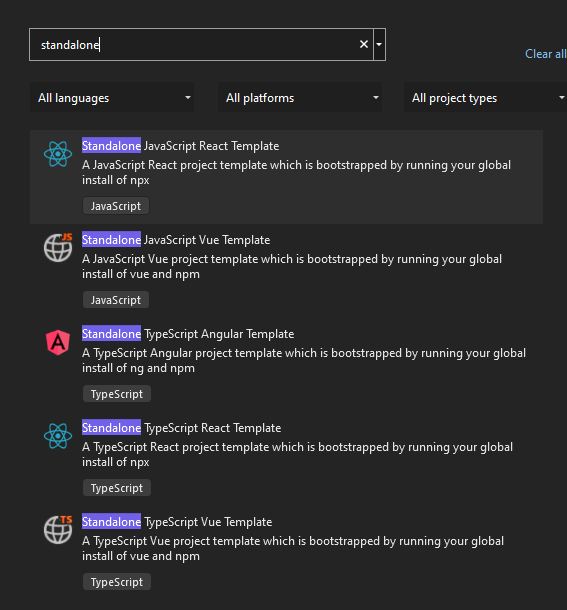
    Standalone JavaScript Templates in VS2022

    Then I’ll click “Add integration for Empty ASP.NET Web API. This will give me a frontend with javascript ready to call a ASP.NET Web API backend. I’ll follow along here.
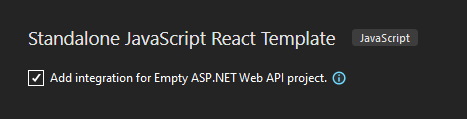
    Standalone JavaScript React Template

    It then uses the React CLI to make the front end, which again, is cool as it’s whatever version I want it to be.
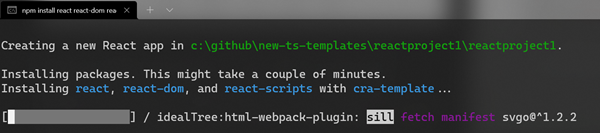
    React Create CLI

    Then I’ll add my ASP.NET Web API backend to the same solution, so now I have an esproj and a csproj like this
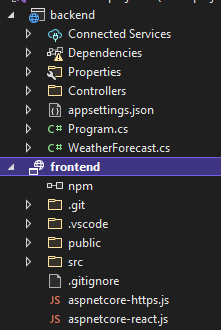
    frontend and backend

    Now I have a nice clean two project system – in this case more JavaScript focused than .NET focused. This one uses npm to startup the project using their web development server and proxyMiddleware to proxy localhost:3000 calls over to the ASP.NET Web API project.

    Here is a React app served by npm calling over to the Weather service served from Kestrel on ASP.NET.
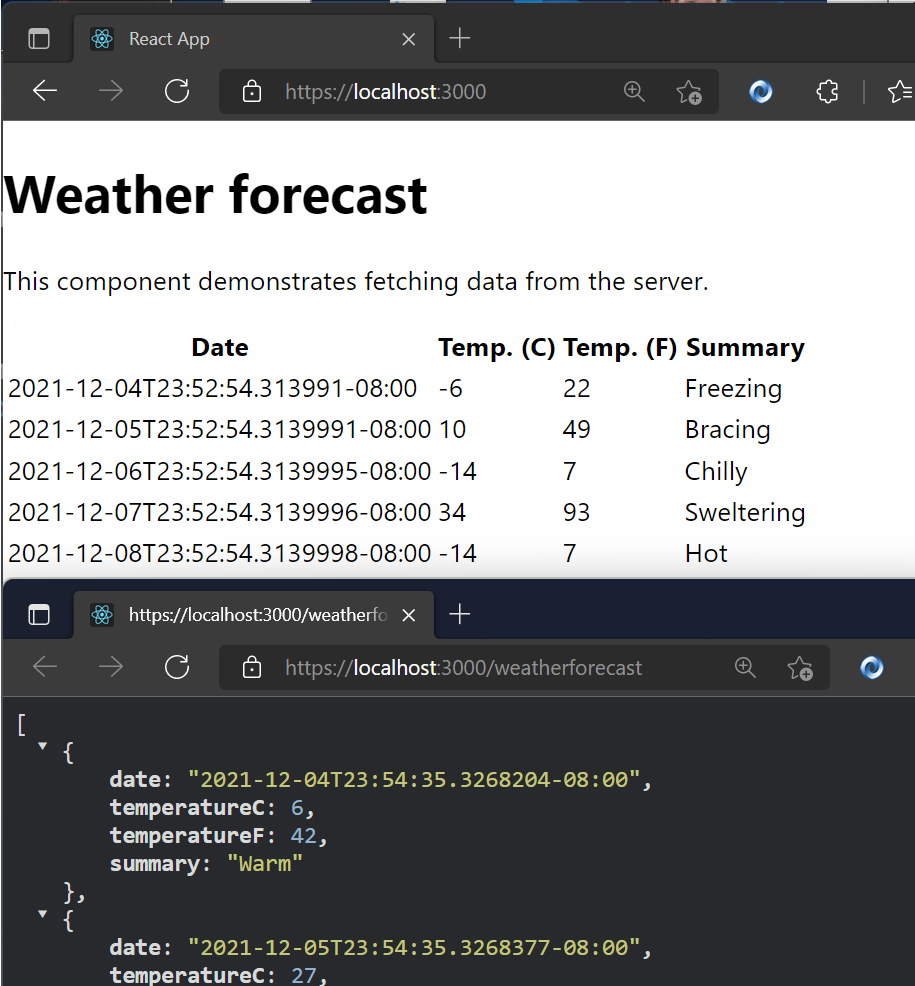
    npm app running in VS 2022 against an ASP.NET Web API

    This is inverted than most ASP.NET Folks are used to, and that’s OK. This shows me that Visual Studio 2022 can support either development style, use the CLI that is installed for whatever Frontend Framework, and allow me to choose what web server and web browser (via Launch.json) I want.

    If you want to flip it, and put ASP.NET Core as the primary and then bring in some TypeScript/JavaScript, follow this tutorial because that’s also possible!


    Sponsor: Make login Auth0’s problem. Not yours. Provide the convenient login features your customers want, like social login, multi-factor authentication, single sign-on, passwordless, and more. Get started for free.


    About Scott

    Scott Hanselman is a former professor, former Chief Architect in finance, now speaker, consultant, father, diabetic, and Microsoft employee. He is a failed stand-up comic, a cornrower, and a book author.

    facebook
    bluesky
    subscribe
    About   Newsletter

    Hosting By
    Hosted on Linux using .NET in an Azure App Service


    Source link

    Share. Facebook Twitter Pinterest LinkedIn Tumblr Email

    Related Posts

    Fragments: January 8

    January 24, 2026

    How to Build and Optimize It for Success

    January 21, 2026

    Report: Companies with technical debt unlikely to see benefits from AI adoption

    January 20, 2026

    Is It Time for a Rethink? – A List Apart

    January 19, 2026

    I’m So Old: Web Edition

    January 18, 2026

    Stop Picking Sides

    January 17, 2026
    Top Posts

    Understanding U-Net Architecture in Deep Learning

    November 25, 202511 Views

    Hard-braking events as indicators of road segment crash risk

    January 14, 20269 Views

    Microsoft 365 Copilot now enables you to build apps and workflows

    October 29, 20258 Views
    Don't Miss

    Designing trust & safety (T&S) in customer experience management (CXM): why T&S is becoming core to CXM operating model 

    January 24, 2026

    Customer Experience (CX) now sits at the intersection of Artificial Intelligence (AI)-enabled automation, identity and access journeys, AI-generated content…

    iPhone 18 Series Could Finally Bring Back Touch ID

    January 24, 2026

    The Visual Haystacks Benchmark! – The Berkeley Artificial Intelligence Research Blog

    January 24, 2026

    Data and Analytics Leaders Think They’re AI-Ready. They’re Probably Not. 

    January 24, 2026
    Stay In Touch
    • Facebook
    • Instagram
    About Us

    At GeekFence, we are a team of tech-enthusiasts, industry watchers and content creators who believe that technology isn’t just about gadgets—it’s about how innovation transforms our lives, work and society. We’ve come together to build a place where readers, thinkers and industry insiders can converge to explore what’s next in tech.

    Our Picks

    Designing trust & safety (T&S) in customer experience management (CXM): why T&S is becoming core to CXM operating model 

    January 24, 2026

    iPhone 18 Series Could Finally Bring Back Touch ID

    January 24, 2026

    Subscribe to Updates

    Please enable JavaScript in your browser to complete this form.
    Loading
    • About Us
    • Contact Us
    • Disclaimer
    • Privacy Policy
    • Terms and Conditions
    © 2026 Geekfence.All Rigt Reserved.

    Type above and press Enter to search. Press Esc to cancel.
