
Close Menu
geekfence.comgeekfence.com
    What's Hot

    Customer experience management (CXM) predictions for 2026: How customers, enterprises, technology, and the provider landscape will evolve 

    December 28, 2025

    What to Know About the Cloud and Data Centers in 2026

    December 28, 2025

    Why Enterprise AI Scale Stalls

    December 28, 2025
    Facebook X (Twitter) Instagram
    • About Us
    • Contact Us
    Facebook Instagram
    geekfence.comgeekfence.com
    • Home
    • UK Tech News
    • AI
    • Big Data
    • Cyber Security
      • Cloud Computing
      • iOS Development
    • IoT
    • Mobile
    • Software
      • Software Development
      • Software Engineering
    • Technology
      • Green Technology
      • Nanotechnology
    • Telecom
    geekfence.comgeekfence.com
    Home»Big Data»Introducing Amazon MWAA Serverless | AWS Big Data Blog
    Big Data

    Introducing Amazon MWAA Serverless | AWS Big Data Blog

    AdminBy AdminNovember 18, 2025No Comments12 Mins Read21 Views
    Facebook Twitter Pinterest LinkedIn Telegram Tumblr Email
    Introducing Amazon MWAA Serverless | AWS Big Data Blog
    Share
    Facebook Twitter LinkedIn Pinterest Email


    Today, AWS announced Amazon Managed Workflows for Apache Airflow (MWAA) Serverless. This is a new deployment option for MWAA that eliminates the operational overhead of managing Apache Airflow environments while optimizing costs through serverless scaling. This new offering addresses key challenges that data engineers and DevOps teams face when orchestrating workflows: operational scalability, cost optimization, and access management.

    With MWAA Serverless you can focus on your workflow logic rather than monitoring for provisioned capacity. You can now submit your Airflow workflows for execution on a schedule or on demand, paying only for the actual compute time used during each task’s execution. The service automatically handles all infrastructure scaling so that your workflows run efficiently regardless of load.

    Beyond simplified operations, MWAA Serverless introduces an updated security model for granular control through AWS Identity and Access Management (IAM). Each workflow can now have its own IAM permissions, running on a VPC of your choosing so you can implement precise security controls without creating separate Airflow environments. This approach significantly reduces security management overhead while strengthening your security posture.

    In this post, we demonstrate how to use MWAA Serverless to build and deploy scalable workflow automation solutions. We walk through practical examples of creating and deploying workflows, setting up observability through Amazon CloudWatch, and converting existing Apache Airflow DAGs (Directed Acyclic Graphs) to the serverless format. We also explore best practices for managing serverless workflows and show you how to implement monitoring and logging.

    How does MWAA Serverless work?

    MWAA Serverless processes your workflow definitions and executes them efficiently in service-managed Airflow environments, automatically scaling resources based on workflow demands. MWAA Serverless uses the Amazon Elastic Container Service (Amazon ECS) executor to run each individual task on its own ECS Fargate container, on either your VPC or a service-managed VPC. Those containers then communicate back to their assigned Airflow cluster using the Airflow 3 Task API.
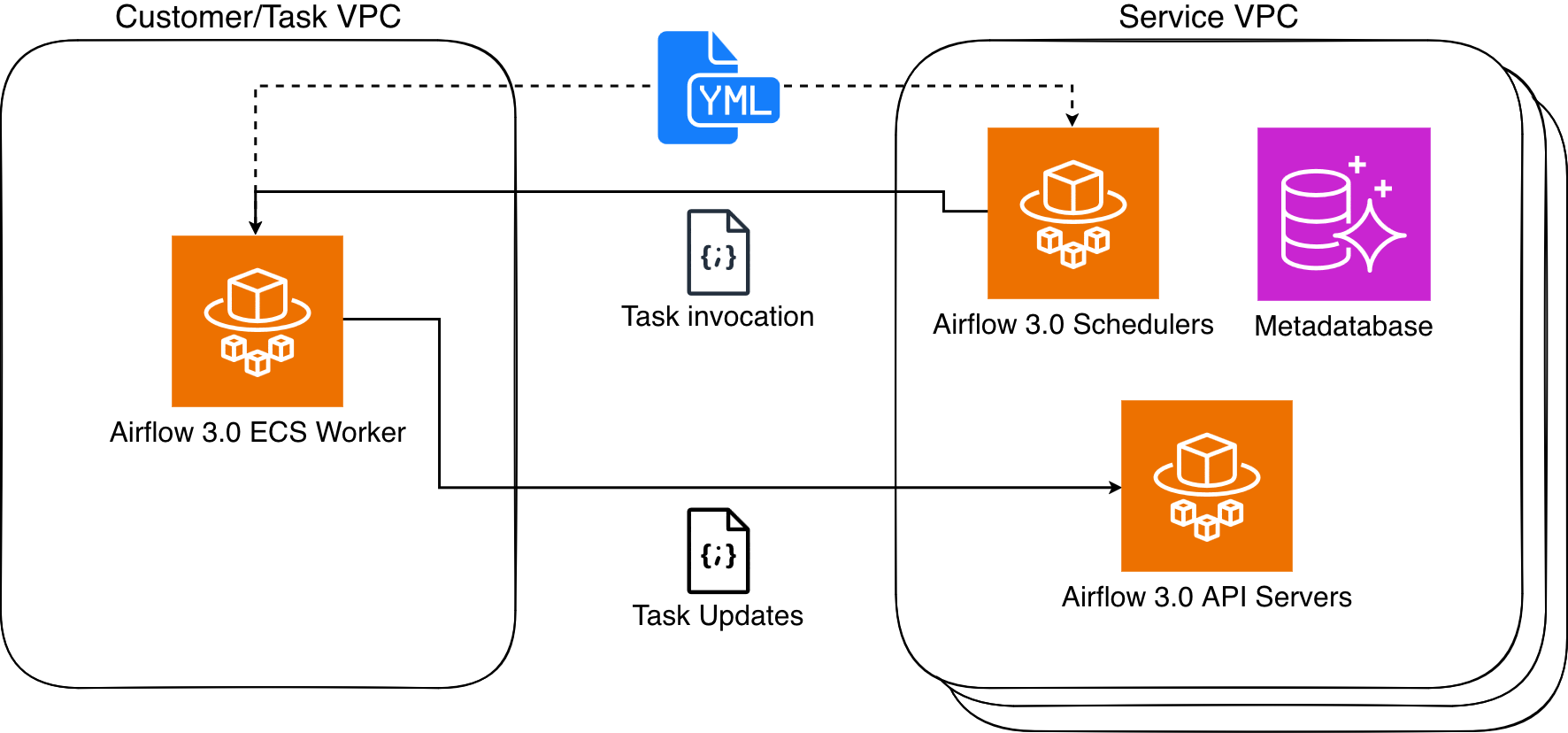

    Figure 1: Amazon MWAA Architecture

    MWAA Serverless uses declarative YAML configuration files based on the popular open source DAG Factory format to enhance security through task isolation. You have two options for creating these workflow definitions:

    This declarative approach provides two key benefits. First, since MWAA Serverless reads workflow definitions from YAML it can determine task scheduling without running any workflow code. Second, this allows MWAA Serverless to grant execution permissions only when tasks run, rather than requiring broad permissions at the workflow level. The result is a more secure environment where task permissions are precisely scoped and time limited.

    Service considerations for MWAA Serverless

    MWAA Serverless has the following limitations that you should consider when deciding between serverless and provisioned MWAA deployments:

    • Operator support
      • MWAA Serverless only supports operators from the Amazon Provider Package.
      • To execute custom code or scripts, you’ll need to use AWS services, such as:
    • User interface
      • MWAA Serverless operates without using the Airflow web interface.
      • For workflow monitoring and management, we provide integration with Amazon CloudWatch and AWS CloudTrail.

    Working with MWAA Serverless

    Complete the following prerequisites and steps to use MWAA Serverless.

    Prerequisites

    Before you begin, verify you have the following requirements in place:

    • Access and permissions
      • An AWS account
      • AWS Command Line Interface (AWS CLI) version 2.31.38 or later installed and configured
      • The appropriate permissions to create and modify IAM roles and policies, including the following required IAM permissions:
        • airflow-serverless:CreateWorkflow
        • airflow-serverless:DeleteWorkflow
        • airflow-serverless:GetTaskInstance
        • airflow-serverless:GetWorkflowRun
        • airflow-serverless:ListTaskInstances
        • airflow-serverless:ListWorkflowRuns
        • airflow-serverless:ListWorkflows
        • airflow-serverless:StartWorkflowRun
        • airflow-serverless:UpdateWorkflow
        • iam:CreateRole
        • iam:DeleteRole
        • iam:DeleteRolePolicy
        • iam:GetRole
        • iam:PutRolePolicy
        • iam:UpdateAssumeRolePolicy
        • logs:CreateLogGroup
        • logs:CreateLogStream
        • logs:PutLogEvents
        • airflow:GetEnvironment
        • airflow:ListEnvironments
        • s3:DeleteObject
        • s3:GetObject
        • s3:ListBucket
        • s3:PutObject
        • s3:Sync
      • Access to an Amazon Virtual Private Cloud (VPC) with internet connectivity
    • Required AWS services – In addition to MWAA Serverless you will need access to the following AWS services:
      • Amazon MWAA to access your existing Airflow environment(s)
      • Amazon CloudWatch to view logs
      • Amazon S3 for DAG and YAML file management
      • AWS IAM to control permissions
    • Development environment
    • Additional requirements
      • Basic familiarity with Apache Airflow concepts
      • Understanding of YAML syntax
      • Knowledge of AWS CLI commands

    Note: Throughout this post, we use example values that you’ll need to replace with your own:

    • Replace amzn-s3-demo-bucket with your S3 bucket name
    • Replace 111122223333 with your AWS account number
    • Replace us-east-2 with your AWS Region. MWAA Serverless is available in multiple AWS Regions. Check the List of AWS Services Available by Region for current availability.

    Creating your first serverless workflow

    Let’s start by defining a simple workflow that gets a list of S3 objects and writes that list to a file in the same bucket. Create a new file called simple_s3_test.yaml with the following content:

    simples3test:
      dag_id: simples3test
      schedule: 0 0 * * *
      tasks:
        list_objects:
          operator: airflow.providers.amazon.aws.operators.s3.S3ListOperator
          bucket: 'amzn-s3-demo-bucket'
          prefix: ''
          retries: 0
        create_object_list:
          operator: airflow.providers.amazon.aws.operators.s3.S3CreateObjectOperator
          data: '{{ ti.xcom_pull(task_ids="list_objects", key="return_value") }}'
          s3_bucket: 'amzn-s3-demo-bucket'
          s3_key: 'filelist.txt'
          dependencies: [list_objects]

    For this workflow to run, you must create an Execution role that has permissions to list and write to the above bucket. The role also needs to be assumable from MWAA Serverless. The following CLI commands create this role and its associated policy:

    aws iam create-role \
    --role-name mwaa-serverless-access-role \
    --assume-role-policy-document '{
        "Version": "2012-10-17",
        "Statement": [
          {
            "Effect": "Allow",
            "Principal": {
              "Service": [
                "airflow-serverless.amazonaws.com"
              ]
            },
            "Action": "sts:AssumeRole"
          },
          {
            "Sid": "AllowAirflowServerlessAssumeRole",
            "Effect": "Allow",
            "Principal": {
              "Service": "airflow-serverless.amazonaws.com"
            },
            "Action": "sts:AssumeRole",
            "Condition": {
              "StringEquals": {
                "aws:SourceAccount": "${aws:PrincipalAccount}"
              },
              "ArnLike": {
                "aws:SourceArn": "arn:aws:*:*:${aws:PrincipalAccount}:workflow/*"
              }
            }
          }
        ]
      }'
    
    aws iam put-role-policy \
      --role-name mwaa-serverless-access-role \
      --policy-name mwaa-serverless-policy   \
      --policy-document '{
    	"Version": "2012-10-17",
    	"Statement": [
    		{
    			"Sid": "CloudWatchLogsAccess",
    			"Effect": "Allow",
    			"Action": [
    				"logs:CreateLogGroup",
    				"logs:CreateLogStream",
    				"logs:PutLogEvents"
    			],
    			"Resource": "*"
    		},
    		{
    			"Sid": "S3DataAccess",
    			"Effect": "Allow",
    			"Action": [
    				"s3:ListBucket",
    				"s3:GetObject",
    				"s3:PutObject"
    			],
    			"Resource": [
    				"arn:aws:s3:::amzn-s3-demo-bucket",
    				"arn:aws:s3:::amzn-s3-demo-bucket/*"
    			]
    		}
    	]
    }'

    You then copy your YAML DAG to the same S3 bucket, and create your workflow based upon the Arn response from the above function.

    aws s3 cp "simple_s3_test.yaml" \
    s3://amzn-s3-demo-bucket/yaml/simple_s3_test.yaml
    
    aws mwaa-serverless create-workflow \
    --name simple_s3_test \
    --definition-s3-location '{ "Bucket": "amzn-s3-demo-bucket", "ObjectKey": "yaml/simple_s3_test.yaml" }' \
    --role-arn arn:aws:iam::111122223333:role/mwaa-serverless-access-role \
    --region us-east-2

    The output of the last command returns a WorkflowARN value, which you then use to run the workflow:

    aws mwaa-serverless start-workflow-run \
    --workflow-arn arn:aws:airflow-serverless:us-east-2:111122223333:workflow/simple_s3_test-abc1234def \
    --region us-east-2

    The output returns a RunId value, which you then use to check the status of the workflow run that you just executed.

    aws mwaa-serverless get-workflow-run \
    --workflow-arn arn:aws:airflow-serverless:us-east-2:111122223333:workflow/simple_s3_test-abc1234def \
    --run-id ABC123456789def \
    --region us-east-2

    If you need to make a change to your YAML, you can copy back to S3 and run the update-workflow command.

    aws s3 cp "simple_s3_test.yaml" \
    s3://amzn-s3-demo-bucket/yaml/simple_s3_test.yaml
    
    aws mwaa-serverless update-workflow \
    --workflow-arn arn:aws:airflow-serverless:us-east-2:111122223333:workflow/simple_s3_test-abc1234def \
    --definition-s3-location '{ "Bucket": "amzn-s3-demo-bucket", "ObjectKey": "yaml/simple_s3_test.yaml" }' \
    --role-arn arn:aws:iam::111122223333:role/mwaa-serverless-access-role \
    --region us-east-2

    Converting Python DAGs to YAML format

    AWS has published a conversion tool that uses the open-source Airflow DAG processor to serialize Python DAGs into YAML DAG factory format. To install, you run the following:

    pip3 install python-to-yaml-dag-converter-mwaa-serverless
    dag-converter convert source_dag.py --output output_yaml_folder

    For example, create the following DAG and name it create_s3_objects.py:

    from datetime import datetime
    from airflow import DAG
    from airflow.models.param import Param
    from airflow.providers.amazon.aws.operators.s3 import S3CreateObjectOperator
    
    default_args = {
        'start_date': datetime(2024, 1, 1),
        'retries': 0,
    }
    
    dag = DAG(
        'create_s3_objects',
        default_args=default_args,
        description='Create multiple S3 objects in a loop',
        schedule=None
    )
    
    # Set number of files to create
    LOOP_COUNT = 3
    s3_bucket="md-workflows-mwaa-bucket"
    s3_prefix = 'test-files'
    
    # Create multiple S3 objects using loop
    last_task=None
    for i in range(1, LOOP_COUNT + 1):  
        create_object = S3CreateObjectOperator(
            task_id=f'create_object_{i}',
            s3_bucket=s3_bucket,
            s3_key=f'{s3_prefix}/{i}.txt',
            data="{{ ds_nodash }}-{{ ts_nodash | lower }}",
            replace=True,
            dag=dag
        )
        if last_task:
            last_task >> create_object
        last_task = create_object

    Once you have installed python-to-yaml-dag-converter-mwaa-serverless, you run:

    dag-converter convert "/path_to/create_s3_objects.py" --output "/path_to/yaml/"

    Where the output will end with:

    YAML validation successful, no errors found
    
    YAML written to /path_to/yaml/create_s3_objects.yaml

    And resulting YAML will look like:

    create_s3_objects:
      dag_id: create_s3_objects
      params: {}
      default_args:
        start_date: '2024-01-01'
        retries: 0
      schedule: None
      tasks:
        create_object_1:
          operator: airflow.providers.amazon.aws.operators.s3.S3CreateObjectOperator
          aws_conn_id: aws_default
          data: '{{ ds_nodash }}-{{ ts_nodash | lower }}'
          encrypt: false
          outlets: []
          params: {}
          priority_weight: 1
          replace: true
          retries: 0
          retry_delay: 300.0
          retry_exponential_backoff: false
          s3_bucket: md-workflows-mwaa-bucket
          s3_key: test-files/1.txt
          task_id: create_object_1
          trigger_rule: all_success
          wait_for_downstream: false
          dependencies: []
        create_object_2:
          operator: airflow.providers.amazon.aws.operators.s3.S3CreateObjectOperator
          aws_conn_id: aws_default
          data: '{{ ds_nodash }}-{{ ts_nodash | lower }}'
          encrypt: false
          outlets: []
          params: {}
          priority_weight: 1
          replace: true
          retries: 0
          retry_delay: 300.0
          retry_exponential_backoff: false
          s3_bucket: md-workflows-mwaa-bucket
          s3_key: test-files/2.txt
          task_id: create_object_2
          trigger_rule: all_success
          wait_for_downstream: false
          dependencies: [create_object_1]
        create_object_3:
          operator: airflow.providers.amazon.aws.operators.s3.S3CreateObjectOperator
          aws_conn_id: aws_default
          data: '{{ ds_nodash }}-{{ ts_nodash | lower }}'
          encrypt: false
          outlets: []
          params: {}
          priority_weight: 1
          replace: true
          retries: 0
          retry_delay: 300.0
          retry_exponential_backoff: false
          s3_bucket: md-workflows-mwaa-bucket
          s3_key: test-files/3.txt
          task_id: create_object_3
          trigger_rule: all_success
          wait_for_downstream: false
          dependencies: [create_object_2]
      catchup: false
      description: Create multiple S3 objects in a loop
      max_active_runs: 16
      max_active_tasks: 16
      max_consecutive_failed_dag_runs: 0

    Note that, because the YAML conversion is done after the DAG parsing, the loop that creates the tasks is run first and the resulting static list of tasks is written to the YAML document with their dependencies.

    Migrating an MWAA environment’s DAGs to MWAA Serverless

    You can take advantage of a provisioned MWAA environment to develop and test your workflows and then move them to serverless to run efficiently at scale. Further, if your MWAA environment is using compatible MWAA Serverless operators, then you can convert all of the environment’s DAGs at once. The first step is to allow MWAA Serverless to assume the MWAA Execution role via a trust relationship. This is a one-time operation for each MWAA Execution role, and can be performed manually in the IAM console or using an AWS CLI command as follows:

    MWAA_ENVIRONMENT_NAME="MyAirflowEnvironment"
    MWAA_REGION=us-east-2
    
    MWAA_EXECUTION_ROLE_ARN=$(aws mwaa get-environment --region $MWAA_REGION --name $MWAA_ENVIRONMENT_NAME --query 'Environment.ExecutionRoleArn' --output text )
    MWAA_EXECUTION_ROLE_NAME=$(echo $MWAA_EXECUTION_ROLE_ARN | xargs basename) 
    MWAA_EXECUTION_ROLE_POLICY=$(aws iam get-role --role-name $MWAA_EXECUTION_ROLE_NAME --query 'Role.AssumeRolePolicyDocument' --output json | jq '.Statement[0].Principal.Service += ["airflow-serverless.amazonaws.com"] | .Statement[0].Principal.Service |= unique | .Statement += [{"Sid": "AllowAirflowServerlessAssumeRole", "Effect": "Allow", "Principal": {"Service": "airflow-serverless.amazonaws.com"}, "Action": "sts:AssumeRole", "Condition": {"StringEquals": {"aws:SourceAccount": "${aws:PrincipalAccount}"}, "ArnLike": {"aws:SourceArn": "arn:aws:*:*:${aws:PrincipalAccount}:workflow/*"}}}]')
    
    aws iam update-assume-role-policy --role-name $MWAA_EXECUTION_ROLE_NAME --policy-document "$MWAA_EXECUTION_ROLE_POLICY"

    Now we can loop through each successfully converted DAG and create serverless workflows for each.

    S3_BUCKET=$(aws mwaa get-environment --name $MWAA_ENVIRONMENT_NAME --query 'Environment.SourceBucketArn' --output text --region us-east-2 | cut -d':' -f6)
    
    for file in /tmp/yaml/*.yaml; do MWAA_WORKFLOW_NAME=$(basename "$file" .yaml); \
          aws s3 cp "$file" s3://$S3_BUCKET/yaml/$MWAA_WORKFLOW_NAME.yaml --region us-east-2; \
          aws mwaa-serverless create-workflow --name $MWAA_WORKFLOW_NAME \
          --definition-s3-location "{\"Bucket\": \"$S3_BUCKET\", \"ObjectKey\": \"yaml/$MWAA_WORKFLOW_NAME.yaml\"}" --role-arn $MWAA_EXECUTION_ROLE_ARN  \
          --region us-east-2  
          done

    To see a list of your created workflows, run:

    aws mwaa-serverless list-workflows --region us-east-2

    Monitoring and observability

    MWAA Serverless workflow execution status is returned via the GetWorkflowRun function. The results from that will return details for that particular run. If there are errors in the workflow definition, they are returned under RunDetail in the ErrorMessage field as in the following example:

    {
      "WorkflowVersion": "7bcd36ce4d42f5cf23bfee67a0f816c6",
      "RunId": "d58cxqdClpTVjeN",
      "RunType": "SCHEDULE",
      "RunDetail": {
        "ModifiedAt": "2025-11-03T08:02:47.625851+00:00",
        "ErrorMessage": "expected token ',', got 'create_test_table'",
        "TaskInstances": [],
        "RunState": "FAILED"
      }
    }

    Workflows that are properly defined, but whose tasks fail, will return "ErrorMessage": "Workflow execution failed":

    {
      "WorkflowVersion": "0ad517eb5e33deca45a2514c0569079d",
      "RunId": "ABC123456789def",
      "RunType": "SCHEDULE",
      "RunDetail": {
        "StartedOn": "2025-11-03T13:12:09.904466+00:00",
        "CompletedOn": "2025-11-03T13:13:57.620605+00:00",
        "ModifiedAt": "2025-11-03T13:16:08.888182+00:00",
        "Duration": 107,
        "ErrorMessage": "Workflow execution failed",
        "TaskInstances": [
          "ex_5496697b-900d-4008-8d6f-5e43767d6e36_create_bucket_1"
        ],
        "RunState": "FAILED"
      },
    }

    MWAA Serverless task logs are stored in the CloudWatch log group /aws/mwaa-serverless// (where / is the same string as the unique workflow id in the ARN of the workflow). For specific task log streams, you will need to list the tasks for the workflow run and then get each task’s information. You can combine these operations into a single CLI command.

    aws mwaa-serverless list-task-instances \
      --workflow-arn arn:aws:airflow-serverless:us-east-2:111122223333:workflow/simple_s3_test-abc1234def \
      --run-id ABC123456789def \
      --region us-east-2 \
      --query 'TaskInstances[].TaskInstanceId' \
      --output text | xargs -n 1 -I {} aws mwaa-serverless get-task-instance \
      --workflow-arn arn:aws:airflow-serverless:us-east-2:111122223333:workflow/simple_s3_test-abc1234def \
      --run-id ABC123456789def \
      --task-instance-id {} \
      --region us-east-2 \
      --query '{Status: Status, StartedAt: StartedAt, LogStream: LogStream}'

    Which would result in the following:

    {
        "Status": "SUCCESS",
        "StartedAt": "2025-10-28T21:21:31.753447+00:00",
        "LogStream": "//aws/mwaa-serverless/simple_s3_test_3-abc1234def//workflow_id=simple_s3_test-abc1234def/run_id=ABC123456789def/task_id=list_objects/attempt=1.log"
    }
    {
        "Status": "FAILED",
        "StartedAt": "2025-10-28T21:23:13.446256+00:00",
        "LogStream": "//aws/mwaa-serverless/simple_s3_test_3-abc1234def//workflow_id=simple_s3_test-abc1234def/run_id=ABC123456789def/task_id=create_object_list/attempt=1.log"
    }

    At which point, you would use the CloudWatch LogStream output to debug your workflow.

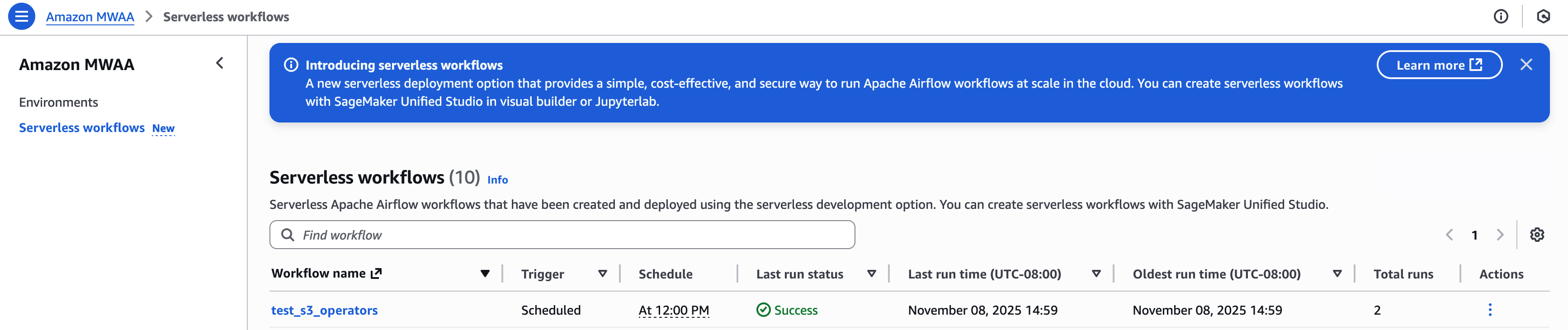
    You may view and manage your workflows in the Amazon MWAA Serverless console:
    For an example that creates detailed metrics and monitoring dashboard using AWS Lambda, Amazon CloudWatch, Amazon DynamoDB, and Amazon EventBridge, review the example in this GitHub repository.

    Clean up resources

    To avoid incurring ongoing charges, follow these steps to clean up all resources created during this tutorial:

    1. Delete MWAA Serverless workflows – Run this AWS CLI command to delete all workflows:
      aws mwaa-serverless list-workflows --query 'Workflows[*].WorkflowArn' --output text | while read -r workflow; do aws mwaa-serverless delete-workflow --workflow-arn $workflow done

    2. Remove the IAM roles and policies created for this tutorial:
      aws iam delete-role-policy --role-name mwaa-serverless-access-role --policy-name mwaa-serverless-policy

    3. Remove the YAML workflow definitions from your S3 bucket:
      aws s3 rm s3://amzn-s3-demo-bucket/yaml/ --recursive

    After completing these steps, verify in the AWS Management Console that all resources have been properly removed. Remember that CloudWatch Logs are retained by default and may need to be deleted separately if you want to remove all traces of your workflow executions.

    If you encounter any errors during cleanup, verify you have the necessary permissions and that resources exist before attempting to delete them. Some resources may have dependencies that require them to be deleted in a specific order.

    Conclusion

    In this post, we explored Amazon MWAA Serverless, a new deployment option that simplifies Apache Airflow workflow management. We demonstrated how to create workflows using YAML definitions, convert existing Python DAGs to the serverless format, and monitor your workflows.

    MWAA Serverless offers several key advantages:

    • No provisioning overhead
    • Pay-per-use pricing model
    • Automatic scaling based on workflow demands
    • Enhanced security through granular IAM permissions
    • Simplified workflow definitions using YAML

    To learn more MWAA Serverless, review the documentation.


    About the authors

    John Jackson

    John Jackson

    John has over 25 years of software experience as a developer, systems architect, and product manager in both startups and large corporations and is the AWS Principal Product Manager responsible for Amazon MWAA.


    Source link

    Share. Facebook Twitter Pinterest LinkedIn Tumblr Email

    Related Posts

    Simplified management of Amazon MSK with natural language using Kiro CLI and Amazon MSK MCP Server

    December 27, 2025

    Top 10 Questions You Asked About Databricks Clean Rooms, Answered

    December 26, 2025

    Top 10 Free Python Courses with Certificates

    December 23, 2025

    Bridging Wireless and 5G

    December 22, 2025

    Modernize Apache Spark workflows using Spark Connect on Amazon EMR on Amazon EC2

    December 21, 2025

    Welcoming Stately Cloud to Databricks: Investing in the Foundation for Scalable AI Applications

    December 20, 2025
    Top Posts

    Understanding U-Net Architecture in Deep Learning

    November 25, 20258 Views

    Microsoft 365 Copilot now enables you to build apps and workflows

    October 29, 20258 Views

    Here’s the latest company planning for gene-edited babies

    November 2, 20257 Views
    Don't Miss

    Customer experience management (CXM) predictions for 2026: How customers, enterprises, technology, and the provider landscape will evolve 

    December 28, 2025

    After laying out our bold CXM predictions for 2025 and then assessing how those bets played out…

    What to Know About the Cloud and Data Centers in 2026

    December 28, 2025

    Why Enterprise AI Scale Stalls

    December 28, 2025

    New serverless customization in Amazon SageMaker AI accelerates model fine-tuning

    December 28, 2025
    Stay In Touch
    • Facebook
    • Instagram
    About Us

    At GeekFence, we are a team of tech-enthusiasts, industry watchers and content creators who believe that technology isn’t just about gadgets—it’s about how innovation transforms our lives, work and society. We’ve come together to build a place where readers, thinkers and industry insiders can converge to explore what’s next in tech.

    Our Picks

    Customer experience management (CXM) predictions for 2026: How customers, enterprises, technology, and the provider landscape will evolve 

    December 28, 2025

    What to Know About the Cloud and Data Centers in 2026

    December 28, 2025

    Subscribe to Updates

    Please enable JavaScript in your browser to complete this form.
    Loading
    • About Us
    • Contact Us
    • Disclaimer
    • Privacy Policy
    • Terms and Conditions
    © 2025 Geekfence.All Rigt Reserved.

    Type above and press Enter to search. Press Esc to cancel.