


Guest Co-Author: George Cragg, Dräger
In the fast-paced world of Health Delivery Organizations (HDOs), network latency isn’t just an inconvenience—it’s unacceptable. For healthcare IT teams, wireless reliability is an important component of supporting a robust healthcare technical infrastructure.
Modern wireless patient monitoring systems use Wi-Fi connections to help transmit real-time patient data. Because these systems are often used in more intensive situations, they require ultra-low latency and minimal packet loss to provide alerts for medical staff. Issues such as interference, inconsistent coverage, and reliability gaps may contribute to delays or interruptions in vital monitoring data.
To solve for this, healthcare IT must design and deploy wireless infrastructure that delivers more secure, reliable, and interoperable connectivity for monitoring devices. Wireless patient monitoring systems will also benefit from Wi-Fi that does not sacrifice network performance or safety. Backwards compatibility is also a key component of more robust healthcare IT environments, where many medical devices need stable connections even as enterprise networks evolve to new standards like Wi-Fi 7 (802.11be).
To address these challenges, Dräger collaborates closely with Cisco to test wireless interoperability across both wired and wireless protocols. This partnership helps reduce deployment risks — especially as hospitals adopt next-generation wireless technologies such as Wi-Fi 7. Cisco Wireless delivers top-tier quality of service (QoS), airtime fairness, comprehensive RF coverage, and efficient multicast packet handling. These enhancements help contribute to Dräger’s devices operating with heightened efficiency and reliability.
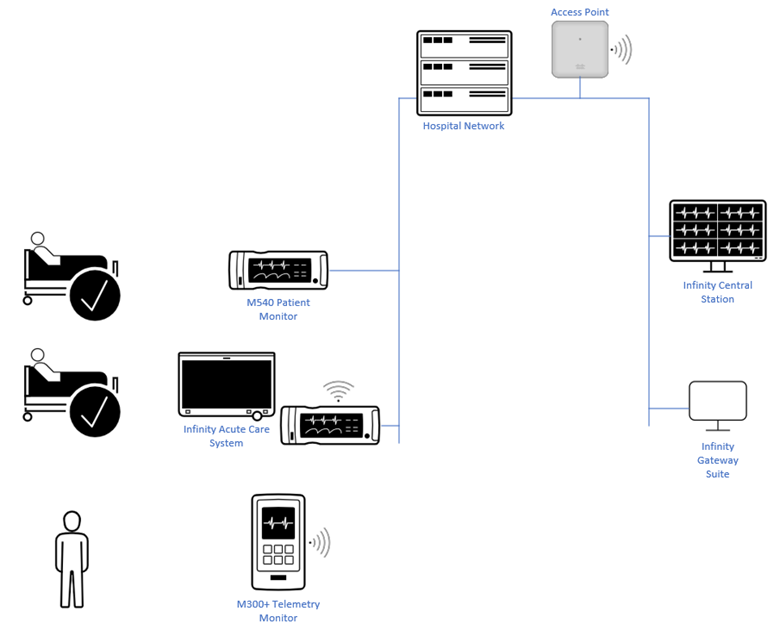
The Ecosystem of Care: Dräger’s Monitoring Components:
The Dräger platform is comprised of several integrated components that work in harmony to help provide clinicians with real-time insights:
- Infinity Acute Care System (IACS): The industry-leading bedside monitor for high-acuity patients, featuring a large display and a portable component for continuous parameter acquisition.
- M540 Patient Monitor: A versatile, portable device that functions as a stand-alone monitor or integrates directly into the IACS.
- M300+ Telemetry: An 802.11 Wi-Fi-only device specifically designed for lower-acuity patients who need to remain mobile within the facility.
- Infinity Central Station (ICS): The “brain” of the operation, where data from across the network is collected, stored, and managed. It allows clinicians to view historical data and manage real-time alarms from a central location.
- Infinity Gateway Suite (InfGW): This software bridges the gap between proprietary Dräger protocols and industry standards like HL7, allowing for integration with Electronic Health Records (EHR) and custom data solutions via API.
Communication Profiles: Multicast vs. Unicast
To help optimize performance and battery life, the system employs two distinct communication profiles:
- Multicast (UDP):Used for bulk patient data, including waveforms and alarms from the IACS and M540 to the ICS. This requires careful management of two-way traffic to handle feedback mechanisms.
- Unicast (TCP):Exclusively used for Telemetry devices (like the M300+) to preserve battery life by preventing the device from processing unnecessary group traffic. It is also used for remote control functions, such as adjusting alarm limits or updating patient demographics.
Cisco’s Network requirements and setup:
To help enable high-performance deployment, networking best practices typically adhere to the following configuration standards:
1). Wireless Configuration
- Dedicated SSIDs: Use separate SSIDs for multicast monitors (M540/Delta) and telemetry devices (M300).
- Security & Performance: Implement WPA3+WPA2-Enterprise/Personal mixed-mode configuration and Platinum-level QoS. Use a DTIM value of 1.
- DSCP Tuning: Maintain a DSCP value of 48 for Layer 3 QOS.
2). Switching & Infrastructure
- Standards: Switches are managed and adherent to IEEE 802.3 and 802.1Q (VLAN) standards.
- Traffic Management: Enable IGMP v2 querying and snooping to help prevent multicast traffic from flooding the network.
3). Network Segmentation
- VLAN Isolation: Place M300 telemetry devices on a separate VLAN from multicast monitors.
- Connectivity: Confirm that the Infinity Central Station (ICS) can communicate across these segments via routing or by using dual network cards.
Dräger and Cisco Joint Interoperability Test Results: Key Metrics for Success
1). Waveform Integrity: Wireless multicast monitors deliver waveforms and parameters to the wired network (ICS or InfGW) with a strict performance target: less than 4 seconds of waveform loss per hour, per device.
Because patient monitors transmit data at fixed intervals, the ICS database assists with identifying gaps. This allows for automated, color-coded reporting (as seen in Figure 2) that tracks data gaps down to a single 200ms packet. If performance issues occur, diagnostic tools can help determine if the gap consists of isolated random events or sequential bursts, which helps contribute to a more efficient troubleshooting process.
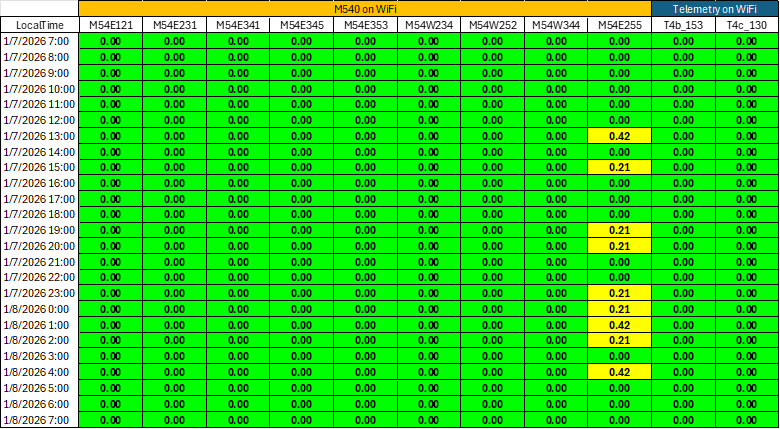
In this report, each cell represents the seconds of data gaps per hour for the devices listed in the columns. The status is color-coded based on performance specifications:
- Green indicates zero gaps
- Yellow signifies gaps within acceptable tolerance
- Red denotes gaps that exceeds the threshold.
The testing infrastructure was on-prem featuring a Cisco CW9176I AP managed by a WLC9800-40 controller, but the same principles apply with cloud managed networks.
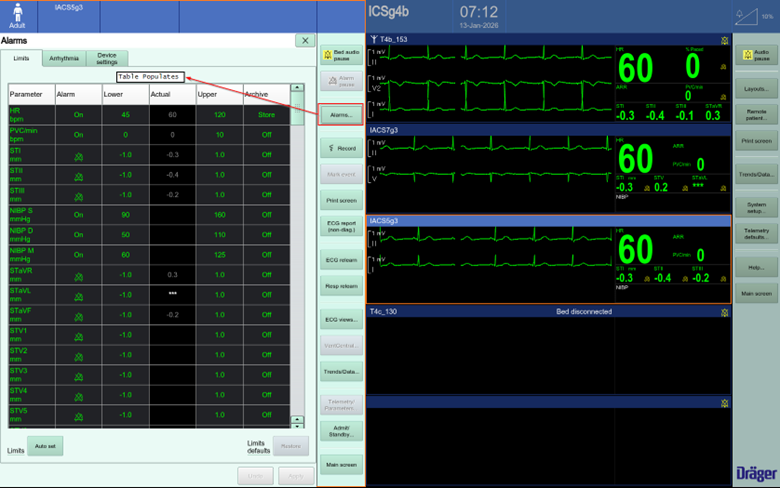
2). Feedback Verification: The system utilizes a multicast feedback mechanism to help inform individual patient monitors that an ICS is active on the network and is managing and storing clinical data. To help verify that this communication path is operating appropriately, confirm that the “Not Monitored by Central” error message is not displayed.
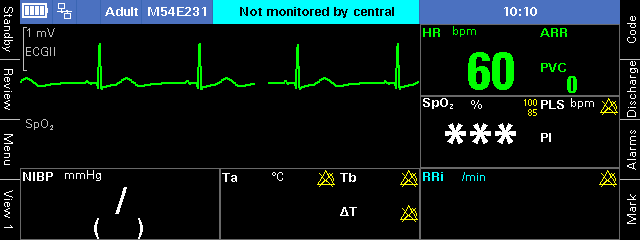
3). Unicast Transaction Success Rate: Unicast testing is highly intuitive: specific actions within the ICS or InfGW interface help trigger point-to-point communication with a targeted device. The integrity of this communication flow is verified by the successful delivery of the requested data. For instance, if a clinician requests to view alarm limits and the table populates correctly, it helps confirms a functional unicast link between the wired server and the wireless client.
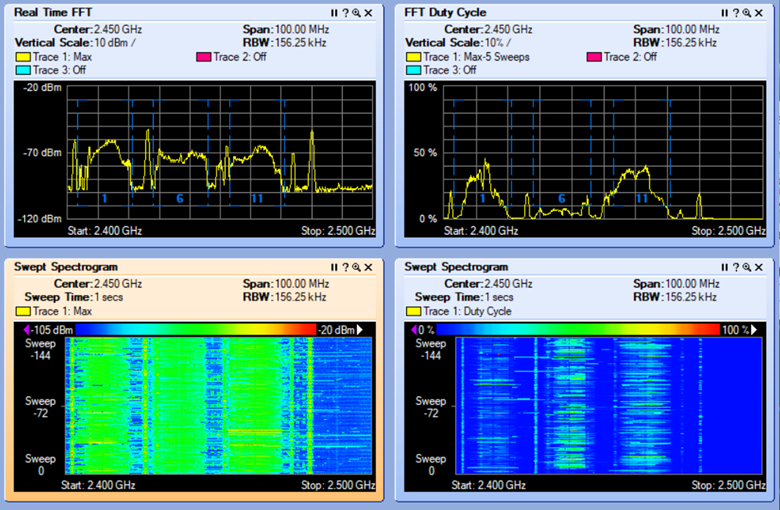
4). Channel Utilization: Effective channel utilization is vital for near real-time applications to help prevent latency. Cisco’s Spectrum Expert tool helps further simplify this by repurposing older access points to scan the spectrum, so that utilization remains at optimal levels—ideally below 50% on the 2.4GHz band.
5). Battery Runtime: To help prevent network conditions from contributing to excessive power drain, battery-powered telemetry devices undergo runtime testing. This confirms that 802.11 PowerSave mechanisms are working correctly, as network inefficiencies may often lead to rapid battery depletion. During interoperability testing, 32 telemetry devices are connected to a single Access Point for a full battery cycle to help verify that runtime remains within acceptable tolerances.
Looking Ahead
As hospitals continue to modernize, the collaboration between Dräger and Cisco serves as a model for more reliable, effective, and innovative patient monitoring. By combining Cisco’s cutting-edge hardware with Dräger’s clinical expertise, HDOs can focus on what matters most: the patient.
Learn more about Cisco Wireless.