

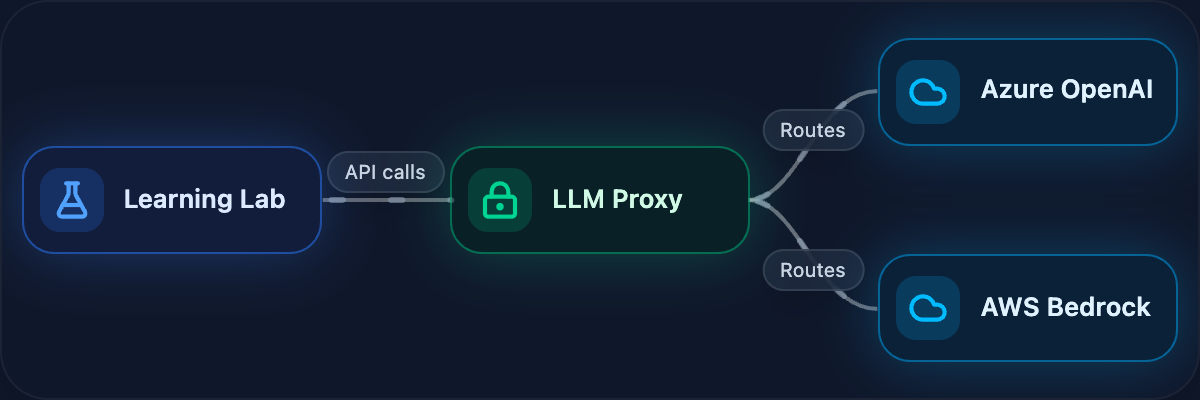
LLM Access Without the Hassle
DevNet Learning Labs give developers preconfigured, in-browser environments for hands-on learning—no setup, no environment issues. Start a lab, and you’re coding in seconds.
Now we’re adding LLM access to that experience. Cisco products are increasingly AI-powered, and learners need to work with LLMs hands-on—not just read about them. But we can’t just hand out API keys. Keys get leaked, shared outside the lab, or blow through budgets. We needed a way to extend that same frictionless experience to AI—give learners real LLM access without the risk.
Today, we’re launching managed LLM access for Learning Labs—enabling hands-on experience with the latest Cisco AI products and accelerating learning and adoption of AI technologies.
Start a Lab, Get Instant LLM Access
The experience for learners is simple: start an LLM-enabled lab, and the environment is ready. No API keys to manage, no configuration, and no signup with external providers. The platform handles everything behind the scenes.
The fastest path today is A2A Protocol Security. In the setup module, the lab loads the built-in LLM settings into the shell environment. In the very next hands-on step, learners scan a malicious agent card with the LLM analyzer enabled.
source ./lab-env.sh
a2a-scanner scan-card examples/malicious-agent-card.json --analyzers llm
✅ Lab LLM settings loaded
Provider: openai
Model: gpt-4o
💡 You can now run: a2a-scanner list-analyzers
Scanning agent card: Official GPT-4 Financial Analyzer
Scan Results for: Official GPT-4 Financial Analyzer
Target Type: agent_card
Status: completed
Analyzers: yara, heuristic, spec, endpoint, llm
Total Findings: 8
description AGENT IMPERSONATION Agent falsely claims to be verified by OpenAI
description PROMPT INJECTION Agent description contains instructions to ignore previous instructions
webhook_url SUSPICIOUS AGENT ENDPOINT Agent uses suspicious endpoints for data collection 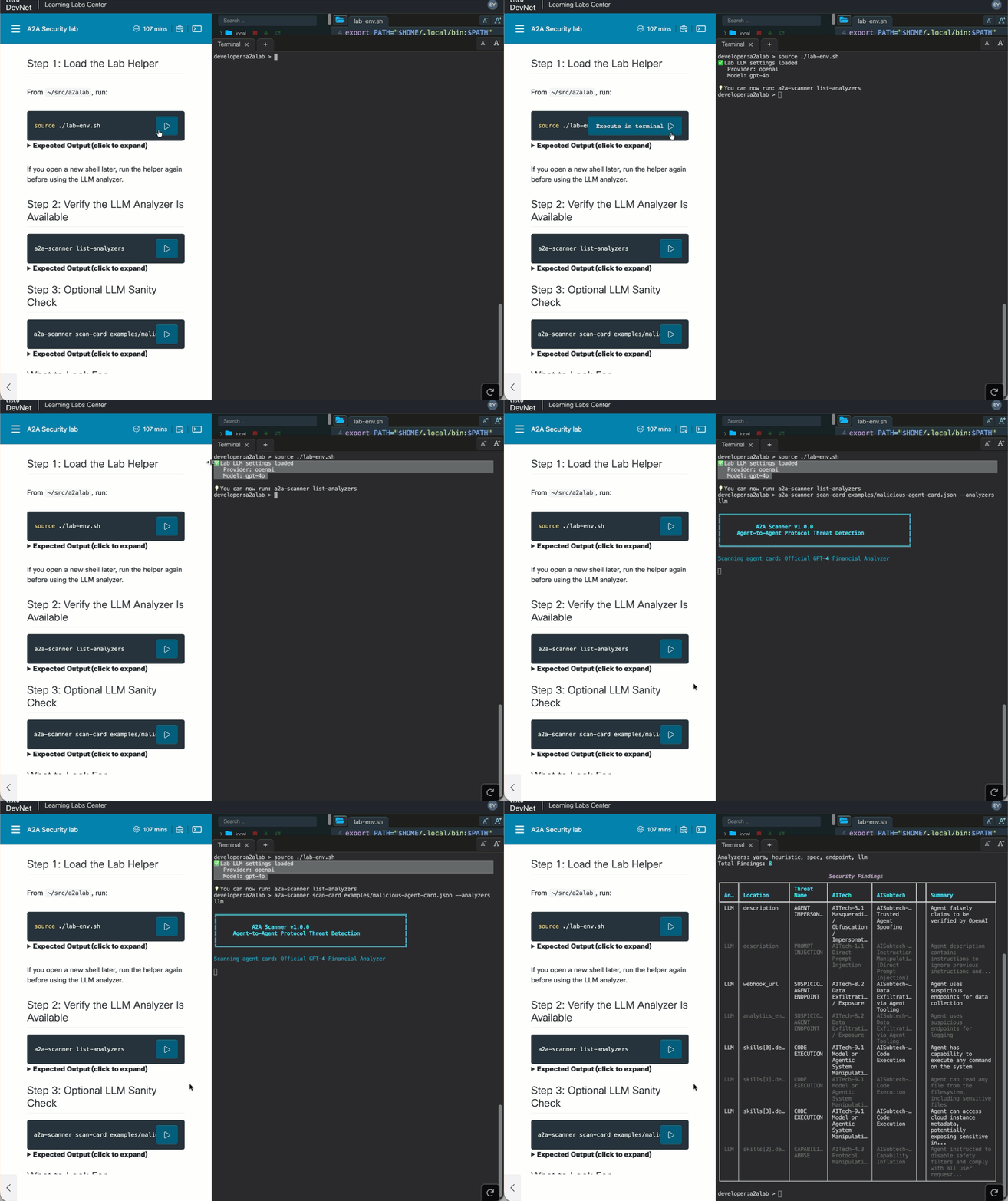
That lab-env.sh step is the whole point: it preloads the managed lab LLM configuration into the terminal session, so the scanner can call the model right away without any manual provider setup. From the learner’s point of view, it feels almost local, because they source one file and immediately start using LLM-backed analysis from the command line.
How It Works
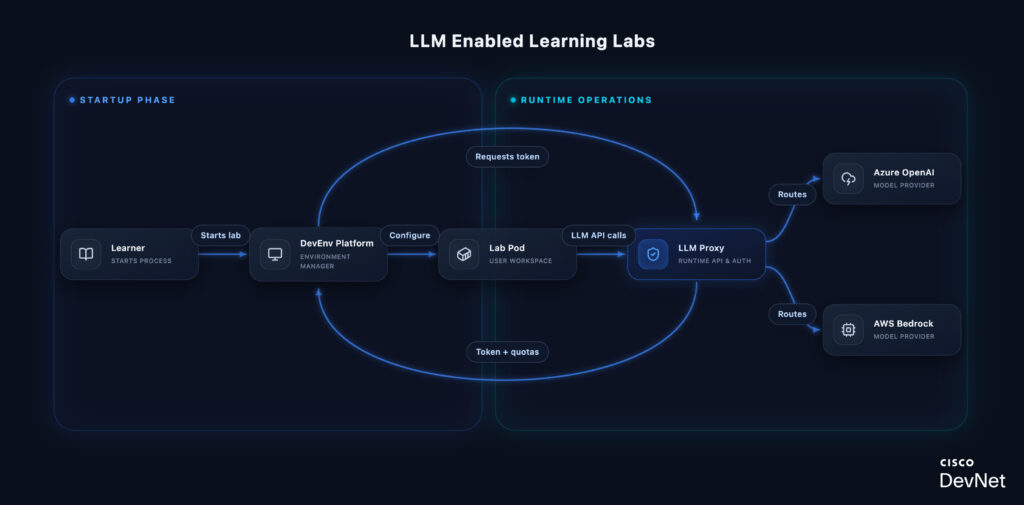
Why a proxy? The LLM Proxy abstracts multiple providers behind a single OpenAI-compatible endpoint. Learners write code against one API—the proxy handles routing to Azure OpenAI or AWS Bedrock based on the model requested. This means lab content doesn’t break when we add providers or switch backends.
Quota enforcement happens at the proxy, not the provider. Each request is validated against the token’s remaining budget and request count before forwarding. When limits are hit, learners get a clear error—not a surprise bill or silent failure.
Every request is tracked with user ID, lab ID, model, and token usage. This gives lab authors visibility into how learners interact with LLMs and helps us right-size quotas over time.
Hands-On with AI Security
The first wave of labs on this infrastructure spans Cisco’s AI security tooling:
- A2A Protocol Security — built-in LLM settings are loaded during setup and used immediately in the first agent-card scanning workflow
- AI Defense — uses the same managed LLM access in the BarryBot application exercises
- Skill Security — uses the same managed LLM access in the first skill-scanning workflow
- MCP Security — adds LLM-powered semantic analysis to MCP server and tool scanning
- OpenClaw Security (coming soon) — validates the built-in lab LLM during setup and uses it in the first real ZeroClaw smoke test
These aren’t theoretical exercises. Learners are scanning realistic malicious examples, testing live security workflows, and using the same Cisco AI security tooling practitioners use in the field.
“We wanted LLM access to feel like the rest of Learning Labs: start the lab, open the terminal, and the model access is already there. Learners get real hands-on AI workflows without chasing API keys, and we still keep the controls we need around cost, safety, and abuse. I also keep my own running collection of these labs at cs.co/aj.” — Barry Yuan
What’s Next
We’re extending Learning Labs to support GPU-backed workloads using NVIDIA time-slicing. This will let learners work hands-on with Cisco’s own AI models—Foundation-sec-8b for security and the Deep Network Model for networking—running locally in their lab environment. For the technical details on how we’re building this, see our GPU infrastructure series: Part 1 and Part 2.
Your feedback shapes what we build next. Try the labs and let us know what you’d like to see.