


A junior loan officer handling data intake, risk screening, and final decisions alone is prone to mistakes because the role demands too much at once. The same weakness appears in monolithic AI agents asked to run complex, multi-stage workflows. They lose context, skip steps, and produce shaky reasoning, which leads to unreliable results.
A stronger approach is to structure AI as a supervised team of specialists that enforces order and accountability. This mirrors expert collaboration and yields more consistent, auditable decisions in high-stakes domains like lending. In this article, we build such a coordinated system, not as a single overworked agent, but as a disciplined team.
What is a Supervisor Agent?
A supervisor agent is a special no longer a task-performing agent, but rather the organizer of a team of other agents working on a task. Consider it as the head of the department of your AI labor force.
Its key responsibilities include:
- Task Decomposition & Delegation: The supervisor takes an incoming request and decomposes the request into logical sub-tasks which is then forwarded to the appropriate specialized agent.
- Workflow Orchestration: It is strict in order of operations. In the case of our loan review, that implies the retrieval of data, policy review, and only after that, a recommendation.
- Quality Control: It checks the performance of every worker agent to see whether it is up to the required standard before the next step.
- Result Synthesis: Once all the worker agents are done, the supervisor takes the outputs of the workers and synthesizes them to give a final, coherent result.
The result of this pattern is more robust, scalable and easier to debug systems. The agents are given one task and this simplifies their logic and increases their performance stability.
Hands-On: Automating Loan Reviews with a Supervisor
The system of the first review of loan applications automation is now being constructed. We aim to take the ID of an applicant, evaluate them in terms of company risk policies, and advise on a concise action to be taken.
Our AI team will consist of:
- Case Intake Agent: Front-desk specialist. It collects the financial information of the applicant and develops a summary.
- Risk Policy Checker Agent: The analyst. It matches the information of the applicant with a series of pre-established lending criteria.
- Lending Decision Agent: The decision maker. It takes the discoveries and suggests a final course of action such as approving or rejecting the loan.
- The Supervisor: The supervisor who does the whole workflow and ensures that every agent does something in the right sequence.
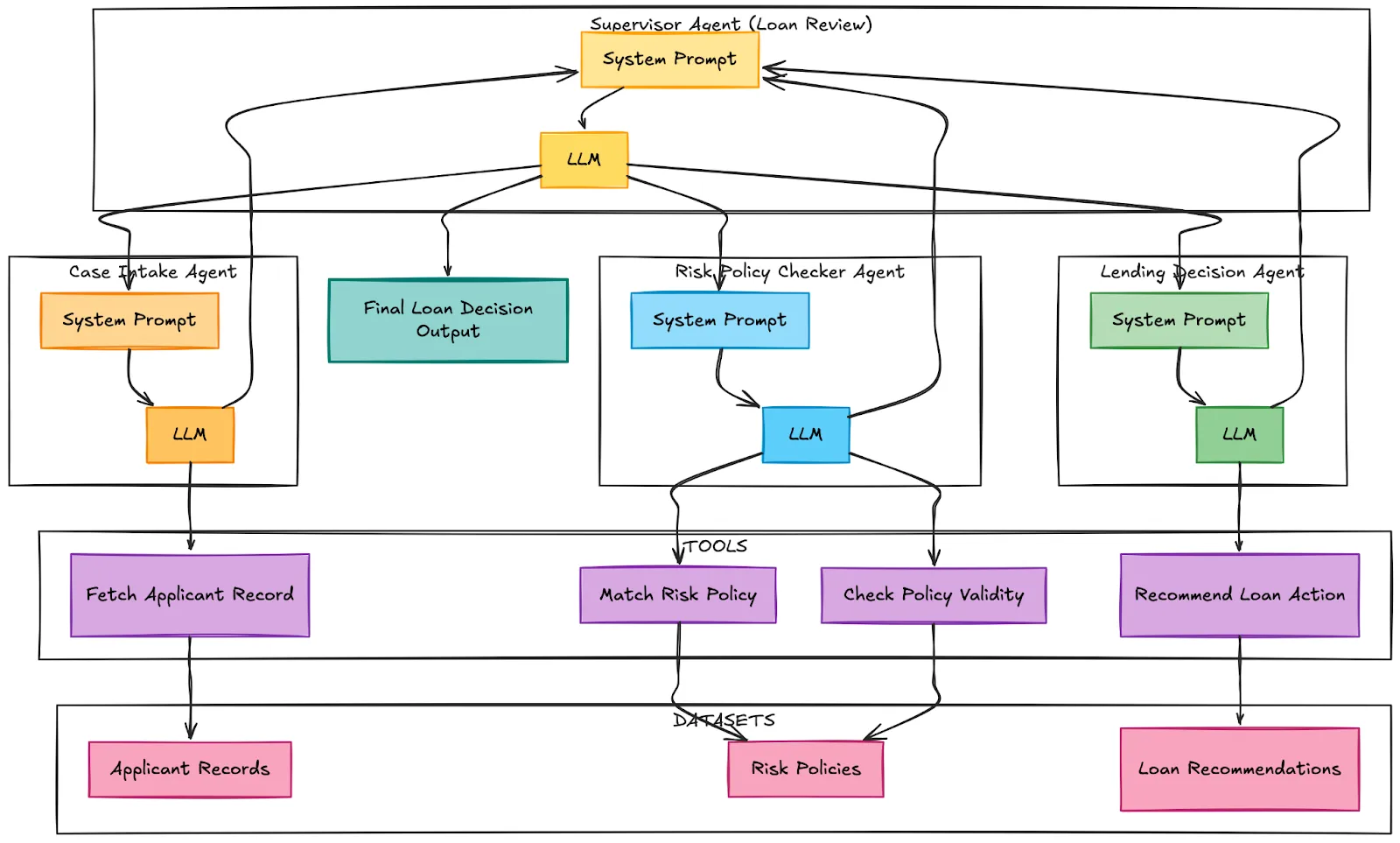
Let’s build this financial team.
Step 1: Install Dependencies
Our system will be based on LangChain, LangGraph, and OpenAI. LangGraph is a library that is developed to create stateful multi-agent workflows.
!uv pip install langchain==1.2.4 langchain-openai langchain-community==0.4.1 langgraph==1.0.6 Step 2: Configure API Keys & Environment
Set up your OpenAI API key to power our language models. The cell below will prompt you to enter your key securely.
import os
import getpass

# OpenAI API Key (for chat & embeddings)
if not os.environ.get("OPENAI_API_KEY"):
    os.environ["OPENAI_API_KEY"] = getpass.getpass(
        "Enter your OpenAI API key (
    )
Step 3: Imports
The definition of the state, tools, and agents will require several elements of our libraries.
from typing import Annotated, Literal
from typing_extensions import TypedDict
from langgraph.graph.message import add_messages
from langgraph.graph import StateGraph, START, END
from langchain_openai import ChatOpenAI
from langgraph.types import Command
from langchain_core.tools import tool
from langchain_core.messages import HumanMessage, SystemMessage, AIMessage
from langchain.agents import create_agent
from IPython.display import display, Markdown
Step 4: The Business Logic – Datasets
We will operate our system on a barebones in-memory data that will be a representation of risk policies, loan recommendations, and applicant records. This makes our example self-contained and simple to follow.
risk_policies = [
    {
        "loan_type": "Home Loan",
        "risk_category": "Low Risk",
        "required_conditions": [
            "credit_score >= 750",
            "stable_income >= 3 years",
            "debt_to_income_ratio < 30%"
        ],
        "notes": "Eligible for best interest rates and fast-track approval."
    },
    {
        "loan_type": "Home Loan",
        "risk_category": "Medium Risk",
        "required_conditions": [
            "credit_score >= 680",
            "stable_income >= 2 years",
            "debt_to_income_ratio < 40%"
        ],
        "notes": "May require collateral or higher interest rate."
    },
    {
        "loan_type": "Personal Loan",
        "risk_category": "Medium Risk",
        "required_conditions": [
            "credit_score >= 650",
            "stable_income >= 2 years"
        ],
        "notes": "Manual verification recommended for income consistency."
    },
    {
        "loan_type": "Auto Loan",
        "risk_category": "Low Risk",
        "required_conditions": [
            "credit_score >= 700",
            "stable_income >= 2 years"
        ],
        "notes": "Vehicle acts as secured collateral."
    }
]

loan_recommendations = [
    {
        "risk_category": "Low Risk",
        "next_step": "Auto approve loan with standard or best interest rate."
    },
    {
        "risk_category": "Medium Risk",
        "next_step": "Approve with adjusted interest rate or require collateral."
    },
    {
        "risk_category": "High Risk",
        "next_step": "Reject or request guarantor and additional documents."
    }
]

applicant_records = [
    {
        "applicant_id": "A101",
        "age": 30,
        "employment_type": "Salaried",
        "annual_income": 1200000,
        "credit_score": 780,
        "debt_to_income_ratio": 25,
        "loan_type": "Home Loan",
        "requested_amount": 4500000,
        "notes": "Working in MNC for 5 years. No missed EMI history."
    },
    {
        "applicant_id": "A102",
        "age": 42,
        "employment_type": "Self Employed",
        "annual_income": 900000,
        "credit_score": 690,
        "debt_to_income_ratio": 38,
        "loan_type": "Home Loan",
        "requested_amount": 3500000,
        "notes": "Business income fluctuates but stable last 2 years."
    },
    {
        "applicant_id": "A103",
        "age": 27,
        "employment_type": "Salaried",
        "annual_income": 600000,
        "credit_score": 640,
        "debt_to_income_ratio": 45,
        "loan_type": "Personal Loan",
        "requested_amount": 500000,
        "notes": "Recent job change. Credit card utilization high."
    }
]
Step 5: Building the Tools for Our Agents
Every agent requires devices to communicate with our data. They are plain Python functions adorned with the Python decoration tool; which are invoked by the LLM when asked to do certain things.
llm = ChatOpenAI(
    model="gpt-4.1-mini",
    temperature=0.0,
    timeout=None
)

@tool
def fetch_applicant_record(applicant_id: str) -> dict:
    """
    Fetches and summarizes an applicant financial record based on the given applicant ID.
    Returns a human-readable summary including income, credit score, loan type,
    debt ratio, and financial notes.

    Args:
        applicant_id (str): The unique identifier for the applicant.

    Returns:
        dict: {
            "applicant_summary": str
        }
    """
    for record in applicant_records:
        if record["applicant_id"] == applicant_id:
            summary = (
                "Here is the applicant financial summary report:\n"
                f"Applicant ID: {record['applicant_id']}\n"
                f"Age: {record['age']}\n"
                f"Employment Type: {record['employment_type']}\n"
                f"Annual Income: {record['annual_income']}\n"
                f"Credit Score: {record['credit_score']}\n"
                f"Debt-to-Income Ratio: {record['debt_to_income_ratio']}\n"
                f"Loan Type Requested: {record['loan_type']}\n"
                f"Requested Amount: {record['requested_amount']}\n"
                f"Financial Notes: {record['notes']}"
            )
            return {"applicant_summary": summary}
    return {"error": "Applicant record not found."}

@tool
def match_risk_policy(loan_type: str, risk_category: str) -> dict:
    """
    Match a given loan type and risk category to the most relevant risk policy rule.

    Args:
        loan_type (str): The loan product being requested.
        risk_category (str): The evaluated applicant risk category.

    Returns:
        dict: A summary of the best matching policy if found, or a message indicating no match.
    """
    context = "\n".join([
        f"{i+1}. Loan Type: {p['loan_type']}, Risk Category: {p['risk_category']}, "
        f"Required Conditions: {p['required_conditions']}, Notes: {p['notes']}"
        for i, p in enumerate(risk_policies)
    ])

    prompt = f"""You are a financial risk reviewer assessing whether a loan request aligns with existing lending risk policies.

Instructions:

- Analyze the loan type and applicant risk category.
- Compare against the list of provided risk policy rules.
- Select the policy that best fits the case considering loan type and risk level.
- If none match, respond: "No appropriate risk policy found for this case."
- If a match is found, summarize the matching policy clearly including any required financial conditions or caveats.

Loan Case:

- Loan Type: {loan_type}
- Risk Category: {risk_category}

Available Risk Policies:

{context}
"""

    result = llm.invoke(prompt).text
    return {"matched_policy": result}

@tool
def check_policy_validity(
    financial_indicators: list[str],
    required_conditions: list[str],
    notes: str
) -> dict:
    """
    Determine whether the applicant financial profile satisfies policy eligibility criteria.

    Args:
        financial_indicators (list[str]): Financial indicators derived from applicant record.
        required_conditions (list[str]): Conditions required by matched policy.
        notes (str): Additional financial or employment context.

    Returns:
        dict: A string explaining whether the loan request is financially justified.
    """
    prompt = f"""You are validating a loan request based on documented financial indicators and policy criteria.

Instructions:

- Assess whether the applicant financial indicators and notes satisfy the required policy conditions.
- Consider financial context nuances.
- Provide a reasoned judgment if the loan is financially justified.
- If not qualified, explain exactly which criteria are unmet.

Input:

- Applicant Financial Indicators: {financial_indicators}
- Required Policy Conditions: {required_conditions}
- Financial Notes: {notes}
"""

    result = llm.invoke(prompt).text
    return {"validity_result": result}

@tool
def recommend_loan_action(risk_category: str) -> dict:
    """
    Recommend next lending step based on applicant risk category.

    Args:
        risk_category (str): The evaluated applicant risk level.

    Returns:
        dict: Lending recommendation string or fallback if no match found.
    """
    options = "\n".join([
        f"{i+1}. Risk Category: {r['risk_category']}, Recommendation: {r['next_step']}"
        for i, r in enumerate(loan_recommendations)
    ])

    prompt = f"""You are a financial lending decision assistant suggesting next steps for a given applicant risk category.

Instructions:

- Analyze the provided risk category.
- Choose the closest match from known lending recommendations.
- Explain why the match is appropriate.
- If no suitable recommendation exists, return: "No lending recommendation found for this risk category."

Risk Category Provided:

{risk_category}

Available Lending Recommendations:

{options}
"""

    result = llm.invoke(prompt).text
    return {"recommendation": result}
Step 6: Implementing the Sub-Agents (The Workers)
We now form our three special agents. Every agent is provided with an extremely narrow system prompt that explains to it both what it should do and what tools it is allowed to access, as well as how to structure its output.
case_intake_agent = create_agent(
    model=llm,
    tools=[fetch_applicant_record],
    system_prompt=r"""
You are a Financial Case Intake Specialist.

THIS IS A RULED TASK. FOLLOW THE STEPS IN ORDER. DO NOT SKIP STEPS.

--- MANDATORY EXECUTION RULES ---

- You MUST call the `fetch_applicant_record` tool before writing ANY analysis or summary.
- If you do not have applicant data from the tool, you MUST stop and say: "Applicant data not available."
- Do NOT hallucinate, infer, or invent financial facts beyond what is provided.
- Inference is allowed ONLY when logically derived from financial notes.

--- STEP 1: DATA ACQUISITION (REQUIRED) ---

Call `fetch_applicant_record` and read:

- Financial indicators
- Financial profile / risk context
- Loan request
- Financial notes

You may NOT proceed without this step.

--- STEP 2: FINANCIAL ANALYSIS ---

Using ONLY the retrieved data:

1. Summarize the applicant financial case.
2. Identify explicit financial indicators.
3. Identify inferred financial risks (label as "inferred").
4. Derive rationale for why the loan may have been requested.

--- STEP 3: VALIDATION CHECK ---

Before finalizing, confirm:

- No financial facts were added beyond tool output.
- Inferences are financially reasonable.
- Summary is neutral and review-ready.

--- FINAL OUTPUT FORMAT (STRICT) ---

Sub-Agent Name: Case Intake Agent

Financial Summary:

- ...

Key Financial Indicators:

- Explicit:
  - ...
- Inferred:
  - ...

Financial Rationale for Loan Request:

- ...

If any section cannot be completed due to missing data, state that explicitly.
"""
)

lending_decision_agent = create_agent(
    model=llm,
    tools=[recommend_loan_action],
    system_prompt=r"""
You are a Lending Decision Recommendation Specialist.

YOU MUST RESPECT PRIOR AGENT DECISIONS.

--- NON-NEGOTIABLE RULES ---

- You MUST read Intake Agent and Risk Policy Checker outputs first.
- You MUST NOT override or contradict the Risk Policy Checker.
- You MUST clearly state whether loan request was:
  - Approved
  - Not Approved
  - Not Validated

--- STEP 1: CONTEXT REVIEW ---

Identify:

- Confirmed financial profile / risk category
- Policy decision outcome
- Key financial risks and constraints

--- STEP 2: DECISION-AWARE PLANNING ---

IF loan request APPROVED:

- Recommend next lending execution steps.

IF loan request NOT APPROVED:

- Do NOT recommend approval.
- Suggest ONLY:
  - Additional financial documentation
  - Risk mitigation steps
  - Financial profile improvement suggestions
  - Monitoring or reassessment steps

IF policy NOT FOUND:

- Recommend cautious next steps and documentation improvement.

--- STEP 3: SAFETY CHECK ---

Before finalizing:

- Ensure recommendation does not contradict policy outcome.
- Ensure all suggestions are financially reasonable.

--- FINAL OUTPUT FORMAT (STRICT) ---

Sub-Agent Name: Lending Decision Agent

Policy Status:

- Approved / Not Approved / Not Found

Lending Recommendations:

- ...

Rationale:

- ...

Notes for Reviewer:

- ...

Avoid speculative financial approvals.
Avoid recommending approval if policy validation failed.
"""
)

risk_policy_checker_agent = create_agent(
    model=llm,
    tools=[match_risk_policy, check_policy_validity],
    system_prompt=r"""
You are a Lending Risk Policy Review Specialist.

THIS TASK HAS HARD CONSTRAINTS. FOLLOW THEM EXACTLY.

--- MANDATORY RULES ---

- You MUST base decisions only on:
  1. Intake summary content
  2. Retrieved risk policy rules
- You MUST NOT approve or reject without a policy check attempt.
- If no policy exists, you MUST explicitly state that.
- Do NOT infer policy eligibility criteria.

--- STEP 1: POLICY IDENTIFICATION (REQUIRED) ---

Use `match_risk_policy` to identify the most relevant policy for:

- The requested loan type
- The evaluated risk category

If no policy is found:

- STOP further validation
- Clearly state that no applicable policy exists

--- STEP 2: CRITERIA EXTRACTION ---

If a policy is found:

- Extract REQUIRED financial conditions exactly as stated
- Do NOT paraphrase eligibility criteria

--- STEP 3: VALIDATION CHECK (REQUIRED) ---

Use `check_policy_validity` with:

- Applicant financial indicators
- Policy required conditions
- Intake financial notes

--- STEP 4: REASONED DECISION ---

Based ONLY on validation result:

- If criteria met → justify approval
- If criteria not met → explain why
- If insufficient data → state insufficiency

--- FINAL OUTPUT FORMAT (STRICT) ---

Sub-Agent Name: Risk Policy Checker Agent

Risk Policy Identified:

- Name:
- Source (if available):

Required Policy Conditions:

- ...

Applicant Evidence:

- ...

Policy Validation Result:

- Met / Not Met / Insufficient Data

Financial Justification:

- ...

Do NOT recommend lending actions here.
Do NOT assume approval unless criteria are met.
"""
)
Step 7: The Mastermind – Implementing the Supervisor Agent
This is the core of our system. Its constitution is the prompt of the supervisor. It establishes the rigid order of workflow and quality checks it must make on the output of each agent before going on.
class State(TypedDict):
    messages: Annotated[list, add_messages]

members = [
    "case_intake_agent",
    "risk_policy_checker_agent",
    "lending_decision_agent"
]

SUPERVISOR_PROMPT = f"""
You are a Loan Review Supervisor Agent.
You are managing a STRICT, ORDERED loan risk review workflow
between the following agents:

{members}

--- WORKFLOW ORDER (MANDATORY) ---

1. case_intake_agent
2. risk_policy_checker_agent
3. lending_decision_agent
4. FINISH

You MUST follow this order. No agent may be skipped.

--- YOUR RESPONSIBILITIES ---

1. Read all messages so far carefully.
2. Determine which agents have already executed.
3. Inspect the MOST RECENT output of each executed agent.
4. Decide which agent MUST act next based on completeness and order.

--- COMPLETENESS REQUIREMENTS ---

Before moving to the next agent, verify the previous agent’s output contains:

case_intake_agent output MUST include:
- "Financial Summary"
- "Key Financial Indicators"
- "Financial Rationale"

risk_policy_checker_agent output MUST include:
- "Policy Validation Result"
- "Financial Justification"
- Either a policy match OR explicit statement no policy exists

lending_decision_agent output MUST include:
- "Policy Status"
- "Lending Recommendations"
- Clear approval / non-approval status

--- ROUTING RULES ---

- If an agent has NOT run yet → route to that agent.
- If an agent ran but required sections missing → route SAME agent again.
- ONLY return FINISH if all three agents completed correctly.
- NEVER return FINISH early.

--- RESPONSE FORMAT ---

Return ONLY one of:

{members + ["FINISH"]}
"""

FINAL_RESPONSE_PROMPT = """
You are the Loan Review Supervisor Agent.

Analyze ALL prior agent outputs carefully.

--- CRITICAL DECISION RULE ---

Your Final Decision MUST be based PURELY on the output of the
lending_decision_agent.

- If lending_decision_agent indicates loan APPROVED
  → Final Decision = APPROVED
- If lending_decision_agent indicates NOT APPROVED or NEEDS INFO
  → Final Decision = NEEDS REVIEW

--- OUTPUT FORMAT (STRICT) ---

- Agent Name: Loan Review Supervisor Agent
- Final Decision: APPROVED or NEEDS REVIEW
- Decision Reasoning: Based on lending_decision_agent output
- Lending recommendation or alternative steps: From lending_decision_agent
"""

class Router(TypedDict):
    next: Literal[
        "case_intake_agent",
        "risk_policy_checker_agent",
        "lending_decision_agent",
        "FINISH"
    ]

def supervisor_node(state: State) -> Command[
    Literal[
        "case_intake_agent",
        "risk_policy_checker_agent",
        "lending_decision_agent",
        "__end__"
    ]
]:
    messages = [SystemMessage(content=SUPERVISOR_PROMPT)] + state["messages"]
    response = llm.with_structured_output(Router).invoke(messages)
    goto = response["next"]

    if goto == "FINISH":
        goto = END
        messages = [SystemMessage(content=FINAL_RESPONSE_PROMPT)] + state["messages"]
        response = llm.invoke(messages)
        return Command(
            goto=goto,
            update={
                "messages": [
                    AIMessage(
                        content=response.text,
                        name="supervisor"
                    )
                ],
                "next": goto
            }
        )

    return Command(goto=goto, update={"next": goto})
Step 8: Defining the Node functions
Here the node functions which will be performing the role of laggraph nodes are to be defined.
def case_intake_node(state: State) -> Command[Literal["supervisor"]]:
    result = case_intake_agent.invoke(state)
    return Command(
        update={
            "messages": [
                AIMessage(
                    content=result["messages"][-1].text,
                    name="case_intake_agent"
                )
            ]
        },
        goto="supervisor"
    )

def risk_policy_checker_node(state: State) -> Command[Literal["supervisor"]]:
    result = risk_policy_checker_agent.invoke(state)
    return Command(
        update={
            "messages": [
                AIMessage(
                    content=result["messages"][-1].text,
                    name="risk_policy_checker_agent"
                )
            ]
        },
        goto="supervisor"
    )

def lending_decision_node(state: State) -> Command[Literal["supervisor"]]:
    result = lending_decision_agent.invoke(state)
    return Command(
        update={
            "messages": [
                AIMessage(
                    content=result["messages"][-1].text,
                    name="lending_decision_agent"
                )
            ]
        },
        goto="supervisor"
    )
Step 9: Constructing and Visualizing the Graph
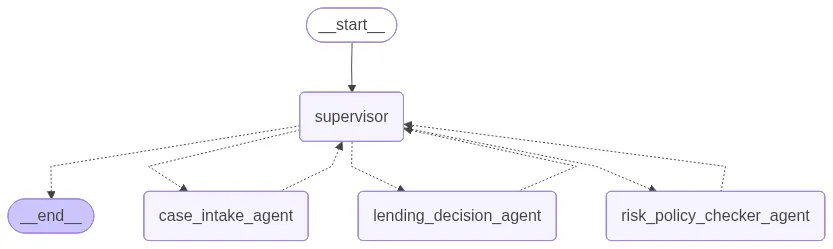
Now that we have defined our nodes, we may construct the workflow graph. The entry point, the nodes of each agent, and conditional edges that direct the workflow depending on the decision of the supervisor are defined.
graph_builder = StateGraph(State)
graph_builder.add_edge(START, "supervisor")
graph_builder.add_node("supervisor", supervisor_node)
graph_builder.add_node("case_intake_agent", case_intake_node)
graph_builder.add_node("risk_policy_checker_agent", risk_policy_checker_node)
graph_builder.add_node("lending_decision_agent", lending_decision_node)
loan_multi_agent = graph_builder.compile()
loan_multi_agent
You can visualize the graph if you have the right libraries, but we will proceed to run it.
Step 10: Running the System
Now for the moment of truth. We will apply as applicants to our system and follow the supervisor arrange the review process. Before this we will download an utility function to format the output.
# This utility file is not essential to the logic but helps format the streaming output nicely.
!gdown 1dSyjcjlFoZpYEqv4P9Oi0-kU2gIoolMB

from agent_utils import format_message

def call_agent_system(agent, prompt, verbose=False):
    events = agent.stream(
        {"messages": [("user", prompt)]},
        {"recursion_limit": 25},
        stream_mode="values"
    )
    for event in events:
        if verbose:
            format_message(event["messages"][-1])

    # Display the final response from the agent as Markdown
    print("\n\nFinal Response:\n")
    if event["messages"][-1].text:
        display(Markdown(event["messages"][-1].text))
    else:
        print(event["messages"][-1].content)

    # Return the overall event messages for optional downstream use
    return event["messages"]

prompt = "Review applicant A101 for loan approval justification."
call_agent_system(loan_multi_agent, prompt, verbose=True)
Output Analysis:
When you run this, you will see a step-by-step execution trace:
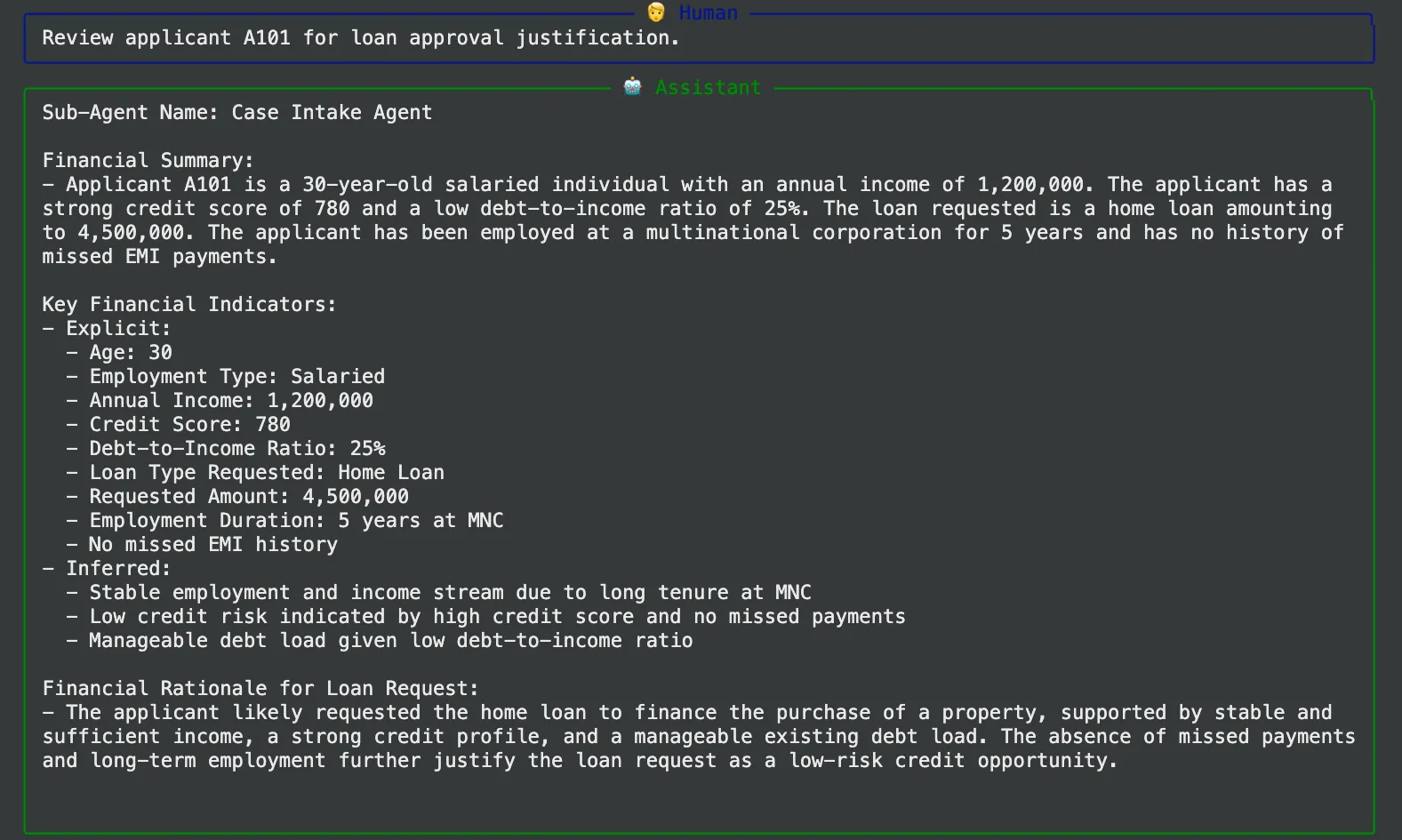
- supervisor (to caseintakeagent): The supervisor initiates the process with directing the task to the intake agent.
- caseintakeagent Output: It is an agent that will run its tool to retrieve the record of applicant A101 and generate a clean financial summary.
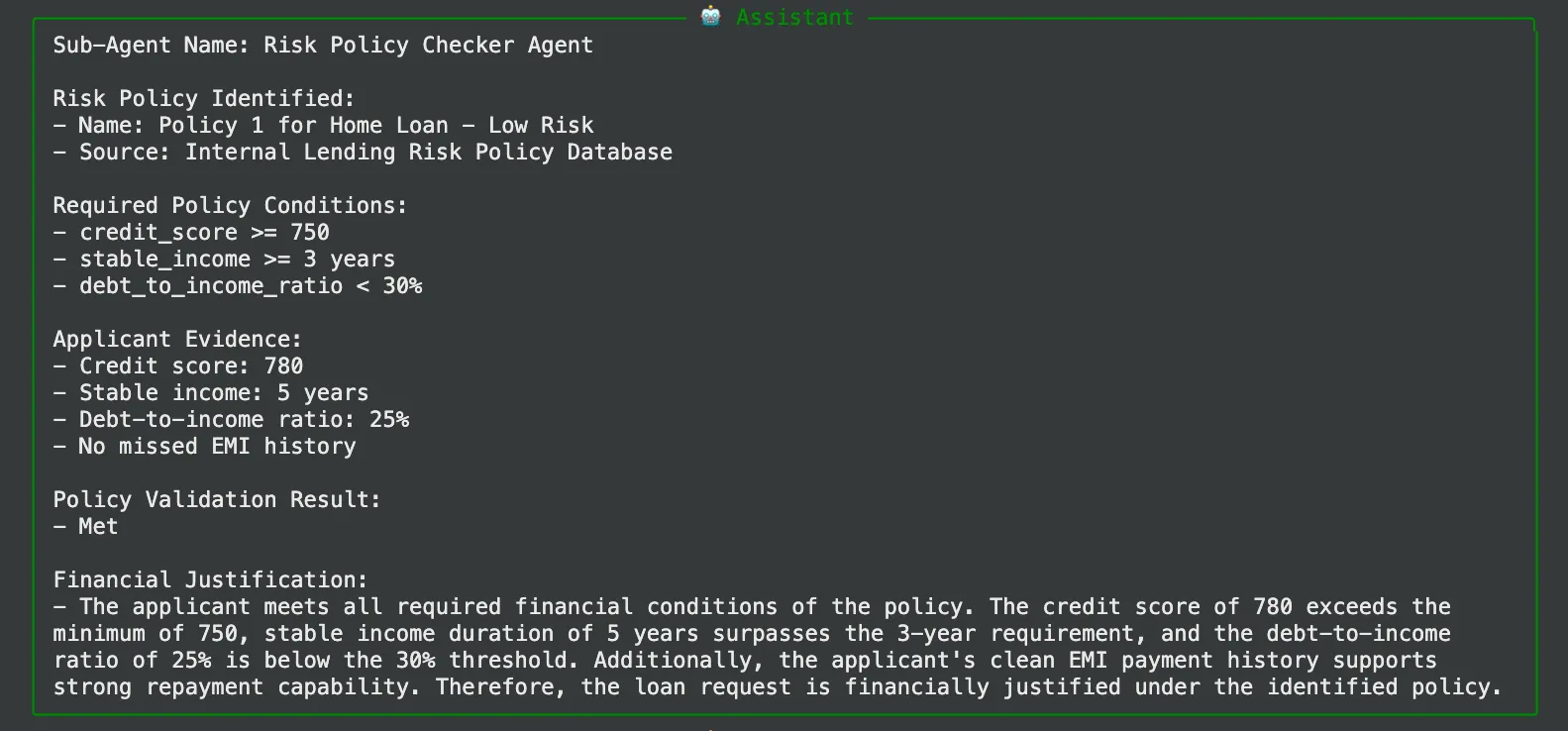
- supervisor -> riskpolicycheckeragent: The supervisor notices that the intake has been made and forwards the task to the policy checker.
- Output of riskpolicycheckeragent: The policy agent will find that A101 is a Low Risk policy that satisfies all their profile requirements of a Home Loan.
- supervisor -> lendingdecisionagent: The supervisor now instigates the ultimate decision-maker.
- lendingdecisionagent Output: This agent will recommend an auto-approval in the category of “Low Risk” category.
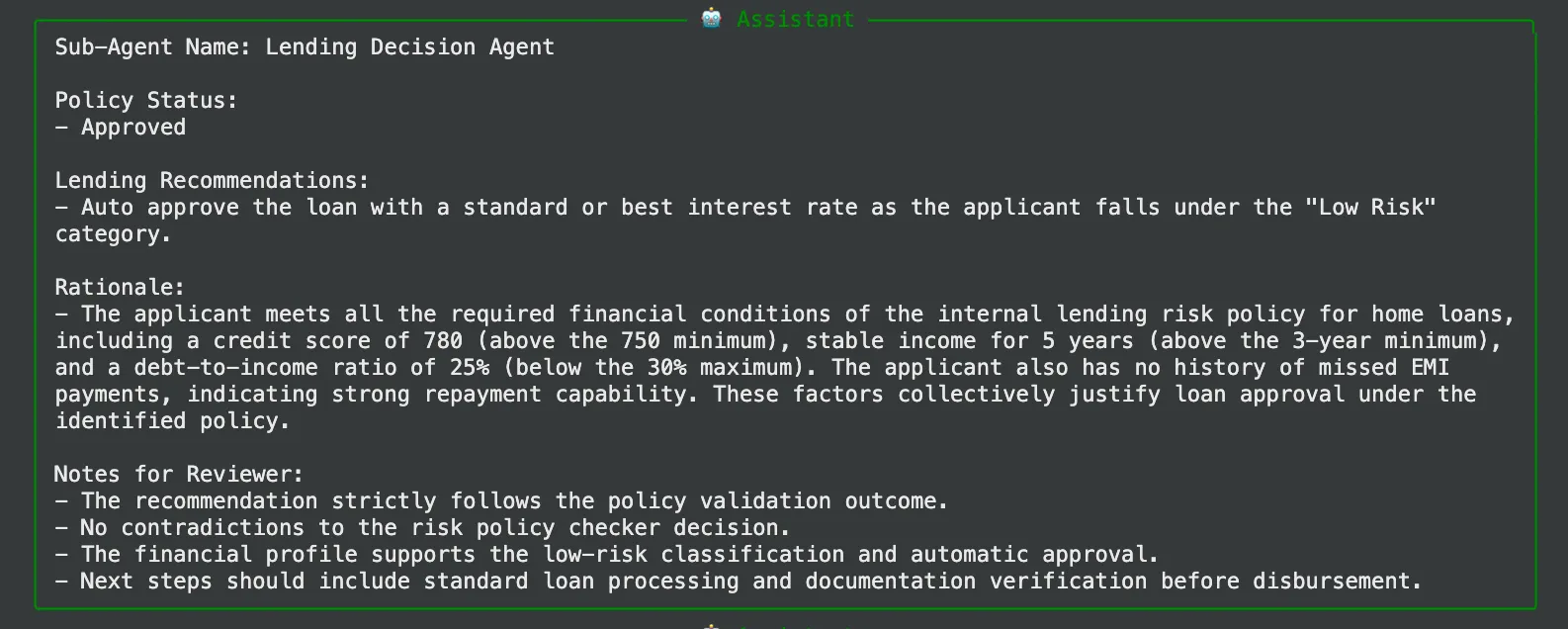
- supervisor -> FINISH: When the supervisor reaches FINISH, it treats the final worker as complete and produces a cumulative summary.

The end product will be a well written message free of any dirt such as:

Colab Notebook: Mastering Supervisor Agents.ipynb
Conclusion
Using a supervisor agent, we changed a complicated business process into predictable, robust and auditable workflow. Even one agent attempting to deal with data retrieval, risk analysis, and decision-making simultaneously would need a much more complicated prompt and would be much more likely to make an error.
The supervisor pattern offers a strong mental model and an architectural approach to developing advanced AI systems. It enables you to deconstruct complexity and assign distinct responsibility and create smart and automated workflows that resemble the effectiveness of a well-coordinated human team. The second way to address a monolithic challenge is not to merely create an agent next time, but a team, and always have a supervisor.
Frequently Asked Questions
A. Reliability and modularity is the primary strength. The overall system becomes easier to build, debug, and maintain because it breaks a complex task into smaller steps handled by specialized agents, which leads to more predictable and consistent outcomes.
A. Yes. In this setup, the supervisor reassigns a task to the same agent when its output is incomplete. More advanced supervisors can go further by adding error correction logic or requesting a second opinion from another agent.
A. While it shines in complex workflows, this pattern also handles moderately complex tasks with just two or three steps effectively. It applies a logical order and makes reasoning process of the AI significantly more transparent and auditable.

Harsh Mishra is an AI/ML Engineer who spends more time talking to Large Language Models than actual humans. Passionate about GenAI, NLP, and making machines smarter (so they don’t replace him just yet). When not optimizing models, he’s probably optimizing his coffee intake. 🚀☕
Login to continue reading and enjoy expert-curated content.