


7 p.m., end of the first day of security operations and first day of training course. My teammate and friend René Straube and I enjoy a well-deserved dinner at an Italian restaurant near the Excel conference center. This is his first time accompanying us to the Black Hat Network Operations Center (NOC), so naturally, we discuss his impressions.
After sharing many positive things, René said to me: “You know, what’s frustrating as an XDR analyst is that very often, during an incident, we see network detections to a public IP address, but we have no idea why that connection was made because we don’t have EDR (and agent on the endpoints), and it would be really helpful to at least know which domain or URL the user was trying to communicate with.” He also told me that he thought we had all the information we needed in Splunk, because we collect DNS logs from Palo Alto Networks NGFW and connection logs from Corelight OpenNDR, which usually contain information about the domains linked to that IP address. The NOC leadership enabled Cisco and other partners to introduce additional pre-approved software and hardware solutions, enhancing our internal efficiency and expanding our visibility capabilities; however, Cisco is not the official provider for Extended Detection & Response, Security Event and Incident Management, Firewall, Network Detection & Response or Collaboration.
“Okay, I understand, René!” If we have this information somewhere, we can probably automate the process and enrich your incident automatically or at the request of an analyst (playbook). Let’s go ahead and try to take it a step further with the opposite scenario. If you see a domain in an incident, maybe what you’re trying to find out as an analyst is which IP address was linked to that domain to verify whether the connection was authorized by the firewall.
The next day, at 7 a.m., at the NOC/SOC, we begin working on it and set up two workflows:
- Find Domains related to IPs
- Input: IP address(es)
- Query Splunk to obtain Palo Alto Network firewall DNS logs and extract the domain queried with this IP address as the response
- If no results are obtained (DNS bypass), query Splunk to obtain Corelight connection logs and extract the domains associated with this IP address
- Inject this DNS resolution event into the XDR data analytics platform, so that it is correlated with your incident and enriched
- Find IPs related to Domain
- Input: Domains(s)
- Query Splunk to obtain Palo Alto Network firewall DNS logs and extract the domain queried with this IP address as the response
- If no results are obtained (DNS bypass), query Splunk to obtain corelight connection logs and extract the domains associated with this IP address
- Inject this DNS resolution or Network Connection event into the XDR data analytics platform, so that it is correlated with your incident and enriched.
Thirty minutes of coding later, two new actions were made available to the analyst in the incident response playbook, guiding them and saving them time and effort.
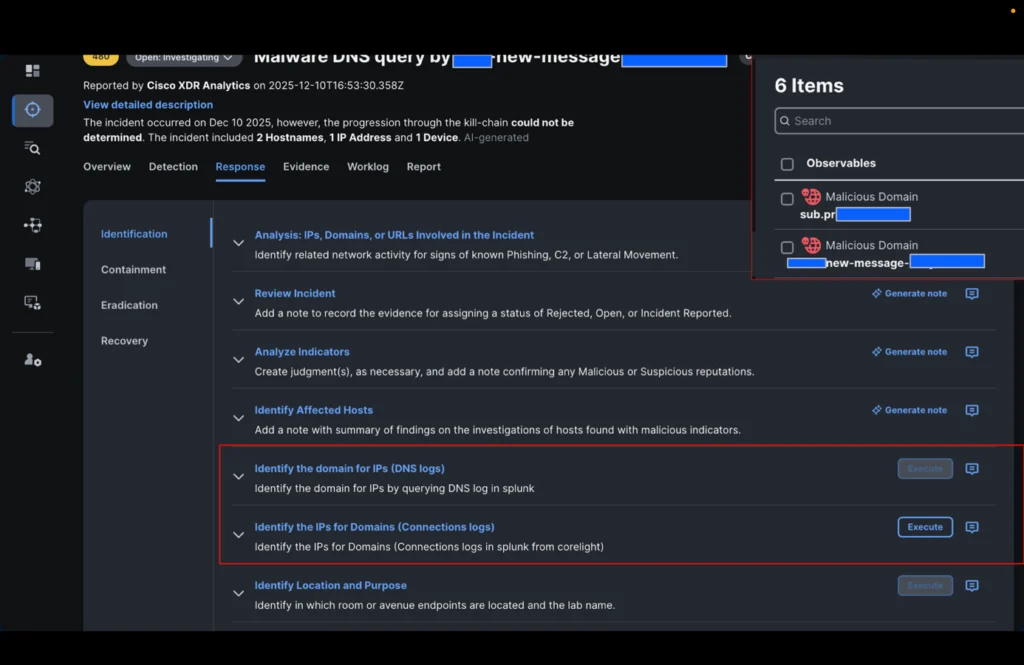
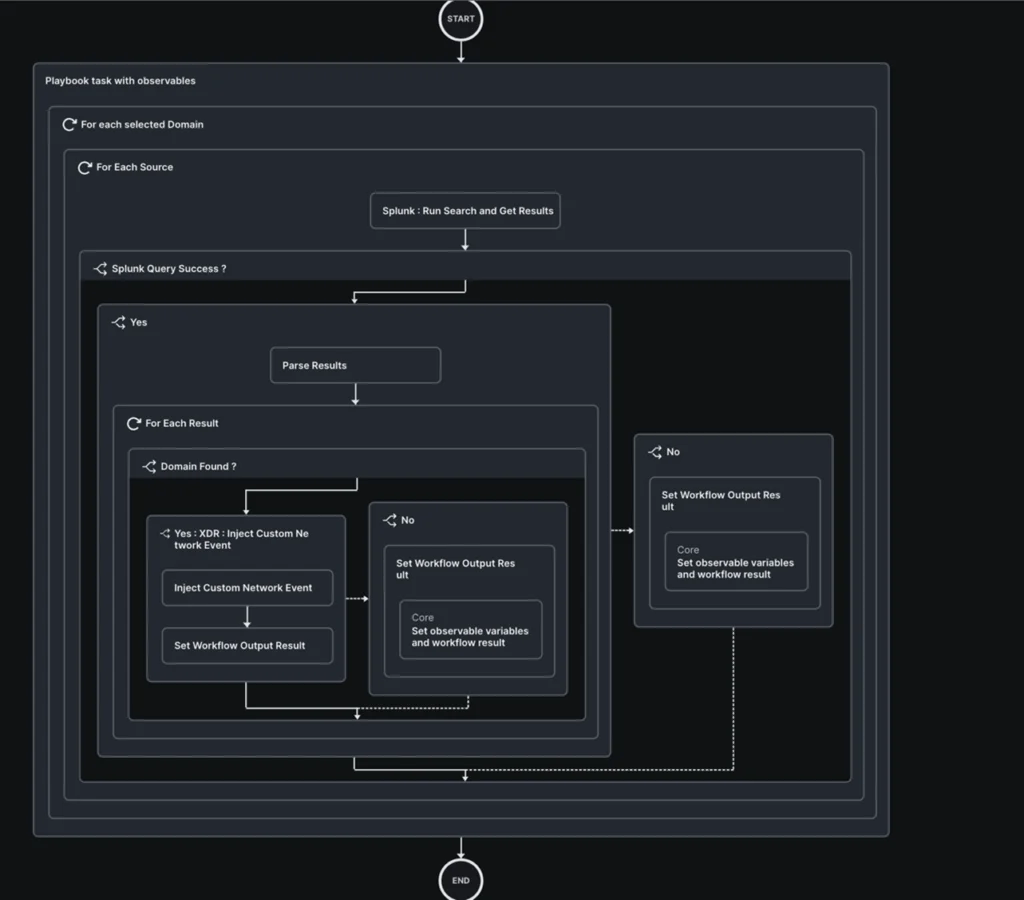
Let’s see how this applies to an incident:
It all starts with a Webex notification about a new incident related to domains associated with malicious activity by Cisco Secure Access (Umbrella DNS) originating from two internal IP addresses connected to the Black Hat Europe general Wi-Fi network.
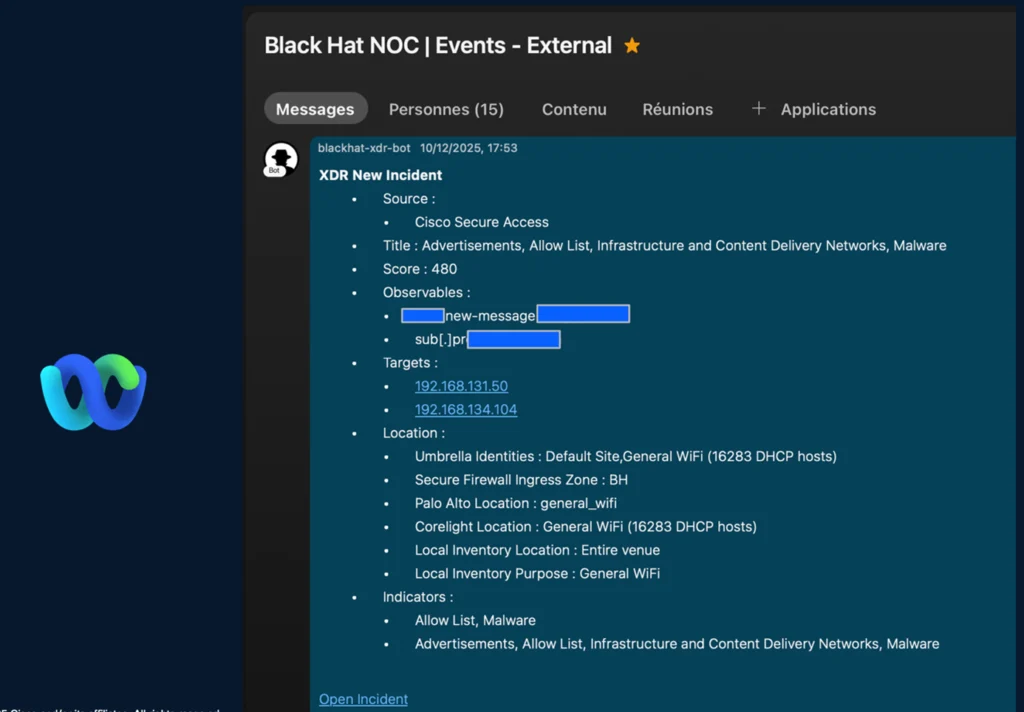
When we opened the incident, a third internal IP address was already identified by Cisco XDR.
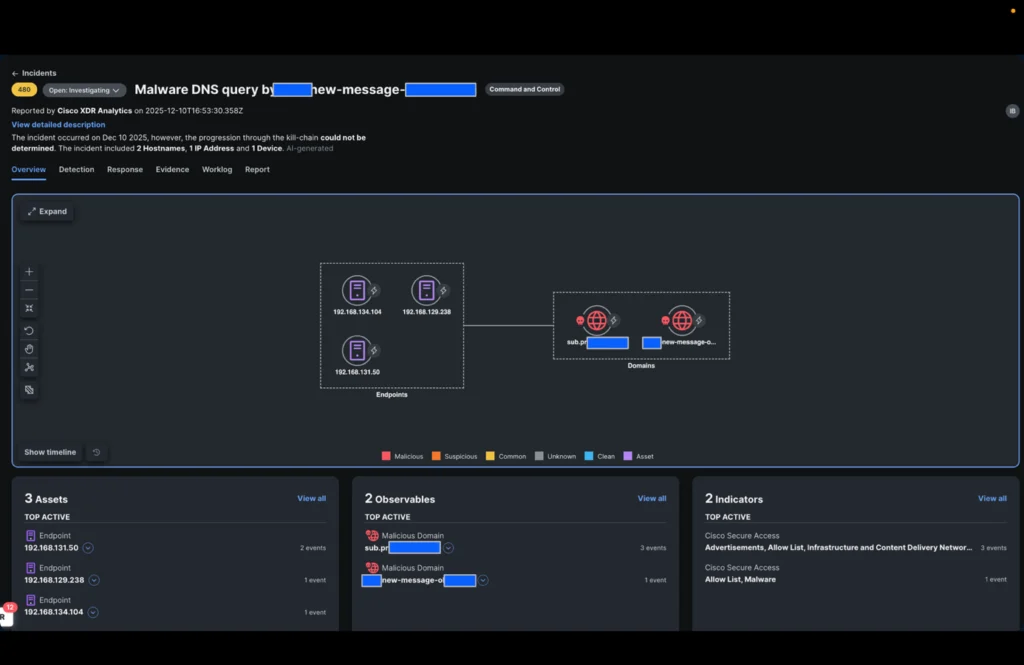
The XDR incident confirms that DNS queries were allowed and enrichment from threat intelligence integrated into Cisco XDR confirmed that the domains were indeed malicious.
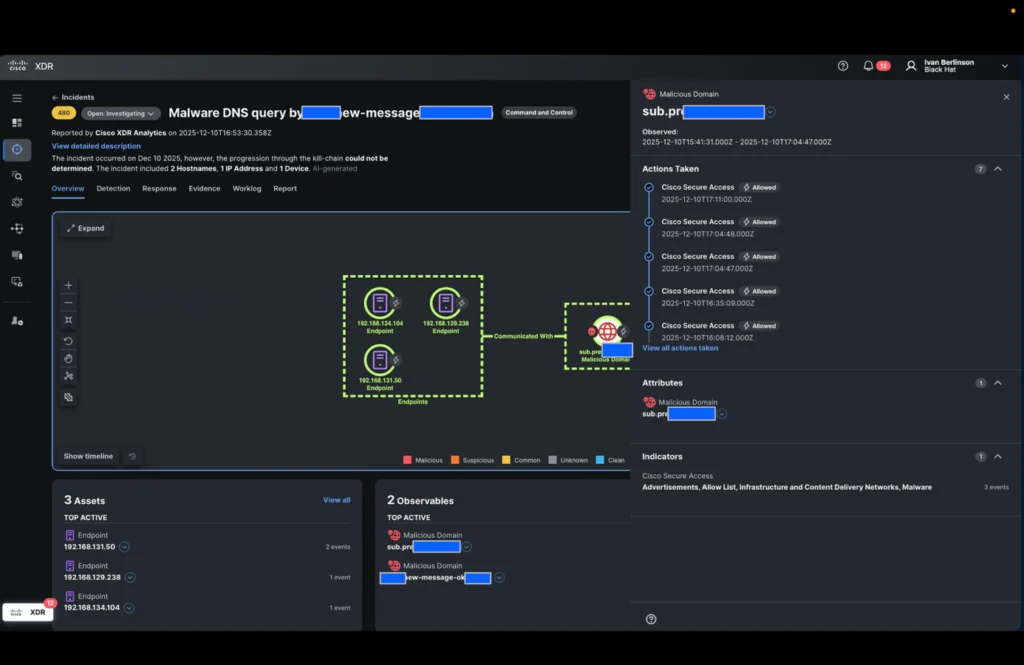
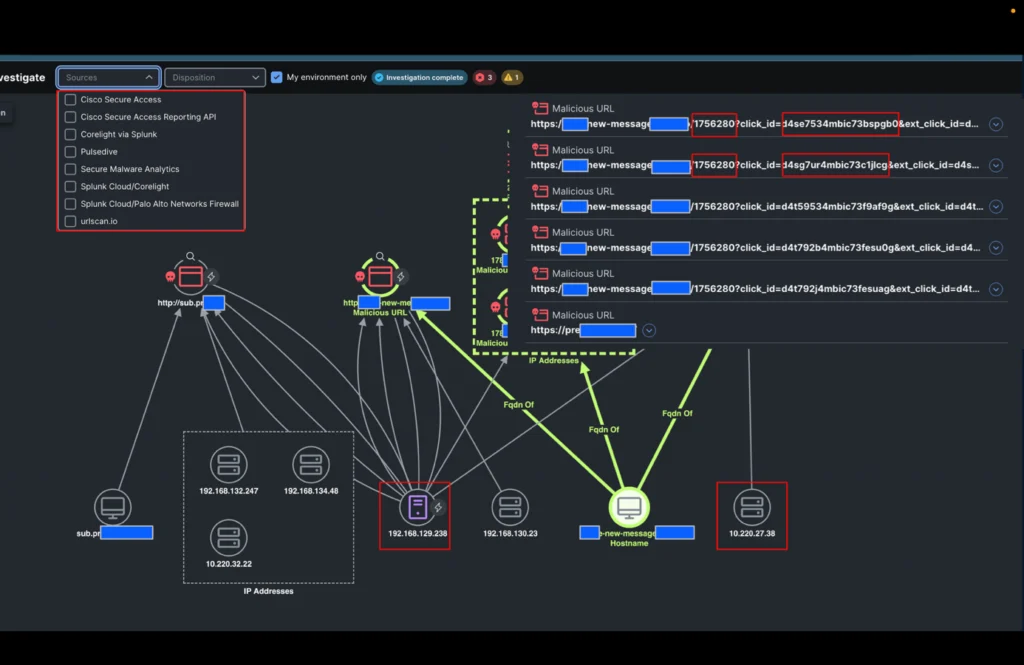
Our analyst must now determine whether the connections to the IP addresses associated with these domains were successful and what they are. He therefore triggers the new playbook action in the identification step: “Identify the IP addresses of the domains” and selects the two domains in the incident.
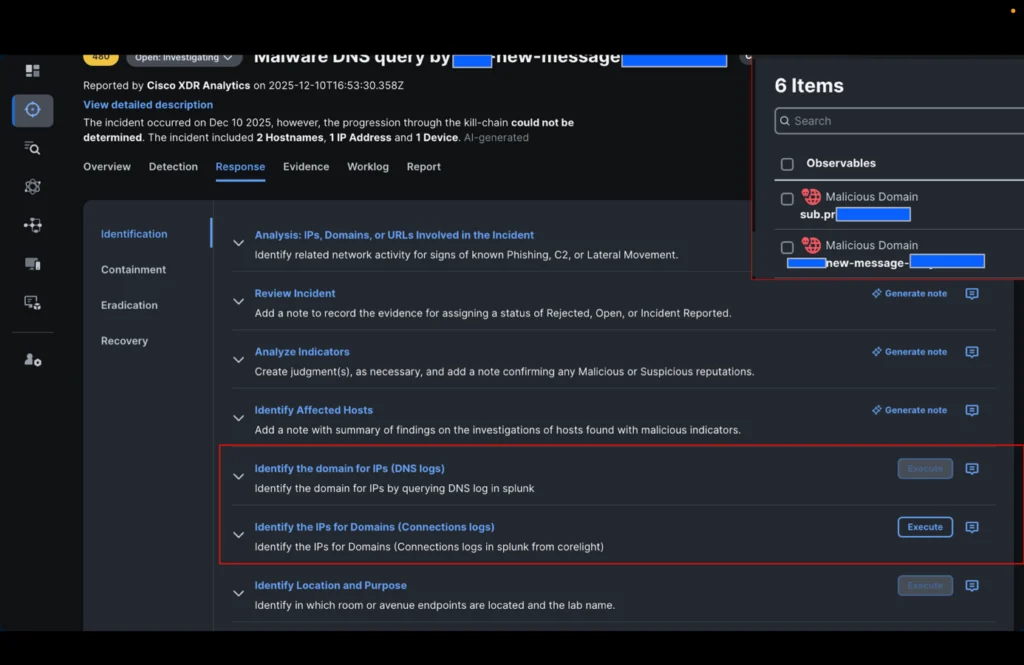
In the time it took to drink a cup of coffee, the incident was enriched with all the IP addresses visible in Black Hat Palo Alto Networks’ DNS logs and Corelight connection logs related to these domains.
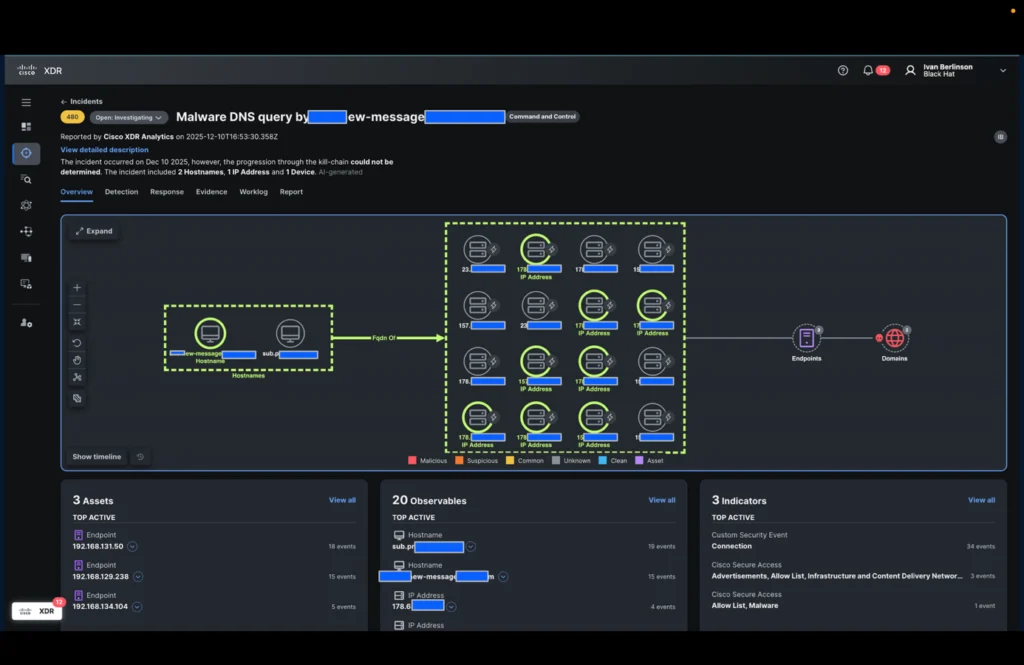
It was then easy for the analyst to investigate all IP addresses involved in the incident with a single click (using XDR ribbons) and obtain additional information.
- An additional internal IP address communicating with some of the IP addresses
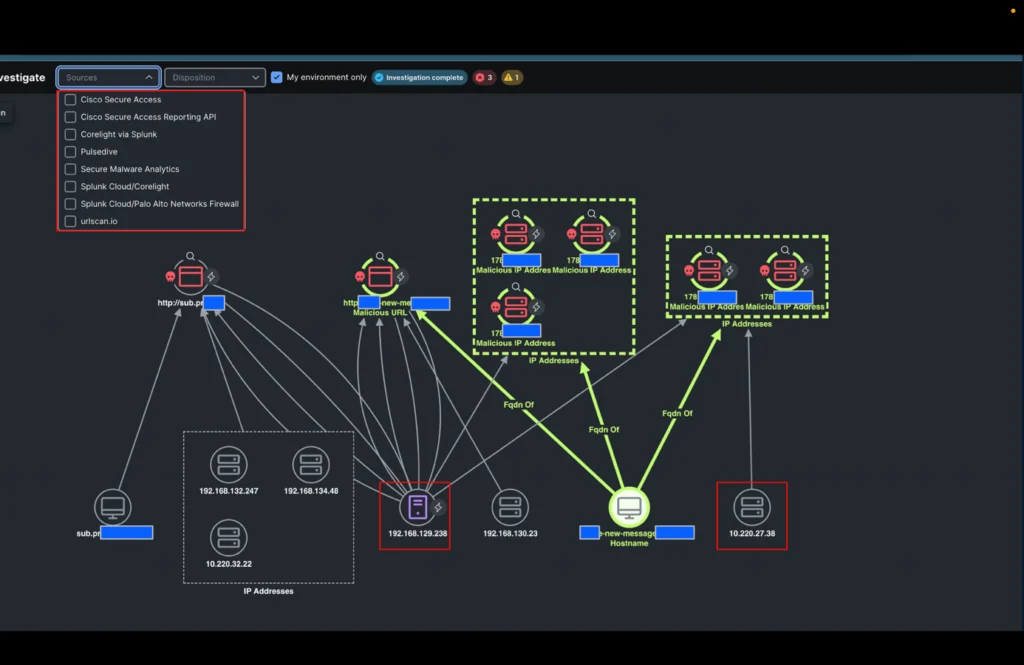
- A pattern in the URLs linked to these domains confirming a potentially successful phishing attack
Conclusion
Thanks to this innovation from Rene’s idea, it took the analyst only a few minutes to confirm the incident and gather enough useful information before forwarding it to our Level 3 analyst, Tony Iacobelli, Manager of the Splunk Cloud Incident Response team.
He also emphasizes the importance of listening to analysts’ feedback and using automation to solve their problems.
You can read the other blogs from our colleagues at Black Hat Europe.
About Black Hat
Black Hat is the cybersecurity industry’s most established and in-depth security event series. Founded in 1997, these annual, multi-day events provide attendees with the latest in cybersecurity research, development, and trends. Driven by the needs of the community, Black Hat events showcase content directly from the community through Briefings presentations, Trainings courses, Summits, and more. As the event series where all career levels and academic disciplines convene to collaborate, network, and discuss the cybersecurity topics that matter most to them, attendees can find Black Hat events in the United States, Canada, Europe, Middle East and Africa, and Asia. For more information, please visit the Black Hat website.
We’d love to hear what you think! Ask a question and stay connected with Cisco Security on social media.
Cisco Security Social Media