


In the previous tutorial, we introduced the Foundation Models framework and demonstrated how to use it for basic content generation. That process was fairly straightforward — you provide a prompt, wait a few seconds, and receive a response in natural language. In our example, we built a simple Q&A app where users could ask any question, and the app displayed the generated text directly.
But what if the response is more complex — and you need to convert the unstructured text into a structured object?
For example, suppose you ask the model to generate a recipe, and you want to turn that response into a Recipe object with properties like name, ingredients, and instructions.
Do you need to manually parse the text and map each part to your data model?
The Foundation Models framework in iOS 26 provides two powerful new macros called Generable and @Guide to help developers simplify this process.
In this tutorial, we’ll explore how these macros work and how you can use them to generate structured data directly from model output.
The Demo App
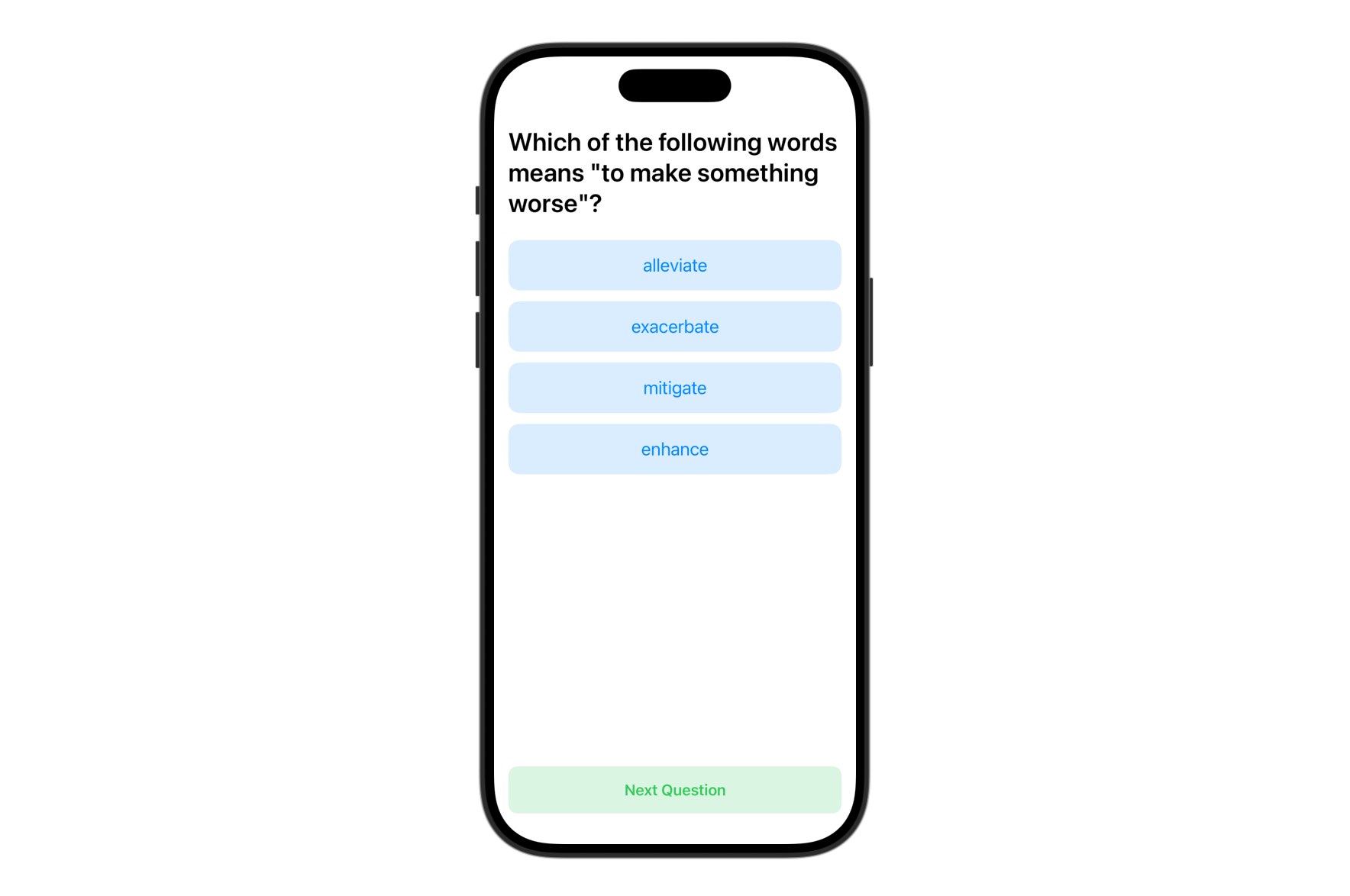
We will build a simple Quiz app that demonstrates how to use Foundation Models to generate structured content. In this case, it’s the vocabulary questions for English learners.
The app displays a multiple-choice question with four answer options, allowing users to test their knowledge interactively. Each question is generated by the on-device language model and automatically parsed into a Swift struct using the @Generable macro.
This demo app shows how developers can move beyond basic text generation and use Foundation Models to create structured content.
Using @Generable and @Guide
Let’s get started with building the demo app. As said before, unlike the previous Q&A demo, this quiz app presents a multiple-choice question with several answer options. To represent the question, we’ll define the following structure in Swift:
struct Question {
    let text: String
    let choices: [String]
    let answer: String
    let explanation: String
}
Later, we will ask the on-device language model to generate quiz questions. The challenge is how we can convert the model’s unstructured text response into a usable Question object. Fortunately, the Foundation Models framework introduces the @Generable macro to simplify the conversion process.
To enable automatic conversion, simply mark your struct with @Generable, like this:
import FoundationModels

@Generable
struct Question {
    @Guide(description: "The quiz question")
    let text: String
    @Guide(.count(4))
    let choices: [String]
    let answer: String
    @Guide(description: "A brief explanation of why the answer is correct.")
    let explanation: String
}
The framework also introduces the @Guide macro, which allows developers to provide specific instructions to the language model when generating properties. For instance, to specify that each question should have exactly 4 choices, you can use @Guide(.count(4)) on the choices array property.
With array, other than controlling the exact number of element, you can also use the following guides:
.minimumCount(3)
.maximumCount(100)
You can also add a descriptive explanation to a property to give the language model more context about the kind of data it should generate. This helps ensure the output is more accurate and aligned with your expectations.
It’s important to pay attention to the order in which properties are declared. When using a Generable type, the language model generates values sequentially based on the order of the properties in your code. This becomes especially important when one property’s value relies on another. For example, in the code above, the explanation property depends on the answer, so it should be declared after the answer to ensure it references the correct context.
Building the Quiz App
With the Question structure ready, we dive into the implementation of the Quiz app. Switch back to ContentView and update the code like this:
import FoundationModels

struct ContentView: View {

    @State private var session = LanguageModelSession(instructions: "You are a high school English teacher.")

    @State private var question: Question?

    var body: some View {
        VStack(spacing: 20) {

            if let question {
                QuestionView(question: question)
            } else {
                ProgressView("Generating questions ...")
            }

            Spacer()

            Button("Next Question") {
                Task {
                    do {
                        question = nil
                        question = try await generateQuestion()
                    } catch {
                        print(error)
                    }
                }
            }
            .padding()
            .frame(maxWidth: .infinity)
            .background(Color.green.opacity(0.18))
            .foregroundStyle(.green)
            .font(.headline)
            .cornerRadius(10)

        }
        .padding(.horizontal)
        .task {
            do {
                question = try await generateQuestion()
            } catch {
                print(error)
            }
        }
    }

    func generateQuestion() async throws -> Question {

        let response = try await session.respond(to: "Create a vocabulary quiz for high school students. Generate one multiple-choice question that tests vocabulary knowledge.", generating: Question.self)

        return response.content
    }
}
The user interface code for this app is simple and easy to follow. What’s worth highlighting, however, is how we integrate the Foundation Models framework to generate quiz questions. In the example above, we create a LanguageModelSession and provide it with a clear instruction, asking the language model to take on the role of an English teacher.
To generate a question, we use the session’s respond method and specify the expected response type using the generatingparameter. The session then automatically produces a response and maps the result into a Question object, saving you from having to parse and structure the data manually.
Next, we’ll implement the QuestionView, which is responsible for displaying the generated quiz question, handling user interaction, and verifying the selected answer. Add the following view definition inside your ContentView file:
struct QuestionView: View {
    let question: Question

    @State private var selectedAnswer: String? = nil
    @State private var didAnswer: Bool = false

    var body: some View {
        ScrollView {
            VStack(alignment: .leading) {
                Text(question.text)
                    .font(.title)
                    .fontWeight(.semibold)
                    .padding(.vertical)

                VStack(spacing: 12) {
                    ForEach(question.choices, id: \.self) { choice in

                        Button {
                            if !didAnswer {
                                selectedAnswer = choice
                                didAnswer = true
                            }

                        } label: {
                            if !didAnswer {
                                Text(choice)
                            } else {
                                HStack {
                                    if choice == question.answer {
                                        Text("✅")
                                    } else if selectedAnswer == choice {
                                        Text("❌")
                                    }

                                    Text(choice)
                                }
                            }
                        }
                        .disabled(didAnswer)
                        .padding()
                        .frame(maxWidth: .infinity)
                        .background(
                            Color.blue.opacity(0.15)
                        )
                        .foregroundStyle(.blue)
                        .font(.title3)
                        .cornerRadius(12)

                    }
                }

                if didAnswer {

                    VStack(alignment: .leading, spacing: 10) {
                        Text("The correct answer is \(question.answer)")

                        Text(question.explanation)
                    }
                    .font(.title3)
                    .padding(.top)
                }
            }


        }
    }

}
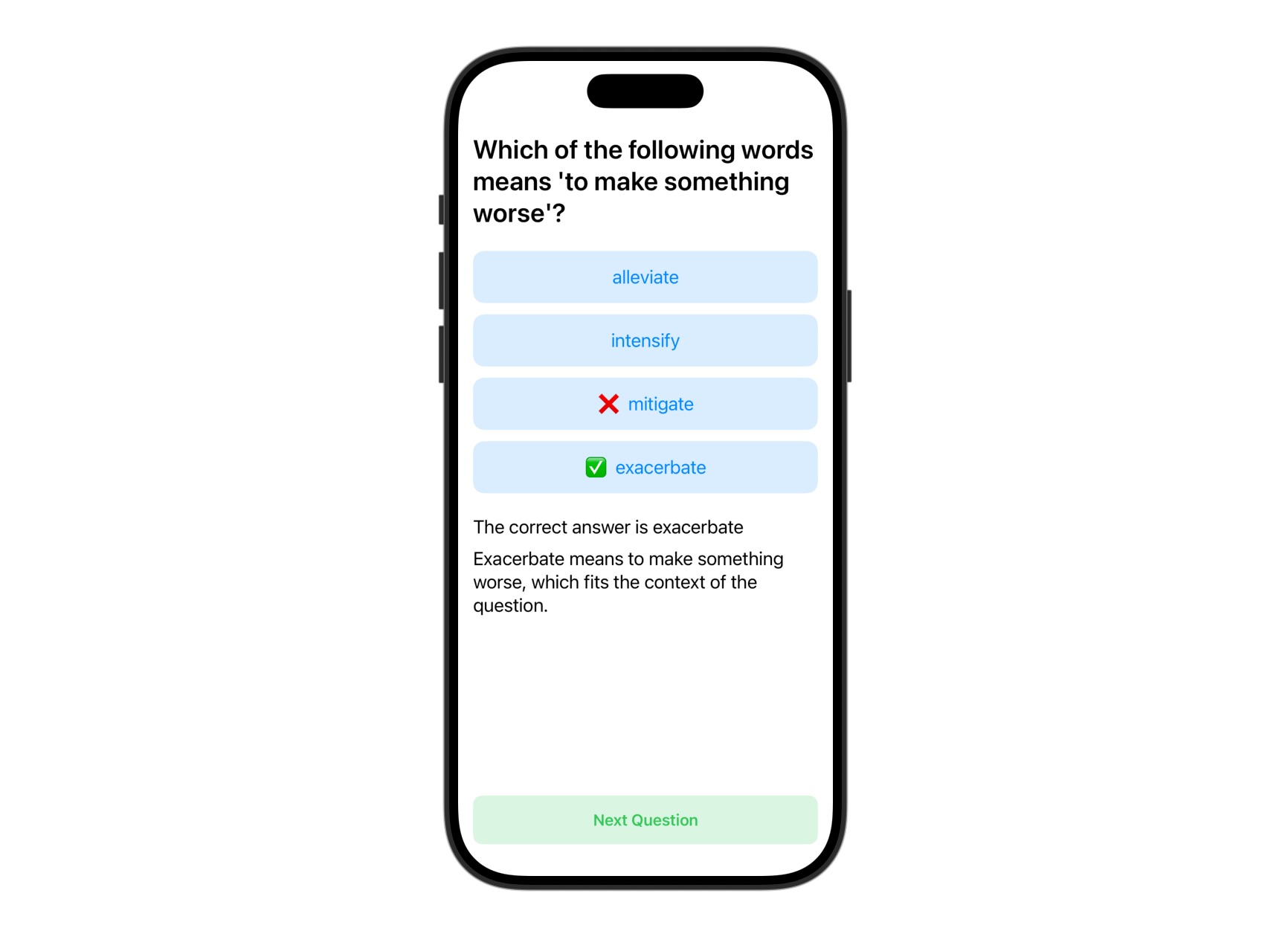
This view presents the question text at the top, followed by four answer choices rendered as tappable buttons. When the user selects an answer, the view checks if it’s correct and displays visual feedback using emojis (✅ or ❌). Once answered, the correct answer and an explanation are shown below. The @State properties track the selected answer and whether the question has been answered, allowing the UI to update reactively.
Once you’ve implemented all the necessary changes, you can test the app in the Preview canvas. You should see a generated vocabulary question like the one shown below, complete with four answer choices. After selecting an answer, the app provides immediate visual feedback and an explanation.
Summary
In this tutorial, we explored how to use the Foundation Models framework in iOS 26 to generate structured content with Swift. By building a simple vocabulary quiz app, we demonstrated how the new @Generable and @Guide macros can turn unstructured language model responses into typed Swift structs.
Stay tuned — in the next tutorial, we’ll dive into another powerful feature of the Foundation Models framework.