Close Menu
geekfence.comgeekfence.com
    What's Hot

    Crisis is the new normal: Everest Group finds 80% of organizations expect AI ROI – but execution gaps threaten outcomes in 2026 

    April 17, 2026

    Live Nation monopoly verdict: Here’s what it means for concerts

    April 17, 2026

    The Download: bad news for inner Neanderthals, and AI warfare’s human illusion

    April 17, 2026
    Facebook X (Twitter) Instagram
    • About Us
    • Contact Us
    Facebook Instagram
    geekfence.comgeekfence.com
    • Home
    • UK Tech News
    • AI
    • Big Data
    • Cyber Security
      • Cloud Computing
      • iOS Development
    • IoT
    • Mobile
    • Software
      • Software Development
      • Software Engineering
    • Technology
      • Green Technology
      • Nanotechnology
    • Telecom
    geekfence.comgeekfence.com
    Home»iOS Development»Keyboard shortcuts for Export Unmodified Original in Photos for Mac – Ole Begemann
    iOS Development

    Keyboard shortcuts for Export Unmodified Original in Photos for Mac – Ole Begemann

    AdminBy AdminNovember 9, 2025No Comments2 Mins Read0 Views
    Facebook Twitter Pinterest LinkedIn Telegram Tumblr Email
    Keyboard shortcuts for Export Unmodified Original in Photos for Mac – Ole Begemann
    Share
    Facebook Twitter LinkedIn Pinterest Email


    Problem

    1. The Photos app on macOS doesn’t provide a keyboard shortcut for the Export Unmodified Original command.
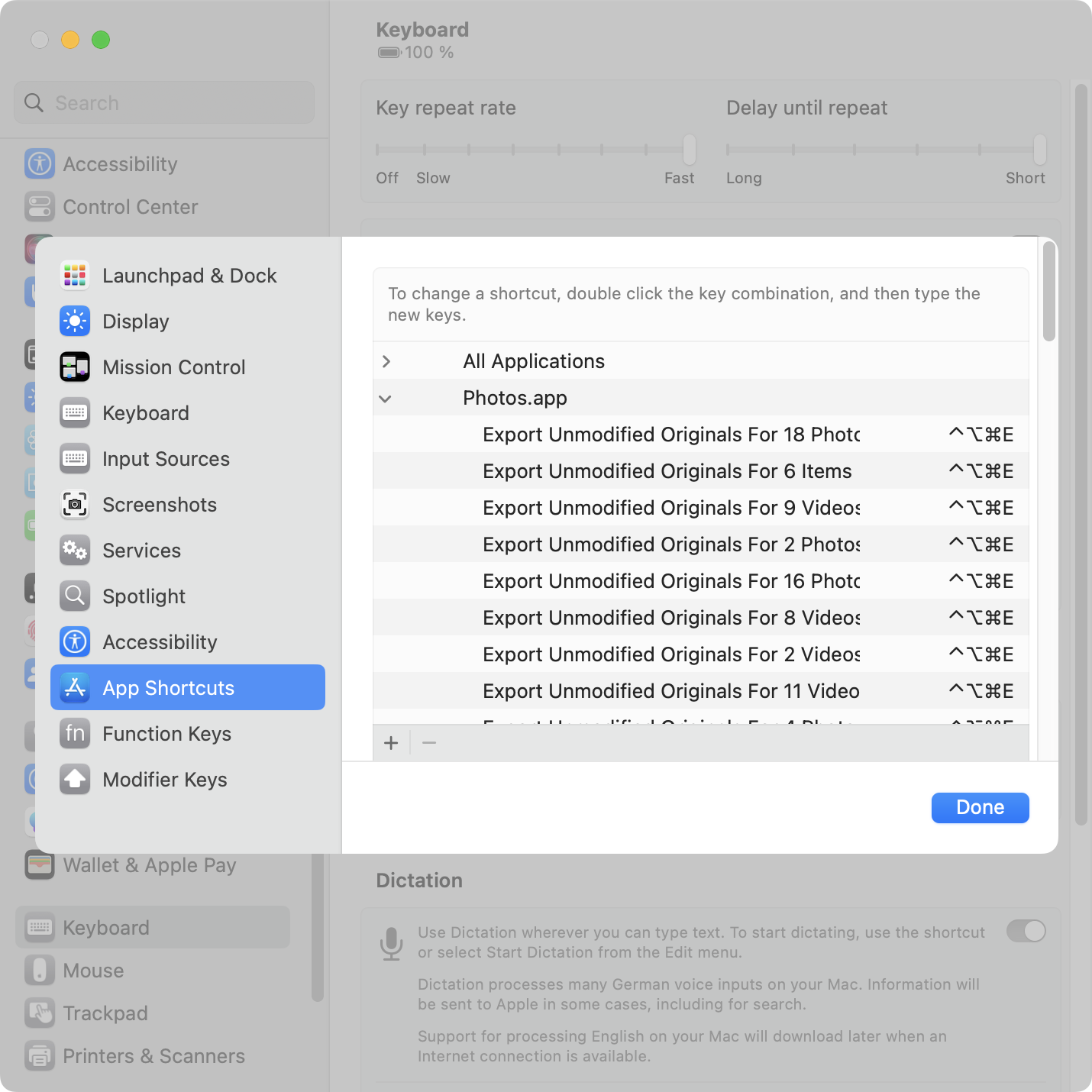
    2. macOS allows you to add your own app-specific keyboard shortcuts via System Settings > Keyboard > Keyboard Shortcuts > App Shortcuts. You need to enter the exact spelling of the menu item you want to invoke.
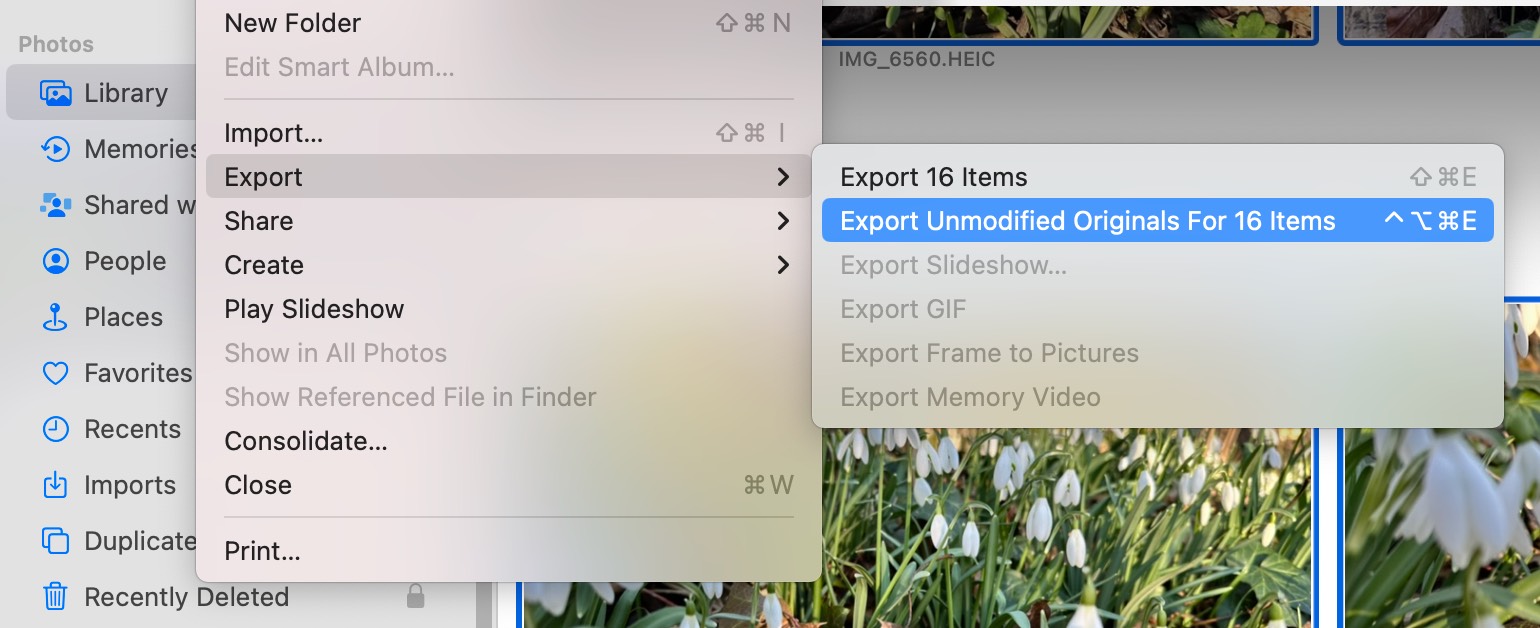
    3. Photos renames the command depending on what’s selected: Export Unmodified Original For 1 Photo“ turns into ”… Originals For 2 Videos” turns into “… For 3 Items” (for mixed selections), and so on. Argh!
    4. The System Settings UI for assigning keyboard shortcuts is extremely tedious to use if you want to add more than one or two shortcuts.
    Keyboard shortcuts for Export Unmodified Original in Photos for Mac – Ole Begemann

    Dynamically renaming menu commands is cute, but it becomes a problem when you want to assign keyboard shortcuts.

    Solution: shell script

    Here’s a Bash script that assigns Ctrl + Opt + Cmd + E to Export Unmodified Originals for up to 20 selected items:

    #!/bin/bash
    
    # Assigns a keyboard shortcut to the Export Unmodified Originals
    # menu command in Photos.app on macOS.
    
    # @ = Command
    # ^ = Control
    # ~ = Option
    # $ = Shift
    shortcut='@~^e'
    
    # Set shortcut for 1 selected item
    echo "Setting shortcut for 1 item"
    defaults write com.apple.Photos NSUserKeyEquivalents -dict-add "Export Unmodified Original For 1 Photo" "$shortcut"
    defaults write com.apple.Photos NSUserKeyEquivalents -dict-add "Export Unmodified Original For 1 Video" "$shortcut"
    
    # Set shortcut for 2-20 selected items
    objects=(Photos Videos Items)
    for i in {2..20}
    do
      echo "Setting shortcut for $i items"
      for object in "${objects[@]}"
      do
        defaults write com.apple.Photos NSUserKeyEquivalents -dict-add "Export Unmodified Originals For $i $object" "$shortcut"
      done
    done
    
    # Use this command to verify the result:
    # defaults read com.apple.Photos NSUserKeyEquivalents
    

    The script is also available on GitHub.

    Usage:

    1. Quit Photos.app.
    2. Run the script. Feel free to change the key combo or count higher than 20.
    3. Open Photos.app.

    Screenshot of the Keyboard Shortcuts window in System Settings in macOS 13.2, listing a bunch of custom keyboard shortcuts for Photos.app.

    Note: There’s a bug in Photos.app on macOS 13.2 (and at least some earlier versions). Custom keyboard shortcuts don’t work until you’ve opened the menu of the respective command at least once. So you must manually open the File > Export once before the shortcut will work. (For Apple folks: FB11967573.)


    Source link

    Share. Facebook Twitter Pinterest LinkedIn Tumblr Email

    Related Posts

    Self sizing cells with rotation support

    April 14, 2026

    swift – Flutter iOS: USSD code with * and # not launching in phone dialer (works on Android)

    April 13, 2026

    UICollectionView cells with circular images plus rotation support

    April 9, 2026

    ios darkmode – Popovers in iOS 26 display wrong system colors and do not change when user switches light/dark mode

    April 8, 2026

    SwiftButler | Cocoanetics

    April 4, 2026

    Deep dive into Swift frameworks

    April 3, 2026
    Top Posts

    Understanding U-Net Architecture in Deep Learning

    November 25, 202529 Views

    Hard-braking events as indicators of road segment crash risk

    January 14, 202624 Views

    Redefining AI efficiency with extreme compression

    March 25, 202623 Views
    Don't Miss

    Crisis is the new normal: Everest Group finds 80% of organizations expect AI ROI – but execution gaps threaten outcomes in 2026 

    April 17, 2026

    Everest Group has released findings from its latest study, Key Priorities for Technology and Services Spend…

    Live Nation monopoly verdict: Here’s what it means for concerts

    April 17, 2026

    The Download: bad news for inner Neanderthals, and AI warfare’s human illusion

    April 17, 2026

    8 Legit Ways to Get a Free Business Email in 2026

    April 17, 2026
    Stay In Touch
    • Facebook
    • Instagram
    About Us

    At GeekFence, we are a team of tech-enthusiasts, industry watchers and content creators who believe that technology isn’t just about gadgets—it’s about how innovation transforms our lives, work and society. We’ve come together to build a place where readers, thinkers and industry insiders can converge to explore what’s next in tech.

    Our Picks

    Crisis is the new normal: Everest Group finds 80% of organizations expect AI ROI – but execution gaps threaten outcomes in 2026 

    April 17, 2026

    Live Nation monopoly verdict: Here’s what it means for concerts

    April 17, 2026

    Subscribe to Updates

    Please enable JavaScript in your browser to complete this form.
    Loading
    • About Us
    • Contact Us
    • Disclaimer
    • Privacy Policy
    • Terms and Conditions
    © 2026 Geekfence.All Rigt Reserved.

    Type above and press Enter to search. Press Esc to cancel.