
Close Menu
geekfence.comgeekfence.com
    What's Hot

    How to go incognito in Chrome, Edge, Firefox, and Safari – Computerworld

    July 7, 2026

    Understanding VHF (Very High Frequency) Propagation

    July 7, 2026

    M&A Monthly: June/July 2026

    July 7, 2026
    Facebook X (Twitter) Instagram
    • About Us
    • Contact Us
    Facebook Instagram
    geekfence.comgeekfence.com
    • Home
    • UK Tech News
    • AI
    • Big Data
    • Cyber Security
      • Cloud Computing
      • iOS Development
    • IoT
    • Mobile
    • Software
      • Software Development
      • Software Engineering
    • Technology
      • Green Technology
      • Nanotechnology
    • Telecom
    geekfence.comgeekfence.com
    Home»UK Tech News»How to go incognito in Chrome, Edge, Firefox, and Safari – Computerworld
    UK Tech News

    How to go incognito in Chrome, Edge, Firefox, and Safari – Computerworld

    AdminBy AdminJuly 7, 2026No Comments3 Mins Read0 Views
    Facebook Twitter Pinterest LinkedIn Telegram Tumblr Email
    How to go incognito in Chrome, Edge, Firefox, and Safari – Computerworld
    Share
    Facebook Twitter LinkedIn Pinterest Email


    How to browse privately with Apple’s Safari

    Chrome may get far more attention for its Incognito mode than any other browser — no surprise, since it’s by far the most popular browser on the planet — but Apple’s Safari was actually the first to introduce private browsing. The term private browsing was first bandied in 2005 to describe early Safari features that limited what was saved by the browser.

    Side note: Early in private browsing, the label porn mode was often used as a synonym to describe what many writers and reporters assumed was the primary application of the feature. The term has fallen out of favor.

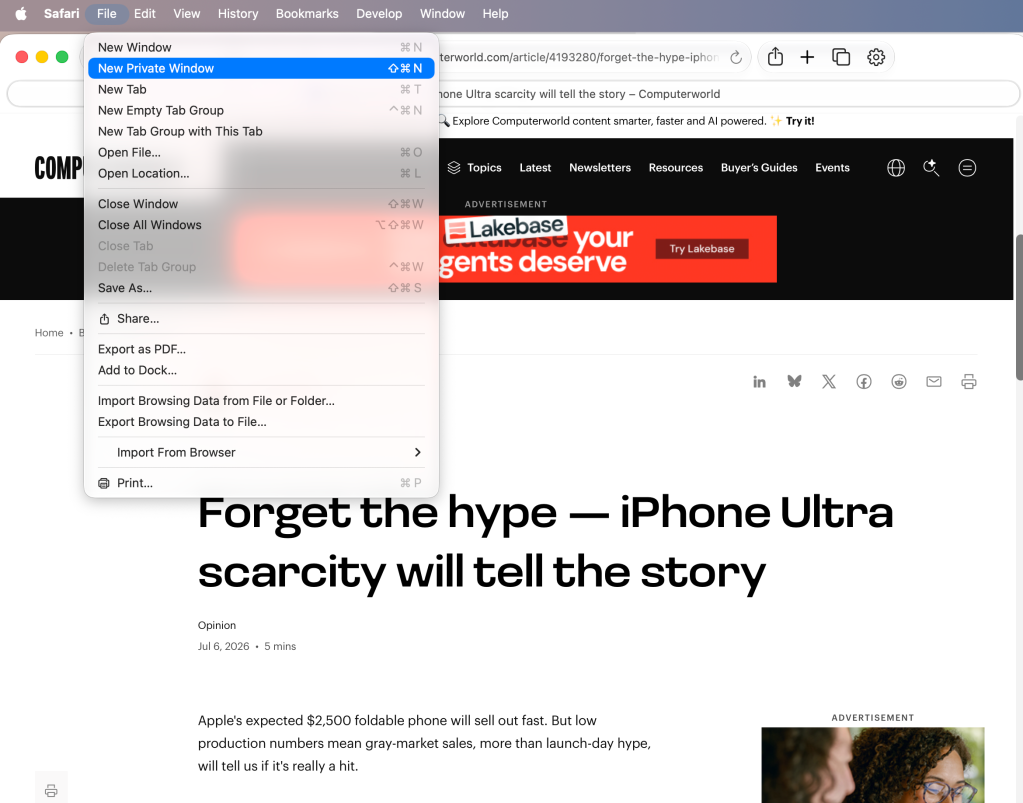
    To open what Safari calls a Private Window on a Mac, users can do a three-key combination of Command-Shift-N, the same shortcut Chrome adopted. Otherwise, a window can be called up by selecting the File menu and clicking on New Private Window.
    Private window in Safari

    From the File menu in Safari, selecting New Private Window gets you started.

    Apple

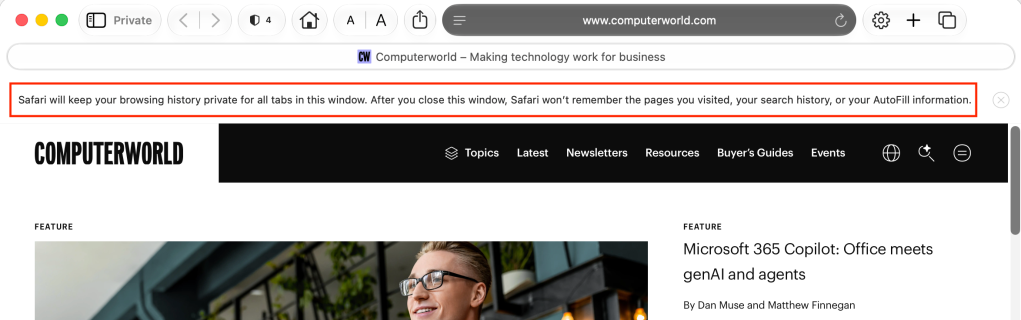
    Safari tags each Private Window by darkening the address bar. It also issues a reminder of what it does — or more accurately — what it doesn’t do. “Safari will keep your browsing history private for all tabs of this window. After you close this window, Safari won’t remember the pages you visited, your search history or your AutoFill information,” the top-of-the-page note reads. The warning is more terse than those of other browsers and omits cautions about still-visible online activity.
    Safari Private browsing

    The darkened address bar at the top — and the Private button in the left window corner — signal that this Safari window is for private browsing.

    Apple

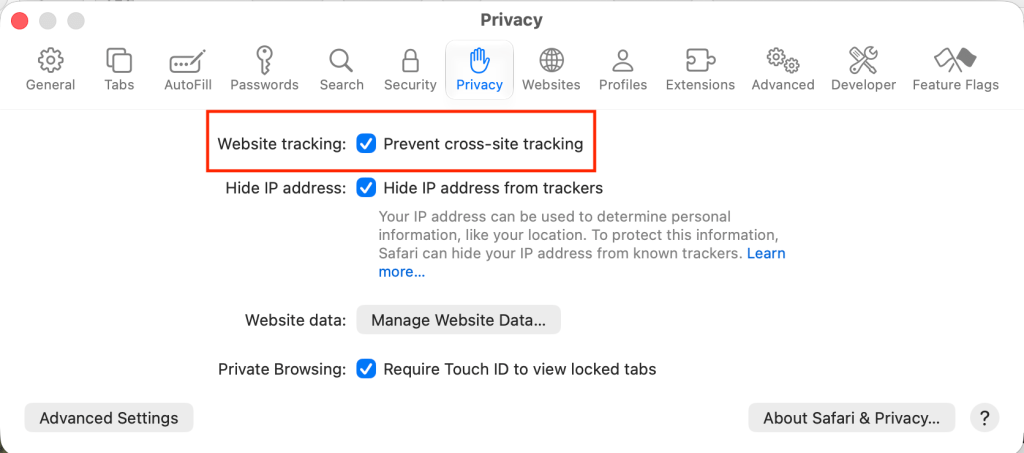
    Like Firefox, Safari automatically engages additional privacy technologies, whether the user browses in standard or private mode. Safari’s Intelligent Tracking Protection (ITP), which has been around for nearly a decade and repeatedly upgraded, now blocks all third-party cookies, among other components advertisers and services use to track people as they bounce from one site to another. ITP is controlled by a single on-off switch — on is the default — found in Preferences under the Privacy icon. If the Website tracking: box is checked to mark Prevent cross-site tracking, ITP is on.
    Safari's Intelligent Tracking Protection

    Switching on cross-site tracking enables Safari’s Intelligent Tracking Protection, which blocks a wide variety of bits advertisers try to use to follow you around the web while you’re using a Private Window.

    Apple

    A link can be opened directly to a Private Window by right-clicking, then selecting Open Link in New Private Window. Close a Private Window just as any Safari window, by clicking the red dot in the upper left corner of the browser frame.

    Pro tip: Once in a Safari Private Window, opening a new tab — either by clicking the + icon at the upper right or by using the Command-T key combo — omits the Private Browsing Enabled notice. (The darkened address bar remains as the sole indicator of a private browsing session.) Other browsers, such as Firefox, repeat their cautionary messages each time a tab is opened in an incognito session.

    Related reading:


    Source link

    Share. Facebook Twitter Pinterest LinkedIn Tumblr Email

    Related Posts

    I Use One UI 9 Daily – This Hidden Feature is a Game-changer

    July 6, 2026

    Agentic-Native Platforms Are Creating A New Technology Business Model

    July 5, 2026

    Pilot Photonics awarded €10.4 million from European Innovation Council

    July 4, 2026

    Cheap Chinese chips could offer way out of RAM price crisis, Apple suggests – Computerworld

    July 3, 2026

    Motorola Edge 70 Fusion Review: All About the Battery Life

    July 2, 2026

    From insights to execution: the need for a new AI operating layer 

    July 1, 2026
    Top Posts

    Understanding U-Net Architecture in Deep Learning

    November 25, 202559 Views

    Hard-braking events as indicators of road segment crash risk

    January 14, 202631 Views

    Redefining AI efficiency with extreme compression

    March 25, 202628 Views
    Don't Miss

    How to go incognito in Chrome, Edge, Firefox, and Safari – Computerworld

    July 7, 2026

    How to browse privately with Apple’s Safari Chrome may get far more attention for its…

    Understanding VHF (Very High Frequency) Propagation

    July 7, 2026

    M&A Monthly: June/July 2026

    July 7, 2026

    Guidelines for Respectful Use of AI – O’Reilly

    July 7, 2026
    Stay In Touch
    • Facebook
    • Instagram
    About Us

    At GeekFence, we are a team of tech-enthusiasts, industry watchers and content creators who believe that technology isn’t just about gadgets—it’s about how innovation transforms our lives, work and society. We’ve come together to build a place where readers, thinkers and industry insiders can converge to explore what’s next in tech.

    Our Picks

    How to go incognito in Chrome, Edge, Firefox, and Safari – Computerworld

    July 7, 2026

    Understanding VHF (Very High Frequency) Propagation

    July 7, 2026

    Subscribe to Updates

    Please enable JavaScript in your browser to complete this form.
    Loading
    • About Us
    • Contact Us
    • Disclaimer
    • Privacy Policy
    • Terms and Conditions
    © 2026 Geekfence.All Rigt Reserved.

    Type above and press Enter to search. Press Esc to cancel.