Close Menu
geekfence.comgeekfence.com
    What's Hot

    Louisiana bill targets online sweepstakes in crackdown

    April 16, 2026

    Nokia and Orange team up for AI RAN

    April 16, 2026

    AI Is Writing Our Code Faster Than We Can Verify It – O’Reilly

    April 16, 2026
    Facebook X (Twitter) Instagram
    • About Us
    • Contact Us
    Facebook Instagram
    geekfence.comgeekfence.com
    • Home
    • UK Tech News
    • AI
    • Big Data
    • Cyber Security
      • Cloud Computing
      • iOS Development
    • IoT
    • Mobile
    • Software
      • Software Development
      • Software Engineering
    • Technology
      • Green Technology
      • Nanotechnology
    • Telecom
    geekfence.comgeekfence.com
    Home»Big Data»Getting started with Apache Iceberg write support in Amazon Redshift – Part 2
    Big Data

    Getting started with Apache Iceberg write support in Amazon Redshift – Part 2

    AdminBy AdminApril 16, 2026No Comments8 Mins Read2 Views
    Facebook Twitter Pinterest LinkedIn Telegram Tumblr Email
    Getting started with Apache Iceberg write support in Amazon Redshift – Part 2
    Share
    Facebook Twitter LinkedIn Pinterest Email


    In Getting started with Apache Iceberg write support in Amazon Redshift – part 1, you learned how to create Apache Iceberg tables and write data directly from Amazon Redshift to your data lake. You set up external schemas, created tables in both Amazon Simple Storage Service (Amazon S3) and S3 Tables, and performed INSERT operations while maintaining ACID (Atomicity, Consistency, Isolation, Durability) compliance.

    Amazon Redshift now supports DELETE, UPDATE, and MERGE operations for Apache Iceberg tables stored in Amazon S3 and Amazon S3 table buckets. With these operations, you can modify data at the row level, implement upsert patterns, and manage the data lifecycle while maintaining transactional consistency using familiar SQL syntax. You can run complex transformations in Amazon Redshift and write results to Apache Iceberg tables that other analytics engines like Amazon EMR or Amazon Athena can immediately query.

    In this post, you work with customer and orders datasets that were created and used in the previously mentioned post to demonstrate these capabilities in a data synchronization scenario.

    Solution overview

    This solution demonstrates DELETE, UPDATE, and MERGE operations for Apache Iceberg tables in Amazon Redshift using a common data synchronization pattern: maintaining customer records and orders data across staging and production tables. The workflow includes three key operations:

    • DELETE – Remove customer records based on opt-out requests
    • UPDATE – Modify existing customer information
    • MERGE – Synchronize order data between staging and production tables using upsert patterns
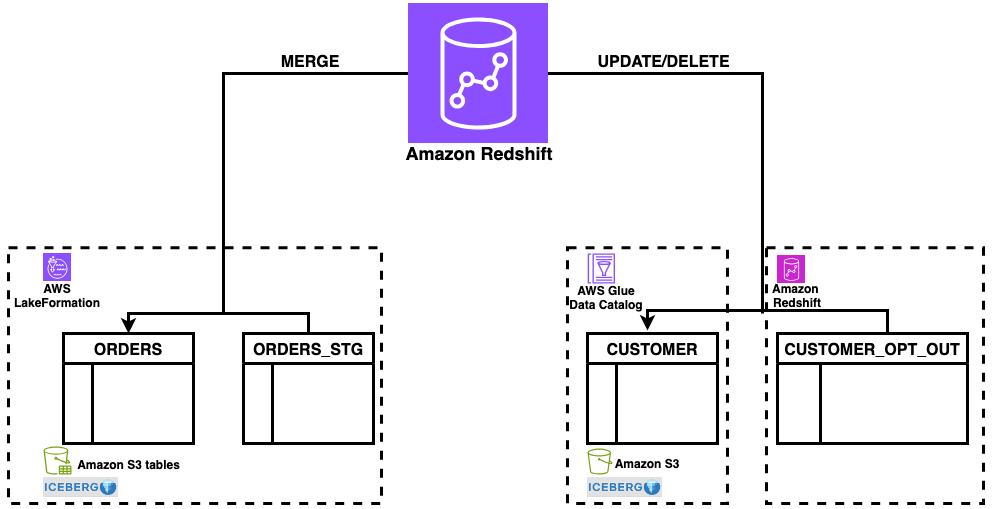
    Figure : solution overview

    Figure 1: solution overview

    The solution uses a staging table (orders_stg) stored in an S3 table bucket for incoming data and reference tables (customer_opt_out) in Amazon Redshift for managing data lifecycle operations. With this architecture, you can process changes efficiently while maintaining ACID compliance across both storage types.

    Prerequisites

    For this walkthrough, you should have completed the setup steps from Getting started with Apache Iceberg write support in Amazon Redshift – part 1, including:

    • Create an Amazon Redshift data warehouse (provisioned or Serverless)
    • Set up the required IAM role (RedshifticebergRole) with appropriate permissions
    • Create an Amazon S3 bucket and S3 Table bucket
    • Configure AWS Glue Data Catalog database and setting up access
    • Set up AWS Lake Formation permissions
    • Create the customer Apache Iceberg table in Amazon S3 standard buckets with sample customer data
    • Create the orders Apache Iceberg table in Amazon S3 Table buckets with sample order data
    • Amazon Redshift data warehouse on p200 version or higher

    Data preparation

    In this section, you set up the sample data needed to demonstrate MERGE, UPDATE, and DELETE operations. To prepare your data, complete the following steps:

    1. Log in to Amazon Redshift using Query Editor V2 with the Federated user option.
    2. Create the orders_stg and customer_opt_out tables with sample data:
    CREATE TABLE "iceberg-write-blog@s3tablescatalog".iceberg_write_namespace.orders_stg
    (
    customer_id BIGINT,
    order_id BIGINT,
    Total_order_amt DECIMAL(10,2),
    Total_order_tax_amt REAL,
    tax_pct DOUBLE PRECISION,
    order_date DATE,
    order_created_at_tz TIMESTAMPTZ,
    is_active_ind BOOLEAN
    )
    USING ICEBERG;
    INSERT INTO "iceberg-write-blog@s3tablescatalog".iceberg_write_namespace.orders_stg
    (order_date, order_id, customer_id, total_order_amt, total_order_tax_amt, tax_pct, order_created_at_tz, is_active_ind)
    VALUES
    ('2024-11-11', 1016, 10, 167.45, 13.40, 0.08, '2024-11-11 06:55:00-06:00', true),
    ('2024-11-12', 1017, 15, 34.99, 2.80, 0.08, '2024-11-12 23:30:30-06:00', true),
    ('2024-11-09', 1014, 9, 500.60, 56.80, 0.09, '2024-11-09 16:20:55-06:00', true),
    ('2024-11-10', 1015, 5, 329.85, 33.51, 0.08, '2024-11-10 11:45:30-06:00', true);
    select * from "iceberg-write-blog@s3tablescatalog".iceberg_write_namespace.orders_stg;

    Figure 2: orders_stg result set

    Figure 2: orders_stg result set

    CREATE TABLE dev.public.customer_opt_out
    (
    customer_id bigint,
    customer_name varchar,
    opt_out_ind char(1),
    cust_rec_upd_ind char(1)
    );
    INSERT INTO dev.public.customer_opt_out VALUES
    (9, 'Customer9 Martinez', 'Y', 'N'),
    (12, 'Customer12 Thomas', 'Y', 'N'),
    (13, 'Customer13 Albon', 'N', 'Y'),
    (14, 'Customer14 Oscar', 'N', 'Y');
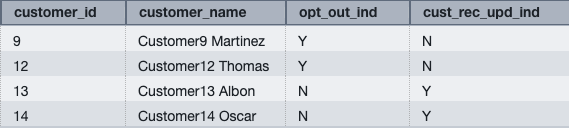
    select * from dev.public.customer_opt_out;

    Figure 3: customer_opt_out result set

    Figure 3: customer_opt_out result set

    You can now use the orders_stg and customer_opt_out tables to demonstrate data manipulation operations on the orders and customer tables created in the prerequisite section.

    MERGE

    MERGE conditionally inserts, updates, or deletes rows in a target table based on the results of a join with a source table. You can use MERGE to synchronize two tables by inserting, updating, or deleting rows in one table based on differences found in the other table.

    To perform a MERGE operation:

    1. Verify that the current data in the orders table for order IDs 1014, 1015, 1016, and 1017.You loaded this sample data in Part 1:

    select * from "iceberg-write-blog@s3tablescatalog".iceberg_write_namespace.orders
    where order_id in (1014,1015,1016,1017);

    Figure 4: orders data for existing orders for orders in orders_stg

    Figure 4: orders data for existing orders for orders in orders_stg

    The orders table contains existing rows for order IDs 1014 and 1015.

    1. Run the following MERGE operation using order_id as the key column to match rows between the orders and orders_stg tables:
    MERGE INTO "iceberg-write-blog@s3tablescatalog".iceberg_write_namespace.orders
    USING "iceberg-write-blog@s3tablescatalog".iceberg_write_namespace.orders_stg
    ON orders.order_id = orders_stg.order_id
    WHEN MATCHED THEN UPDATE 
    SET
    customer_id         = orders_stg.customer_id,
    total_order_amt     = orders_stg.total_order_amt,
    total_order_tax_amt = orders_stg.total_order_tax_amt,
    tax_pct             = orders_stg.tax_pct,
    order_date          = orders_stg.order_date,
    order_created_at_tz = orders_stg.order_created_at_tz,
    is_active_ind       = orders_stg.is_active_ind
    WHEN NOT MATCHED THEN INSERT
    VALUES 
    (orders_stg.customer_id,orders_stg.order_id,orders_stg.total_order_amt,orders_stg.total_order_tax_amt,orders_stg.tax_pct,orders_stg.order_date,orders_stg.order_created_at_tz,orders_stg.is_active_ind);

    The operation updates existing rows (1014 and 1015) and inserts new rows for order IDs that don’t exist in the orders table (1016 and 1017).

    1. Verify the updated data in the orders table:

    select * from "iceberg-write-blog@s3tablescatalog".iceberg_write_namespace.orderswhere order_id in (1014,1015,1016,1017);

    Figure 5: merged data on orders from orders_stg

    Figure 5: merged data on orders from orders_stg

    The MERGE operation performs the following changes:

    • Updates existing rows – Order IDs 1014 and 1015 have updated total_order_amt and total_order_tax_amt values from the orders_stg table
    • Inserts new rows – Order IDs 1016 and 1017 are inserted because they don’t exist in the orders table

    This demonstrates the upsert pattern, where MERGE conditionally updates or inserts rows based on the matching key column.

    UPDATE

    UPDATE modifies existing rows in a table based on specified conditions or values from another table.

    Update the customer Apache Iceberg table using data from the customer_opt_out Amazon Redshift native table. The UPDATE operation uses the cust_rec_upd_ind column as a filter, updating only rows where the value is ‘Y’.

    To perform an UPDATE operation:

    1. Verify the current customer_name values for customer IDs 13 and 14 in customer_opt_out and customer (loaded this sample data in Part 1) tables:

    select * from dev.public.customer_opt_out
    where cust_rec_upd_ind = 'Y';

    Figure 6: verify existing customer data for customers from customer_opt_out
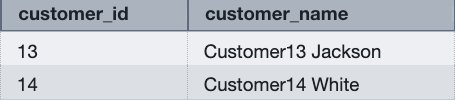
    Figure 6: verify existing customer data for customers from customer_opt_out

    select customer_id,customer_name from dev.demo_iceberg.customer
    where customer_id in(13,14);

    Figure 7: verify existing customer name for customers from customer_opt_out

    Figure 7: verify existing customer name for customers from customer_opt_out

    1. Run the following UPDATE operation to modify customer names based on the cust_rec_upd_ind from customer_opt_out:
    UPDATE dev.demo_iceberg.customerSET customer_name = customer_opt_out.customer_name
    FROM dev.public.customer_opt_out
    WHERE customer_opt_out.cust_rec_upd_ind = 'Y'and customer.customer_id = customer_opt_out.customer_id;

    1. Verify the changes for customer IDs 13 and 14:

    select customer_id,customer_name from dev.demo_iceberg.customer where customer_id in(13,14) order by 1;

    Figure 8: updated customer names in customer table

    Figure 8: updated customer names in customer table

    The UPDATE operation modifies the customer_name values based on the join condition with the customer_opt_out table. Customer IDs 13 and 14 now have updated names (Customer13 Albon and Customer14 Oscar).

    DELETE

    DELETE removes rows from a table based on specified conditions. Without a WHERE clause, DELETE removes all the rows from table.

    Delete rows from the customer Apache Iceberg table using data from the customer_opt_out Amazon Redshift native table. The DELETE operation uses the opt_out_ind column as a filter, removing only rows where the value is ‘Y’.

    To perform a DELETE operation:

    1. Verify the opt-out indicator data in the customer_opt_out table:
    select * from dev.public.customer_opt_out
    where opt_out_ind = 'Y';

    Figure 9: verify customer records for opt out

    Figure 9: verify customer records for opt out

    1. Verify the current customer data for customer IDs 9 and 12:

    select * from dev.demo_iceberg.customerwhere customer_id in(9,12);

    Figure 0: verify existing customers data in customer table for opt out

    Figure 10: verify existing customers data in customer table for opt out

    1. Review the query execution plan:
    EXPLAINDELETE FROM demo_iceberg.customerUSING public.customer_opt_out
    WHERE customer.customer_id = customer_opt_out.customer_id
    AND customer_opt_out.opt_out_ind = 'Y';

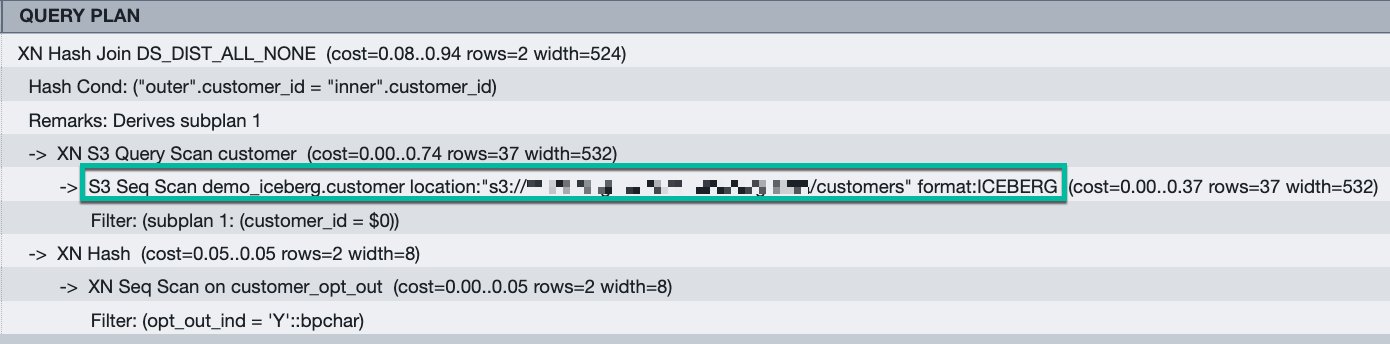
    Figure 1: query plan for the DELETE queryThe execution plan shows Amazon S3 scans for Apache Iceberg format tables, indicating that Amazon Redshift removes rows directly from the Amazon S3 bucket.

    Figure 11: query plan for the DELETE query. The execution plan shows Amazon S3 scans for Apache Iceberg format tables, indicating that Amazon Redshift removes rows directly from the Amazon S3 bucket.

    1. Run the following DELETE operation:
    DELETE FROM demo_iceberg.customer
    USING public.customer_opt_out
    WHERE customer.customer_id = customer_opt_out.customer_id
    AND customer_opt_out.opt_out_ind = 'Y';

    1. Verify that the rows were removed:
    select * from dev.demo_iceberg.customer where customer_id in(9,12);

    Figure 2: result set from customer table for opt out customer after delete

    Figure 12: result set from customer table for opt out customer after delete

    The query returns no rows, confirming that customer IDs 9 and 12 were successfully deleted from the customer table.

    Best practices

    After performing multiple UPDATE or DELETE operations, consider running table maintenance to optimize read performance:

    • For AWS Glue tables – Use AWS Glue table optimizers. For more information, see Table optimizers in the AWS Glue Developer Guide.
    • For S3 Tables – Use S3 Tables maintenance operations. For more information, see S3 Tables maintenance in the Amazon S3 User Guide.

    Table maintenance merges and compacts deletion files generated by Merge-on-Read operations, improving query performance for subsequent reads.

    Conclusion

    You can use Amazon Redshift support for DELETE, UPDATE, and MERGE operations on Apache Iceberg tables to build data architectures that combine warehouse performance with data lake scalability. You can modify data at the row level while maintaining ACID compliance, giving you the same flexibility with Apache Iceberg tables as you have with native Amazon Redshift tables.

    Get started:


    About the authors

    Sanket Hase

    Sanket Hase

    Sanket is an Engineering Manager with the Amazon Redshift team, leading query execution teams in the areas of data lake analytics, hardware-software co-design, and vectorized query execution.

    Raghu Kuppala

    Raghu Kuppala

    Raghu is an Analytics Specialist Solutions Architect experienced working in the databases, data warehousing, and analytics space. Outside of work, he enjoys trying different cuisines and spending time with his family and friends.

    Ritesh Sinha

    Ritesh is an Analytics Specialist Solutions Architect based out of San Francisco. He has helped customers build scalable data warehousing and big data solutions for over 16 years. He loves to design and build efficient end-to-end solutions on AWS. In his spare time, he loves reading, walking, and doing yoga.

    Sundeep Kumar

    Sundeep Kumar

    Sundeep is a Sr. Specialist Solutions Architect at Amazon Web Services (AWS), helping customers build data lake and analytics platforms and solutions. When not building and designing data lakes, Sundeep enjoys listening to music and playing guitar.


    Source link

    Share. Facebook Twitter Pinterest LinkedIn Tumblr Email

    Related Posts

    Agentic Reasoning in Practice: Making Sense of Structured and Unstructured Data

    April 15, 2026

    A Governance Roadmap For Mid-Market Organizations

    April 14, 2026

    From Frameworks to Security: A Complete Guide to Web Development in Dubai

    April 13, 2026

    GLM-5.1: Architecture, Benchmarks, Capabilities & How to Use It

    April 12, 2026

    How to Shift from CCM to CXM: Why Customer Communications Must Become Conversational

    April 11, 2026

    Introducing workload simulation workbench for Amazon MSK Express broker

    April 9, 2026
    Top Posts

    Understanding U-Net Architecture in Deep Learning

    November 25, 202528 Views

    Hard-braking events as indicators of road segment crash risk

    January 14, 202624 Views

    Redefining AI efficiency with extreme compression

    March 25, 202623 Views
    Don't Miss

    Louisiana bill targets online sweepstakes in crackdown

    April 16, 2026

    Louisiana lawmakers are pressing ahead with a push to rein in illegal online sweepstakes-style gaming,…

    Nokia and Orange team up for AI RAN

    April 16, 2026

    AI Is Writing Our Code Faster Than We Can Verify It – O’Reilly

    April 16, 2026

    Getting started with Apache Iceberg write support in Amazon Redshift – Part 2

    April 16, 2026
    Stay In Touch
    • Facebook
    • Instagram
    About Us

    At GeekFence, we are a team of tech-enthusiasts, industry watchers and content creators who believe that technology isn’t just about gadgets—it’s about how innovation transforms our lives, work and society. We’ve come together to build a place where readers, thinkers and industry insiders can converge to explore what’s next in tech.

    Our Picks

    Louisiana bill targets online sweepstakes in crackdown

    April 16, 2026

    Nokia and Orange team up for AI RAN

    April 16, 2026

    Subscribe to Updates

    Please enable JavaScript in your browser to complete this form.
    Loading
    • About Us
    • Contact Us
    • Disclaimer
    • Privacy Policy
    • Terms and Conditions
    © 2026 Geekfence.All Rigt Reserved.

    Type above and press Enter to search. Press Esc to cancel.